
TinyFast
TinyFast instantly compresses images, videos, and PDFs on your Mac with simple drag and drop, ensuring privacy and.
Visit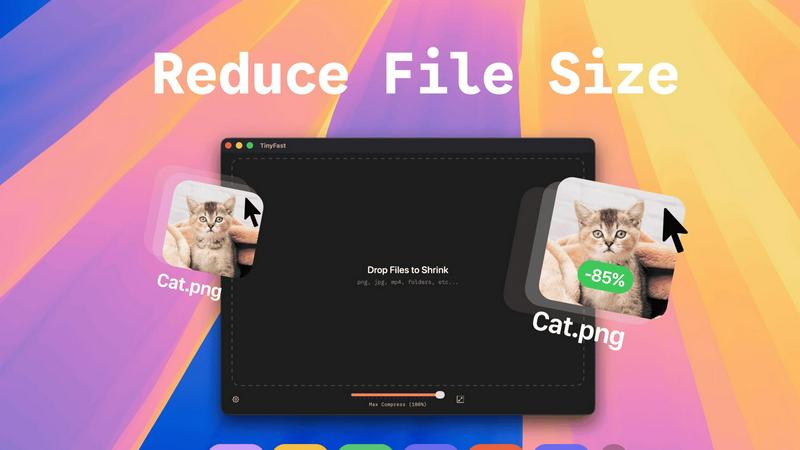
About TinyFast
TinyFast is the ultimate file compression tool designed exclusively for macOS, ensuring a lightning-fast and seamless experience for users. This app allows you to compress files like images, videos, documents, and more directly on your Mac, eliminating the need for slow and insecure online tools. With a simple drag-and-drop interface, TinyFast ensures that your files are compressed locally in mere seconds, keeping your sensitive assets secure and private. Whether you are a developer, designer, or creator, TinyFast is engineered to enhance your workflow by delivering powerful, efficient compression without the hassle of uploads or privacy concerns. Optimize your assets for websites, prepare client files for delivery, or simply free up disk space with this essential utility that integrates seamlessly into your creative process. Experience the benefits of fast, local, and safe file compression, and join the growing community of over 500 Mac users who trust TinyFast for their file management needs.
Features of TinyFast
Batch & Drag-Drop Shrink
TinyFast allows you to drop entire folders for compression, providing optimized output in seconds. This feature streamlines your workflow by enabling you to compress multiple files simultaneously, saving you valuable time.
Blazing-Fast Compression
Experience incredibly fast file compression thanks to optimized native engines designed for speed. Forget about waiting for uploads and downloads; TinyFast shrinks large files in seconds, allowing you to get back to your work without delay.
Resize Resolution
With TinyFast, you can set automatic resizing for your image and video resolutions. This feature ensures that your media assets are not only compressed but also resized to fit your specific requirements, enhancing your efficiency.
100% Local & Private
TinyFast prioritizes your privacy by keeping files on your device. No uploads to cloud servers and no risk of data exposure. This feature guarantees that your sensitive files remain confidential, aligning with best practices for data security.
Use Cases of TinyFast
Optimizing Web Assets
Web designers can use TinyFast to compress images and videos before uploading them to websites. This optimization reduces loading times, enhances user experience, and improves SEO rankings, all while maintaining high quality.
Preparing Client Deliverables
Freelancers and agencies can prepare client files by compressing them with TinyFast. This ensures that large documents, images, or videos are delivered quickly and in a manageable size, making client communication more efficient.
Freeing Up Disk Space
Users looking to free up disk space on their Macs can leverage TinyFast's compression capabilities. By shrinking the size of large files, you can reclaim valuable storage without sacrificing important data or quality.
Enhancing Collaborative Projects
In collaborative environments, teams can utilize TinyFast to compress shared files quickly. This feature ensures that everyone has access to optimized assets, keeping projects moving forward without the delays associated with online compression tools.
Frequently Asked Questions
How does TinyFast ensure my files remain private?
TinyFast processes all file compression locally on your Mac, meaning your files never leave your device. There are no uploads to cloud servers, ensuring total privacy by design.
Can I compress multiple files at once?
Yes! TinyFast supports batch processing, allowing you to drop entire folders for compression. You can compress multiple files simultaneously, making it a time-efficient solution.
What types of files can I compress with TinyFast?
TinyFast supports a wide range of file types including images (PNG, JPG, TIFF), videos (MP4, MOV), documents (PDF, DOCX), code files (JS, CSS), and audio files (MP3), making it a versatile tool for various needs.
Is there a trial version available?
Yes, TinyFast offers a free version that allows you to compress up to 5 files per day. Additionally, there are paid plans available for users who need unlimited compression.
Explore more in this category:
Similar to TinyFast

Visual financial timelines for couples and young professionals: model cash flow, life events, and shared goals.

Online tally counter for tracking attendance, workouts, inventory, sports scores, visitors, habits, and everyday counting tasks.

The #1 Native Form Builder Plugin for Framer - No Code, No Embeds, No External Platforms.

Free AI attractiveness test and face analysis with private, on-device photo processing.

A free launch checklist for SaaS, apps, AI tools and more. Every step says why it matters and when you can skip it.

Create readable text, logos, posters, ads, packaging, and ecommerce visuals with Ideogram 4 AI workflows.

Practical, independent guides to home repairs, maintenance, costs, troubleshooting, and everyday fixes.

Translate JSON, Markdown, and TXT files while preserving keys, nested paths, and project structure.