
KPI Studio
Paste your data, pick a chart, and export a polished video animation for your timeline in under 60 seconds.
Visit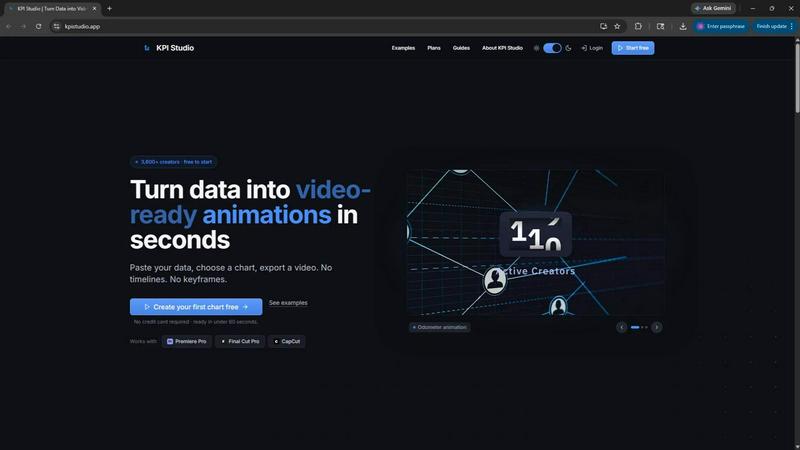
About KPI Studio
KPI Studio is a purpose-built tool for data-driven video creators who need polished, animated charts in every video but have zero time for motion design. It eliminates the broken workflow that forces you to choose between amateur screenshots, rigid Canva templates, hours in After Effects, or expensive freelancers. KPI Studio removes that entire process by letting you paste your data, choose a chart style, and export a fully animated, video-ready visual in under 60 seconds. No timelines, no keyframes, and no setup required. The tool is built for creators on a publish schedule who need the chart ready today, not tomorrow. It supports transparent background exports like MOV with alpha, so charts drop directly into Premiere Pro, Final Cut Pro, CapCut, or any editor with zero additional editing. For advanced workflows, JSON export allows deeper editing and integration into custom pipelines. Over 3,600 creators already use KPI Studio to turn raw numbers into count-up animations, growing bar charts, drawing line charts, and more. The value proposition is simple: speed. You paste, customize, and export. If your data changes, just re-export in seconds. No redoing keyframes, no waiting for a freelancer, no reopening a motion design project. KPI Studio is the fastest path from data to video.
Features of KPI Studio
One-Click Video Export in Under 60 Seconds
Paste your raw data, choose a chart type, and hit export. The entire process from data to a fully animated, video-ready visual takes less than 60 seconds. There are no timelines to learn, no keyframes to set, and no complex software to install. You get a polished motion graphic that is ready for your editing timeline the moment you click export. Data changes? Just paste the new numbers and re-export instantly. No rework required.
Transparent Background and Multi-Format Support
Export your animated charts with transparent backgrounds using MOV with alpha channel support. This means your charts drop directly into Premiere Pro, Final Cut Pro, CapCut, or any video editor with zero additional editing. You also get full support for MP4, GIF, and PNG formats across multiple aspect ratios including 16:9 widescreen, 1:1 square, 9:16 stories, and 4:3 standard. Every export is ready to use the second it finishes.
JSON Export for Advanced Custom Pipelines
For creators who need deeper control, KPI Studio offers JSON export that allows you to integrate animated charts into custom workflows and pipelines. This advanced feature lets developers and power users manipulate chart data, styles, and animations programmatically. It opens the door for automated reporting, batch processing, and seamless integration with existing data systems without sacrificing the speed of the core tool.
Real-Time Preview and Instant Customization
See your chart animate in real time as you adjust colors, fonts, chart types, and animation styles. The live preview eliminates guesswork and ensures your visual matches your brand and video style before you export. You can switch between count-up numbers, growing bar charts, and drawing line charts instantly. This feature saves creators from the iterative export-and-check cycle that plagues traditional motion design tools.
Use Cases of KPI Studio
YouTube Channel Growth and Milestone Videos
YouTube creators can animate subscriber count milestones, revenue totals, or view count metrics in seconds. Instead of spending hours in After Effects to create a simple count-up animation, you paste your latest numbers, choose a counter style, and export a transparent MOV that drops directly into your timeline. This allows you to publish milestone videos faster and keep your audience engaged with professional-looking data reveals.
Social Media Shorts and Instagram Stories
For platforms like Instagram, TikTok, and YouTube Shorts, static screenshots of data fail to capture attention. KPI Studio lets you export square or vertical 9:16 animated charts that show growth comparisons, industry benchmarks, or performance metrics. Motion-based posts outperform static visuals significantly, and with KPI Studio you can create these in under a minute. No design skills required.
Client Reporting and Data-Driven Presentations
Agencies and freelancers who need to present client data in video form can use KPI Studio to generate professional animated charts for reports, case studies, and pitch decks. The tool supports PowerPoint and Google Slides integration, so you can drop animated KPIs directly into presentations. Clients see their data come to life, which improves message retention and demonstrates the value of your work without expensive motion design.
eLearning and Educational Content
Educators and course creators can use animated charts to explain complex data trends, historical comparisons, or progress metrics in their video lessons. A self-drawing line chart showing revenue trends over time is far more engaging than a static image. KPI Studio makes it possible to create these educational visuals in seconds, allowing instructors to focus on teaching rather than technical animation work.
Frequently Asked Questions
What file formats does KPI Studio support for export?
KPI Studio supports MP4, MOV with alpha channel for transparent backgrounds, GIF, and PNG. You can also export in multiple aspect ratios including 16:9 widescreen, 1:1 square, 9:16 stories, and 4:3 standard. For advanced users, JSON export is available for custom pipeline integration.
Do I need any design or motion graphics experience to use KPI Studio?
No. KPI Studio is built specifically for creators with no motion design experience. There are no timelines, keyframes, or complex software to learn. You simply paste your data, choose a chart style, customize the look in real time, and export. The entire process takes under 60 seconds.
Can I use KPI Studio with my existing video editing software?
Yes. KPI Studio exports with transparent background support via MOV with alpha channel, so charts drop directly into Premiere Pro, Final Cut Pro, CapCut, and any other video editor without additional editing. You can also export standard MP4 files for direct use in PowerPoint, Google Slides, and social media platforms.
What happens if my data changes after I export a chart?
You simply paste the new data into KPI Studio and re-export. There is no need to redo keyframes, adjust animations, or reopen a motion design project. The entire process takes less than 60 seconds again. This is a major advantage over traditional tools like After Effects where every number change requires manual rework.
Pricing of KPI Studio
KPI Studio offers simple, transparent pricing with three tiers. The Free plan costs $0 per month and includes unlimited PNG exports, 3 free animated exports, all chart types, and real-time preview. The Creator Pack is a one-time purchase for $11.99 and includes everything in Free plus 10 video exports in GIF, MP4, WebM, and MOV formats, no watermark, and 1080p export resolution with no expiry on credits. The Pro plan is $19.99 per month and includes everything in Free plus unlimited video exports in all formats, no watermark, 4K export resolution, and the ability to cancel anytime.
Similar to KPI Studio

Enhance photos, create images, and generate videos with an all-in-one AI enhancer.

Create videos from text, images, or references with HappyHorse 1.1, flexible 720P/1080P output, optional audio, and API workflows.

Create videos from podcasts, narration, voice recordings, or music with audio-aware AI, prompts, reference images, and flexible output settings.

Create Hailuo AI videos from text or images with prompt guidance, motion and camera controls, task tracking, and downloads.

Motiofy is an AI creative workspace that helps creators and teams turn ideas into polished visual stories.

MetaMuse video and image generation for creative teams and developers.


Create, remix, and edit cinematic AI videos online with text, image, audio, and video prompts.