
EditTextImage
Edit text in your images online in 30 seconds, keeping font, color, and perspective perfectly intact without Photoshop.
Visit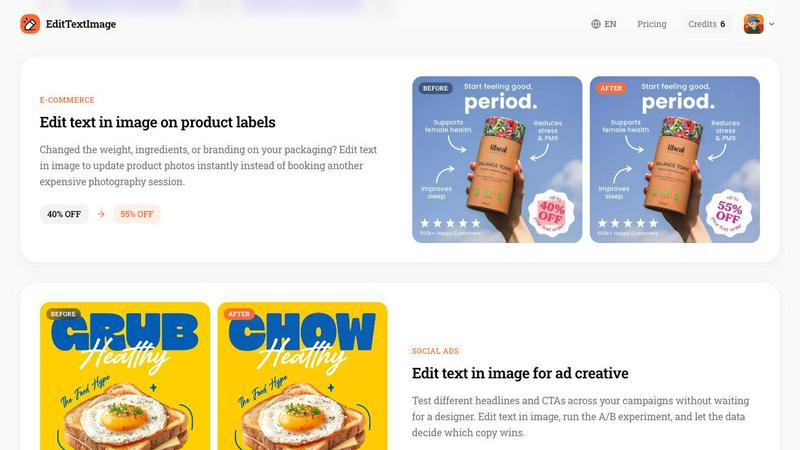
About EditTextImage
EditTextImage is a lightning-fast AI tool that lets you change text in any image while perfectly preserving the original font, color, layout, and perspective. No Photoshop skills, no font files, and no subscription required. In roughly 10 seconds, you can fix a typo, swap a date, or A/B test a headline on a finished image without needing the original design file. The AI samples the typeface directly from the pixels, so paid fonts and hand-lettering work seamlessly. This tool is built for anyone who needs quick text edits on posters, screenshots, product photos, documents, or social ads. Whether you are a marketer, designer, content creator, or business owner, EditTextImage eliminates the painful process of recreating designs just to change one word. The output is delivered at 2K resolution, ensuring your edited image looks crisp and professional. The first edit is completely free with no credit card required, and after that, you pay a one-time fee of $9.90 for 30 edits. Credits never expire and commercial use is included. EditTextImage is the fastest, most efficient way to edit text in images online.
Features of EditTextImage
Pixel-Perfect Text Replacement
The AI samples the typography directly from the image pixels, so the font, color, size, drop shadow, and perspective all stay intact. Even if you are using a paid font you do not have installed or a custom hand-lettered style, the replacement text matches the original with stunning accuracy. No more smeared backgrounds or warped text.
Lightning-Fast Processing
Edit any image in roughly 10 seconds. Upload your file, type the original text and the replacement, and the AI delivers a high-quality 2K resolution result almost instantly. This speed makes it perfect for quick fixes, last-minute changes, and production workflows where every second counts.
No Design Skills or Software Needed
You do not need Photoshop, Canva, or any design experience. The entire process is done online with a simple three-step workflow: upload your image, enter the text change, and download the result. No font files to install, no layers to manage, and no complex tools to learn.
One-Time Payment with Free Trial
Start with one free edit with no credit card required. Then, pay a single one-time fee of $9.90 for 30 edits. There is no monthly subscription, no recurring charges, and credits never expire. Commercial use is included, making it a cost-effective solution for businesses and freelancers.
Use Cases of EditTextImage
Document Fixes and Corrections
Lost the source file for an important document? Only have a screenshot or scan? EditTextImage lets you edit text directly on the image to update invoice numbers, fix typos in contracts, or correct dates in official documents. This saves hours of time compared to recreating the entire document from scratch.
Posters, Flyers, and Event Materials
When a date changes, a speaker drops out, or a venue moves, you need a quick fix on an existing poster. Instead of reopening the design file or waiting for a designer, upload the finished poster and edit the text directly. This is perfect for reusing high-quality event materials season after season.
App Screenshot Localization
App Stores require screenshots in multiple languages for global distribution. Instead of rebuilding every UI mockup from scratch, use EditTextImage to swap languages on existing screenshots. The AI preserves the exact layout and typography, so your localized screenshots look pixel-perfect every time.
E-Commerce and Product Photography
Changed the weight, ingredients, or branding on your product packaging? EditTextImage lets you update product photos instantly without booking another expensive photography session. You can also A/B test different headlines and CTAs on social ad creative without waiting for a designer to recreate the image.
Frequently Asked Questions
How does EditTextImage preserve the original font and color?
The AI samples the typography directly from the pixels of your uploaded image. It analyzes the font style, size, color, drop shadow, perspective, and background texture. When you enter the replacement text, the AI generates new text that matches these characteristics exactly, so the edit looks like it was part of the original design.
Is there a limit on image size or format?
EditTextImage accepts PNG, JPEG, and WebP files up to 10 MB. The output is delivered at 2K resolution, ensuring high quality for professional use. If your file exceeds the size limit, you can compress it before uploading.
Do I need to sign up with a credit card for the free trial?
No. You get one free credit to edit text in an image with no credit card required. Simply sign in with Google to start. After your free edit, you can purchase a one-time pack of 30 edits for $9.90. There are no subscriptions or hidden fees.
What happens if I try to edit sensitive or prohibited content?
EditTextImage has strict acceptable use policies. The tool cannot be used to edit IDs, passports, visa support letters, official seals, bank statements, or tampered receipts. Edits intended to deceive third parties, including visa or immigration submissions, fake refunds, or falsified chat screenshots, are prohibited. Violations result in account termination without refund, and request logs may be shared with law enforcement.
Pricing of EditTextImage
EditTextImage offers a simple, transparent pricing model. Your first edit is completely free with no credit card required. After that, you pay a one-time fee of $9.90 for 30 edits. There are no monthly subscriptions, no recurring charges, and credits never expire. Commercial use is included in every purchase, making it an affordable solution for individuals, freelancers, and businesses alike.
Similar to EditTextImage

Create readable text, logos, posters, ads, packaging, and ecommerce visuals with Ideogram 4 AI workflows.

Enhance photos, create images, and generate videos with an all-in-one AI enhancer.


Generate and edit production-ready images with GPT Image 2 API, detailed prompts, reference images, readable text, and developer-friendly workflows.

Explore Flux LoRA online workflows and a roadmap for models, generation, and guided training.

AI image and video studio. Generate from a prompt, animate stills, swap faces, restyle clips and edit — one credit pool, no subscription.

MetaMuse video and image generation for creative teams and developers.

NanoEditor is an AI-powered D&D portrait generator that turns character details like ancestry, class and gear into focused fantasy RPG art.