
Browser Notes
Skip signups and save instantly with Browser Notes, a lightning-fast local extension for notes, sticky boards, and mind maps.
Visit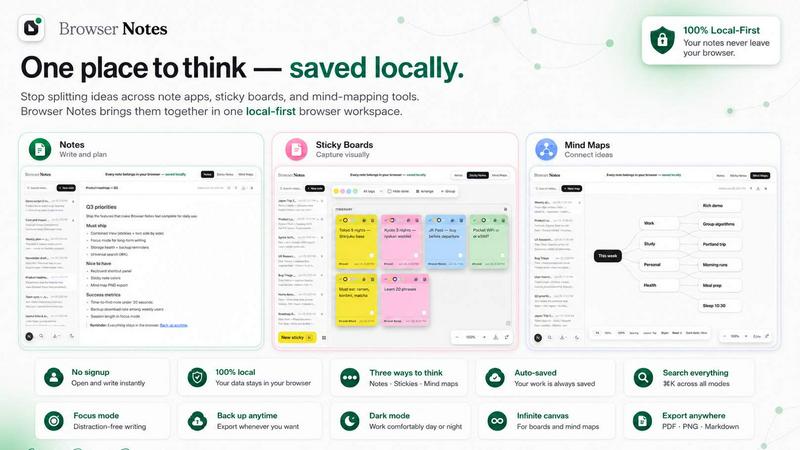
About Browser Notes
Browser Notes is a lightning-fast, local-first workspace that consolidates your notes, sticky notes, and mind maps directly inside your browser. No more jumping between scattered writing apps, cluttered sticky boards, or separate mind-mapping tools. And crucially, your private ideas stay private. There is zero account creation, zero user tracking, and zero forced cloud sync. Everything you create is stored locally in your browser, meaning you can work offline without interruption. Backing up your data is a simple, manual action you control. This product is for anyone who values speed, privacy, and simplicity: students, researchers, project managers, developers, writers, or anyone who needs to capture and organize thoughts instantly. The core value proposition is efficiency. You get three distinct tools in one unified workspace. Write and format with Markdown in the Notes tool. Brainstorm freely on an infinite canvas with Sticky Notes. Or visually branch ideas from a central concept with Mind Maps. You can even start from a template to skip the setup. With a search shortcut (Ctrl+K) and a full list of keyboard shortcuts (Ctrl+/), you navigate and create at the speed of thought. Browser Notes is a Chrome Extension that turns your new tab or a dedicated window into a powerhouse of personal knowledge management, all without ever touching the cloud.
Features of Browser Notes
Three Tools in One Workspace
Browser Notes is not just one note-taking app; it is three powerful tools fused into a single, cohesive workspace. You get a Markdown editor for formatted notes, a free-form canvas for sticky note brainstorming, and a dedicated mind map creator. This eliminates the need to switch between different applications for different thinking styles. You can jump from drafting a detailed document to visually mapping a project plan in a single click, keeping your entire thought process unified and saving precious seconds every time.
Local-First, Zero-Account Privacy
Your data never leaves your machine. Browser Notes stores everything locally in your browser's storage. There is no account to create, no email to enter, and no tracking scripts to load. This means your ideas are not pushed to a cloud server you don't control. You are immune to data breaches on external servers and can work completely offline. The speed of access is instant because there is no network latency. You own your data, and you decide when and how to back it up.
Instant Backup and Restore
Control your data destiny with a simple, manual backup system. You can export your entire workspace as a single backup file with one action. This file can be stored anywhere you choose: on your hard drive, a USB stick, or your own private cloud. If you switch computers or need to restore your data for any reason, the "Import backup" feature brings everything back exactly as it was. This is a fast, transparent, and reliable way to ensure your work is never lost.
Keyboard-First Navigation and Search
Designed for speed, Browser Notes is built around keyboard shortcuts. Press Ctrl+K to instantly search through all your notes, sticky notes, and mind maps. Press Ctrl+/ to view a complete list of all available shortcuts. This eliminates the need to use a mouse for common actions, dramatically accelerating your workflow. Whether you are creating a new note, switching between tools, or finding a specific idea, you can do it in a fraction of a second.
Use Cases of Browser Notes
Rapid Project Planning
When a new project lands on your desk, speed is critical. Use the Mind Map tool to quickly branch out the core objective, key deliverables, timelines, and risks from a central node. Then, switch to the Notes tool to write a detailed project brief with Markdown formatting. Finally, use the Sticky Notes canvas to brainstorm a list of immediate action items. All of this happens in one workspace, without opening a single other app, getting your plan from zero to structured in minutes.
Private Journaling and Idea Capture
For personal thoughts, daily journals, or sensitive business ideas that you do not want on any server, Browser Notes is the perfect solution. Because it is local-first and requires no account, you can write freely without worrying about privacy. The Markdown notes tool provides a clean, distraction-free writing environment. You can capture a fleeting idea in a sticky note or expand it into a full journal entry, knowing it is stored securely and privately on your own machine.
Academic Research and Study
Students and researchers can use Browser Notes to manage their entire knowledge base for a subject. Start a mind map for a research topic, branching out into subtopics, key papers, and arguments. Use the Notes tool to write summaries of articles or lectures in Markdown. Use sticky notes to jot down quick references or quotes. The ability to search everything with Ctrl+K means you can find that specific citation or idea instantly, without sifting through dozens of files.
Creative Brainstorming Sessions
When you need to generate a flood of ideas, the Sticky Notes canvas is your best friend. Throw every thought onto the board as a separate sticky note, move them around, color-code them, and group related concepts. As a coherent idea forms, you can immediately capture it as a structured note or visualize the connections with a mind map. This fluid transition from chaotic brainstorming to structured thinking happens in seconds, keeping your creative flow unbroken.
Frequently Asked Questions
Is an internet connection required to use Browser Notes?
No. Browser Notes is a local-first application. It stores all your data directly in your browser's local storage. You can create, edit, and organize all your notes, sticky notes, and mind maps completely offline. An internet connection is only needed to install the extension from the Chrome Web Store or to perform a manual backup download.
How is my data kept private and secure?
Your data is never sent to any external server. Browser Notes does not require an account, does not use user tracking, and does not perform any forced cloud synchronization. Everything you write is stored locally in your browser. This means your private ideas remain private on your device. You are in complete control of your data, and you can back it up manually to a location of your choice.
How do I back up or restore my data?
Backing up is a simple, manual process. You can export your entire workspace as a single backup file with one click. You can then store this file anywhere you like. To restore, you use the "Import backup" feature, which will load your previous workspace from that file. This gives you full control over your data without any automatic or hidden processes.
Can I use Browser Notes on multiple computers?
Because data is stored locally, it does not sync automatically between computers. However, you can easily transfer your workspace. Simply create a backup file on your first computer, transfer that file to your second computer (via USB, email, or your own cloud service), and then use the "Import backup" feature on the second computer. This gives you a fast and secure way to move your workspace without relying on a third-party sync service.
Explore more in this category:
Similar to Browser Notes

Panzoe is an all-in-one AI platform for personal productivity, business automation, AI assistants, content creation, and custom AI solutions.

Free collection of online developer utilities, code formatters, and digital converters designed to streamline your daily workflow.

Visual financial timelines for couples and young professionals: model cash flow, life events, and shared goals.

Online tally counter for tracking attendance, workouts, inventory, sports scores, visitors, habits, and everyday counting tasks.

The #1 Native Form Builder Plugin for Framer - No Code, No Embeds, No External Platforms.

A free launch checklist for SaaS, apps, AI tools and more. Every step says why it matters and when you can skip it.

Practical, independent guides to home repairs, maintenance, costs, troubleshooting, and everyday fixes.

Translate JSON, Markdown, and TXT files while preserving keys, nested paths, and project structure.