
StatPecker vs X11.social
Side-by-side comparison to help you choose the right product.

StatPecker
StatPecker transforms your data into rapid AI insights and stunning visuals for impactful storytelling and.
Last updated: March 1, 2026

X11.social
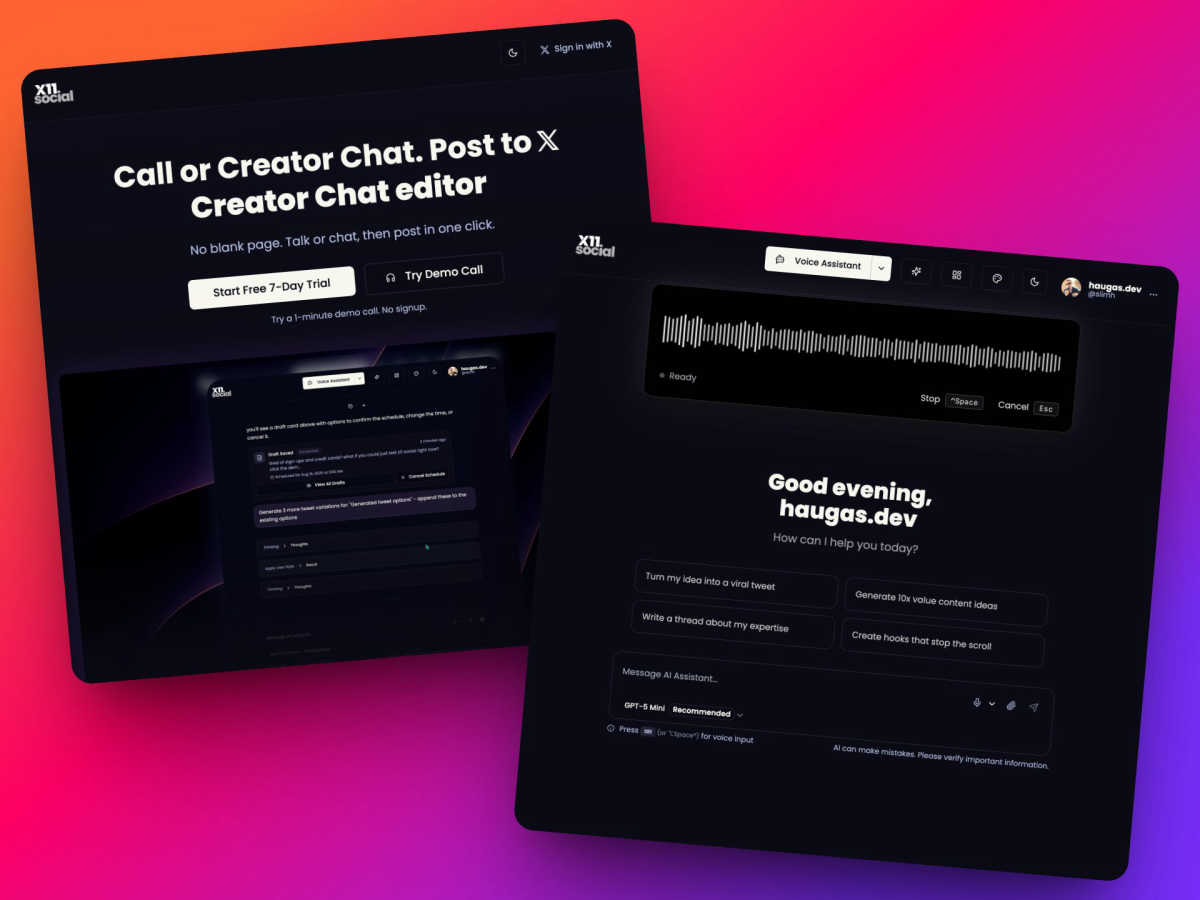
Effortlessly create and schedule posts to X using your voice or AI from any webpage with X11.social.
Last updated: March 1, 2026
Visual Comparison
StatPecker

X11.social
Feature Comparison
StatPecker
Ask Your Query
With StatPecker, you can obtain instant insights from validated sources using AI. There's no need for complex tools; simply ask your questions and get immediate answers, making data exploration straightforward and efficient.
Publish & Embed
StatPecker allows you to create interactive visuals that can be seamlessly integrated into your blogs, articles, and websites. This feature ensures your data representations are not only informative but also engaging and shareable.
Upload & Analyze CSVs
Users can easily upload local CSV files (up to 50 MB) and gain insights without the typical spreadsheet hassle. The local SQL agent processes the data right on your device, ensuring privacy and quick access to visualized insights.
Instant Visuals
StatPecker generates clean, ready-to-share visualizations that can be used in a variety of contexts. Whether for reports, presentations, or social media, you can export infographics as images with ease, transforming your data into compelling visual narratives.
X11.social
Call to Tweet
With the Call to Tweet feature, you can create posts while on the go. Simply dial our local number, talk, and your ideas are transformed into tweets by the time you park. This hands-free option is perfect for busy individuals who want to capture their thoughts without stopping.
Smart Actions
Smart Actions enhance your posting experience by providing action buttons when you need them most. Whether you want to post, schedule, adjust the tone, or attach media, these buttons appear seamlessly in your chat flow, allowing you to execute commands instantly and efficiently.
Context-Aware Voice Assistant
This feature allows the AI to understand the context of what you're reading or watching. Whether it's a YouTube video or an article, simply ask the AI to summarize or create a post. It intelligently converts long videos into threads and articles into concise posts, ensuring you never miss a beat.
Virality Analytics
Virality Analytics is a game-changer for content creators. It provides insights into why certain posts may flop before you hit send. This allows you to make necessary adjustments to enhance engagement, ensuring your content is always on point and ready to go viral.
Use Cases
StatPecker
Data-Driven Marketing
Marketers can utilize StatPecker to visualize customer data and track campaign performance metrics. By creating infographics that depict trends and insights, they can make informed decisions that enhance marketing strategies and drive engagement.
Academic Research
Educators and researchers can leverage StatPecker to present complex data in visually appealing formats. This makes it easier for audiences to comprehend research findings and enhances the overall impact of academic presentations or publications.
Business Reporting
StatPecker is ideal for analysts who need to summarize and present business performance data. Its ability to generate quick, insightful visuals enables teams to share findings with stakeholders effectively, facilitating better strategic decisions.
Content Creation
Content creators can harness StatPecker's capabilities to enrich articles or blogs with informative infographics. By transforming raw data into eye-catching visuals, they can boost reader engagement and enhance the storytelling aspect of their content.
X11.social
Busy Professionals
For busy professionals who often find themselves short on time, X11.social offers the perfect solution. You can capture your thoughts during meetings or commutes, ensuring that no great idea goes to waste, and maintain an active presence on X effortlessly.
Content Creators
Content creators can utilize X11.social to consistently generate high-quality posts. With the ability to create threads from videos or articles, you can expand your content reach without being bogged down by the writing process.
Influencers
Influencers can leverage X11.social to keep their followers engaged with fresh content. The auto-scheduling feature ensures that you have posts ready to go at optimal times, maximizing your reach and engagement.
Entrepreneurs
Entrepreneurs can use X11.social to share insights, updates, and thoughts on industry trends without the hassle of traditional content creation. With voice-to-post capabilities, you can easily communicate your brand's message while focusing on growing your business.
Overview
About StatPecker
StatPecker is an innovative, AI-driven tool that transforms the data visualization landscape. It enables individuals and businesses to convert raw data into stunning infographics in just seconds. As data becomes the backbone of decision-making, StatPecker empowers content creators, analysts, marketers, educators, and researchers to present information engagingly and effectively. The tool eliminates the complexities often associated with traditional data visualization software, making it accessible to users of varying skill levels. By automating the data storytelling process, StatPecker facilitates effortless insight extraction, trend visualization, and the creation of impactful visual content. Whether you are crafting a detailed report, enhancing a presentation, or enriching an article, StatPecker equips you with essential tools to elevate your data presentation and engage your audience like never before.
About X11.social
X11.social is the lightning-fast AI copilot specifically designed for creators on X (formerly Twitter). This innovative tool transforms your fleeting thoughts and spontaneous ideas into polished, on-brand posts in mere seconds. It eliminates the traditional friction of content creation, making it an essential assistant for busy individuals like founders, influencers, and content creators. With X11.social, you can effortlessly capture over 100 ideas weekly that might otherwise slip away during commutes, workouts, or deep work sessions. The platform features two ultra-efficient input methods: a hands-free phone call for voice-to-post creation and a smart chat editor for precise control. It integrates smoothly with your X account, providing action buttons like Post, Schedule, and Attach right within your chat flow, allowing for instant execution of commands. With X11.social, you can grow your X account simply by talking, typing, or browsing the web, all while ensuring that every output sounds authentically like you—only sharper and primed for virality.
Frequently Asked Questions
StatPecker FAQ
What types of data can I analyze with StatPecker?
You can analyze a variety of data types by uploading local CSV files. StatPecker enables you to extract insights and visualize data from these files efficiently.
Is my data safe when using StatPecker?
Yes, your data remains private while using StatPecker. The tool processes your uploaded CSV files directly on your device, ensuring that sensitive information is not shared or stored externally.
Can I integrate StatPecker visuals into my website?
Absolutely! StatPecker allows you to publish and embed your visuals seamlessly into blogs, articles, and websites, making it easy to share your findings with a wider audience.
What if I need help getting started with StatPecker?
StatPecker offers an intuitive interface, but if you encounter any issues, you can reach out for support. The team behind StatPecker is committed to helping users navigate the tool effectively and maximize its potential.
X11.social FAQ
How does X11.social help with content creation?
X11.social streamlines the content creation process by using AI to convert your voice or text into polished posts. This eliminates the friction of traditional writing, allowing you to focus on your ideas instead.
Can I schedule posts using X11.social?
Yes, X11.social includes a smart scheduling feature that allows you to plan and automate your posts, ensuring consistent engagement with your audience without requiring constant manual effort.
Is there a way to analyze potential post performance?
Absolutely! X11.social offers Virality Analytics, which helps predict how well your posts may perform by analyzing key metrics before you publish, allowing you to adjust for maximum impact.
What input methods does X11.social support?
X11.social supports two primary input methods: a hands-free voice call for immediate posting and a smart chat editor for those who prefer typing and editing their content with precision.
Alternatives
StatPecker Alternatives
StatPecker is an innovative AI-driven tool designed for data visualization, empowering users to create engaging and informative visuals from raw data quickly and efficiently. As the demand for data-driven insights continues to grow, many users seek alternatives to StatPecker for various reasons, including pricing flexibility, specific feature sets, or compatibility with different platforms. Businesses and individuals may find that their unique needs require different capabilities that StatPecker may not fully address, prompting a search for other options. When considering alternatives, it's essential to evaluate the ease of use, the range of visualization features, and the ability to integrate with existing workflows. Look for tools that offer intuitive interfaces, robust data analysis capabilities, and customization options that align with your presentation goals. Additionally, consider pricing structures and support resources to ensure you choose a solution that meets your requirements.
X11.social Alternatives
X11.social is a cutting-edge AI copilot designed for creators on X (formerly Twitter). It streamlines the content creation process, allowing users to transform spontaneous thoughts into polished posts with remarkable speed. Often, users seek alternatives to X11.social for various reasons such as pricing, feature availability, or compatibility with their preferred platforms. As the landscape of social media management evolves, it's crucial to find a solution that aligns with specific needs, whether that be budget constraints or the desire for unique functionalities that enhance productivity and creativity. When searching for alternatives, users should consider key factors like ease of use, integration capabilities, and the quality of AI-generated content. Features such as voice-to-text functionality, context recognition, and scheduling options can significantly impact the overall effectiveness of a tool. Evaluating these aspects will ensure you find a solution that not only meets your immediate requirements but also adapts to your evolving content creation needs.