
Fusedash vs Threat Watch
Side-by-side comparison to help you choose the right product.

Fusedash transforms raw data into interactive dashboards and charts, enabling instant insights for your team.
Last updated: March 4, 2026

Threat Watch
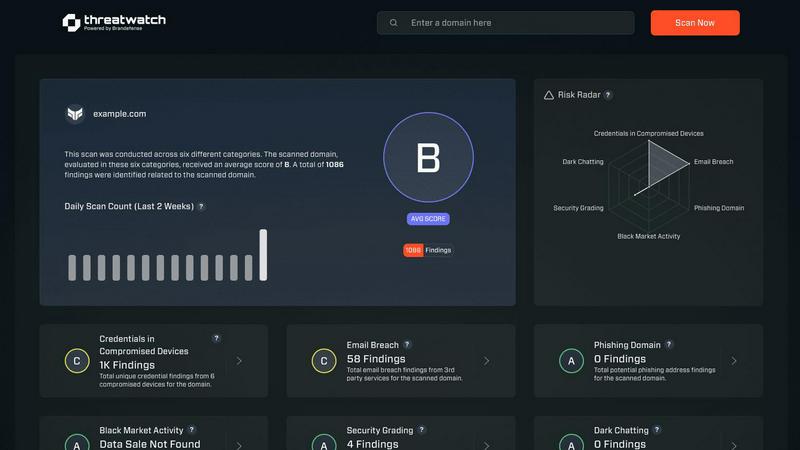
Rapidly assess your cybersecurity health with Threat Watch for instant insights on compromised accounts and devices.
Last updated: March 1, 2026
Visual Comparison
Fusedash

Threat Watch
Feature Comparison
Fusedash
Flexible Views
Fusedash offers the ability to build tailored dashboards, charts, maps, or report-style views, allowing different teams to access the specific answers they need. This feature minimizes unnecessary back and forth, enabling stakeholders to see what matters most while retaining a unified data source.
AI Chart Generator
The AI Chart Generator within Fusedash allows users to create powerful visuals from CSVs or APIs in mere minutes. Users can select the right chart type, apply comparisons, and refine labels to ensure the charts tell the right story, facilitating faster reporting and enhanced clarity.
Dashboard Software
Fusedash combines dashboarding and reporting in one workspace, allowing teams to monitor KPIs while giving context through narrative reporting. This feature helps clarify changes, their significance, and future implications, keeping teams aligned and reducing conflicting reports.
AI Chat
The Smart Chat feature allows users to interact with their data using plain language. This functionality accelerates the data exploration process, providing suggestions for metrics, charts, and breakdowns, and easily converting insights into shareable dashboard views.
Threat Watch
Real-time Risk Assessment
Threat Watch delivers real-time risk assessments by continuously monitoring your organization’s digital footprint. This feature ensures that you are always aware of your current security posture, allowing for quick responses to emerging threats.
Comprehensive Threat Intelligence
With comprehensive threat intelligence, Threat Watch aggregates data from the surface, deep, and dark web. This feature enables users to gain insights into potential vulnerabilities and threats, transforming raw data into meaningful action plans.
Automated Credential Monitoring
Automated credential monitoring scans for compromised employee credentials and breached accounts, alerting your security team instantly. This proactive feature helps mitigate risks associated with unauthorized access and data breaches.
Vulnerability Detection and Reporting
Threat Watch provides robust vulnerability detection and reporting, identifying weak points in your security framework. This feature enables organizations to address critical vulnerabilities quickly, reducing the likelihood of exploitation by cybercriminals.
Use Cases
Fusedash
Marketing Performance Tracking
Marketing teams can utilize Fusedash to create dashboards that visualize campaign performance metrics, enabling them to quickly assess the success of various strategies. This helps in making data-driven decisions to optimize future campaigns based on real-time insights.
Sales Analytics
Sales teams can leverage Fusedash to monitor sales performance across different regions and segments. By using interactive charts and maps, they can identify trends, track targets, and allocate resources more effectively, enhancing overall sales strategies.
Financial Reporting
Finance departments can use Fusedash to generate comprehensive financial reports that combine various data sources. This allows them to present a clear financial picture to stakeholders, ensuring everyone understands key metrics and financial health.
Operational Efficiency Monitoring
Operations teams can employ Fusedash to track key operational metrics and workflows. By visualizing data through customizable dashboards, they can identify bottlenecks and inefficiencies, facilitating quicker adjustments and optimizations.
Threat Watch
Protecting Employee Credentials
Organizations can leverage Threat Watch to protect employee credentials by continuously monitoring for breaches and compromised accounts. This use case ensures that sensitive information remains secure and minimizes the risk of unauthorized access.
Identifying Phishing Threats
Threat Watch helps security teams identify and mitigate phishing threats in real-time. By analyzing suspicious addresses and links, organizations can prevent potential data breaches and protect their employees from social engineering attacks.
Improving Incident Response Times
With its automated insights, Threat Watch enhances incident response times. Security teams can quickly prioritize and address critical vulnerabilities, ensuring that threats are contained before they can escalate into significant security incidents.
Comprehensive Security Health Evaluation
Organizations can use Threat Watch for a comprehensive evaluation of their cybersecurity health. Regular scans assess critical security categories, providing actionable insights that help strengthen overall security posture and compliance.
Overview
About Fusedash
Fusedash is a cutting-edge AI-powered data visualization platform crafted for teams eager to turn their connected data into clear, actionable insights. It serves as a unified workspace, enabling users to create decision-ready dashboards, interactive charts, detailed maps, and narrative reports without the hassle of reconstructing logic across multiple disconnected tools. The primary value proposition of Fusedash lies in its consistency and efficiency: key metrics and KPIs are defined once and reused across various views and reports, ensuring that everyone in the organization—from leadership to marketing to operations—aligns on the same trusted numbers. Fusedash is tailored for teams fed up with manual reporting cycles and conflicting data narratives. It empowers users to monitor real-time happenings while gaining a deeper understanding of the underlying reasons by drilling down into segments, regions, or time periods. With integrated AI features such as natural language data chat and intelligent visualization assistance, Fusedash accelerates data exploration and reporting, transforming raw data into a unified source of truth that fosters alignment and drives actionable insights.
About Threat Watch
Threat Watch is your organization’s lightning-fast command center for cybersecurity intelligence, designed to provide an immediate, crystal-clear view of your digital security posture. This unified platform continuously analyzes your assets, vulnerabilities, and exposures across the surface, deep, and dark web. By transforming complex threat data into actionable insights, Threat Watch empowers IT leaders, security teams, and business executives to move at the speed of risk. Its core value proposition lies in speed and efficiency, enabling users to identify critical risks in real-time and prioritize them based on actual business impact. With Threat Watch, organizations can execute mitigation strategies faster than threats can evolve, automating the heavy lifting of cyber threat intelligence. From detecting compromised employee credentials and breached accounts to identifying phishing addresses and vulnerable devices, Threat Watch saves you the most valuable resource—time—ensuring your cybersecurity health is always a priority.
Frequently Asked Questions
Fusedash FAQ
What types of data can I upload to Fusedash?
You can upload various data formats, including CSV files and connect through APIs. Fusedash also supports public data integration, allowing for enriched views that provide greater context.
How does Fusedash ensure data consistency across reports?
Fusedash allows you to define your key metrics and KPIs once, ensuring that they can be reused across all views and reports. This standardization helps maintain consistency and trust in the data presented throughout the organization.
Can I customize the dashboards for different teams?
Absolutely! Fusedash enables you to customize layouts, filters, and time ranges, ensuring that each team sees the data that matters most to them without duplicating work.
What are the AI capabilities of Fusedash?
Fusedash includes advanced AI features like Smart Chat, allowing users to ask questions in plain language and receive suggestions for metrics and visualizations. This functionality enhances data exploration and helps users find the insights they need quickly.
Threat Watch FAQ
What types of threats does Threat Watch monitor?
Threat Watch monitors a wide range of threats, including compromised credentials, phishing addresses, breached accounts, and vulnerabilities across the surface, deep, and dark web.
How quickly can Threat Watch identify risks?
Threat Watch is designed for speed, providing real-time risk assessments that allow organizations to identify critical threats as they emerge, ensuring timely action.
Is there a trial available for Threat Watch?
Yes, Threat Watch offers a free initial scan, allowing organizations to evaluate its capabilities and understand their cybersecurity posture before making a commitment.
Can Threat Watch integrate with existing security tools?
Threat Watch is designed to complement existing security tools and frameworks, making it easier for organizations to enhance their cybersecurity strategies without overhauling their current systems.
Alternatives
Fusedash Alternatives
Fusedash is an AI-powered data visualization platform designed to help teams turn their raw data into clear, actionable insights. As part of the analytics and business intelligence category, it provides a unified workspace for creating decision-ready dashboards and reports. Users commonly seek alternatives to Fusedash for various reasons, including pricing concerns, specific feature requirements, or compatibility with existing systems and workflows. When choosing an alternative, it's essential to consider factors such as ease of use, integration capabilities, and the ability to deliver consistent and reliable data across the organization.
Threat Watch Alternatives
Threat Watch is a powerful cybersecurity intelligence platform that helps organizations instantly assess and monitor their cybersecurity health. It falls under the category of business intelligence, specifically tailored for IT leaders and security teams who need to act quickly on potential threats. Users often seek alternatives to Threat Watch due to various factors, including pricing, specific feature sets, or integration capabilities with existing platforms. When searching for an alternative, it's crucial to consider aspects like real-time monitoring capabilities, ease of use, and the ability to prioritize risk based on business impact. --- [{"question": "What is Threat Watch?", "answer": "Threat Watch is a cybersecurity intelligence platform that provides instant evaluations of an organization's cybersecurity health, delivering actionable insights to enhance security posture."},{"question": "Who is Threat Watch for?", "answer": "Threat Watch is designed for IT leaders, security teams, and business executives who require fast and efficient cybersecurity intelligence to mitigate risks."},{"question": "Is Threat Watch free?", "answer": "Threat Watch is a subscription-based service, and pricing details can vary based on the specific needs of the organization."},{"question": "What are the main features of Threat Watch?", "answer": "Main features of Threat Watch include a real-time cyber health dashboard, automated exposure scanning, and prioritized risk intelligence for effective threat management."}]