
Nano Banana Pro vs SimpleDraw
Side-by-side comparison to help you choose the right product.

Nano Banana Pro
Nano Banana Pro generates stunning, consistent 4K AI images with lightning speed and professional quality.
Last updated: February 28, 2026

SimpleDraw
Create accurate floor plans and scale drawings instantly with our free, powerful web tool.
Last updated: March 1, 2026
Visual Comparison
Nano Banana Pro

SimpleDraw
Feature Comparison
Nano Banana Pro
Lightning-Fast 4K Generation
Experience a 15% faster generation speed powered by the advanced gemini 3 pro image preview technology. This means you get stunning, high-resolution 4K-ready images in a fraction of the time, accelerating your creative workflow from concept to final visual without any lag or compromise on detail.
Perfect Character Consistency
Nano Banana Pro excels at maintaining flawless character features across multiple generated images. Built on multi-image understanding technology, it ensures your character's appearance, style, and details remain unwavering, which is critical for projects like comic series, storyboards, and consistent brand character design.
Advanced Image-to-Image Editing (Nano Banana Edit)
Go beyond text prompts. Upload up to 10 existing photos and transform them with AI-driven instructions. Reimagine scenes, alter styles, add new elements, or completely overhaul an image while preserving key original features, offering unparalleled creative flexibility and rapid iteration.
11 Flexible Aspect Ratios & Superior Text Rendering
Create for any platform or format with support for 11 aspect ratios, from square (1:1) to cinematic ultrawide (21:9). Coupled with an enhanced text engine, it renders crystal-clear, high-fidelity text within images-perfect for creating sharp logos, posters, and social media graphics with readable typography.
SimpleDraw
Dedicated Floor Plan Mode
This specialized mode is built for speed, allowing you to create accurate floor plans of rooms, apartments, and entire houses with zero friction. Draw walls, and add windows and doors with a single click. A comprehensive library of interior fixtures for kitchens, bathrooms, living rooms, and bedrooms lets you furnish your plans instantly. View measurements in real-time as you make adjustments, streamlining the entire design process from blank canvas to finished plan.
Smart Alignment & Snap System
Work with lightning-quick precision. The smart alignment system assists you in placing points and lines exactly where you want them. Simply point your mouse in the right area, and SimpleDraw snaps elements into place with clear visual feedback. For even greater control, use keyboard shortcuts to lock lines to vertical or horizontal axes. If you need finer control, zoom in for pixel-perfect placement, making complex drawings efficient and error-free.
Non-Destructive Editing & Complete Control
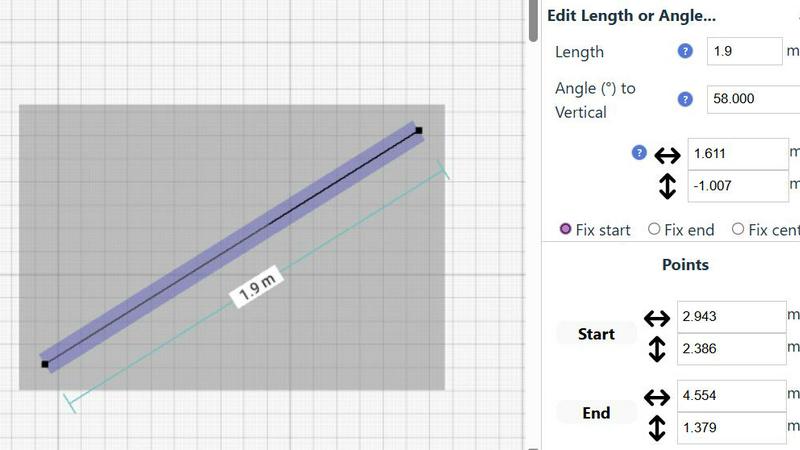
Maintain full creative freedom and speed. Every element in your drawing is 100% editable at any time, so you can iterate and refine without starting over. Use undo/redo functions (with keyboard shortcuts) to revert changes instantly. Group elements to move, copy, and paste them together, streamlining repetitive tasks. For ultimate precision, input exact positions, line lengths, and angles directly via keyboard, bypassing the mouse for rapid, accurate adjustments.
Comprehensive Measurement System
Ensure absolute accuracy with a dynamic and flexible measurement system. Contextual measurements display in real-time as you draw, helping you build to exact specifications. You have fine control over which measurements are shown and can switch seamlessly between metric and standard US units (feet and inches). This feature guarantees that every plan you create is not just a sketch, but a scale-accurate blueprint ready for action.
Use Cases
Nano Banana Pro
Serialized Content & Storyboarding
Ideal for authors, comic artists, and filmmakers who need to visualize characters and scenes consistently across a series. Generate multiple frames or illustrations of the same character in different actions and settings with perfect continuity, speeding up pre-production and concept development dramatically.
Marketing & Social Media Asset Creation
Marketers and social media managers can rapidly produce a high-volume of on-brand, platform-optimized visuals. Create cohesive ad banners, promotional posters, and engaging social posts in the correct aspect ratios, all with crisp text and professional-grade quality to capture audience attention instantly.
Conceptual Design & Prototyping
Designers and developers can bring product concepts, UI mockups, and game assets to life in seconds. Use detailed text prompts or transform basic sketches into high-fidelity renders, allowing for quick iteration, client presentations, and testing of visual ideas without lengthy manual design processes.
Personalized Art & Photo Transformation
Individuals and artists can reimagine personal photos or create custom artwork. Turn a portrait into a Pixar-style caricature, apply unique artistic filters, or generate hyper-realistic fantasy scenes from descriptions. Nano Banana Edit makes personalized, high-quality art creation accessible and fast for everyone.
SimpleDraw
Home Renovation & Room Planning
Plan your renovation projects with speed and confidence. Visualize new kitchen layouts, bathroom configurations, or living room arrangements before swinging a hammer or buying materials. Test different furniture placements instantly to see what fits, ensuring your design is both beautiful and functional from the very first step, saving you costly mistakes and time.
Creating Real Estate & Rental Listings
Generate professional, accurate floor plans for apartment listings or house sales in minutes. Quickly draft clear, scale drawings that give potential buyers or tenants a perfect understanding of the space. This fast, professional touch enhances your listing, provides better information, and can help properties stand out in a competitive market without needing expensive software or services.
DIY Project Visualization
Map out your weekend projects with absolute precision. Whether you're building a custom bookshelf, planning a garden layout, or designing a workshop, SimpleDraw lets you sketch dimensions and spatial relationships accurately. This turns abstract ideas into actionable plans quickly, ensuring you cut materials correctly the first time and execute your vision efficiently.
Interior Design & Furniture Planning
Experiment with interior design layouts at lightning speed. Arrange and rearrange furniture, fixtures, and decor within an accurate room model to find the perfect aesthetic and flow. Check clearances for walkways and ensure new purchases will fit perfectly, making design decisions fast and with total confidence before making any commitments.
Overview
About Nano Banana Pro
Nano Banana Pro is the professional-grade AI image generator engineered for ultimate speed and stunning visual fidelity. It transforms your text prompts and existing images into breathtaking, 4K-ready visuals in a flash. Powered by advanced technology like gemini 3 pro image preview, it delivers a 15% faster generation experience without compromising on quality. This tool is built for creators, designers, marketers, and developers who demand precision and efficiency in their visual workflow. Its core value lies in perfect character consistency, allowing you to generate multiple images of the same character with unwavering accuracy-ideal for storyboards, character design, and serialized content. Beyond text-to-image, Nano Banana Pro includes powerful Image-to-Image editing with Nano Banana Edit, letting you upload and transform up to 10 photos with AI prompts. With support for 11 flexible aspect ratios and enhanced text rendering for crisp logos and posters, it's the fastest, most versatile toolkit for bringing any visual concept to life at lightning speed. Trusted by over 10,000 creators, it's the definitive solution for anyone who needs to produce high-quality, consistent visuals rapidly.
About SimpleDraw
SimpleDraw is your instant, zero-friction gateway to professional-grade scale drawings. It's a powerful, free online tool engineered for speed and efficiency, designed for anyone who needs to create precise diagrams, floor plans, or technical sketches without the complexity of traditional CAD software. Built for the modern user, it empowers DIY enthusiasts, homeowners, interior designers, and hobbyists to visualize projects with absolute accuracy directly in their web browser. The core value proposition is unmatched simplicity: there's no software to download, no account to create, and no steep learning curve to climb. You get lightning-fast access to a focused set of intuitive tools that deliver the precision of professional software with the ease of pen and paper. From planning a complex room layout to mapping out a garden renovation, SimpleDraw transforms your ideas into accurate, scalable drawings in minutes, not hours. It’s the definitive tool for turning vision into actionable plans with speed and confidence, all from a simple browser tab.
Frequently Asked Questions
Nano Banana Pro FAQ
What makes Nano Banana Pro faster than other AI image generators?
Nano Banana Pro is powered by the advanced gemini 3 pro image preview technology, which optimizes the generation pipeline. This proprietary architecture reduces processing time by 15% compared to standard models, delivering 4K-ready results at lightning speed without sacrificing the detail or quality of the final image.
How does the Character Consistency feature work?
The feature is built on a sophisticated multi-image understanding model. When you generate a character, the AI learns and locks in key features like facial structure, hairstyle, clothing, and style. For subsequent prompts involving that character, it references this understanding to ensure all visual attributes remain perfectly consistent across every new image you create.
Can I edit my own photos with Nano Banana Pro?
Absolutely. Through the Nano Banana Edit tool, you can upload up to 10 of your own images. You can then apply AI prompts to transform them-change the style, setting, add elements, or completely reimagine the scene. It's a powerful way to enhance photos, create artistic versions, or fix and alter existing visuals with AI guidance.
What image formats and resolutions does it support?
Nano Banana Pro generates high-quality images suitable for professional use, with resolutions up to 4K. The output format is PNG, ensuring high fidelity with transparency support where needed. This makes the images ready for print, digital displays, and further editing in professional software suites.
SimpleDraw FAQ
Is SimpleDraw really free to use?
Yes, SimpleDraw is completely free. There is no cost to access the core scale drawing and floor plan creation tools. You can start drawing immediately with no trial periods, subscriptions, or hidden fees. The tool is committed to providing powerful, accessible design software without financial barriers.
Do I need to download software or create an account?
No. SimpleDraw requires zero installation and no account creation. It is a 100% web-based application that runs directly in your browser. You can start a new drawing instantly by visiting the website, ensuring maximum speed and eliminating all friction to getting started.
What kind of drawings can I create with SimpleDraw?
SimpleDraw is optimized for creating precise scale drawings and floor plans. This includes detailed room layouts, complete house or apartment plans, kitchen and bathroom designs, furniture arrangements, and technical sketches for DIY projects. It provides specialized tools for architectural elements like walls, doors, and windows.
Can I use SimpleDraw on any device?
SimpleDraw is designed to work in any modern web browser on desktop or laptop computers. For the best experience with precise mouse or trackpad control for drawing, using a computer is recommended. The interface and tools are built for efficiency on these platforms.
Alternatives
Nano Banana Pro Alternatives
Nano Banana Pro is a top-tier AI image generator in the Design Tools and Image & Photo categories, renowned for its lightning-fast 4K output and flawless character consistency. Users often explore alternatives for various reasons, such as budget constraints, a need for different core features, or compatibility with other platforms and workflows. When evaluating other tools, key factors include generation speed and output quality, the ability to maintain character or style consistency across projects, and the availability of advanced editing features like image-to-image transformation. Your specific creative needs will determine the right fit. Ultimately, the best alternative aligns with your priorities, whether that's raw speed for rapid prototyping, specialized artistic styles, or a particular pricing model that fits your project scope. The goal is to find a tool that empowers your visual creation without compromise.
SimpleDraw Alternatives
SimpleDraw is a free, browser-based tool for creating precise scale drawings and floor plans. It belongs to the category of lightweight, accessible design software, offering professional-grade accuracy without the complexity of traditional CAD programs. Its core mission is to deliver speed and eliminate friction in the drafting process. Users often explore alternatives for various reasons. Some may require advanced features beyond basic floor plans, need offline desktop software, or seek tools integrated with specific project management ecosystems. Others might be evaluating different pricing models, as SimpleDraw's free model is a key part of its appeal. When choosing an alternative, prioritize your specific workflow needs. Consider the required precision level, the complexity of your projects, and whether you need collaboration features or platform-specific apps. The goal is to find a tool that matches your project's demands without sacrificing the efficiency and speed that tools like SimpleDraw provide.