
Subclip
Subclip streamlines video editing with AI-driven subtitles, voice cloning, and dubbing, saving you 80% of your editing time.
Visit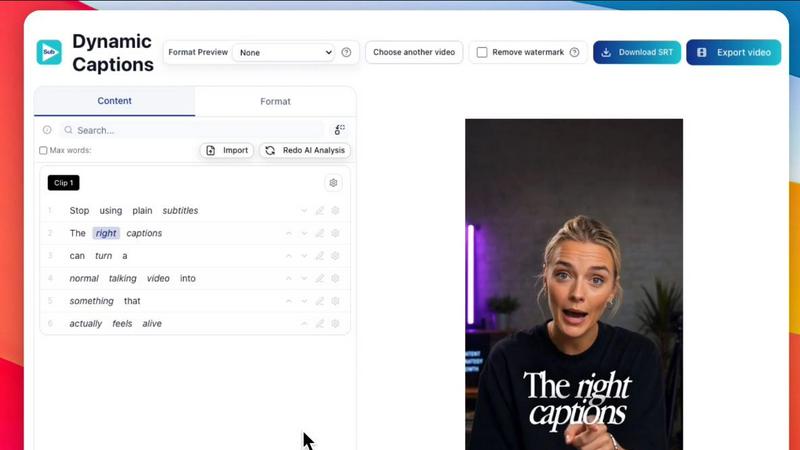
About Subclip
Subclip is an innovative AI-powered video editing platform designed specifically for creators, marketers, and educators who want to streamline their video production process. With its unique capability to edit videos as easily as editing a document, Subclip empowers users to drag and drop transcripts to edit their content seamlessly. This tool is particularly beneficial for YouTubers, podcasters, course creators, and content teams, allowing them to save significant time and effort. Subclip's advanced features include voice cloning for re-recording segments, one-click removal of silences and filler words, accurate auto-generated subtitles, and dubbing into multiple languages while maintaining background music. By simplifying traditional video editing workflows, Subclip enhances productivity and creativity, making it the go-to solution for anyone looking to elevate their video content without the hassle of complicated software.
Features of Subclip
AI Clipping
Subclip's AI Clipping feature automatically identifies the most engaging segments of your video, such as punchlines and emotional highs, allowing you to create impactful clips quickly. This not only saves time but also ensures that you highlight the best moments of your content.
One-Click Unlimited Captions
Generate unlimited subtitles in over 48 languages with just one click. This feature allows you to reach a global audience, making your videos accessible and engaging for viewers worldwide. Customize the text and formatting effortlessly before publishing.
AI Dubbing with Voice Clone
Subclip's AI Dubbing feature lets you translate your voice into 21+ languages while preserving your original tone and emotion. This means you can easily dub your content for international audiences without the need for additional recordings, streamlining your workflow significantly.
Share and Collaborate
The platform supports collaborative work by allowing users to share projects with team members and gather feedback in real-time. This feature enhances teamwork and ensures that everyone can contribute to the final product, regardless of their location.
Use Cases of Subclip
Content Creation for YouTubers
YouTubers can utilize Subclip to efficiently edit long-form videos into bite-sized, engaging clips that attract more viewers. By automating the editing process, creators can focus more on content quality and audience engagement.
Course Creation for Educators
Educators can dub their recorded lectures or courses into over 20 languages, using their own voice. This feature ensures that learning materials are accessible to a diverse student body, enhancing educational outreach.
Podcast Production for Podcasters
Podcasters can benefit from Subclip by easily removing background noise and silences, ensuring that their audio quality is top-notch. With one-click enhancements, they can produce polished episodes ready for distribution.
Agency Workflow for Freelancers
Agencies and freelancers can increase their output dramatically using Subclip's unlimited transcription and collaboration features. By streamlining the video editing process, they can handle more projects simultaneously, maximizing profitability.
Frequently Asked Questions
What types of videos can I edit with Subclip?
You can edit a wide range of videos with Subclip, including YouTube videos, podcasts, online courses, and promotional content. The platform is designed for creators across various fields.
How does the AI voice cloning feature work?
The AI voice cloning feature analyzes your voice and generates a digital clone that can re-record segments of your video in multiple languages. This helps maintain consistency in tone and emotion.
Is there a limit to the number of captions I can generate?
No, Subclip offers unlimited caption generation for your videos. You can create subtitles in over 48 languages without worrying about any restrictions.
Can I collaborate with my team on Subclip?
Absolutely! Subclip includes collaboration tools that allow you to share projects with your team members, collect feedback, and work together seamlessly within the platform.
Similar to Subclip


Oravaa's lightning-fast Voice AI handles your 24/7 calls, qualifies leads instantly, and automates reminders in under 400ms.

Hush Touch is an offline voice-to-text app for Mac that learns your vocabulary and delivers accurate, real-time.

Glossa provides fast AI translation of sermons into 100+ languages, breaking language barriers for your church.

Bantr is a powerful offline TTS app for Mac with unlimited private voiceovers.

KaiCalls is your 24/7 AI phone agent that instantly captures leads and answers every call, text, and message.

Vowen instantly turns your voice into notes and actions across all your apps.

Bargou One is your ultimate AI tool for chat, content creation, translation, and speech solutions all in one place.