
ProcessSpy
ProcessSpy is a powerful macOS tool that provides in-depth process monitoring with advanced filtering, real-time insights, and seamless performance.
Visit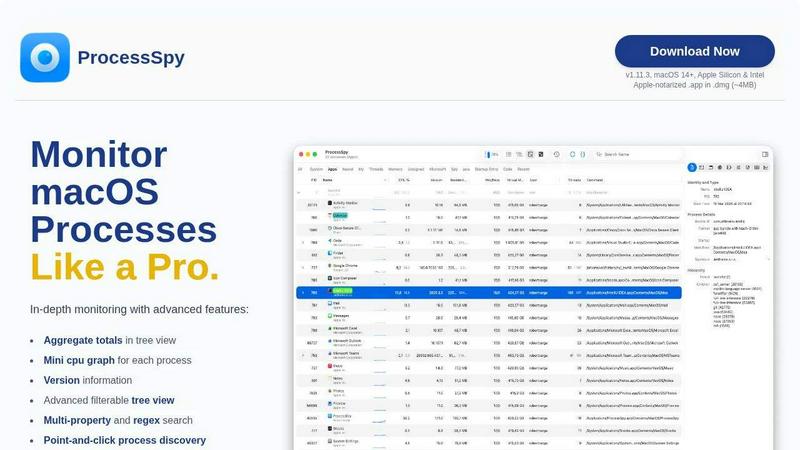
About ProcessSpy
ProcessSpy is the ultimate process monitoring tool designed specifically for macOS users. It serves as a powerful alternative to the built-in Activity Monitor, offering advanced features that reveal what lies beneath the surface of your system. By visualizing process trees, inspecting open files, and displaying environment variables, ProcessSpy allows users to manage applications with unparalleled precision. It's especially beneficial for developers, system administrators, and tech enthusiasts who require in-depth information about running processes. With its intuitive design and fast performance, ProcessSpy leverages native macOS APIs to provide a seamless user experience. Whether you need to kill stubborn apps or analyze CPU and memory usage, ProcessSpy delivers the essential insights necessary for efficient system management.
Features of ProcessSpy
Advanced Tree View
ProcessSpy offers an advanced tree view that provides detailed insights into running processes. Users can filter and search in real-time, including JavaScript filters, allowing for complex queries and immediate results. This feature enhances visibility into resource consumption and process hierarchy, making it easier to manage system performance.
JavaScript Filters
With JavaScript filters, ProcessSpy empowers users to create intricate filtering conditions tailored to their needs. This feature enables the combination of multiple criteria, allowing for precise searches that can significantly streamline the process discovery experience. It's perfect for users who demand more control over their monitoring tasks.
Process History Recording
This paid feature allows users to record historical data for CPU, memory, and thread usage over time. Users can analyze trends and performance metrics, exporting results to CSV for further analysis. This functionality is essential for developers and IT professionals who need to review application behavior over extended periods.
Remember Finished Processes
ProcessSpy can remember finished processes, along with their command-line arguments, environment variables, and operational history. This feature is invaluable for troubleshooting and retrospective analysis, giving users insights into past activities and system behavior.
Use Cases of ProcessSpy
Monitoring Resource Usage
Developers can utilize ProcessSpy to monitor resource usage across various applications in real-time. By visualizing CPU and memory consumption, they can pinpoint resource hogs and optimize performance, ensuring smoother operations during development cycles.
Debugging Applications
When debugging, developers need detailed information about running processes. ProcessSpy provides comprehensive command-line info and version details, making it easier to identify issues and understand how different components interact within the system.
Managing Background Services
System administrators can leverage ProcessSpy to manage background services effectively. By identifying processes that run unnoticed, they can optimize system performance and ensure that critical services are functioning as expected without unnecessary resource consumption.
Analyzing System Performance
Tech enthusiasts can use ProcessSpy to analyze overall system performance. By monitoring process behavior and resource allocation, they can optimize their macOS experience, ensuring that applications run smoothly and efficiently without unexpected slowdowns.
Frequently Asked Questions
Is ProcessSpy safe to install on my Mac?
Yes, ProcessSpy is Apple-notarized and distributed as a signed .app in a .dmg file. This ensures that it is verified and completely safe to use on both Intel and Apple Silicon Macs.
Does ProcessSpy support older versions of macOS?
ProcessSpy is designed specifically for macOS 14 and newer, meaning the features and optimizations are aligned with the latest system capabilities, ensuring the best user experience.
What is the license model for ProcessSpy?
The license is valid for one user across unlimited devices, including lifetime updates. Users can purchase a license for $24.99, which unlocks all paid features and ensures access to future enhancements.
Can I export data from ProcessSpy?
Yes, ProcessSpy allows users to export data, including historical values for CPU, memory, and threads, to CSV files. This feature is particularly useful for professionals who need to analyze performance data outside the application.
Similar to ProcessSpy

Jev turns text or JSON into Choice, Score and Noul answers with probabilities. Build decision flows, process batches and call the API from one Console

Search 20,000+ open-source and SaaS tools by the job you need done or the app you want to replace.

Jev-compatible typed decisions API: moderation, routing, intent and scoring for any text, hosted in the EU.

A free directory of 950+ projects built on Laya, the open-source decision model. Updated daily.

The #1 Native Form Builder Plugin for Framer - No Code, No Embeds, No External Platforms.

Where modern software products get discovered, launched, and distributed. Explore verified AI tools, SaaS startups, and developer software.

Translate JSON, Markdown, and TXT files while preserving keys, nested paths, and project structure.
