
BoltShot
BoltShot is the fastest API for capturing perfect screenshots instantly from any URL with no browser ops required.
Visit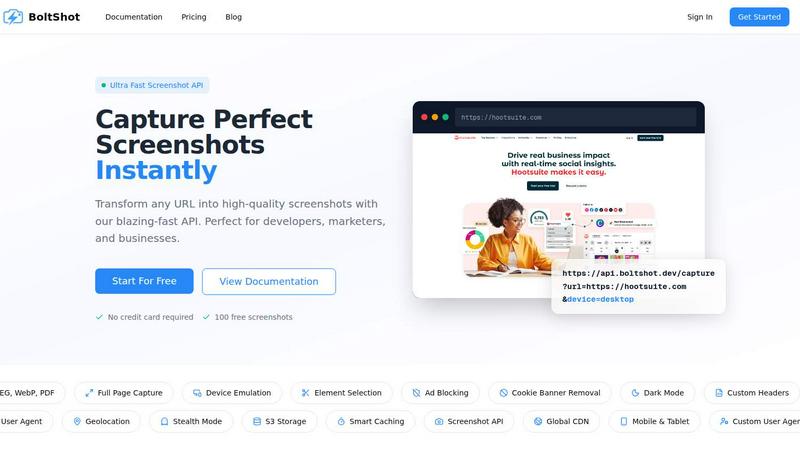
About BoltShot
BoltShot is a lightning-fast screenshot API that transforms any URL into high-quality, pixel-perfect images and PDFs with a single, simple API request. Designed for developers, marketers, and businesses who demand speed and reliability, BoltShot eliminates the complexity of managing headless browser clusters and infrastructure. Instead of wrestling with Puppeteer setups or babysitting Chrome instances, you get blazing-fast screenshot capture in formats like PNG, JPEG, WebP, and PDF. The core value proposition is pure efficiency: send a URL, get a screenshot in milliseconds. BoltShot supports full-page captures that automatically scroll through entire websites, device emulation for mobile, tablet, and desktop viewports, and custom viewport settings for flexible rendering. You can target specific page elements using CSS selectors, while built-in features like ad blocking, automatic cookie banner removal, and smart caching ensure you get clean, distraction-free results every time. For advanced workflows, BoltShot offers S3 uploads with global CDN delivery, custom user agents, geolocation emulation, stealth mode to avoid detection, and custom headers. Whether you need e-commerce previews, automated reporting, web archiving, cross-browser testing, or compliance monitoring, BoltShot integrates seamlessly without the overhead of managing your own infrastructure. It is the ultimate speed layer for any workflow that requires high-quality website screenshots on demand.
Features of BoltShot
Blazing Fast Capture with Multiple Formats
BoltShot delivers screenshots at incredible speed, supporting output in PNG, JPEG, WebP, and PDF formats through a single API call. You can specify the exact format you need for your workflow, whether it is a lightweight JPEG for previews, a lossless PNG for archiving, a modern WebP for web performance, or a full PDF for documentation. The API processes requests in milliseconds, making it ideal for real-time applications where speed is critical. No more waiting for slow rendering or dealing with format conversion headaches.
Full Page and Element Specific Capture
Capture entire web pages with automatic scrolling for complete full-page screenshots, or use CSS selectors to target and capture only specific elements on a page. This flexibility means you can get exactly what you need, whether it is a full product listing page for e-commerce monitoring or just a specific widget for UI testing. The element targeting feature gives you pixel-perfect precision without manual cropping or post-processing.
Device Emulation and Custom Viewports
Emulate any device with built-in presets for mobile, tablet, and desktop viewports. BoltShot renders screenshots exactly as they would appear on different devices, ensuring your content looks perfect across all screen sizes. You can also define custom viewport dimensions for complete control over the capture area. This is essential for responsive design testing, app store previews, and ensuring consistent visual branding across platforms.
Clean Capture with Intelligent Removal
BoltShot automatically detects and removes distractions like cookie consent banners, advertisements, popups, and overlay modals. This clean capture feature ensures your screenshots are pristine and professional without any manual cleanup. The ad blocking and cookie banner removal are built directly into the API, so you get clean results with zero extra configuration. Combined with dark mode support and custom headers, you have full control over the final output.
Use Cases of BoltShot
E-Commerce Product Previews and Monitoring
E-commerce teams can use BoltShot to automatically capture product pages, category listings, and checkout flows for visual monitoring and preview generation. The ability to capture full pages and specific elements means you can generate consistent product thumbnails, track visual changes over time, and ensure your storefront looks perfect on all devices. The fast API response time supports real-time previews for dynamic content management systems.
Automated Web Archiving and Compliance Monitoring
Businesses needing to archive web pages for compliance, legal, or historical purposes can rely on BoltShot for reliable, timestamped screenshots. The full-page capture and clean output ensure every detail is preserved without ads or popups interfering. With S3 storage and CDN delivery, archives are securely stored and instantly accessible. The stealth mode and custom user agents allow for consistent captures even on sites with bot detection.
Cross-Browser and Responsive Design Testing
Developers and QA teams can integrate BoltShot into their CI/CD pipelines to automatically capture screenshots of web applications across multiple device emulations. This enables rapid visual regression testing and responsive design validation without maintaining a complex browser farm. The element targeting feature allows for focused testing of specific UI components, while the fast capture speed keeps build times low.
Automated Reporting and Dashboard Generation
Marketing and analytics teams can use BoltShot to generate visual reports by capturing live dashboards, analytics pages, and content previews. The API integrates easily with reporting tools, email automation, and notification systems to deliver up-to-date visual snapshots. The caching and CDN features ensure that frequently accessed reports are delivered instantly, while the clean capture removes any distracting elements from the final image.
Frequently Asked Questions
How fast is BoltShot compared to managing my own Puppeteer setup?
BoltShot is dramatically faster and more reliable than self-managed Puppeteer or headless Chrome setups. While maintaining your own infrastructure involves constant babysitting, updates, and scaling challenges, BoltShot processes screenshot requests in milliseconds with a 99.9% success rate. You eliminate all operational overhead and get instant results without managing browser clusters.
What file formats does BoltShot support for screenshots?
BoltShot supports PNG, JPEG, WebP, and PDF output formats. You can specify the desired format in your API request, allowing you to choose the best format for your use case. PNG is ideal for lossless quality, JPEG for smaller file sizes, WebP for modern web performance, and PDF for document generation.
Can I capture specific parts of a webpage instead of the whole page?
Yes, BoltShot allows you to target and capture specific elements on a page using CSS selectors. This element targeting feature gives you pixel-perfect precision, so you can capture exactly what you need without manual cropping. It is perfect for capturing specific widgets, buttons, or sections of a page.
How does BoltShot handle ads, cookie banners, and popups?
BoltShot includes built-in ad blocking and automatic cookie banner removal features that detect and eliminate distractions from your screenshots. The API also removes overlay modals and popups, ensuring your captures are clean and professional. These features work automatically with no extra configuration required.
Pricing of BoltShot
BoltShot offers a free tier that requires no credit card and includes 100 free screenshots to get started. For higher volume needs, BoltShot provides scalable pricing plans designed for developers and businesses. You can start for free and upgrade as your usage grows, with transparent pricing that scales with your needs. Visit the BoltShot pricing page for detailed plan information and enterprise options.
Similar to BoltShot

Jev-compatible typed decisions API: moderation, routing, intent and scoring for any text, hosted in the EU.

A free directory of 950+ projects built on Laya, the open-source decision model. Updated daily.

The #1 Native Form Builder Plugin for Framer - No Code, No Embeds, No External Platforms.

Where modern software products get discovered, launched, and distributed. Explore verified AI tools, SaaS startups, and developer software.

Translate JSON, Markdown, and TXT files while preserving keys, nested paths, and project structure.


