
AskFormulas
AskFormulas instantly generates and validates Excel and Google Sheets formulas, saving you hours of debugging time.
Visit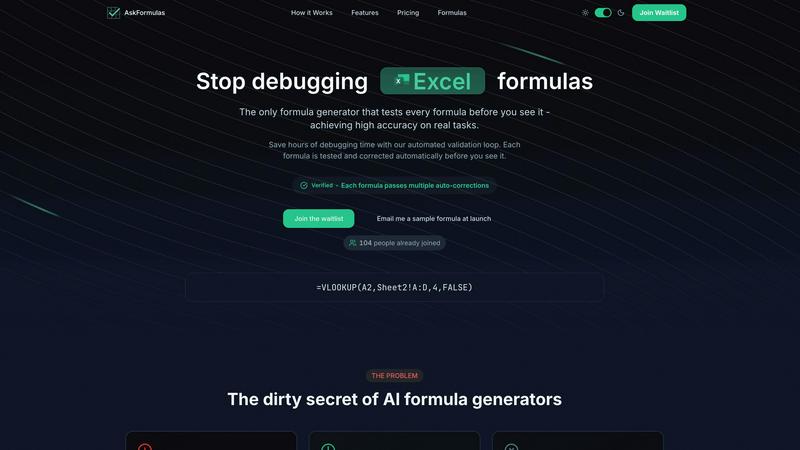
About AskFormulas
AskFormulas is an innovative AI-powered tool designed to transform the way users create and manage formulas in Excel and Google Sheets. It addresses the common pain points associated with formula creation, including frustration over broken formulas that can lead to extensive debugging sessions. Unlike conventional formula generators that can have error rates as high as 40-60%, AskFormulas stands out by ensuring that every formula is validated before it reaches the user. This guarantees that each formula is accurate and ready for immediate use. The platform is user-friendly, allowing individuals from various backgrounds—whether they are experienced financial analysts or small business owners without technical expertise—to input their requirements in plain English. By eliminating guesswork and enhancing efficiency, AskFormulas empowers users to make data-driven decisions swiftly, thus enabling them to work smarter rather than harder.
Features of AskFormulas
Natural Language Input
With AskFormulas, users can describe their formula needs in simple English. This feature eliminates the requirement for syntax knowledge, making it accessible for anyone. For instance, you can request "Sum all values in column B where column A contains the word Sales" and receive a valid formula instantly.
Three-Step Validation Process
Every formula generated by AskFormulas undergoes a rigorous three-step validation process. The first step analyzes your request, converting it into appropriate formula syntax. Next, the formula runs in a secure sandbox environment using synthetic test data. Finally, the system performs auto-corrections until the formula is verified, ensuring high accuracy before you see it.
Instant Verified Output
Once your formula is created, it appears with a green "Verified" badge, indicating that it has passed all validation tests. This feature provides users with confidence that the formula is not only valid but also optimized for use in their spreadsheets.
Smart Error Detection
AskFormulas excels in identifying and correcting errors automatically. If you input a flawed formula, the tool detects issues and provides a corrected version. This functionality eliminates the occurrence of common errors like #REF! or #VALUE!, ensuring a seamless experience for users.
Use Cases of AskFormulas
Financial Analysis
Financial analysts can leverage AskFormulas to quickly generate complex formulas for data analysis. Whether performing calculations on sales figures or forecasting trends, the tool provides accurate and reliable formula outputs, saving valuable time.
Small Business Management
Small business owners can utilize AskFormulas to manage their finances without needing extensive Excel knowledge. By simply describing their needs, they can generate the necessary formulas for budgeting, expense tracking, and revenue analysis in a matter of seconds.
Academic Research
Researchers and students can benefit from AskFormulas when analyzing data sets in spreadsheets. The tool enables them to create formulas for statistical analysis, such as averages or standard deviations, ensuring they can focus on their research rather than formula debugging.
Project Management
Project managers can use AskFormulas to streamline task tracking and resource allocation. By generating formulas that calculate timelines, budgets, and resource usage, they can ensure projects stay on track and within budget without wasting time on manual calculations.
Frequently Asked Questions
How accurate are the generated formulas?
AskFormulas guarantees high accuracy as every formula is validated through a three-step process before being presented to the user. This eliminates the frustration of dealing with broken formulas.
Does it work with both Excel and Google Sheets?
Yes, AskFormulas seamlessly operates with both Excel and Google Sheets. Users can easily toggle between the two platforms, and the tool automatically adjusts the formula syntax as needed.
How many formulas can I generate each month?
AskFormulas offers various plans, allowing users to generate a specific number of validated formulas each month. The Starter plan supports up to 500 formulas, while the Pro plan offers 2,000 formulas, and the Team plan accommodates 6,000 formulas.
Is there a way to access my previously generated formulas?
Absolutely! AskFormulas maintains a history of your last 10 generated formulas, giving you easy access to your personal formula library whenever you need to revisit past work.
Explore more in this category:
Similar to AskFormulas

Free collection of online developer utilities, code formatters, and digital converters designed to streamline your daily workflow.

Visual financial timelines for couples and young professionals: model cash flow, life events, and shared goals.

Online tally counter for tracking attendance, workouts, inventory, sports scores, visitors, habits, and everyday counting tasks.

The #1 Native Form Builder Plugin for Framer - No Code, No Embeds, No External Platforms.

A free launch checklist for SaaS, apps, AI tools and more. Every step says why it matters and when you can skip it.

Practical, independent guides to home repairs, maintenance, costs, troubleshooting, and everyday fixes.

Translate JSON, Markdown, and TXT files while preserving keys, nested paths, and project structure.

Highlight faster. Study in flow with custom shortcuts and a workflow built around you. Print smarter, or turn any page into a tiled poster.