
TinyFast vs WA Reminders
Side-by-side comparison to help you choose the right product.

TinyFast instantly compresses images, videos, and PDFs on your Mac with simple drag and drop, ensuring privacy and.
Last updated: February 28, 2026

WA Reminders
WA Reminders lets you effortlessly schedule WhatsApp messages, ensuring timely communication with clients for your business.
Last updated: April 4, 2026
Visual Comparison
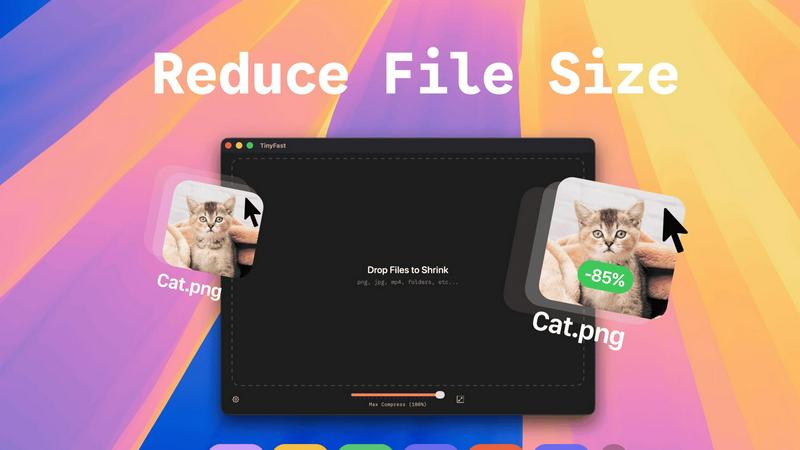
TinyFast
WA Reminders

Feature Comparison
TinyFast
Batch & Drag-Drop Shrink
TinyFast allows you to drop entire folders for compression, providing optimized output in seconds. This feature streamlines your workflow by enabling you to compress multiple files simultaneously, saving you valuable time.
Blazing-Fast Compression
Experience incredibly fast file compression thanks to optimized native engines designed for speed. Forget about waiting for uploads and downloads; TinyFast shrinks large files in seconds, allowing you to get back to your work without delay.
Resize Resolution
With TinyFast, you can set automatic resizing for your image and video resolutions. This feature ensures that your media assets are not only compressed but also resized to fit your specific requirements, enhancing your efficiency.
100% Local & Private
TinyFast prioritizes your privacy by keeping files on your device. No uploads to cloud servers and no risk of data exposure. This feature guarantees that your sensitive files remain confidential, aligning with best practices for data security.
WA Reminders
Link WhatsApp with a QR Code
Quickly connect your WhatsApp account by scanning a QR code, similar to how WhatsApp Web works. This feature ensures a fast setup, making it easy for users to get started with scheduling messages without any hassle.
Schedule from Google Calendar
Easily schedule messages using Google Calendar events by adding an internationally formatted phone number in the title or description. This integration allows you to manage appointments effortlessly, ensuring your clients receive timely reminders.
Full Contact List Sync
When you schedule messages from the WA Reminders app, your entire contact list is automatically imported from your phone. This feature simplifies the scheduling process, reducing the risk of missed payments and improving client communication.
Recurring Message Scheduling
Set up recurring messages for important reminders with ease. Whether managing appointments or follow-ups, this feature saves you and your team time, ensuring no critical reminders are overlooked.
Use Cases
TinyFast
Optimizing Web Assets
Web designers can use TinyFast to compress images and videos before uploading them to websites. This optimization reduces loading times, enhances user experience, and improves SEO rankings, all while maintaining high quality.
Preparing Client Deliverables
Freelancers and agencies can prepare client files by compressing them with TinyFast. This ensures that large documents, images, or videos are delivered quickly and in a manageable size, making client communication more efficient.
Freeing Up Disk Space
Users looking to free up disk space on their Macs can leverage TinyFast's compression capabilities. By shrinking the size of large files, you can reclaim valuable storage without sacrificing important data or quality.
Enhancing Collaborative Projects
In collaborative environments, teams can utilize TinyFast to compress shared files quickly. This feature ensures that everyone has access to optimized assets, keeping projects moving forward without the delays associated with online compression tools.
WA Reminders
Healthcare Professionals
Physiotherapists, doctors, and clinics can use WA Reminders to schedule appointment reminders for patients, reducing the number of missed appointments and ensuring efficient clinic operations.
Small Business Owners
Independent shop owners can utilize WA Reminders to send promotional messages and appointment reminders to clients, fostering better customer relationships and increasing foot traffic.
Event Organizers
Event planners can schedule reminders for attendees regarding upcoming events or changes in schedule, ensuring everyone stays informed and engaged leading up to the event.
Team Collaboration
Teams can coordinate communication by scheduling group reminders or follow-ups within WhatsApp, streamlining collaboration and ensuring everyone is on the same page regarding tasks and deadlines.
Overview
About TinyFast
TinyFast is the ultimate file compression tool designed exclusively for macOS, ensuring a lightning-fast and seamless experience for users. This app allows you to compress files like images, videos, documents, and more directly on your Mac, eliminating the need for slow and insecure online tools. With a simple drag-and-drop interface, TinyFast ensures that your files are compressed locally in mere seconds, keeping your sensitive assets secure and private. Whether you are a developer, designer, or creator, TinyFast is engineered to enhance your workflow by delivering powerful, efficient compression without the hassle of uploads or privacy concerns. Optimize your assets for websites, prepare client files for delivery, or simply free up disk space with this essential utility that integrates seamlessly into your creative process. Experience the benefits of fast, local, and safe file compression, and join the growing community of over 500 Mac users who trust TinyFast for their file management needs.
About WA Reminders
WA Reminders is a powerful scheduling tool designed specifically for WhatsApp users, enabling efficient management of messages and reminders for businesses. This innovative app allows users to schedule WhatsApp messages directly from their device or sync them with Google Calendar, making it easy to streamline communication. Ideal for independent professionals, clinics, and small shops that depend on appointments, WA Reminders helps reduce no-shows and enhances client engagement. The app connects seamlessly with both WhatsApp Business and regular WhatsApp accounts, allowing you to send personalized messages directly from your own number. With WA Reminders, you can focus on what matters most—your business—while ensuring that important reminders and messages reach your clients at the right time.
Frequently Asked Questions
TinyFast FAQ
How does TinyFast ensure my files remain private?
TinyFast processes all file compression locally on your Mac, meaning your files never leave your device. There are no uploads to cloud servers, ensuring total privacy by design.
Can I compress multiple files at once?
Yes! TinyFast supports batch processing, allowing you to drop entire folders for compression. You can compress multiple files simultaneously, making it a time-efficient solution.
What types of files can I compress with TinyFast?
TinyFast supports a wide range of file types including images (PNG, JPG, TIFF), videos (MP4, MOV), documents (PDF, DOCX), code files (JS, CSS), and audio files (MP3), making it a versatile tool for various needs.
Is there a trial version available?
Yes, TinyFast offers a free version that allows you to compress up to 5 files per day. Additionally, there are paid plans available for users who need unlimited compression.
WA Reminders FAQ
Do you offer a free plan?
No, WA Reminders does not offer a free plan. However, it provides a 14-day money-back guarantee, allowing users to try the service risk-free and request a refund if it does not meet their needs.
Can I import contacts from my phone to send reminders?
Yes, WA Reminders automatically imports your full contact list from your phone when you schedule messages through the app. This feature simplifies the process of managing your contacts for reminders.
How do the WhatsApp reminder messages look?
The reminder messages sent through WA Reminders appear as regular messages from your own WhatsApp number, ensuring a personal touch in communication with clients and customers.
Do you support more languages than English for the messages?
Currently, WA Reminders primarily supports English for message scheduling. However, users can send messages in their preferred language, provided it is supported by WhatsApp.
Alternatives
TinyFast Alternatives
TinyFast is a powerful file compression tool specifically designed for macOS users. It enables lightning-fast shrinking of images, videos, PDFs, and more, all processed locally to ensure maximum privacy and efficiency. Users often seek alternatives to TinyFast for various reasons, including pricing, specific features that may better suit their needs, or compatibility with different operating systems. When choosing an alternative, it’s essential to consider factors such as speed, security, the variety of supported file formats, and the ease of integration into your existing workflow. --- [{"question": "What is TinyFast?", "answer": "TinyFast is a file compression tool for macOS that quickly reduces the size of images, videos, PDFs, and more, all processed locally on your Mac."},{"question": "Who is TinyFast for?", "answer": "TinyFast is ideal for developers, designers, and creators who need efficient and secure file compression without compromising their workflow."},{"question": "Is TinyFast free?", "answer": "TinyFast is a premium tool, and users should check the official website for pricing details and any available trial options."},{"question": "What are the main features of TinyFast?", "answer": "TinyFast features blazing-fast local compression, 100% private and secure processing, and supports a wide range of file formats including images, videos, documents, and audio files."}]
WA Reminders Alternatives
WA Reminders is a powerful scheduling tool designed specifically for businesses that rely on WhatsApp for communication. It allows users to conveniently schedule messages for appointments, reducing the likelihood of no-shows and optimizing business management. As a productivity and management tool, it caters especially to independent professionals, clinics, and small shops. Users often seek alternatives to WA Reminders for various reasons, including pricing, feature sets, or compatibility with other platforms. When searching for a suitable alternative, consider key factors like ease of use, integration capabilities with existing tools, and whether the features align with your specific business needs. Finding an alternative that meets these criteria can enhance your operational efficiency.