
SureThing.io vs TinyFast
Side-by-side comparison to help you choose the right product.

SureThing.io
SureThing.io is your fully autonomous business agent that remembers you and works with unmatched speed.
Last updated: March 19, 2026

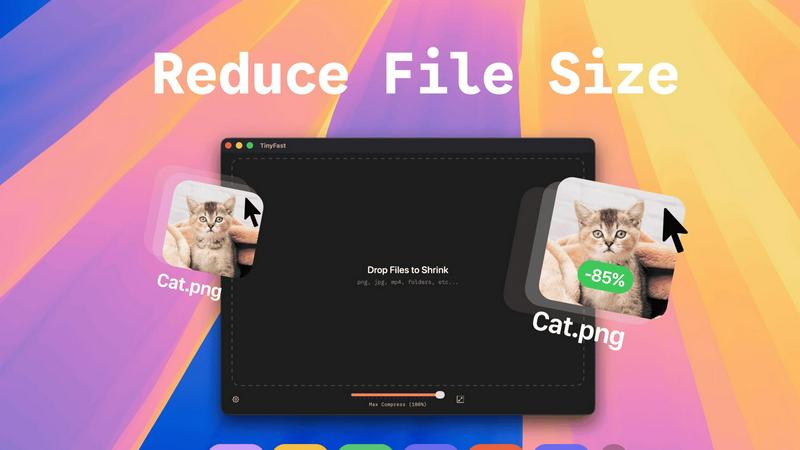
TinyFast instantly compresses images, videos, and PDFs on your Mac with simple drag and drop, ensuring privacy and.
Last updated: February 28, 2026
Visual Comparison
SureThing.io

TinyFast
Feature Comparison
SureThing.io
Proactive Autonomous Operation
SureThing doesn't wait for commands. It operates 24/7, actively monitoring your inbox, calendar, and project boards to identify needs and take pre-authorized action. This lightning-fast shift from command-based to anticipatory management eliminates delays and keeps workflows moving at maximum speed, even when you're offline or focused on other tasks.
State-of-the-Art Agentic Memory
This is the core engine. SureThing's memory persists across weeks and months, learning your goals, preferences, and communication style. The longer you work together, the less instruction it needs. It remembers past decisions, contact details, and project contexts, ensuring every action is informed and efficient, with zero repetitive explanations required.
Enterprise-Grade Security & Compliance
Built for trust with real work. SureThing is SOC 2 Type II certified and Google CASA Tier 2 compliant, meeting rigorous standards for data security, privacy, and availability. This foundation allows professionals to confidently connect it to business-critical apps and information, ensuring reliability that goes far beyond prototype-level agents.
Cross-Application Action & Integration
SureThing executes tasks seamlessly across your connected software ecosystem. It can draft emails in Gmail, set meetings in Google Calendar, update tickets in project tools, and more. This creates a unified, automated command center, drastically cutting down on manual app-switching and accelerating task completion from minutes to seconds.
TinyFast
Batch & Drag-Drop Shrink
TinyFast allows you to drop entire folders for compression, providing optimized output in seconds. This feature streamlines your workflow by enabling you to compress multiple files simultaneously, saving you valuable time.
Blazing-Fast Compression
Experience incredibly fast file compression thanks to optimized native engines designed for speed. Forget about waiting for uploads and downloads; TinyFast shrinks large files in seconds, allowing you to get back to your work without delay.
Resize Resolution
With TinyFast, you can set automatic resizing for your image and video resolutions. This feature ensures that your media assets are not only compressed but also resized to fit your specific requirements, enhancing your efficiency.
100% Local & Private
TinyFast prioritizes your privacy by keeping files on your device. No uploads to cloud servers and no risk of data exposure. This feature guarantees that your sensitive files remain confidential, aligning with best practices for data security.
Use Cases
SureThing.io
The Solo Founder & Executive
For the entrepreneur running a full go-to-market launch alone, SureThing acts as a force multiplier. It manages investor and customer communications, schedules critical meetings, tracks launch timelines, and handles administrative overhead. This provides the efficiency of a full team, enabling one person to execute at the speed of a much larger organization.
The Technical Director & Engineering Lead
Technical leaders, like the OpenClaw contributor, use SureThing to offload project coordination and communication. It can monitor code review threads, draft status updates in the lead's technical voice, manage sprint calendars, and ensure nothing slips through the cracks, freeing up deep focus time for architecture and complex problem-solving.
The Busy Executive & Manager
Executives inundated with emails and meetings deploy SureThing to reclaim their schedule. It prioritizes incoming communications, drafts concise replies for approval, proactively finds optimal meeting times, and provides daily briefings. This creates massive efficiency gains, turning a reactive inbox into a strategically managed operation.
The Project & Operations Manager
For professionals juggling multiple ongoing projects, SureThing serves as an autonomous project coordinator. It tracks dependencies across tools, sends reminder follow-ups to stakeholders, updates project statuses based on communication, and flags potential delays instantly, ensuring relentless forward momentum and speed.
TinyFast
Optimizing Web Assets
Web designers can use TinyFast to compress images and videos before uploading them to websites. This optimization reduces loading times, enhances user experience, and improves SEO rankings, all while maintaining high quality.
Preparing Client Deliverables
Freelancers and agencies can prepare client files by compressing them with TinyFast. This ensures that large documents, images, or videos are delivered quickly and in a manageable size, making client communication more efficient.
Freeing Up Disk Space
Users looking to free up disk space on their Macs can leverage TinyFast's compression capabilities. By shrinking the size of large files, you can reclaim valuable storage without sacrificing important data or quality.
Enhancing Collaborative Projects
In collaborative environments, teams can utilize TinyFast to compress shared files quickly. This feature ensures that everyone has access to optimized assets, keeping projects moving forward without the delays associated with online compression tools.
Overview
About SureThing.io
SureThing.io is the autonomous AI agent that remembers you and works while you sleep. It moves beyond reactive chatbots to a proactive partner that operates on your behalf 24/7. This agent monitors your digital workspace, drafts email replies in your unique voice, manages your calendar, tracks complex projects, and executes actions across your connected applications, all while you focus on high-level strategy. Its core differentiator is a state-of-the-art persistent memory, allowing it to learn and recall your preferences, communication patterns, key contacts, and long-term goals across every interaction. This means it never loses context, avoids repeating past mistakes, and continuously adapts to become more efficient. Built for real-world reliability over flashy demos, SureThing is SOC 2 certified and Google CASA Tier 2 compliant, offering enterprise-grade security for professionals who need an agent they can truly trust with sensitive, actual work. It's designed for busy executives, solo founders, and technical leaders who demand speed, efficiency, and a system that gets smarter and more autonomous over time, effectively acting as a tireless extension of themselves.
About TinyFast
TinyFast is the ultimate file compression tool designed exclusively for macOS, ensuring a lightning-fast and seamless experience for users. This app allows you to compress files like images, videos, documents, and more directly on your Mac, eliminating the need for slow and insecure online tools. With a simple drag-and-drop interface, TinyFast ensures that your files are compressed locally in mere seconds, keeping your sensitive assets secure and private. Whether you are a developer, designer, or creator, TinyFast is engineered to enhance your workflow by delivering powerful, efficient compression without the hassle of uploads or privacy concerns. Optimize your assets for websites, prepare client files for delivery, or simply free up disk space with this essential utility that integrates seamlessly into your creative process. Experience the benefits of fast, local, and safe file compression, and join the growing community of over 500 Mac users who trust TinyFast for their file management needs.
Frequently Asked Questions
SureThing.io FAQ
How is SureThing different from a chatbot like ChatGPT?
Chatbots are reactive tools that require constant prompting and instruction, losing context after each session. SureThing is a proactive, autonomous agent with persistent memory. It learns your patterns, works unattended across your apps, and takes initiative on your behalf. It's designed for continuous operation and task execution, not just conversation.
What does "Google CASA Tier 2 Compliant" mean?
Google's Cloud Application Security Assessment (CASA) Tier 2 is a rigorous security framework. Compliance means SureThing has been independently verified to meet high standards for data protection, secure development practices, and infrastructure security. This is crucial for an agent that accesses your email, calendar, and other sensitive connected services.
How does SureThing learn my preferences and "voice"?
Through continuous interaction and observation of your work. As you work and provide feedback on its actions (like edited email drafts or corrected calendar entries), its state-of-the-art memory system builds a nuanced model of your communication style, priorities, and decision-making patterns. This learning process accelerates over time, requiring less manual input.
Can I control what actions SureThing takes autonomously?
Absolutely. You define the scope and permissions. SureThing can be configured to only draft emails for your review, or it can be authorized to send certain types of routine communications automatically. For significant actions like scheduling high-stakes meetings, it will typically seek confirmation. You maintain full oversight and control over its level of autonomy.
TinyFast FAQ
How does TinyFast ensure my files remain private?
TinyFast processes all file compression locally on your Mac, meaning your files never leave your device. There are no uploads to cloud servers, ensuring total privacy by design.
Can I compress multiple files at once?
Yes! TinyFast supports batch processing, allowing you to drop entire folders for compression. You can compress multiple files simultaneously, making it a time-efficient solution.
What types of files can I compress with TinyFast?
TinyFast supports a wide range of file types including images (PNG, JPG, TIFF), videos (MP4, MOV), documents (PDF, DOCX), code files (JS, CSS), and audio files (MP3), making it a versatile tool for various needs.
Is there a trial version available?
Yes, TinyFast offers a free version that allows you to compress up to 5 files per day. Additionally, there are paid plans available for users who need unlimited compression.
Alternatives
SureThing.io Alternatives
SureThing.io is an autonomous AI agent for business management, operating in the productivity and management category. It proactively handles tasks like email, scheduling, and project tracking with persistent memory, learning your preferences to work reliably on your behalf. Users often seek alternatives for various reasons. Common drivers include budget constraints, specific feature needs not covered, or platform compatibility requirements. Some may prefer a different user interface or a tool that integrates with a unique set of existing apps. When evaluating alternatives, prioritize core functionality. Look for proactive automation, not just reactive chatbots. Strong security compliance is essential for handling real business data. Finally, consider the agent's ability to maintain context and learn over time, ensuring it becomes more valuable with use.
TinyFast Alternatives
TinyFast is a powerful file compression tool specifically designed for macOS users. It enables lightning-fast shrinking of images, videos, PDFs, and more, all processed locally to ensure maximum privacy and efficiency. Users often seek alternatives to TinyFast for various reasons, including pricing, specific features that may better suit their needs, or compatibility with different operating systems. When choosing an alternative, it’s essential to consider factors such as speed, security, the variety of supported file formats, and the ease of integration into your existing workflow. --- [{"question": "What is TinyFast?", "answer": "TinyFast is a file compression tool for macOS that quickly reduces the size of images, videos, PDFs, and more, all processed locally on your Mac."},{"question": "Who is TinyFast for?", "answer": "TinyFast is ideal for developers, designers, and creators who need efficient and secure file compression without compromising their workflow."},{"question": "Is TinyFast free?", "answer": "TinyFast is a premium tool, and users should check the official website for pricing details and any available trial options."},{"question": "What are the main features of TinyFast?", "answer": "TinyFast features blazing-fast local compression, 100% private and secure processing, and supports a wide range of file formats including images, videos, documents, and audio files."}]