
Shrinkpad vs Veo 3 - Cinematic AI Video Generator with Realistic Physics
Side-by-side comparison to help you choose the right product.

Shrinkpad
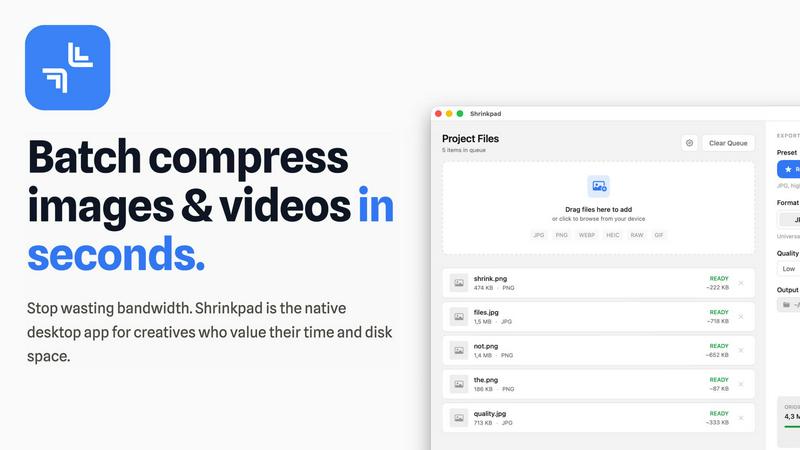
Shrinkpad instantly compresses batches of images and videos on your Mac to save space and time.
Last updated: February 28, 2026

Veo 3 - Cinematic AI Video Generator with Realistic Physics
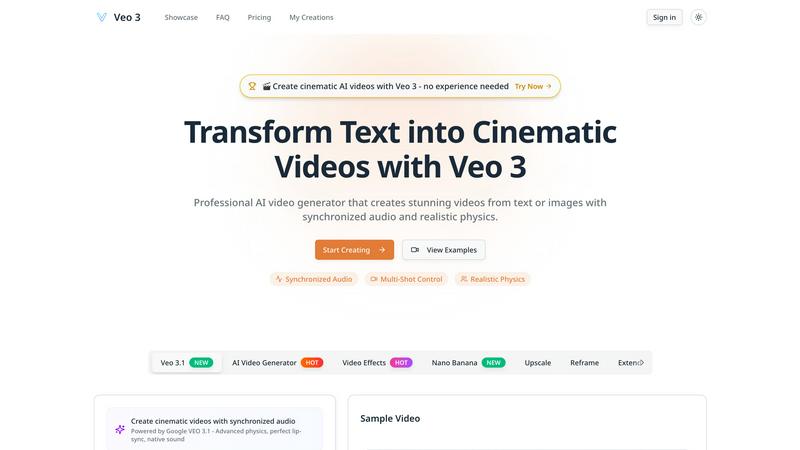
Create cinematic AI videos with realistic physics and audio from text instantly.
Last updated: February 28, 2026
Visual Comparison
Shrinkpad
Veo 3 - Cinematic AI Video Generator with Realistic Physics
Feature Comparison
Shrinkpad
Lightning-Fast Batch Processing
Stop processing files one by one. Shrinkpad is engineered for speed, leveraging multi-threaded compression and optimization for Apple Silicon to process thousands of images and videos in minutes. Drop an entire folder and watch as it instantly detects and queues all media files, ready for bulk compression with a single click. This massive time savings is a game-changer for handling large projects.
Intelligent Quality Optimization
No more guessing at compression settings. Shrinkpad automatically analyzes the visual complexity of each file to apply the perfect compression ratio. Its smart algorithms ensure maximum file size reduction without introducing artifacts or noticeable quality loss, delivering optimized assets that look perfect every time, automatically.
Complete Local Privacy & Security
Your files stay on your machine, period. Unlike web-based tools, Shrinkpad performs all compression locally using native macOS frameworks. This means your original high-resolution assets, client work, and sensitive projects are never uploaded to a cloud server, ensuring total privacy and security throughout your workflow.
Advanced Format & Workflow Support
Shrinkpad handles over 50 formats effortlessly, from common JPGs and PNGs to professional RAW files, HEIC, WEBP, AVIF, MP4, and MOV videos. It includes pro features like automatic file renaming, metadata stripping, and subfolder preservation. Export assets at 2x/4x from design tools and let Shrinkpad optimize and organize them in one fell swoop.
Veo 3 - Cinematic AI Video Generator with Realistic Physics
Realistic Physics Simulation Engine
Veo 3's core AI accurately models real-world physics, ensuring every element in your video behaves naturally. Objects have proper weight and momentum, liquids flow realistically, and movements adhere to gravity. This eliminates the unnatural, "glitchy" motion common in other AI video tools, resulting in professional, believable scenes where a basketball bounces correctly and a feather floats on the wind with authentic grace.
Synchronized Audio & Video Generation
Go beyond silent clips. From a single text prompt, Veo 3 automatically generates complete, synchronized audio to match the visuals. This includes character dialogue, precise sound effects, ambient background noise, and even musical scores. It listens to your descriptive prompt and creates a rich auditory layer that enhances storytelling, making your videos immersive and production-ready in one swift step.
Extended 60-Second 1080p Video Creation
Break free from short, fragmented clips. Veo 3 enables the generation of extended, high-definition videos up to 60 seconds long at 1080p resolution. This extended duration supports coherent narrative arcs, complex scene progression, and detailed storytelling while maintaining consistent visual quality and character continuity from the first frame to the last, all generated rapidly.
Professional Multi-Shot & Camera Control
Direct your cinematic vision with precision. Veo 3 provides advanced controls for camera movements, angles, and transitions. You can craft complex sequences involving multiple shots-like follow shots, close-ups, and wide angles-while the AI maintains consistency in characters, lighting, and environments. This feature puts professional-grade cinematography tools at your fingertips for dynamic, engaging video sequences.
Use Cases
Shrinkpad
Optimizing Website & App Assets
Developers and web designers can drastically reduce bundle sizes and improve load times. By batch-compressing hero images, icons, and promotional videos, Shrinkpad helps achieve faster Lighthouse Performance scores (like LCP) and enhances user experience without manual, per-file optimization.
Managing Photographer & Creator Libraries
Photographers and content creators drowning in large RAW files and 4K video footage can reclaim terabytes of storage. Shrinkpad processes entire shoots or content batches in one go, preparing files for client delivery, portfolio sites, or archiving while maintaining professional quality and saving enormous amounts of time.
Streamlining Design-to-Export Workflows
Designers using Figma, Photoshop, or Sketch can export all assets at high resolutions for various devices and then use Shrinkpad for final optimization. It automatically compresses and renames batches of files, eliminating the tedious, manual step of exporting individually optimized versions.
Preparing Files for Email & Collaboration
Professionals who need to send large batches of images or videos via email or collaboration platforms can use Shrinkpad to quickly reduce file sizes before sharing. This avoids hitting attachment limits, speeds up upload/download times, and ensures recipients get optimized files instantly.
Veo 3 - Cinematic AI Video Generator with Realistic Physics
Marketing & Advertising Content Creation
Generate high-impact promotional videos, product demos, and social media ads in minutes, not weeks. Quickly produce cinematic visuals that capture brand essence, demonstrate products with realistic physics, and pair them with compelling audio narratives. This slashes production time and cost while delivering professional-quality content that engages and converts audiences at lightning speed.
Educational & Explainer Video Production
Transform complex concepts into clear, engaging visual stories. Educators and trainers can create detailed explainer videos with accurate physical simulations-like scientific processes or historical reenactments-complete with descriptive narration and sound effects. This makes learning materials more accessible, memorable, and efficient to produce for any subject.
Entertainment & Short-Form Storytelling
Idea to screen in record time. Writers, filmmakers, and content creators can prototype scenes, visualize scripts, or produce complete short films and narrative sequences. Craft stories with multiple characters, dynamic camera work, and rich audio landscapes, enabling rapid storytelling for YouTube, TikTok, or other platforms without a film crew.
Prototyping & Creative Concept Visualization
Rapidly visualize ideas for pitches, storyboards, or creative projects. Designers, agencies, and artists can use Veo 3 to generate realistic mock-ups of scenes, test visual concepts, and create dynamic mood videos. This accelerates the feedback loop and decision-making process, allowing teams to iterate and present compelling visual concepts with incredible efficiency.
Overview
About Shrinkpad
Shrinkpad is the ultimate batch compression powerhouse built exclusively for macOS. It slashes through the tedious work of optimizing images and videos, delivering lightning-fast results without sacrificing quality. Designed for photographers, designers, developers, and content creators, it transforms hours of manual busywork into a task that takes seconds. Simply drag and drop hundreds of files or entire folders, and Shrinkpad compresses them in a flash, reducing sizes by up to 90% while preserving visual integrity. Every operation happens locally on your Mac using native Apple frameworks, guaranteeing complete privacy—your files never touch the cloud. With seamless support for over 50 formats, including RAW photos and 4K videos, Shrinkpad is the essential tool for reclaiming disk space, speeding up websites, and streamlining your entire media workflow with unmatched efficiency.
About Veo 3 - Cinematic AI Video Generator with Realistic Physics
Veo 3 is the revolutionary AI video generator that transforms your simple text prompts into stunning, cinematic videos in minutes. Forget complex filming, expensive equipment, or years of editing experience. This Google DeepMind breakthrough, announced in 2025, is engineered for speed and professional results, making it the ultimate tool for creators of all levels. Describe your vision in words, and Veo 3's advanced AI brings it to life with breathtaking 1080p quality, extended 60-second narratives, and a deep understanding of real-world physics. It automatically generates perfectly synchronized audio, including dialogue, sound effects, and scores, from that same single prompt. Whether you're a marketer, educator, filmmaker, or social media creator, Veo 3 delivers an intuitive, lightning-fast pipeline from imagination to engaging video content. Its multi-shot control and camera precision allow for complex storytelling, ensuring your final product isn't just a clip, but a coherent, visually captivating story ready to captivate any audience instantly.
Frequently Asked Questions
Shrinkpad FAQ
What file formats does Shrinkpad support?
Shrinkpad supports a wide range of over 50 image and video formats. This includes common formats like JPG, PNG, GIF, and MP4, as well as professional formats like RAW camera files (from Canon, Nikon, Sony, etc.), HEIC, WEBP, AVIF, ProRes, and MOV. It handles mixed batches of photos and videos seamlessly.
Does Shrinkpad support video compression?
Yes, absolutely. Shrinkpad provides powerful video compression alongside image optimization. It can compress large video files (including 4K footage) by significant percentages, reducing their size for easier storage, sharing, or web use while maintaining a high-quality visual output.
How many files can I process at once?
With the paid Personal or Team plans, you get unlimited batch processing. You can queue and process thousands of files in a single session without crashes. The Free Starter plan has a limit of 10 files per batch for initial testing.
Are my files uploaded to the cloud?
No. Privacy is a core principle of Shrinkpad. All processing is performed 100% locally on your Mac using Apple's native frameworks. Your original files, compressed results, and any data never leave your computer, ensuring complete security and privacy.
Veo 3 - Cinematic AI Video Generator with Realistic Physics FAQ
What is Veo 3 and who created it?
Veo 3 is a state-of-the-art AI video generation platform developed by Google DeepMind. It transforms text descriptions (prompts) into high-quality, cinematic videos complete with synchronized audio and realistic physics. It's designed for fast, efficient video creation for professionals and beginners across marketing, education, and entertainment.
How long and high-quality are the videos Veo 3 can generate?
Veo 3 can generate videos up to 60 seconds in length at a full 1080p high-definition resolution. The AI maintains consistent visual quality and coherent storytelling throughout the entire duration, representing a significant leap in length and fidelity for AI-generated video.
Does Veo 3 create sound and music for the videos?
Yes, absolutely. One of Veo 3's breakthrough features is its ability to generate synchronized audio directly from your text prompt. This includes character dialogue, ambient sound effects, Foley sounds, and musical scores that match the on-screen action, creating a fully-produced video from a single input.
Can I control camera angles and shot sequences?
Yes. Veo 3 includes professional multi-shot scene control. You can direct specific camera movements, angles, and transitions within your prompt. The AI will generate complex sequences with multiple shots while ensuring consistency in characters, lighting, and the environment for a polished, cinematic result.
Alternatives
Shrinkpad Alternatives
Shrinkpad is a powerful batch compression tool for macOS, squarely in the image and video optimization category. It excels at slashing file sizes locally and at lightning speed, making it a favorite for Mac users who prioritize efficiency and privacy. Users often explore alternatives for various reasons. Some may need a tool that works across Windows or online platforms, while others might seek different pricing models or specific advanced features not present in their current solution. The quest for the perfect fit is common in any software category. When evaluating an alternative, key factors to consider are processing speed, format support, and whether it operates locally or in the cloud. Your ideal choice should match your platform, respect your budget, and deliver the quality control you need without slowing down your creative workflow.
Veo 3 - Cinematic AI Video Generator with Realistic Physics Alternatives
Veo 3 is a top-tier AI video generator in the cinematic content category. It transforms text or images into high-quality videos with realistic physics and synchronized audio in minutes. Its focus on cinematic quality and natural object behavior sets a high bar for AI video creation. Users often seek alternatives for various reasons. Budget constraints, specific feature needs, or platform compatibility can drive the search. Some may require different video lengths, more control over outputs, or a different pricing model to fit their workflow. When evaluating other options, prioritize your core needs. Look for key factors like output quality, generation speed, and ease of use. Consider the tool's ability to handle your desired video length, the realism of its physics, and whether it includes audio generation. The right fit balances power with efficiency for your projects.