
ScopeGuard vs ScreenDemos
Side-by-side comparison to help you choose the right product.

ScopeGuard stops scope creep in its tracks, ensuring you get paid for every hour you work and recover lost revenue.
Last updated: February 28, 2026

ScreenDemos
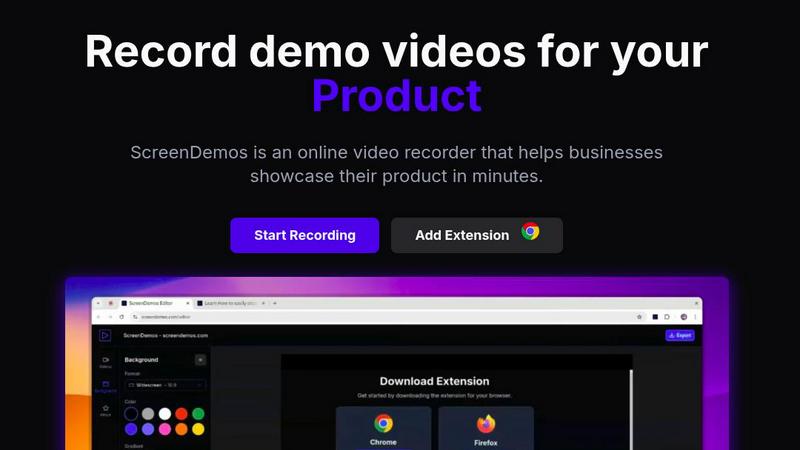
Create professional product demo videos in minutes with ScreenDemos' automatic effects and seamless recording.
Last updated: February 28, 2026
Visual Comparison
ScopeGuard

ScreenDemos
Feature Comparison
ScopeGuard
Instant AI Scope Analysis
ScopeGuard's advanced AI technology provides instant analysis of client requests against your contract. This feature ensures that freelancers can quickly determine whether new tasks are within their agreed-upon scope, saving time and enhancing accuracy.
Chrome Extension Integration
With the ScopeGuard Chrome extension, users can check the scope of any client request directly from their browser. A simple right-click lets freelancers import contracts or verify requests instantly, allowing for seamless workflow integration without interruptions.
Client Approval Portal
ScopeGuard includes a built-in client approval feature that simplifies the approval process for out-of-scope work. Freelancers can send secure approval requests that clients can review and approve with just one click, accelerating the billing process.
Comprehensive Dashboard
The ScopeGuard dashboard acts as a command center for freelancers. It provides a clear overview of unbilled work across all projects, ensuring that users never miss an opportunity to invoice for their hard work and revenue.
About ScreenDemos
Automatic Zoom Effects
With ScreenDemos' automatic zoom effects, producing engaging video demos becomes effortless. This feature guides the viewer's attention seamlessly, allowing you to highlight key areas of your screen without manual adjustments or extensive editing.
Smooth Animated Cursor
The smooth animated cursor feature enhances the viewer experience by providing a larger, more visible cursor that glides effortlessly across the screen. This makes it easier for viewers to follow along, ensuring that they do not miss critical actions during the demo.
Shortcuts Hints
Improve viewer engagement with shortcut hints displayed on-screen. This feature allows you to effortlessly showcase keyboard shortcuts during your demo, making it easier for your audience to learn and understand the functionalities of your product.
Custom Backgrounds
Personalize your demo videos with custom backgrounds that align with your brand’s identity. This feature allows you to maintain a consistent visual style across your videos, enhancing brand recognition while engaging your audience.
Use Cases
ScopeGuard
Freelancers Managing Multiple Clients
Freelancers juggling multiple clients can use ScopeGuard to easily track which client requests are in or out of scope. This helps to maintain clarity and ensures they are compensated for all additional work performed.
Consultants Evaluating Project Changes
Consultants can leverage ScopeGuard to quickly assess changes in project scope when clients request adjustments. The AI tools help in determining the financial implications of these changes, enabling informed discussions with clients.
Designers Handling Client Feedback
For designers receiving feedback on their work, ScopeGuard allows for a rapid assessment of whether requested changes fall within the original agreement. This ensures that they can charge appropriately for any additional design work needed.
Developers Assessing New Features
Developers can utilize ScopeGuard to verify whether new feature requests from clients fall within the scope of existing contracts. This capability helps in managing client expectations and protecting the developer's income.
ScreenDemos
Product Demos for Entrepreneurs
Entrepreneurs can leverage ScreenDemos to create stunning product demos in mere minutes. Whether announcing a new feature or showcasing product capabilities, this tool helps capture potential customers' attention quickly and effectively.
Onboarding Tutorials for Teams
Design and support teams can use ScreenDemos to produce onboarding tutorials that simplify the training process. By creating clear, concise videos, teams can expedite user onboarding and reduce confusion, ultimately enhancing the user experience.
Marketing Campaigns for Marketers
Marketers can utilize ScreenDemos to produce captivating videos for marketing campaigns. By showcasing features or benefits dynamically, they can engage their audience and communicate effectively, driving higher conversion rates.
Social Media Sharing for Developers
Developers can create quick demo videos to share on social media platforms, highlighting new features or changes in their applications. This not only boosts visibility but also encourages user feedback and engagement in real-time.
Overview
About ScopeGuard
ScopeGuard is the ultimate solution for freelancers seeking to safeguard their earnings from the insidious threat of scope creep. This AI-powered tool is meticulously designed to identify, track, and bill for out-of-scope client requests in an instant. With freelancers losing an average of $5,200 annually due to unpaid work, ScopeGuard steps in to plug that financial leak. Users can seamlessly import their contracts or Statements of Work (SOW) into the system. By simply right-clicking with the Chrome extension on any webpage—whether it is an email in Gmail, a message in Slack, or a task in Asana—freelancers can instantly verify if a new client request falls within the agreed scope. The AI evaluates the text against the user's contract in seconds, providing a verdict of in-scope, out-of-scope, or borderline. From there, it enables logging of additional work, sending secure approval requests to clients, and generating invoices, all from a single, user-friendly dashboard. ScopeGuard is built for speed and efficiency, integrating effortlessly into existing workflows and requiring no complex setup. It is an essential tool for freelancers, independent contractors, and consultants who refuse to give away their expertise for free and desire a fast, efficient system to protect their hard-earned revenue.
About ScreenDemos
ScreenDemos is the revolutionary, lightning-fast solution designed to help businesses create professional-grade video demos right from their web browsers. It streamlines the traditional, often tedious process of recording, editing, and post-processing, allowing users to produce studio-quality videos in minutes instead of hours. With a user-friendly browser extension, anyone—from marketing teams and product developers to educators and support staff—can effortlessly record their screens and automatically generate engaging content. The tool enhances videos with dynamic zoom effects, smooth cursor animations, and on-screen shortcut hints, ensuring viewers remain captivated. The main value proposition is clear: eliminate the need for complex software and editing skills, enabling users to focus on communicating their ideas with speed and impact. Whether you are showcasing a product feature or creating a tutorial, ScreenDemos is engineered for efficiency and effectiveness, making it an essential tool for modern businesses.
Frequently Asked Questions
ScopeGuard FAQ
How does the AI scope checking work?
ScopeGuard's AI analyzes the text of client requests and compares it against the pre-uploaded contracts or SOWs. In seconds, it delivers an accurate assessment of whether the request is in-scope, out-of-scope, or borderline.
What file formats can I import?
Users can import contracts in various formats, including PDFs, Word documents, and even screenshots. This flexibility ensures that freelancers can easily incorporate their existing agreements into the ScopeGuard system.
How does client approval work?
ScopeGuard allows freelancers to send approval requests directly to clients through the platform. Clients receive a secure link to review and approve additional work, making the process straightforward and efficient.
Is my contract data secure?
Absolutely! ScopeGuard employs enterprise-grade security to ensure that all contract data remains protected and private. Your documents are stored on secure servers, and none of your data leaves the system.
ScreenDemos FAQ
Is ScreenDemos privacy-friendly?
Yes, ScreenDemos prioritizes user privacy. It never collects or stores any user data, processing all recordings locally. Users can choose to save videos on their devices or on the ScreenDemos website, ensuring data security.
What devices are supported?
ScreenDemos is compatible with all major browsers that support extensions, including Chrome and Firefox. It works seamlessly across all operating systems, including Windows, macOS, and Linux, making it accessible for everyone.
Why do I need to give permission to the extension?
The ScreenDemos extension requires permission to access your screen for recording. This ensures that users can capture their screen accurately and utilize the tool's features effectively while maintaining security and privacy.
Can I edit my videos after recording?
Yes, ScreenDemos allows you to preview and make edits to your demo videos after recording. This means you can refine your content, add enhancements, and ensure that it meets your quality standards before sharing it with your audience.
Alternatives
ScopeGuard Alternatives
ScopeGuard is an innovative AI-powered tool designed specifically for freelancers and independent contractors to combat scope creep effectively. By allowing users to import their contracts or Statements of Work, it instantly identifies and tracks out-of-scope requests from clients, ensuring users are compensated for every hour worked. As freelancers often face financial losses due to unpaid extra work, many seek alternatives to ScopeGuard that may better suit their needs. When searching for alternatives, users might consider factors such as pricing, specific features, integration capabilities with existing platforms, and ease of use. A suitable alternative should provide a streamlined experience, enabling quick assessments of project scope while offering robust support and reliable analytics. Ultimately, the right choice will depend on individual workflows and unique business requirements.
ScreenDemos Alternatives
ScreenDemos is a fast and efficient solution for creating professional-grade product demos directly from your web browser. As part of the content creation and design tools category, it enables users to record their screens and produce engaging videos without the hassle of traditional editing. Users often seek alternatives due to various factors, including pricing, specific feature sets, or compatibility with different platforms. Whether it's for budget constraints or the need for specialized functionalities, exploring alternatives can provide options that better suit individual or team requirements. When selecting an alternative, consider factors such as user-friendliness, the range of features offered, integration capabilities, and the overall cost. Look for tools that prioritize speed and efficiency, mirroring the streamlined experience that ScreenDemos provides. Additionally, ensure that any chosen solution aligns with your specific needs in video production and enhances your workflow.