
OGimagen vs RemoveTexts
Side-by-side comparison to help you choose the right product.

OGimagen quickly generates stunning Open Graph images and meta tags for social media, enhancing your content in seconds.
Last updated: March 11, 2026

RemoveTexts
RemoveTexts is an AI tool that instantly erases text from images, delivering professional results without any design skills needed.
Last updated: March 11, 2026
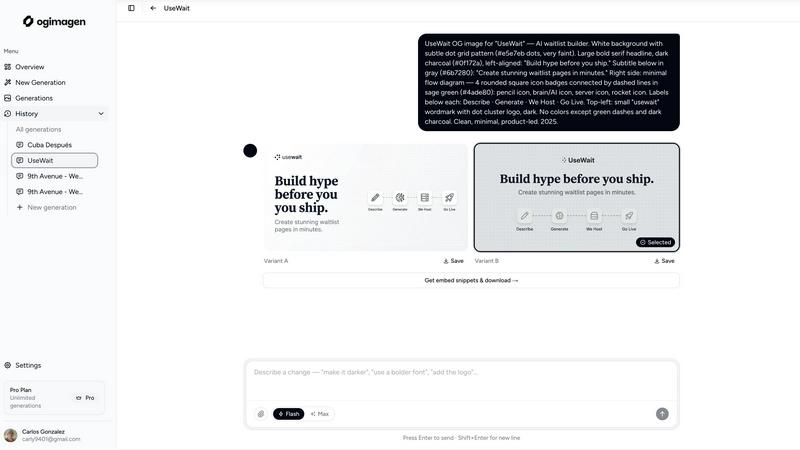
Visual Comparison
OGimagen
RemoveTexts

Feature Comparison
OGimagen
Fast Image Generation
OGimagen allows users to generate high-quality OG images rapidly. Simply fill out a form with your title, description, brand color, and style preset, and watch as the AI produces two pixel-perfect image variants optimized for different platforms. This streamlined process significantly reduces the time spent on creating engaging graphics.
Multi-Platform Compatibility
The tool creates images compatible with multiple social media platforms, including Facebook, Twitter, and LinkedIn. Each image is tailored to meet the specific size requirements of these platforms, ensuring that your content looks great no matter where it is shared. This feature is crucial for maintaining professionalism and consistency across your online presence.
Meta Tag Generation
After generating your images, OGimagen provides you with ready-to-paste meta tag snippets for various frameworks. Free users receive basic HTML snippets, while Pro users unlock advanced snippets compatible with Next.js, Astro, Svelte, and more. This feature simplifies the integration process, allowing users to easily embed their images into their websites.
MCP Integration
For advanced users, OGimagen supports integration with multi-code editor platforms (MCP) such as Claude Code and Cursor. This functionality allows you to generate OG images directly from your coding environment, streamlining your workflow and enabling you to attach logos and brand assets as reference images while grabbing embed snippets seamlessly.
RemoveTexts
Paint to Remove
This feature allows users to manually brush over specific areas of text they wish to erase. It provides precise control, ensuring that only the intended text is removed while preserving the surrounding image quality.
Auto Remove All
With this powerful one-click option, the AI automatically detects and removes every text element in the image. This feature is perfect for those who want a quick clean-up without having to manually select each text area.
Edit & Replace Text
This innovative feature enables users to change existing text in images while matching the original style. Whether you need to update a product label or correct a subtitle, it offers a seamless editing experience.
Remove Objects
In addition to text, this feature allows users to erase unwanted objects, logos, or other visual elements from their images. It combines the power of AI to ensure the background is reconstructed flawlessly, giving a clean result without any traces of the removed items.
Use Cases
OGimagen
Social Media Marketing
Marketers can leverage OGimagen to create eye-catching social cards that boost engagement on platforms like Facebook and Twitter. By utilizing the tool's fast generation capabilities, marketers can quickly produce images tailored to specific campaigns, enhancing their overall social media strategy.
Blogging
Bloggers can enhance their posts with professional OG images generated by OGimagen. By providing visually appealing previews, bloggers can improve click-through rates and attract more readers to their sites. This feature is particularly valuable for those looking to stand out in a crowded digital landscape.
E-Commerce
E-commerce businesses can use OGimagen to create promotional images for their products. With customizable images that reflect brand identity, businesses can improve their product visibility on social media and drive more traffic to their online stores, ultimately increasing sales.
Content Management Systems
Web developers and content managers can integrate OGimagen's meta tags into their content management systems effortlessly. With ready-to-use snippets, they can ensure that all shared links on social media feature optimized previews, improving user experience and driving engagement.
RemoveTexts
E-commerce Product Cleaning
Online sellers can use RemoveTexts to quickly eliminate watermarks and text overlays from product images, ensuring that their listings look professional and polished, ultimately boosting sales.
Social Media Content Creation
Content creators can efficiently remove unwanted captions, logos, or memes from images before posting them on their social media platforms. This helps maintain a clean aesthetic and enhances viewer engagement.
Document Redaction
Legal professionals and businesses can utilize RemoveTexts to redact sensitive information from documents and images, ensuring compliance with privacy laws while maintaining the integrity of the original content.
Creative Projects and Design
Artists and graphic designers can leverage RemoveTexts to edit images for various creative projects, allowing for the removal of distracting elements that could detract from the overall visual impact of their work.
Overview
About OGimagen
OGimagen is a cutting-edge AI tool designed to simplify the creation of Open Graph images, Twitter cards, and LinkedIn images. It enables users to generate stunning, production-ready social cards in mere seconds, ensuring that your links appear professional when shared across various platforms. Whether you're a developer, content creator, or marketer, OGimagen is tailored for anyone looking to enhance their online presence without requiring any design skills. The tool utilizes artificial intelligence to create visually appealing images that are optimized for engagement and click-through rates. With OGimagen, you can quickly input your content, customize your design using brand colors and styles, and receive ready-to-use meta tags for seamless integration into your website or application. This efficiency not only saves you time but also helps you capture the attention of your audience on social media, making it an invaluable asset for anyone looking to elevate their digital marketing strategy.
About RemoveTexts
RemoveTexts is a groundbreaking AI-powered online image editing tool designed to remove unwanted text, watermarks, and other visual distractions from images with just a single click. Ideal for creators, marketers, and designers alike, it streamlines the process of enhancing visuals by eliminating text elements such as captions, memes, and date stamps. With RemoveTexts, users can achieve professional-grade results in less than 30 seconds without needing any design skills or Photoshop expertise. The platform leverages advanced deep learning technology to reconstruct the original background seamlessly, ensuring that the final image looks clean and polished. Whether you are an e-commerce seller needing clean product photos or a content creator looking to remove unwanted overlays, RemoveTexts is your go-to solution for quick and effective image editing.
Frequently Asked Questions
OGimagen FAQ
What exactly is an OG image?
An OG image is a rich media representation of a web page that appears when the page is shared on social media platforms. It helps to create visually appealing previews that enhance engagement and click-through rates.
How does AI generation work?
OGimagen uses artificial intelligence to analyze your provided content and generate customized images that meet the specifications of various social media platforms, ensuring professional quality in seconds.
What's the difference between Starter, Growth, and Pro?
The Starter plan offers ten generations of images for a one-time fee, while the Growth plan provides 25 generations and additional features for a higher fee. The Pro plan, billed monthly, includes 50 generations, MCP integration, and permanent CDN hosting.
Can I extend CDN hosting without upgrading to Pro?
Yes, users can extend their CDN hosting by upgrading their plans or purchasing additional hosting as needed, ensuring their images remain accessible even after the initial hosting period expires.
RemoveTexts FAQ
How does RemoveTexts work?
RemoveTexts uses advanced AI technology to analyze and reconstruct the background of an image after removing text or objects. It employs deep learning inpainting techniques, ensuring that the final result is seamless and professional.
What image formats does RemoveTexts support?
The tool supports popular image formats including JPG, PNG, and WebP, allowing users to upload a wide range of images for text removal without hassle.
Is there a limit to the image size I can upload?
Yes, users can upload images up to 10 MB in size. This ensures that images maintain their quality while being processed for text removal.
Can I use RemoveTexts for commercial purposes?
Absolutely! Many users, including e-commerce sellers and marketers, use RemoveTexts to prepare images for commercial use, ensuring that their visuals are clean and appealing without any unwanted text.
Alternatives
OGimagen Alternatives
OGimagen is an AI-powered tool designed to create stunning Open Graph images swiftly, making it an essential asset in the developer tools category. Users often seek alternatives to OGimagen due to factors such as pricing, varying feature sets, and specific platform compatibility needs. It's crucial to evaluate alternatives based on ease of use, quality of generated images, integration capabilities with existing systems, and overall cost-effectiveness before making a choice. When searching for an alternative, consider the user interface, the diversity of templates available, and the ability to customize images according to your branding. Additionally, assess the performance speed of the tool and the support provided, as these can significantly impact your experience and productivity.
RemoveTexts Alternatives
RemoveTexts is an AI-powered tool designed to effortlessly remove text from images in seconds, making it a valuable asset for anyone needing quick and clean image edits. As a part of the image and photo editing category, it simplifies tasks like eliminating watermarks, subtitles, or unwanted text without the need for complex software like Photoshop. Users often seek alternatives to RemoveTexts for various reasons, such as pricing, specific feature sets, or compatibility with different platforms and devices. When choosing an alternative, consider factors like ease of use, output quality, language support, and the ability to perform batch processing. A good alternative should offer reliable performance and meet your specific editing needs efficiently.