
HeyVid vs TinyFast
Side-by-side comparison to help you choose the right product.

HeyVid AI is your all-in-one solution for quickly generating stunning videos and images with professional quality at lightning speed.
Last updated: April 4, 2026

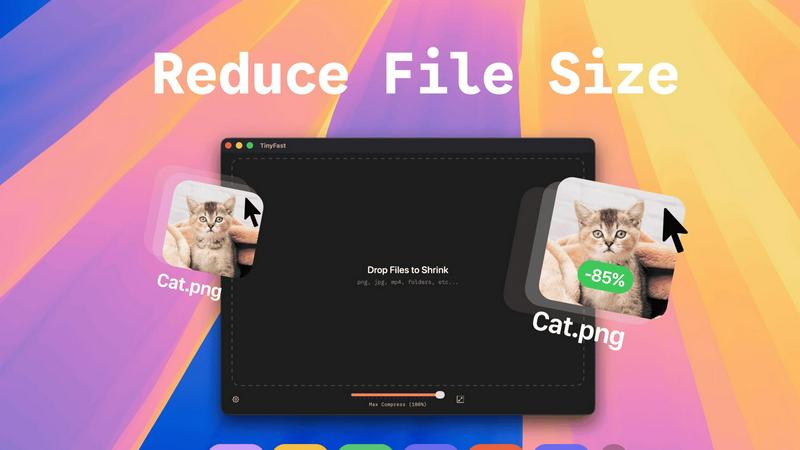
TinyFast instantly compresses images, videos, and PDFs on your Mac with simple drag and drop, ensuring privacy and.
Last updated: February 28, 2026
Visual Comparison
HeyVid

TinyFast
Feature Comparison
HeyVid
Text to Video
Transform written content into dynamic videos with the Text to Video feature. Simply input your text, and HeyVid AI will generate a visually appealing video that conveys your message effectively. This feature is perfect for content creators looking to bring their scripts to life quickly.
Image to Video
With the Image to Video capability, you can animate static images and create engaging video content. Upload your visuals, and watch as HeyVid AI breathes life into them, adding motion and effects that captivate viewers. Ideal for marketers and social media managers, this feature enhances visual storytelling.
AI Image Generator
The AI Image Generator allows users to create stunning visuals from text prompts or existing images. Choose from various leading image models to produce unique and eye-catching graphics that stand out. This feature is perfect for businesses wanting to elevate their branding with custom imagery.
AI Video API & Workflow
HeyVid's AI Video API and Workflow tools streamline the video creation process for developers and businesses. Integrate video generation capabilities into your applications seamlessly, enabling automated content creation at scale. This feature is crucial for tech entrepreneurs looking to enhance their services with advanced video solutions.
TinyFast
Batch & Drag-Drop Shrink
TinyFast allows you to drop entire folders for compression, providing optimized output in seconds. This feature streamlines your workflow by enabling you to compress multiple files simultaneously, saving you valuable time.
Blazing-Fast Compression
Experience incredibly fast file compression thanks to optimized native engines designed for speed. Forget about waiting for uploads and downloads; TinyFast shrinks large files in seconds, allowing you to get back to your work without delay.
Resize Resolution
With TinyFast, you can set automatic resizing for your image and video resolutions. This feature ensures that your media assets are not only compressed but also resized to fit your specific requirements, enhancing your efficiency.
100% Local & Private
TinyFast prioritizes your privacy by keeping files on your device. No uploads to cloud servers and no risk of data exposure. This feature guarantees that your sensitive files remain confidential, aligning with best practices for data security.
Use Cases
HeyVid
Marketing Campaigns
HeyVid is a game-changer for digital marketers. Use the platform to create compelling ad campaigns that grab attention and drive conversions. With its quick video and image generation capabilities, marketers can produce content that resonates with their audience and boosts engagement.
Educational Content
Educators can leverage HeyVid to generate informative video tutorials and training materials. Whether for online courses or classroom settings, the platform enables teachers to create visually appealing content that enhances learning experiences and keeps students engaged.
Product Launches
Launching a new product? Use HeyVid to create stunning launch videos that build anticipation and excitement. With dynamic visuals and professional quality, your product announcements will stand out, making it easier to capture your audience's interest and drive sales.
Social Media Content
Social media managers can save time and effort with HeyVid's one-click video maker. Generate short-form videos and eye-catching thumbnails that enhance your social media presence and engage followers effectively. The platform equips you with the tools to keep your content fresh and captivating.
TinyFast
Optimizing Web Assets
Web designers can use TinyFast to compress images and videos before uploading them to websites. This optimization reduces loading times, enhances user experience, and improves SEO rankings, all while maintaining high quality.
Preparing Client Deliverables
Freelancers and agencies can prepare client files by compressing them with TinyFast. This ensures that large documents, images, or videos are delivered quickly and in a manageable size, making client communication more efficient.
Freeing Up Disk Space
Users looking to free up disk space on their Macs can leverage TinyFast's compression capabilities. By shrinking the size of large files, you can reclaim valuable storage without sacrificing important data or quality.
Enhancing Collaborative Projects
In collaborative environments, teams can utilize TinyFast to compress shared files quickly. This feature ensures that everyone has access to optimized assets, keeping projects moving forward without the delays associated with online compression tools.
Overview
About HeyVid
HeyVid is your ultimate AI-powered video and image generator, designed to simplify the content creation process for everyone from creators to marketers. It allows users to generate stunning high-quality videos and images quickly and effortlessly. With easy-to-use features, HeyVid caters to a wide range of individuals and businesses, including entrepreneurs, educators, and digital agencies. The platform's main value proposition lies in its ability to streamline the creative workflow, enabling users to turn ideas into professional content within moments. Whether you need a pitch video, a product launch, or engaging social media posts, HeyVid has the tools you need to captivate your audience and elevate your brand's presence.
About TinyFast
TinyFast is the ultimate file compression tool designed exclusively for macOS, ensuring a lightning-fast and seamless experience for users. This app allows you to compress files like images, videos, documents, and more directly on your Mac, eliminating the need for slow and insecure online tools. With a simple drag-and-drop interface, TinyFast ensures that your files are compressed locally in mere seconds, keeping your sensitive assets secure and private. Whether you are a developer, designer, or creator, TinyFast is engineered to enhance your workflow by delivering powerful, efficient compression without the hassle of uploads or privacy concerns. Optimize your assets for websites, prepare client files for delivery, or simply free up disk space with this essential utility that integrates seamlessly into your creative process. Experience the benefits of fast, local, and safe file compression, and join the growing community of over 500 Mac users who trust TinyFast for their file management needs.
Frequently Asked Questions
HeyVid FAQ
What types of content can I create with HeyVid?
With HeyVid, you can create a variety of content types, including videos from text or images, animations, and high-quality images from prompts. The platform supports multiple AI models to cater to diverse creative needs.
Is HeyVid suitable for beginners?
Absolutely! HeyVid is designed with an intuitive interface that makes it easy for users of all skill levels to create professional-quality content. You don't need any editing skills to get started—just describe your vision, and let HeyVid do the rest.
Can I use HeyVid for commercial purposes?
Yes, HeyVid is perfect for commercial use. Whether you are creating marketing materials, educational content, or corporate videos, the platform provides the tools needed to produce high-quality content that aligns with your business goals.
Are there any limitations on the AI models?
While HeyVid offers a wide range of AI models for video and image generation, certain models may have specific requirements, such as credit usage or resolution options. Users can select models based on their project needs and desired outcomes.
TinyFast FAQ
How does TinyFast ensure my files remain private?
TinyFast processes all file compression locally on your Mac, meaning your files never leave your device. There are no uploads to cloud servers, ensuring total privacy by design.
Can I compress multiple files at once?
Yes! TinyFast supports batch processing, allowing you to drop entire folders for compression. You can compress multiple files simultaneously, making it a time-efficient solution.
What types of files can I compress with TinyFast?
TinyFast supports a wide range of file types including images (PNG, JPG, TIFF), videos (MP4, MOV), documents (PDF, DOCX), code files (JS, CSS), and audio files (MP3), making it a versatile tool for various needs.
Is there a trial version available?
Yes, TinyFast offers a free version that allows you to compress up to 5 files per day. Additionally, there are paid plans available for users who need unlimited compression.
Alternatives
HeyVid Alternatives
HeyVid is an all-in-one AI video and image generator designed to help users create high-quality visual content quickly and efficiently. As a productivity and management tool, it caters to those who need professional-grade media without the steep learning curve or time commitment typically associated with such tasks. Users often seek alternatives to HeyVid for various reasons, including pricing concerns, specific feature sets, or compatibility with different platforms. When selecting an alternative, it's crucial to consider factors such as ease of use, the quality of output, available features, and whether it meets your specific content creation needs. Doing your homework can lead to the perfect solution tailored to your requirements.
TinyFast Alternatives
TinyFast is a powerful file compression tool specifically designed for macOS users. It enables lightning-fast shrinking of images, videos, PDFs, and more, all processed locally to ensure maximum privacy and efficiency. Users often seek alternatives to TinyFast for various reasons, including pricing, specific features that may better suit their needs, or compatibility with different operating systems. When choosing an alternative, it’s essential to consider factors such as speed, security, the variety of supported file formats, and the ease of integration into your existing workflow. --- [{"question": "What is TinyFast?", "answer": "TinyFast is a file compression tool for macOS that quickly reduces the size of images, videos, PDFs, and more, all processed locally on your Mac."},{"question": "Who is TinyFast for?", "answer": "TinyFast is ideal for developers, designers, and creators who need efficient and secure file compression without compromising their workflow."},{"question": "Is TinyFast free?", "answer": "TinyFast is a premium tool, and users should check the official website for pricing details and any available trial options."},{"question": "What are the main features of TinyFast?", "answer": "TinyFast features blazing-fast local compression, 100% private and secure processing, and supports a wide range of file formats including images, videos, documents, and audio files."}]