
DocuExtractor vs Redbark
Side-by-side comparison to help you choose the right product.

DocuExtractor
Instantly convert messy receipts and invoices into clean, structured data.
Last updated: February 28, 2026

Redbark instantly syncs your Australian bank data to Google Sheets and YNAB automatically.
Last updated: March 4, 2026
Visual Comparison
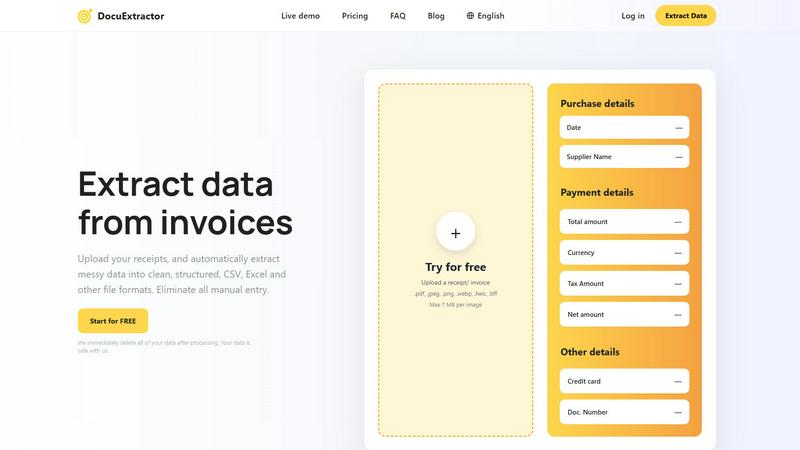
DocuExtractor
Redbark

Feature Comparison
DocuExtractor
Blazing-Fast, Automated AI Extraction
Experience instant data conversion with our fully automated pipeline. Just drag and drop your documents; our combined OCR, Deep Learning, and LLM (AI) technology takes over. It automatically detects document type and language, extracts all key financial fields—like date, total amount, tax, and supplier—and structures the data without any manual intervention. This hands-off approach delivers results in seconds, not hours, accelerating your workflow dramatically.
99.6% Accuracy with Specialized Algorithms
Achieve near-perfect data reliability. DocuExtractor isn't a generic OCR tool; it uses specialized algorithms fine-tuned for financial documents like receipts and invoices. This targeted approach ensures the highest precision in extracting critical numbers and text, minimizing errors and the need for time-consuming verification. You can trust the extracted data to be accurate and ready for immediate use in your accounting software or reports.
Batch Processing & Versatile Upload
Process hundreds of documents in one go to maximize efficiency. Our platform allows you to upload entire batches of receipts, invoices, or PDFs simultaneously. Support a wide range of file formats including PDF, JPG, PNG, and more, with each file up to 7MB. This bulk handling capability means you can convert a month's worth of paperwork into structured data in under a minute, streamlining your monthly closing and bookkeeping tasks.
Secure, Enterprise-Ready Platform
Operate with complete confidence and security. DocuExtractor is built for businesses of all sizes with a firm commitment to data privacy. We immediately and permanently delete all your documents and extracted data after processing. Coupled with enterprise-grade infrastructure that reliably handles millions of documents, the platform ensures your sensitive financial information is protected while delivering scalable, robust performance for teams and firms.
About Redbark
Pass-Through Data Architecture
Your financial data flows directly from your bank to your destination tool at high speed. Redbark never stores your transactions, balances, or account details on its servers. This ensures maximum privacy and security, with data moving in a seamless, efficient pipeline from source to spreadsheet without unnecessary stops.
100+ Bank & Brokerage Integrations
Connect to every major Australian bank and credit union via the regulated CDR system, along with global brokerages and crypto exchanges. This extensive coverage means you can aggregate virtually all your financial accounts in one place quickly, from everyday banking to complex investment portfolios, without compatibility headaches.
Automated Background Sync & Smart Deduplication
Forget manual refreshes. Your bank pushes new data via instant webhooks, triggering automatic background syncs so your sheets are always current. Intelligent ID-based deduplication with overlap buffers catches late-posting transactions, ensuring you never have duplicate rows cluttering your data.
Multi-Destination & Multi-Account Support
Sync the same bank accounts to multiple tools simultaneously—like Google Sheets, YNAB, and Actual Budget—each with its own custom formatting. You can also sync every account separately—savings, transactions, credit cards, loans—each to its own dedicated sheet, budget, or database for ultimate organizational speed.
Use Cases
DocuExtractor
Automating Accounts Payable Processing
Revolutionize your AP workflow by eliminating manual entry of supplier invoices. Simply upload incoming invoice PDFs or scans in batches. DocuExtractor instantly extracts vendor details, invoice numbers, dates, line items, net amounts, and taxes. Download a clean CSV file ready for direct import into your accounting software like QuickBooks or Xero, slashing processing time from hours to minutes and drastically reducing human error.
Streamlining Expense Report Reconciliation
Simplify employee expense management. Instead of manually deciphering receipt photos, employees or managers can upload all receipts directly to DocuExtractor. The AI quickly pulls out merchant names, dates, totals, and payment methods, generating an organized Excel spreadsheet. This automates the most tedious part of expense reporting, ensuring faster reimbursements, easier policy compliance, and seamless integration with expense management systems.
Accelerating Bank Statement Data Entry
Speed up financial reconciliation and analysis. Upload bank or credit card statement PDFs to automatically extract transaction dates, descriptions, and amounts. This converts unstructured statement data into a structured, sortable format perfect for cash flow analysis, audit preparation, or feeding into financial models. What used to take a full day of manual copying and pasting can now be completed in a matter of seconds.
Optimizing Bookkeeping for Firms and Freelancers
Empower bookkeepers and freelance accountants to handle more clients efficiently. Use DocuExtractor as a first-step processing tool for all client documents—receipts, bills, invoices. The rapid extraction standardizes data from various sources and formats, freeing up valuable time usually spent on data entry. This allows professionals to focus on higher-value advisory services, analysis, and client relationships, significantly boosting capacity and profitability.
Redbark
Real-Time Business Cash Flow Management
Small business owners and freelancers can automate their bookkeeping by having all business account transactions sync instantly to a Google Sheet. This provides a live, always-updated view of income, expenses, and cash flow, enabling faster decision-making and streamlined invoice tracking without manual entry.
Automated Investment Portfolio Tracking
Investors can connect global brokerage accounts to automatically sync holdings and transaction data into a central dashboard. This allows for rapid, automated performance monitoring across different asset classes and platforms, saving hours of manual logging and providing a consolidated, real-time financial picture.
Effortless Personal Budgeting
Individuals can connect their everyday accounts and credit cards to sync transactions directly into budgeting apps like YNAB or Actual Budget. This eliminates the slow, frustrating chore of manual transaction entry, ensuring budgets are always accurate and up-to-date with the latest spending, all happening automatically in the background.
Consolidated Financial Reporting
Financial analysts, advisors, or individuals managing complex finances can aggregate data from multiple banks, loans, and investment accounts into a single Notion database or Google Sheet. This creates a powerful, automated reporting hub for net worth tracking, audit trails, and financial analysis with data that refreshes at lightning speed.
Overview
About DocuExtractor
DocuExtractor is the lightning-fast AI-powered document conversion engine built for finance professionals. It is designed specifically for accountants, bookkeepers, and financial teams who are bogged down by manual data entry from receipts, invoices, bank statements, and PDFs. This advanced tool leverages cutting-edge OCR, deep learning, and LLM (AI) technology to instantly transform messy, unstructured document data into perfectly clean, organized CSV or Excel files. The core value proposition is unmatched speed and efficiency: eliminate hours of tedious manual work with a simple drag-and-drop process. With a proven accuracy rate of 99.6% and support for over 45 languages, DocuExtractor automates the entire extraction workflow. Upload documents in batches, let the specialized AI extract key fields like dates, supplier names, totals, and taxes, and download structured results in seconds. It’s built for scale, processing over 500,000 documents monthly with enterprise-grade security, ensuring all data is deleted post-processing. For any professional seeking to optimize data management, slash processing time, and boost productivity, DocuExtractor delivers immediate, reliable results.
About Redbark
Redbark is the lightning-fast, secure bridge for your financial data. It connects your Australian bank accounts and global investment portfolios directly to the productivity tools you already use, like Google Sheets, Notion, YNAB, and Airtable. This eliminates the tedious, error-prone chore of manual data entry and messy CSV file imports forever. Instead of relying on outdated and risky screen-scraping methods, Redbark leverages Australia's official Consumer Data Right (CDR) framework, giving you bank-approved, secure access to your transaction, balance, and investment data. Your information syncs automatically on a schedule you control, flowing directly from your financial institution to your chosen destination without ever being stored on Redbark's servers. Built with speed, simplicity, and ironclad privacy at its core, it's the perfect automated solution for freelancers tracking invoices, investors monitoring portfolios, small business owners managing cash flow, and anyone who wants a clear, real-time view of their finances in a familiar spreadsheet or dashboard. Setup takes just minutes with no coding required, supporting a wide range of Australian banks via CDR, New Zealand banks, and global brokerages.
Frequently Asked Questions
DocuExtractor FAQ
How accurate is DocuExtractor?
DocuExtractor delivers industry-leading accuracy of 99.6% for financial documents. This high precision is achieved through specialized AI algorithms trained specifically on invoices, receipts, and statements, not generic text. The system combines Optical Character Recognition (OCR) with Deep Learning and Large Language Models (LLMs) to understand context and extract data reliably, ensuring minimal errors and maximum trust in your output.
What happens to my documents after processing?
Your data security is our top priority. We immediately and permanently delete all uploaded documents and the extracted data from our servers once the processing is complete. We do not use your documents to train our AI models. This strict data hygiene policy ensures your sensitive financial information remains completely confidential and safe with us, making DocuExtractor a secure choice for businesses of any size.
What file formats and languages do you support?
DocuExtractor supports a wide range of common file formats including PDF, JPEG, PNG, WebP, HEIC, and TIFF, with individual files up to 7MB. Our platform also has extensive global reach, with automatic language detection and processing support for over 45 languages. This allows multinational teams and businesses dealing with international documents to process everything seamlessly in one place.
Can I process multiple documents at once?
Absolutely. DocuExtractor is built for speed and efficiency, featuring powerful batch processing capabilities. You can upload dozens or even hundreds of receipts, invoices, or PDFs simultaneously in a single session. The system will process them all automatically in parallel, extracting data from each document and compiling the results into a single, downloadable CSV or Excel file, saving you an enormous amount of time.
Redbark FAQ
How is Redbark different from screen scraping?
Redbark does not use insecure screen scraping. It connects to Australian banks via the official Consumer Data Right (CDR) framework through an ACCC-accredited intermediary. This is a regulated, bank-approved method that is faster, more reliable, and far more secure, with transparent user consent and data handling practices.
Is my financial data stored on Redbark's servers?
No. Redbark uses a pass-through data architecture. Your transaction and balance data flows directly from your bank to your chosen destination (like Google Sheets) without being stored on Redbark's systems. We only store encrypted connection tokens necessary for the sync process, never your actual financial data.
Which Australian banks and destinations do you support?
We support all major Australian banks and many credit unions via CDR Open Banking, including CommBank, Westpac, NAB, ANZ, and Macquarie. You can sync data to Google Sheets, Notion, YNAB, Actual Budget, and more. A full, updated list of connections and destinations is available on our website.
How does the automated sync work?
Once connected, Redbark can sync data on a schedule you set. For many CDR-connected banks, we also use webhooks—instant notifications from your bank when a new transaction occurs. This triggers an immediate background sync, pushing the new data to your tools in near real-time, often within minutes of the transaction.
Alternatives
DocuExtractor Alternatives
DocuExtractor is a powerful productivity tool that automates data extraction from receipts and invoices. It uses advanced OCR to convert messy documents into clean, structured data like CSV and Excel in seconds, saving accountants and bookkeepers immense time. Users often explore alternatives for various reasons. Cost is a primary factor, as budget constraints or pricing models may not align with every business. Others might seek specific integrations, different feature sets like mobile scanning, or platforms that better suit their existing software ecosystem. When evaluating other options, prioritize core needs. Look for high accuracy rates in data capture, support for batch processing to handle volume, and output formats that work with your workflow. Security, ease of use, and reliable customer support are also critical for a seamless, efficient experience.
Redbark Alternatives
Redbark is a secure data connector that automatically syncs financial data from Australian banks and global brokerages to apps like Google Sheets. It operates in the personal and business finance automation category, eliminating manual data entry through direct, bank-approved connections. Users often seek alternatives for various reasons. These can include budget constraints, a need for different integration platforms, or specific feature requirements not covered by a single tool. It's a common step to find the perfect fit for one's unique financial workflow. When evaluating options, prioritize security, reliability, and ease of use. Look for tools that offer direct, official data access methods over less secure workarounds. Ensure the platform supports your specific banks and connects to the apps where you need your data to live.