
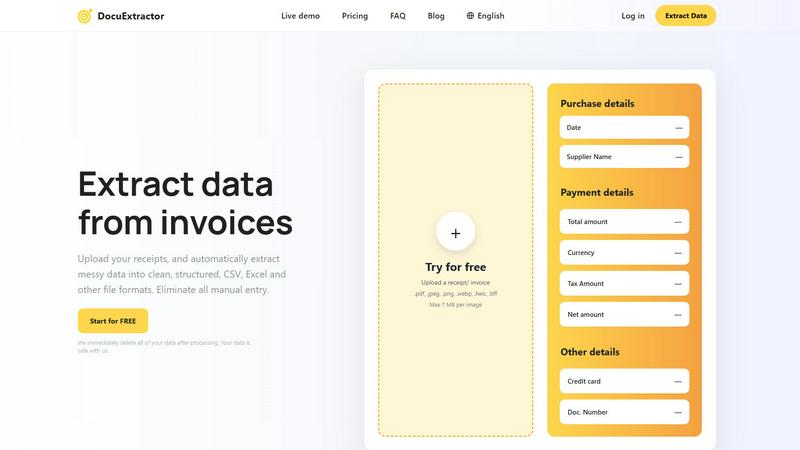
About DocuExtractor
DocuExtractor is the lightning-fast AI-powered document conversion engine built for finance professionals. It is designed specifically for accountants, bookkeepers, and financial teams who are bogged down by manual data entry from receipts, invoices, bank statements, and PDFs. This advanced tool leverages cutting-edge OCR, deep learning, and LLM (AI) technology to instantly transform messy, unstructured document data into perfectly clean, organized CSV or Excel files. The core value proposition is unmatched speed and efficiency: eliminate hours of tedious manual work with a simple drag-and-drop process. With a proven accuracy rate of 99.6% and support for over 45 languages, DocuExtractor automates the entire extraction workflow. Upload documents in batches, let the specialized AI extract key fields like dates, supplier names, totals, and taxes, and download structured results in seconds. It’s built for scale, processing over 500,000 documents monthly with enterprise-grade security, ensuring all data is deleted post-processing. For any professional seeking to optimize data management, slash processing time, and boost productivity, DocuExtractor delivers immediate, reliable results.
Features of DocuExtractor
Blazing-Fast, Automated AI Extraction
Experience instant data conversion with our fully automated pipeline. Just drag and drop your documents; our combined OCR, Deep Learning, and LLM (AI) technology takes over. It automatically detects document type and language, extracts all key financial fields—like date, total amount, tax, and supplier—and structures the data without any manual intervention. This hands-off approach delivers results in seconds, not hours, accelerating your workflow dramatically.
99.6% Accuracy with Specialized Algorithms
Achieve near-perfect data reliability. DocuExtractor isn't a generic OCR tool; it uses specialized algorithms fine-tuned for financial documents like receipts and invoices. This targeted approach ensures the highest precision in extracting critical numbers and text, minimizing errors and the need for time-consuming verification. You can trust the extracted data to be accurate and ready for immediate use in your accounting software or reports.
Batch Processing & Versatile Upload
Process hundreds of documents in one go to maximize efficiency. Our platform allows you to upload entire batches of receipts, invoices, or PDFs simultaneously. Support a wide range of file formats including PDF, JPG, PNG, and more, with each file up to 7MB. This bulk handling capability means you can convert a month's worth of paperwork into structured data in under a minute, streamlining your monthly closing and bookkeeping tasks.
Secure, Enterprise-Ready Platform
Operate with complete confidence and security. DocuExtractor is built for businesses of all sizes with a firm commitment to data privacy. We immediately and permanently delete all your documents and extracted data after processing. Coupled with enterprise-grade infrastructure that reliably handles millions of documents, the platform ensures your sensitive financial information is protected while delivering scalable, robust performance for teams and firms.
Use Cases of DocuExtractor
Automating Accounts Payable Processing
Revolutionize your AP workflow by eliminating manual entry of supplier invoices. Simply upload incoming invoice PDFs or scans in batches. DocuExtractor instantly extracts vendor details, invoice numbers, dates, line items, net amounts, and taxes. Download a clean CSV file ready for direct import into your accounting software like QuickBooks or Xero, slashing processing time from hours to minutes and drastically reducing human error.
Streamlining Expense Report Reconciliation
Simplify employee expense management. Instead of manually deciphering receipt photos, employees or managers can upload all receipts directly to DocuExtractor. The AI quickly pulls out merchant names, dates, totals, and payment methods, generating an organized Excel spreadsheet. This automates the most tedious part of expense reporting, ensuring faster reimbursements, easier policy compliance, and seamless integration with expense management systems.
Accelerating Bank Statement Data Entry
Speed up financial reconciliation and analysis. Upload bank or credit card statement PDFs to automatically extract transaction dates, descriptions, and amounts. This converts unstructured statement data into a structured, sortable format perfect for cash flow analysis, audit preparation, or feeding into financial models. What used to take a full day of manual copying and pasting can now be completed in a matter of seconds.
Optimizing Bookkeeping for Firms and Freelancers
Empower bookkeepers and freelance accountants to handle more clients efficiently. Use DocuExtractor as a first-step processing tool for all client documents—receipts, bills, invoices. The rapid extraction standardizes data from various sources and formats, freeing up valuable time usually spent on data entry. This allows professionals to focus on higher-value advisory services, analysis, and client relationships, significantly boosting capacity and profitability.
Frequently Asked Questions
How accurate is DocuExtractor?
DocuExtractor delivers industry-leading accuracy of 99.6% for financial documents. This high precision is achieved through specialized AI algorithms trained specifically on invoices, receipts, and statements, not generic text. The system combines Optical Character Recognition (OCR) with Deep Learning and Large Language Models (LLMs) to understand context and extract data reliably, ensuring minimal errors and maximum trust in your output.
What happens to my documents after processing?
Your data security is our top priority. We immediately and permanently delete all uploaded documents and the extracted data from our servers once the processing is complete. We do not use your documents to train our AI models. This strict data hygiene policy ensures your sensitive financial information remains completely confidential and safe with us, making DocuExtractor a secure choice for businesses of any size.
What file formats and languages do you support?
DocuExtractor supports a wide range of common file formats including PDF, JPEG, PNG, WebP, HEIC, and TIFF, with individual files up to 7MB. Our platform also has extensive global reach, with automatic language detection and processing support for over 45 languages. This allows multinational teams and businesses dealing with international documents to process everything seamlessly in one place.
Can I process multiple documents at once?
Absolutely. DocuExtractor is built for speed and efficiency, featuring powerful batch processing capabilities. You can upload dozens or even hundreds of receipts, invoices, or PDFs simultaneously in a single session. The system will process them all automatically in parallel, extracting data from each document and compiling the results into a single, downloadable CSV or Excel file, saving you an enormous amount of time.
Explore more in this category:
Similar to DocuExtractor

Free collection of online developer utilities, code formatters, and digital converters designed to streamline your daily workflow.

All-in-One POS, Inventory & Accounting Software for Bangladeshi Businesses

Visual financial timelines for couples and young professionals: model cash flow, life events, and shared goals.

Online tally counter for tracking attendance, workouts, inventory, sports scores, visitors, habits, and everyday counting tasks.

The #1 Native Form Builder Plugin for Framer - No Code, No Embeds, No External Platforms.


A free launch checklist for SaaS, apps, AI tools and more. Every step says why it matters and when you can skip it.

Practical, independent guides to home repairs, maintenance, costs, troubleshooting, and everyday fixes.