
DocuExtractor vs Receipt Generator
Side-by-side comparison to help you choose the right product.

DocuExtractor
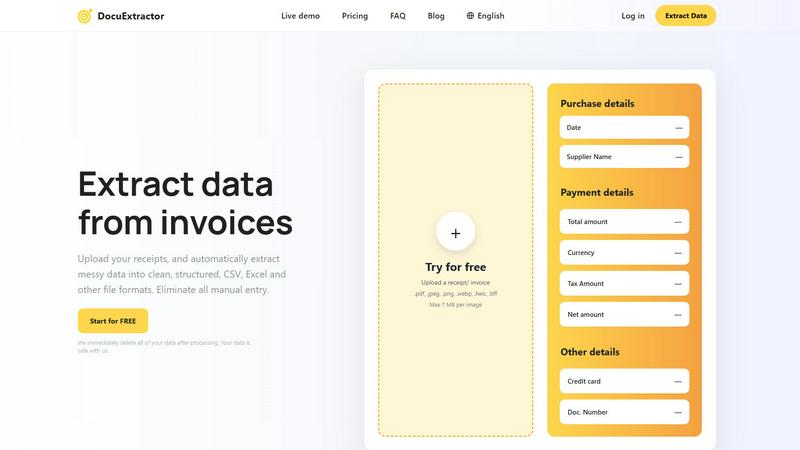
Instantly convert messy receipts and invoices into clean, structured data.
Last updated: February 28, 2026

Receipt Generator
Create and customize realistic receipts in seconds with 400+ free templates for business, creative, and personal use.
Last updated: April 4, 2026
Visual Comparison
DocuExtractor
Receipt Generator

Feature Comparison
DocuExtractor
Blazing-Fast, Automated AI Extraction
Experience instant data conversion with our fully automated pipeline. Just drag and drop your documents; our combined OCR, Deep Learning, and LLM (AI) technology takes over. It automatically detects document type and language, extracts all key financial fields—like date, total amount, tax, and supplier—and structures the data without any manual intervention. This hands-off approach delivers results in seconds, not hours, accelerating your workflow dramatically.
99.6% Accuracy with Specialized Algorithms
Achieve near-perfect data reliability. DocuExtractor isn't a generic OCR tool; it uses specialized algorithms fine-tuned for financial documents like receipts and invoices. This targeted approach ensures the highest precision in extracting critical numbers and text, minimizing errors and the need for time-consuming verification. You can trust the extracted data to be accurate and ready for immediate use in your accounting software or reports.
Batch Processing & Versatile Upload
Process hundreds of documents in one go to maximize efficiency. Our platform allows you to upload entire batches of receipts, invoices, or PDFs simultaneously. Support a wide range of file formats including PDF, JPG, PNG, and more, with each file up to 7MB. This bulk handling capability means you can convert a month's worth of paperwork into structured data in under a minute, streamlining your monthly closing and bookkeeping tasks.
Secure, Enterprise-Ready Platform
Operate with complete confidence and security. DocuExtractor is built for businesses of all sizes with a firm commitment to data privacy. We immediately and permanently delete all your documents and extracted data after processing. Coupled with enterprise-grade infrastructure that reliably handles millions of documents, the platform ensures your sensitive financial information is protected while delivering scalable, robust performance for teams and firms.
Receipt Generator
Extensive Template Library
With over 400 professionally designed templates, Receipt Generator covers a vast array of stores and restaurants. This wide selection ensures that you always have the perfect starting point for your receipt creation needs.
AI "Place in Scene" Feature
The unique AI "Place in Scene" feature allows users to create realistic images of receipts placed on any surface, such as a desk or counter. This eliminates the need for printing and enhances the visual context of your receipts for various uses.
Full Customization Options
Receipt Generator empowers users with complete control over every aspect of their receipts. Customize line items, prices, taxes, payment methods, and more to ensure your receipt meets your exact specifications.
Instant Download Capability
Experience the convenience of lightning-fast downloads with just one click. Export your finished receipt in high-resolution PNG or PDF formats without waiting, ensuring you can use your receipts immediately.
Use Cases
DocuExtractor
Automating Accounts Payable Processing
Revolutionize your AP workflow by eliminating manual entry of supplier invoices. Simply upload incoming invoice PDFs or scans in batches. DocuExtractor instantly extracts vendor details, invoice numbers, dates, line items, net amounts, and taxes. Download a clean CSV file ready for direct import into your accounting software like QuickBooks or Xero, slashing processing time from hours to minutes and drastically reducing human error.
Streamlining Expense Report Reconciliation
Simplify employee expense management. Instead of manually deciphering receipt photos, employees or managers can upload all receipts directly to DocuExtractor. The AI quickly pulls out merchant names, dates, totals, and payment methods, generating an organized Excel spreadsheet. This automates the most tedious part of expense reporting, ensuring faster reimbursements, easier policy compliance, and seamless integration with expense management systems.
Accelerating Bank Statement Data Entry
Speed up financial reconciliation and analysis. Upload bank or credit card statement PDFs to automatically extract transaction dates, descriptions, and amounts. This converts unstructured statement data into a structured, sortable format perfect for cash flow analysis, audit preparation, or feeding into financial models. What used to take a full day of manual copying and pasting can now be completed in a matter of seconds.
Optimizing Bookkeeping for Firms and Freelancers
Empower bookkeepers and freelance accountants to handle more clients efficiently. Use DocuExtractor as a first-step processing tool for all client documents—receipts, bills, invoices. The rapid extraction standardizes data from various sources and formats, freeing up valuable time usually spent on data entry. This allows professionals to focus on higher-value advisory services, analysis, and client relationships, significantly boosting capacity and profitability.
Receipt Generator
Business Expense Tracking
Small business owners can utilize Receipt Generator to create accurate receipts for expense tracking and documentation. This helps in maintaining organized financial records and simplifies tax preparation.
Creative Projects and Mockups
Content creators can benefit from the AI "Place in Scene" feature to generate realistic receipts for social media posts, blogs, or video content. This adds a professional touch and elevates the quality of visual projects.
Inventory Documentation
Resellers can use Receipt Generator to document inventory purchases with authentic-looking receipts. This is essential for tracking expenses and managing stock effectively, ensuring a transparent operation.
Personal Use and Budgeting
Individuals can create receipts for personal budgeting. Whether it's tracking household expenses or documenting gifts, Receipt Generator makes it easy to keep financial records organized and accessible.
Overview
About DocuExtractor
DocuExtractor is the lightning-fast AI-powered document conversion engine built for finance professionals. It is designed specifically for accountants, bookkeepers, and financial teams who are bogged down by manual data entry from receipts, invoices, bank statements, and PDFs. This advanced tool leverages cutting-edge OCR, deep learning, and LLM (AI) technology to instantly transform messy, unstructured document data into perfectly clean, organized CSV or Excel files. The core value proposition is unmatched speed and efficiency: eliminate hours of tedious manual work with a simple drag-and-drop process. With a proven accuracy rate of 99.6% and support for over 45 languages, DocuExtractor automates the entire extraction workflow. Upload documents in batches, let the specialized AI extract key fields like dates, supplier names, totals, and taxes, and download structured results in seconds. It’s built for scale, processing over 500,000 documents monthly with enterprise-grade security, ensuring all data is deleted post-processing. For any professional seeking to optimize data management, slash processing time, and boost productivity, DocuExtractor delivers immediate, reliable results.
About Receipt Generator
Receipt Generator is the ultimate online tool for creating customized receipts in seconds. With over 400 store-specific templates ranging from Walmart and Starbucks to CVS and Best Buy, users can easily generate authentic-looking receipts tailored to their needs. Whether you're a small business owner, freelancer, content creator, or reseller, Receipt Generator provides the flexibility to edit every detail, including items, prices, dates, and payment methods, before instantly downloading high-resolution PNG files. No account is needed to get started, making it incredibly accessible for anyone. What truly sets Receipt Generator apart is its innovative AI "Place in Scene" feature, which allows users to generate photorealistic images of their receipts on various surfaces, enhancing their visual appeal for projects, documentation, or social media. With lightning-fast performance and a user-friendly interface, Receipt Generator has become the go-to tool for over 10,000 satisfied users worldwide.
Frequently Asked Questions
DocuExtractor FAQ
How accurate is DocuExtractor?
DocuExtractor delivers industry-leading accuracy of 99.6% for financial documents. This high precision is achieved through specialized AI algorithms trained specifically on invoices, receipts, and statements, not generic text. The system combines Optical Character Recognition (OCR) with Deep Learning and Large Language Models (LLMs) to understand context and extract data reliably, ensuring minimal errors and maximum trust in your output.
What happens to my documents after processing?
Your data security is our top priority. We immediately and permanently delete all uploaded documents and the extracted data from our servers once the processing is complete. We do not use your documents to train our AI models. This strict data hygiene policy ensures your sensitive financial information remains completely confidential and safe with us, making DocuExtractor a secure choice for businesses of any size.
What file formats and languages do you support?
DocuExtractor supports a wide range of common file formats including PDF, JPEG, PNG, WebP, HEIC, and TIFF, with individual files up to 7MB. Our platform also has extensive global reach, with automatic language detection and processing support for over 45 languages. This allows multinational teams and businesses dealing with international documents to process everything seamlessly in one place.
Can I process multiple documents at once?
Absolutely. DocuExtractor is built for speed and efficiency, featuring powerful batch processing capabilities. You can upload dozens or even hundreds of receipts, invoices, or PDFs simultaneously in a single session. The system will process them all automatically in parallel, extracting data from each document and compiling the results into a single, downloadable CSV or Excel file, saving you an enormous amount of time.
Receipt Generator FAQ
Can I use Receipt Generator for personal use?
Yes, Receipt Generator is designed for legitimate business, creative, and personal use, allowing users to create customized receipts for various purposes.
Do I need to create an account to use the Receipt Generator?
No, you do not need to create an account to start using Receipt Generator. You can begin generating receipts immediately without any sign-up process.
How does the AI "Place in Scene" feature work?
The AI "Place in Scene" feature allows you to generate photorealistic images of your receipts placed on different surfaces, giving a realistic look without the need for printing.
What formats can I download my receipts in?
You can download your receipts in high-resolution PNG or PDF formats, ensuring you have the flexibility to use them as needed without compromising quality.
Alternatives
DocuExtractor Alternatives
DocuExtractor is a powerful productivity tool that automates data extraction from receipts and invoices. It uses advanced OCR to convert messy documents into clean, structured data like CSV and Excel in seconds, saving accountants and bookkeepers immense time. Users often explore alternatives for various reasons. Cost is a primary factor, as budget constraints or pricing models may not align with every business. Others might seek specific integrations, different feature sets like mobile scanning, or platforms that better suit their existing software ecosystem. When evaluating other options, prioritize core needs. Look for high accuracy rates in data capture, support for batch processing to handle volume, and output formats that work with your workflow. Security, ease of use, and reliable customer support are also critical for a seamless, efficient experience.
Receipt Generator Alternatives
Receipt Generator is a powerful online tool designed for creating custom receipts. It falls under the Productivity & Management category, offering users over 400 templates from well-known stores like Walmart and Starbucks. Many users seek alternatives to Receipt Generator for various reasons, such as pricing, specific features that may better suit their needs, or platform compatibility. When choosing an alternative, consider factors like ease of use, customization options, and whether the tool meets your particular requirements for generating receipts. When looking for a receipt generator alternative, prioritize tools that provide a wide selection of templates, flexibility in design, and quick download options. It's also important to assess the level of customer support and any additional features that can enhance your experience, such as AI capabilities or unique presentation options. A well-rounded alternative should cater to both individual and business needs effectively.