
CleanPaste.org vs Prompt Builder
Side-by-side comparison to help you choose the right product.

CleanPaste.org
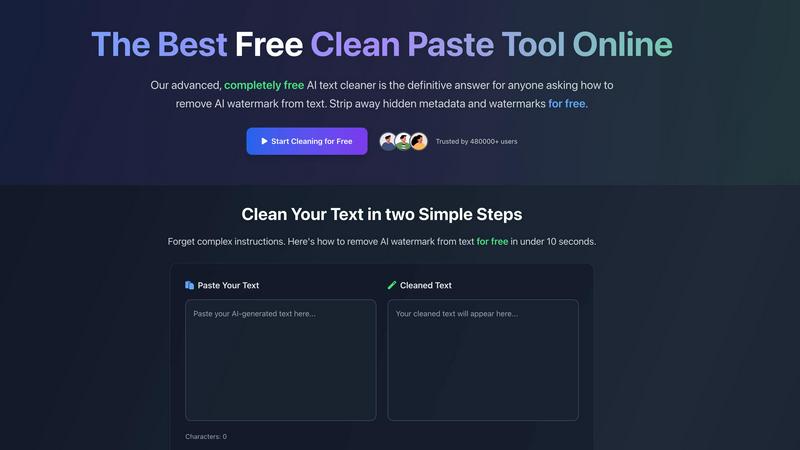
CleanPaste.org swiftly removes invisible characters and AI watermarks from your text for a clean, authentic finish.
Last updated: March 2, 2026

Prompt Builder
Craft, optimize, and manage AI prompts for any model in seconds, enhancing efficiency and consistency in your workflow.
Last updated: April 13, 2026
Visual Comparison
CleanPaste.org
Prompt Builder
Feature Comparison
CleanPaste.org
Instant Processing
CleanPaste.org offers lightning-fast processing, allowing users to remove invisible characters and hidden metadata in mere seconds. Simply paste your content and click clean—it's that easy. The tool processes everything in real-time, providing immediate results without any annoying delays.
Watermark Removal Mode
The watermark removal mode is a standout feature that effectively strips AI watermarks while maintaining the integrity of the original text. This ensures that your content not only passes detection tests but also retains a natural, human-like quality that resonates with readers.
Comprehensive Character Stripping
This tool employs advanced algorithms to detect and eliminate all types of invisible characters, including zero-width spaces and hidden formatting artifacts. Users can trust CleanPaste.org to thoroughly cleanse their text, ensuring a polished and professional appearance.
User-Friendly Interface
With its intuitive design, CleanPaste.org is incredibly easy to use. There are no sign-ups or complicated processes—just paste your text and click to clean. The user-friendly interface makes it accessible for everyone, regardless of technical skill level.
Prompt Builder
Prompt Generator
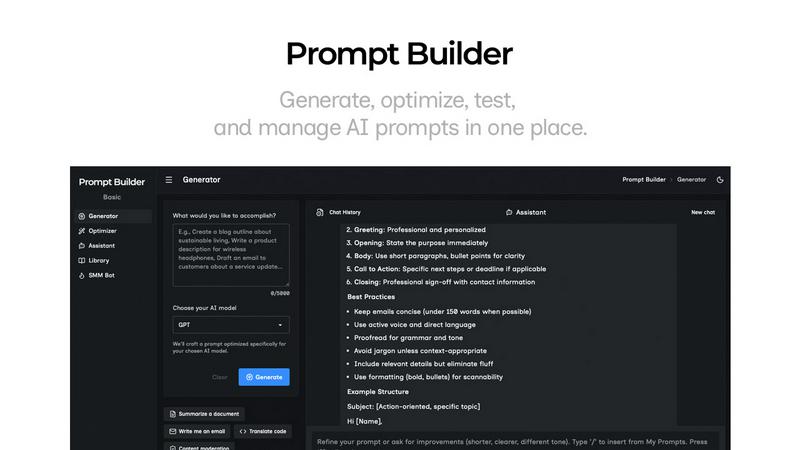
The Prompt Generator enables users to describe their ideas and select a target AI model. It automatically generates a professional-grade prompt optimized for that model, saving time and ensuring high-quality outputs tailored to specific requirements.
Chat Refinement
With the built-in chat refinement feature, users can iteratively improve their prompts. This chat environment allows real-time adjustments, making it easy to refine language, structure, and specificity, ultimately leading to more effective prompts.
Prompt Library
The Prompt Library is a centralized repository where users can save, organize, and reuse their best prompts. It includes features for searching, filtering by category and model, and managing prompts, making it easy to keep track of valuable resources across different projects.
Prompt Optimizer
The Prompt Optimizer takes existing prompts and enhances them in seconds. By providing structured improvements in clarity, constraints, and output formats, users can quickly turn mediocre prompts into high-performing ones that yield better results.
Use Cases
CleanPaste.org
For Students
CleanPaste.org is an invaluable resource for students looking to submit polished essays and assignments. By removing hidden characters and AI-generated artifacts, students can present their work with confidence, ensuring it meets academic standards without compromising on quality.
For Content Creators & Bloggers
Content creators and bloggers can benefit from CleanPaste.org by ensuring their writing retains an authentic voice. The tool cleans drafts of any invisible characters and AI watermarks, allowing creators to connect with their audience through natural and engaging content.
For Professionals
Professionals drafting emails, reports, or presentations can use CleanPaste.org to enhance the professionalism of their communication. The tool helps eliminate any traces of AI-assisted writing, resulting in clear, concise, and human-centric text.
For SEO Specialists
SEO specialists can utilize CleanPaste.org to clean up AI-assisted articles before submission. By removing watermarks and hidden metadata, they can ensure their content passes various detection tests, enhancing its credibility and effectiveness in search rankings.
Prompt Builder
Content Creation
Content creators can leverage Prompt Builder to generate engaging articles, social media posts, and marketing copy. By swiftly crafting and optimizing prompts, they can ensure their content resonates with target audiences and stands out in crowded markets.
Educational Resources
Educators and trainers can use Prompt Builder to create tailored prompts for lesson plans, quizzes, and instructional content. This tool allows for quick adjustments and refinements to meet specific learning outcomes and student needs.
Software Development
Developers can utilize Prompt Builder to generate prompts for interactive AI applications, ensuring that the AI responds accurately to user queries. With the ability to fine-tune prompts for different models, they can enhance user experience and functionality.
Market Research
Market researchers can create prompts for surveys and data collection, refining them based on feedback and results. This enables them to gather precise insights, leading to more informed decisions and strategies based on accurate data.
Overview
About CleanPaste.org
CleanPaste.org is a groundbreaking online tool that simplifies the process of removing AI watermarks, hidden metadata, and invisible characters from text. This tool is ideal for a diverse audience, including students, content creators, and professionals who wish to ensure their content appears entirely human-written while preserving its authenticity. With CleanPaste.org, users can quickly paste their text and click to clean it, resulting in a seamless experience where unwanted traces are stripped away in seconds. Trusted by over 480,000 users, this platform stands out as the preferred solution for enhancing the integrity of writing without sacrificing quality or originality. Its commitment to being 100% free makes it accessible to everyone, proving that quality content creation is achievable without financial barriers.
About Prompt Builder
Prompt Builder is an innovative workspace designed for prompt engineering that empowers users to create, test, and save prompts tailored to various AI models. Its intuitive interface allows users to start with a draft and refine it through a chat feature, ensuring the final output aligns with the chosen model, whether it's GPT, Claude, Gemini, or others. This tool is especially beneficial for content creators, marketers, developers, and AI enthusiasts who demand efficiency in generating high-quality prompts. By eliminating the tedious process of rewriting prompts for different models, Prompt Builder streamlines the workflow, saving valuable time and effort. The platform also features an Optimizer that enhances existing prompts, a library for storing reusable prompts, and an Assistant for quick testing. With Prompt Builder, transforming an idea into a ready-to-use prompt is quick and seamless, allowing users to focus on results rather than the intricacies of prompt crafting.
Frequently Asked Questions
CleanPaste.org FAQ
How does CleanPaste remove invisible characters?
CleanPaste.org utilizes advanced algorithms designed to detect and strip invisible characters, zero-width spaces, hidden metadata, and AI watermarks from your text. Simply paste your content and click clean for instant results.
Is CleanPaste truly free? What's the catch?
Yes, CleanPaste.org is completely free with no hidden catches. There are no usage limits, premium features, or sign-up requirements. The goal is to provide the best tool for everyone to remove unwanted text artifacts.
What types of hidden characters does CleanPaste remove?
CleanPaste.org effectively removes a wide variety of invisible characters, including zero-width spaces, hidden metadata, and AI watermarks. All features are available at no cost to users, ensuring a comprehensive cleaning process.
How quickly can I expect results from CleanPaste?
With CleanPaste.org, results are instantaneous. Users can paste their text and see it cleaned within seconds, making the tool incredibly efficient for anyone in need of quick and reliable text cleansing.
Prompt Builder FAQ
How does Prompt Builder optimize prompts for different AI models?
Prompt Builder tailors prompts specifically for selected AI models by adjusting the structure, constraints, and output format. This ensures users receive optimized responses with fewer retries.
Can I save my prompts for future use?
Yes, Prompt Builder includes a comprehensive Prompt Library where you can save, organize, and reuse your best prompts. This feature allows for easy access to valuable resources across multiple projects.
Is there a limit on the number of prompts I can generate?
Users can start free with 25 assistant requests per month. This allows ample opportunity to explore and generate various prompts without any upfront payment or credit card requirement.
What types of prompts can I create with Prompt Builder?
You can create a wide range of prompts, including content for articles, social media posts, educational resources, and interactive applications. The tool is versatile and supports numerous AI models for diverse use cases.
Alternatives
CleanPaste.org Alternatives
CleanPaste.org is an innovative online tool that falls under the category of AI assistants, specifically designed for content creators, students, and professionals. Its primary function is to swiftly remove invisible characters, AI watermarks, and hidden metadata from text, ensuring a clean and authentic appearance. Users often seek alternatives to CleanPaste.org due to various factors, including the desire for unique features, varying pricing models, or specific platform compatibility. When choosing an alternative, it's essential to consider factors such as processing speed, user experience, additional functionalities like plagiarism checks, and the overall reliability of the tool.
Prompt Builder Alternatives
Prompt Builder is a cutting-edge prompt engineering workspace designed to generate, optimize, test, and manage AI prompts all in one centralized location. It caters specifically to users looking to streamline their AI interactions across various models such as GPT, Claude, and others. As AI technology evolves, users often seek alternatives for a multitude of reasons, including pricing structures, feature sets, platform compatibility, and ease of use. When searching for alternatives, it's essential to consider factors like the range of supported AI models, the intuitiveness of the user interface, and the availability of optimization tools. Additionally, reviewing community resources like libraries of reusable prompts can enhance the overall experience and productivity. Prioritizing these aspects will help you find a solution that best fits your specific needs.