
ytskim
ytskim instantly transcribes and summarizes YouTube videos so you can get the key insights without watching the whole thing.
Visit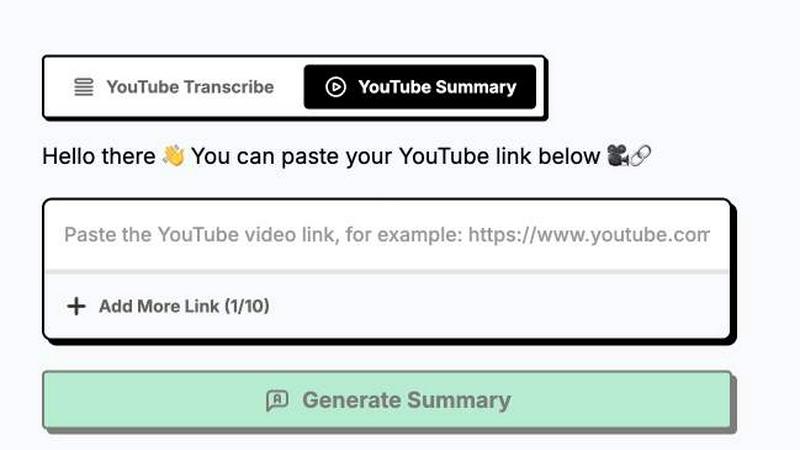
About ytskim
ytskim is a lightning-fast AI tool that extracts accurate transcripts and generates structured summaries from any YouTube video in seconds. Designed for researchers, content creators, students, and professionals who need to consume video content quickly, ytskim eliminates the tedious process of watching entire videos to extract key information. The core value proposition is speed and efficiency: instead of spending hours watching tutorials, lectures, or long-form content, users can get a complete, searchable transcript and a concise, organized summary instantly. The tool uses advanced speech-to-text AI to capture every word with high accuracy, then processes the transcript through a smart summarization engine that identifies main points, key arguments, and important details. This means you can skim through hours of video content in just a few seconds, pulling out exactly what you need without losing context. Whether you are a student researching for a paper, a developer following a coding tutorial, a marketer analyzing competitor content, or a journalist fact-checking interviews, ytskim transforms passive video watching into active, efficient information gathering. The tool supports multiple languages, handles various video lengths, and delivers clean, structured outputs that are ready to copy, paste, or integrate into your workflow. No more scrubbing through timelines or taking manual notes. ytskim is built for anyone who values their time and needs to get the essence of video content without the fluff.
Features of ytskim
Instant Transcript Extraction
ytskim pulls the full transcript from any YouTube video in seconds, using advanced speech recognition that captures every word with high accuracy. The tool handles multiple languages, background noise, and different speaking speeds, ensuring you get a clean, readable text version of the entire video. This transcript is fully searchable and copyable, making it easy to find specific quotes, timestamps, or sections without rewatching the video. Whether the video is 5 minutes or 5 hours long, the extraction happens almost instantly, saving you massive amounts of time.
AI-Powered Structured Summaries
Beyond just providing raw text, ytskim uses a smart AI engine to analyze the transcript and generate a structured summary. The summary breaks down the video into clear sections: main topics, key points, important quotes, and action items. This structured format lets you grasp the core message of any video in under 30 seconds. The AI identifies the most relevant information, removes filler content, and presents everything in a logical, easy-to-scan layout. Perfect for quickly understanding complex topics or long presentations.
Multi-Language Support
ytskim supports a wide range of languages for both transcription and summarization. Whether the YouTube video is in English, Spanish, French, German, Japanese, or many other languages, the tool accurately transcribes the audio and then summarizes the content in the same language. This makes it an invaluable resource for international researchers, global teams, or anyone consuming content from creators around the world. The language detection is automatic, so you do not need to specify anything manually.
One-Click Copy and Export
Speed is the priority, and ytskim ensures you can get your data out as fast as you get it in. With a single click, you can copy the full transcript, the structured summary, or specific sections to your clipboard. The tool also offers export options to plain text, Markdown, or PDF formats, making it easy to integrate the extracted information into notes, reports, or documentation. No complicated menus or multi-step processes. Just click, copy, and move on to your next task.
Use Cases of ytskim
Student Research and Study Aid
Students can use ytskim to quickly extract key points from lecture videos, educational YouTube channels, or academic presentations. Instead of spending hours watching and rewatching content, they get a structured summary that captures the main concepts, definitions, and examples. This is especially useful for exam preparation, writing essays, or compiling study notes. The transcript also serves as a searchable reference for specific terms or quotes mentioned by the lecturer.
Content Creator Research and Inspiration
Content creators can analyze competitor videos, trending topics, or tutorial content in a fraction of the time. By using ytskim to summarize multiple videos, creators can quickly identify common themes, popular arguments, or effective presentation styles. The structured summaries help in brainstorming new video ideas, understanding audience preferences, and gathering reference material without the need to watch every single video end to end.
Professional Development and Training
Professionals in any field can use ytskim to stay updated with industry trends, training materials, or conference presentations. Instead of blocking out an hour to watch a webinar or a keynote speech, they can get the key takeaways in seconds. This is perfect for busy executives, project managers, or team leads who need to quickly absorb information from multiple sources and make informed decisions. The structured format makes it easy to share insights with colleagues.
Journalist and Researcher Fact-Checking
Journalists and researchers can use ytskim to verify quotes, extract specific data points, or review interviews from YouTube videos. The accurate transcript allows for precise fact-checking, while the summary helps in identifying the most newsworthy or relevant sections. Instead of scrubbing through long interviews or press conferences, they can search the transcript for specific keywords and get the exact context needed for their articles or reports.
Frequently Asked Questions
Is ytskim free to use?
ytskim offers a free tier that allows you to transcribe and summarize a limited number of videos per day. For users who need higher volume processing, longer video support, or advanced features like batch processing and API access, there are affordable paid plans available. The free tier is designed to give you a full experience of the speed and accuracy of the tool before committing to a subscription.
How accurate is the transcription?
The transcription accuracy is very high, typically exceeding 95% for clear audio with standard accents. The AI is trained on millions of hours of speech data and handles various speaking speeds, background noise levels, and multiple languages. For videos with heavy accents, overlapping speech, or poor audio quality, accuracy may be slightly lower, but the tool still provides a highly usable transcript that captures the essence of the content.
Can I summarize videos longer than one hour?
Yes, ytskim can handle videos of any length, from short clips to multi-hour lectures or podcasts. The free tier may have a maximum video length limit, but paid plans offer support for longer videos. The processing time remains fast regardless of video length, with the AI efficiently extracting and summarizing content from even the longest videos in just a few seconds.
What formats can I export the transcript and summary to?
You can export your transcript and summary in multiple formats including plain text, Markdown, and PDF. The one-click copy function also lets you paste the content directly into any application. Markdown format is particularly useful for developers and writers who want to integrate the content into documentation, blog posts, or note-taking apps like Notion or Obsidian.
Explore more in this category:
Similar to ytskim

Apps and files on an infinite canvas where people and AI agents work together.

Jev turns text or JSON into Choice, Score and Noul answers with probabilities. Build decision flows, process batches and call the API from one Console

Panzoe is an all-in-one AI platform for personal productivity, business automation, AI assistants, content creation, and custom AI solutions.

A notepad calculator that reads plain text and gives instant answers as you type, free on Mac, iOS, Windows, Linux, Android and Web.

AI Email Filter sorts incoming mail into folders using plain-language prompts you write. Works with any IMAP mailbox; bring your own LLM if you want.

Free collection of online developer utilities, code formatters, and digital converters designed to streamline your daily workflow.

Visual financial timelines for couples and young professionals: model cash flow, life events, and shared goals.

Online tally counter for tracking attendance, workouts, inventory, sports scores, visitors, habits, and everyday counting tasks.