
Very Good Calendar Sync
Very Good Calendar Sync silently unifies your work and personal calendars on your Mac in two minutes, no accounts linked.
Visit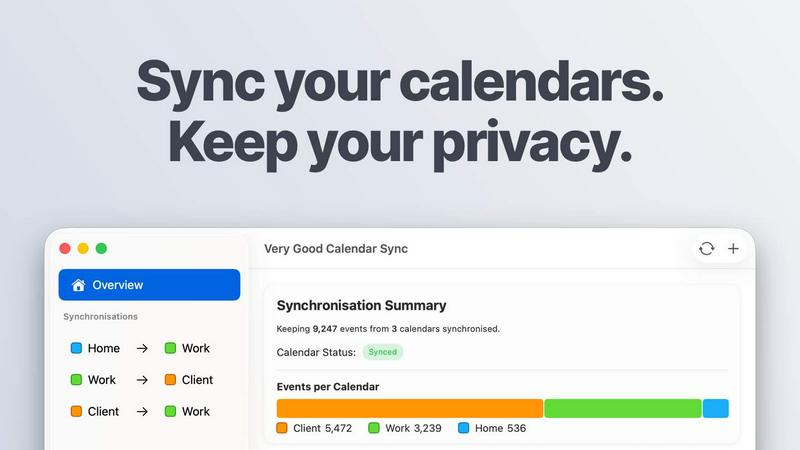
About Very Good Calendar Sync
Very Good Calendar Sync is a macOS-native application that keeps your work, personal, and client calendars perfectly synchronized without compromising your privacy. Built for speed and efficiency, this tool runs quietly in your menu bar, monitors your calendars, and syncs changes automatically in the background. Set it up once and forget it. New meeting on your work calendar? It appears on your personal calendar instantly. No manual cross-checking. No double-bookings. No guesswork.
The app works with any calendar available in macOS Calendar.app, including Google Calendar, Microsoft Outlook/Exchange, Apple iCloud, and any CalDAV account. You control exactly what gets synchronized: choose specific weekdays, set daily hours, or pick a start date for syncing. You also decide what to share. Clone events with full details or redact them to show only that you are busy. Title, description, and location stay private.
Privacy is the core of this product. Your calendar data never leaves your Mac. No credentials to share. No third-party access. No cloud storage. The app uses your Mac's native calendar access. Nothing is transmitted externally. No servers of its own. No data collection. No analytics on your calendar. Just your Mac talking to your calendars.
Perfect for consultants managing client calendars, employees balancing work and personal schedules, freelancers juggling multiple projects, or anyone tired of calendar chaos. Your first sync is free. Download the app and set it up in two minutes.
Features of Very Good Calendar Sync
Clone or Redact Events
Share your availability without sharing your life. Clone events with full details when you want colleagues to see meeting titles and descriptions. Redact events to show only that you are busy, keeping titles, descriptions, and locations completely private. This flexibility lets you maintain professional transparency while protecting personal information.
Stays Out of the Way
The app runs quietly in your menu bar. Set up your syncs once, then forget about it. Synchronisation happens automatically whenever your calendars change. No pop-ups. No reminders. No manual intervention. The app does its job silently in the background, so you can focus on your actual work without interruption.
Filter by Day and Time
Synchronise only weekdays, weekends, or pick specific days. Set a time range to limit syncing to work hours, like 9 AM to 6 PM. Each synchronisation gets its own rules. You can have different sync settings for your work calendar versus your personal calendar. This granular control ensures only relevant events appear on the right calendars.
No Accounts to Link
Your Google, Microsoft, and Apple credentials stay safe under macOS Internet Accounts. No logins on third-party websites. No extra accounts to create. No passwords to share. The app uses your existing calendar setup directly. This eliminates the security risks associated with linking accounts through external services.
Built into macOS
Works directly with Calendar.app. No extra apps to install. No connections to configure. Your calendars are already there. The app integrates seamlessly with the native macOS calendar system, so there is no learning curve. If it shows up in Calendar.app, it works with Very Good Calendar Sync.
No Middleman
The app runs entirely on your Mac. No servers of its own. No data collection. No analytics on your calendar. Just your Mac talking to your calendars. This on-device approach means your sensitive scheduling data never travels to external servers. You maintain complete control over your information at all times.
Use Cases of Very Good Calendar Sync
Consultants Managing Client Calendars
Consultants often juggle multiple client calendars alongside their own internal schedules. Very Good Calendar Sync keeps every client calendar in sync without manually cross-checking availability or risking double-bookings. Set up each client calendar sync once with custom rules. New client meetings appear on your personal calendar automatically. No more emailing back and forth to find available times.
Employees with Multiple Calendars
Professionals balancing work and personal schedules need seamless integration between both worlds. Never get double-booked because your team could not see your dentist appointment. Sync your personal calendar to show busy blocks on your work calendar without revealing private details. Your colleagues see availability without knowing where you are or what you are doing.
Freelancers Juggling Multiple Projects
Freelancers often work with several clients who each have their own calendar systems. Keep all project calendars synchronized without linking accounts or exposing sensitive client data. Set different sync rules for each client. Filter by workdays and business hours. Clone project meetings with full details while redacting personal appointments. Stay organized across all your engagements.
Agencies and Cross-Functional Teams
Agencies balance internal team calendars with client-facing schedules. Very Good Calendar Sync ensures everyone sees the same real-time availability. Internal meetings block time on client calendars without revealing confidential details. Client appointments appear on team calendars automatically. No confusion. No missed meetings. No double-bookings across internal and external commitments.
Frequently Asked Questions
Do you store any of my calendar data?
No. Your calendar data never leaves your Mac. The app runs entirely on your device with no servers of its own. There is no data collection, no analytics on your calendar, and no third-party access. Nothing is transmitted externally. Just your Mac talking to your calendars directly through macOS native calendar access.
Which calendar providers are supported?
Very Good Calendar Sync works with any calendar available in macOS Calendar.app. This includes Google Calendar, Microsoft Outlook/Exchange, Apple iCloud, and any CalDAV account. If it shows up in Calendar.app, it works with the app. No extra setup or third-party access required.
Does it sync when my Mac is off or asleep?
No. The app runs on your Mac and requires the device to be powered on and awake to perform synchronisations. When your Mac goes to sleep or shuts down, syncing pauses. Synchronisation resumes automatically when your Mac wakes up. For continuous syncing, keep your Mac awake during working hours.
Is this app available for Windows?
No. Very Good Calendar Sync is built specifically for macOS and integrates directly with Calendar.app. There is no Windows version available. The app leverages macOS native calendar access and menu bar functionality, which are not available on Windows systems.
Is this app available for iOS?
No. Very Good Calendar Sync is a macOS-only application. It runs on your Mac desktop or laptop. There is no iOS version for iPhone or iPad. The app is designed to work with the full Calendar.app experience available on macOS.
Pricing of Very Good Calendar Sync
One synchronisation between two calendars is completely free. No payment required. When you are ready for more, pick a plan that fits your needs.
Monthly plan costs 1.99 pounds per month. Flexible month-to-month subscription. Cancel anytime.
Annual plan costs 19.99 pounds per year. Best value option. Save over 15 percent compared to the monthly plan.
Lifetime plan costs 39.99 pounds one time. One payment, yours forever. All future updates included.
All plans include unlimited synchronisations, all calendar providers, and email support. Per-user license for all your Macs. Download for free. Choose your plan in the app.
Explore more in this category:
Similar to Very Good Calendar Sync

Free collection of online developer utilities, code formatters, and digital converters designed to streamline your daily workflow.

Visual financial timelines for couples and young professionals: model cash flow, life events, and shared goals.

Online tally counter for tracking attendance, workouts, inventory, sports scores, visitors, habits, and everyday counting tasks.

The #1 Native Form Builder Plugin for Framer - No Code, No Embeds, No External Platforms.

A free launch checklist for SaaS, apps, AI tools and more. Every step says why it matters and when you can skip it.

Practical, independent guides to home repairs, maintenance, costs, troubleshooting, and everyday fixes.

Translate JSON, Markdown, and TXT files while preserving keys, nested paths, and project structure.

Highlight faster. Study in flow with custom shortcuts and a workflow built around you. Print smarter, or turn any page into a tiled poster.