
JustPDF
JustPDF is your lightning-fast, private browser toolkit with 17 essential tools to edit and convert PDFs instantly.
Visit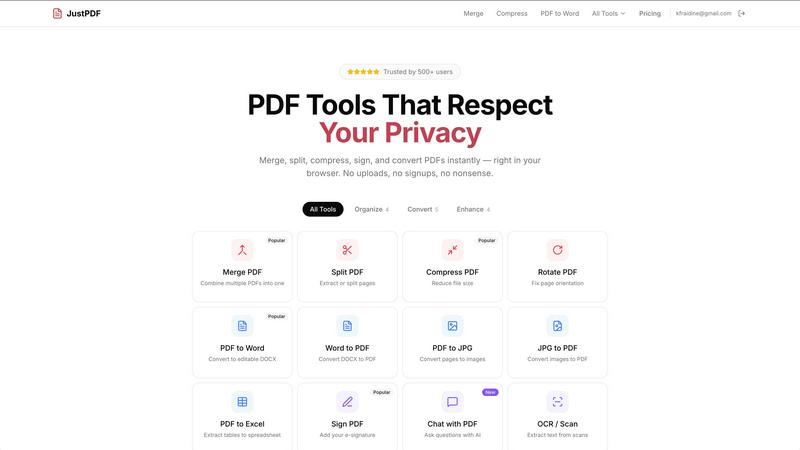
About JustPDF
JustPDF is a lightning-fast, privacy-first suite of PDF tools that operates entirely within your web browser. It provides 17 professional-grade utilities for managing, converting, and editing PDFs, all without ever uploading your sensitive documents to a remote server. Unlike competitors like Smallpdf or iLovePDF, JustPDF leverages JavaScript and WebAssembly to process files locally on your device. This means your files never leave your computer—a fact you can verify yourself by checking the Network tab in your browser's developer tools. The platform is designed for anyone who needs quick, reliable, and secure PDF manipulation, from students and professionals handling confidential contracts to educators managing FERPA-protected materials. Its core value proposition is unmatched speed and ironclad privacy, offering a seamless, account-free experience for casual users and unlimited, powerful access for pros, all starting at just $4 per month.
Features of JustPDF
100% Browser-Based Processing
Every operation, from merging to compressing, happens directly in your browser using client-side JavaScript and WebAssembly. This architecture guarantees that your files are processed at blistering speeds and with complete privacy, as no data is transmitted over the internet. You can work offline and rest assured that sensitive documents remain solely on your device.
Comprehensive PDF Toolkit
JustPDF packs a powerful array of 17 essential tools into one interface. This includes core organization features like Merge, Split, Compress, and Rotate, alongside advanced converters for Word, Excel, JPG, and even WebP/HEIC images. Specialized tools for unlocking PDFs, adding e-signatures, converting to grayscale, and performing OCR/Scan ensure every common PDF task is covered.
AI-Powered Chat with PDF
Go beyond basic editing with the integrated AI chat feature. This innovative tool allows you to upload a PDF and ask questions about its content, summarize sections, or extract key information instantly. It brings intelligent document interaction to your browser, making research and data review faster than ever before.
No-Account Free Tier & Pro Access
Start using tools immediately without any sign-up. The free tier offers 3 operations per day, completely watermark-free. For power users, the Pro subscription unlocks unlimited access to all tools for a flat rate starting at $4 per month, providing exceptional value for frequent, high-volume PDF processing needs.
Use Cases of JustPDF
Handling Sensitive Legal Documents
Lawyers and legal professionals can merge contracts, redact information, add e-signatures, and compress files for sending—all with the absolute confidence that confidential client data never leaves their local machine, maintaining attorney-client privilege and compliance.
Student and Academic Work
Students and researchers can quickly convert lecture slides from PDF to Word for note-taking, compress large research papers for submission, and use the AI chat to summarize academic articles. Its FERPA compliance makes it safe for handling educational records.
Efficient Business Administration
Office administrators can batch-convert invoices from PDF to Excel for accounting, combine multiple reports into a single file for presentations, and flatten forms for distribution. The speed and offline capability prevent workflow interruptions.
Personal Document Management
Individuals can easily organize personal records, such as converting smartphone photos (HEIC/JPG) into PDFs for archiving, rotating scanned documents, or unlocking a PDF to print a recipe. The simple, drag-and-drop interface makes quick tasks effortless.
Frequently Asked Questions
How does JustPDF ensure my privacy?
JustPDF ensures privacy by processing all files locally in your web browser. The code runs on your device using JavaScript and WebAssembly, meaning file data is never sent to or stored on any external server. You can confirm this by opening your browser's Developer Tools (F12) and watching the Network tab during an operation—you'll see no file uploads.
What tools are included for free?
The free tier provides access to all 17 tools, including Merge, Split, Compress, Convert (PDF to Word, JPG to PDF, etc.), Rotate, Sign, and even Chat with PDF. You are limited to 3 total operations per day, but all results are free of watermarks and do not require an account.
What is the "Chat with PDF" feature?
This is an AI-powered tool that allows you to interact with your PDF document. After uploading a file, you can ask questions in natural language, and the AI will analyze the text content to provide answers, generate summaries, or find specific information, dramatically speeding up review and research.
Do I need an internet connection to use JustPDF?
An internet connection is required to initially load the JustPDF website and its processing engine (JavaScript/WebAssembly files). However, once loaded, many core processing functions can be performed offline, as the computation happens on your device. Some advanced features like AI Chat may require a connection.
Pricing of JustPDF
JustPDF operates on a freemium model. Access to the full suite of 17 tools is completely free, allowing for 3 operations per day with no account required and no watermarks on output. For unlimited usage, the Pro subscription starts at $4 per month, providing unrestricted access to every tool for high-volume users who require maximum efficiency and privacy.
Explore more in this category:
Similar to JustPDF

Apps and files on an infinite canvas where people and AI agents work together.

Jev turns text or JSON into Choice, Score and Noul answers with probabilities. Build decision flows, process batches and call the API from one Console

Panzoe is an all-in-one AI platform for personal productivity, business automation, AI assistants, content creation, and custom AI solutions.

A notepad calculator that reads plain text and gives instant answers as you type, free on Mac, iOS, Windows, Linux, Android and Web.

AI Email Filter sorts incoming mail into folders using plain-language prompts you write. Works with any IMAP mailbox; bring your own LLM if you want.

Free collection of online developer utilities, code formatters, and digital converters designed to streamline your daily workflow.

Visual financial timelines for couples and young professionals: model cash flow, life events, and shared goals.

Online tally counter for tracking attendance, workouts, inventory, sports scores, visitors, habits, and everyday counting tasks.