
Easy Watermark Remover
Effortlessly remove Gemini watermarks from images online with Quick Crop or AI Smart Removal, no signup or extensions needed.
Visit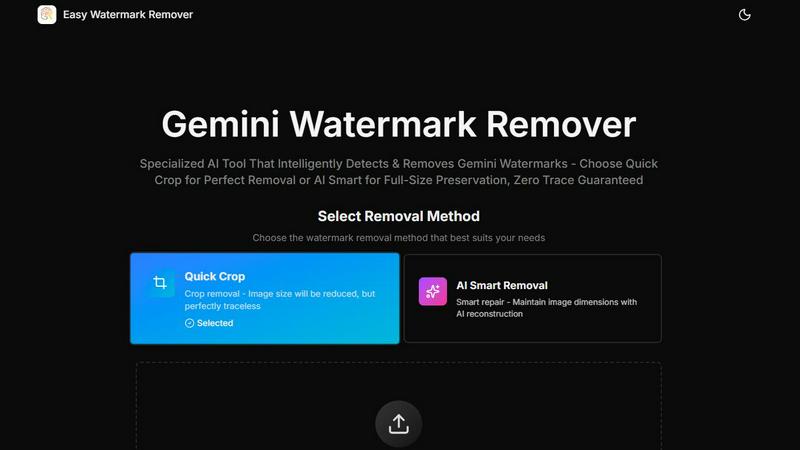
About Easy Watermark Remover
Easy Watermark Remover is a powerful, browser-based tool developed by easywatermarkremover.com. It is specifically designed to remove Gemini AI lightning logos and invisible SynthID watermarks from images generated by Imagen 3. This user-friendly tool offers two effective methods for watermark removal: Quick Crop and AI Smart Removal. Quick Crop provides a speedy solution for erasing watermarks by trimming the image, while AI Smart Removal employs advanced deep learning algorithms to reconstruct pixels, ensuring the original dimensions of the image are preserved. Easy Watermark Remover is perfect for content creators, marketers, and e-commerce professionals who need a fast and reliable solution for watermark removal without compromising on image quality. With no signups or installations required, users can efficiently process images directly from their devices, ensuring utmost privacy.
Features of Easy Watermark Remover
Quick Crop
Quick Crop is an efficient method that allows users to remove visible watermarks by cropping them out of the image. This feature is ideal when the watermark is located in a plain area of the image, such as a sky or a blurred background. While this method reduces the image size, it guarantees a clean and traceless result, making it perfect for quick edits.
AI Smart Removal
AI Smart Removal leverages deep learning technology to maintain the original dimensions of the image while effectively removing watermarks. This feature is crucial when the watermark overlaps important details, such as product edges or text. By utilizing advanced pixel reconstruction techniques, it offers a seamless cleanup that preserves the integrity of the image.
Batch Processing
Easy Watermark Remover supports batch processing, allowing users to upload multiple images at once for watermark removal. This feature significantly enhances efficiency, especially for marketers and businesses that need to edit numerous images quickly. Users can save time and streamline their workflow with this convenient option.
Cross-Device Compatibility
The tool is designed to work flawlessly across all devices, including desktops, tablets, and smartphones. As a web-based application, it eliminates the need for downloads or installations, making it accessible anywhere, anytime. Users can effortlessly remove watermarks on the go, ensuring flexibility and convenience.
Use Cases of Easy Watermark Remover
Digital Marketing
Digital marketers often require high-quality images for advertisements, social media, and promotional materials. Easy Watermark Remover allows them to efficiently erase watermarks from images, ensuring a polished look that attracts more engagement and conversions.
E-commerce Product Listings
E-commerce businesses frequently use product mockups and images to showcase their offerings. By utilizing Easy Watermark Remover, sellers can quickly remove unwanted watermarks, allowing their products to shine without distractions, ultimately boosting sales.
Content Creation for Blogs
Bloggers and content creators need visually appealing images to complement their written content. With Easy Watermark Remover, they can easily remove any distracting watermarks from images, ensuring that the final visuals are clean and professional, enhancing the overall quality of their posts.
Presentation Graphics
Professionals preparing presentations often rely on high-quality images to convey their message effectively. Easy Watermark Remover ensures that any visible watermarks are swiftly removed, resulting in a polished and professional presentation that effectively communicates their ideas.
Frequently Asked Questions
How does Easy Watermark Remover work?
Easy Watermark Remover offers two methods for watermark removal: Quick Crop, which trims the image to eliminate the watermark, and AI Smart Removal, which reconstructs pixels to maintain original dimensions while removing the watermark.
Is there a limit on image file size?
Yes, Easy Watermark Remover supports image files up to 16MB and accepts formats such as PNG, JPG, and WebP. This ensures a wide range of images can be processed without issues.
Do I need to sign up to use the tool?
No, Easy Watermark Remover does not require any sign-up or installation. Users can access the tool directly through their browser, enabling quick and hassle-free watermark removal.
Is my privacy protected when using Easy Watermark Remover?
Absolutely! All processing occurs locally on your device, meaning there are no server uploads. Your images remain private, ensuring your sensitive content is not shared or stored elsewhere.
Explore more in this category:
Similar to Easy Watermark Remover

AI image generation and editing with precise typography, native 2K output, and localized edits.

A fast image studio for creating and editing high-quality images with accurate details, readable text, and consistent characters.


Free AI attractiveness test and face analysis with private, on-device photo processing.

Create readable text, logos, posters, ads, packaging, and ecommerce visuals with Ideogram 4 AI workflows.

Enhance photos, create images, and generate videos with an all-in-one AI enhancer.