
Dayter
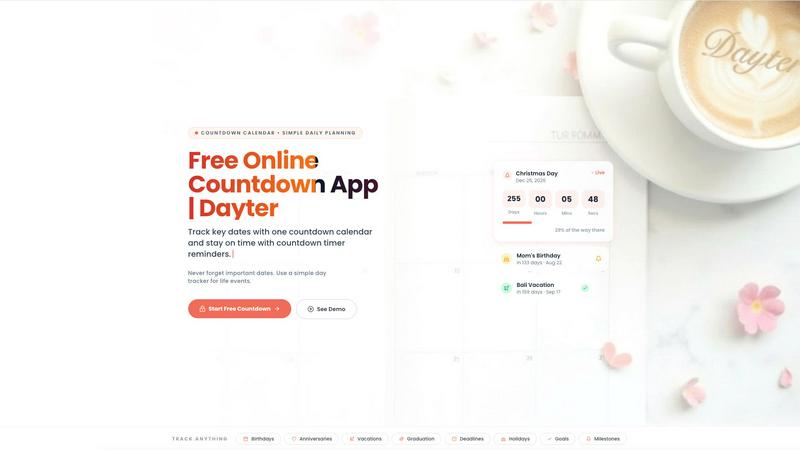
Dayter is your free online countdown calendar that tracks key dates and sends reminders so you never miss a moment.
VisitPublished on:
April 18, 2026
Pricing:
About Dayter
Dayter is your lightning-fast, all-in-one countdown calendar and daily planning engine. It’s built for speed and efficiency, transforming how you track time and manage your life's most important moments. Forget juggling multiple apps or scribbling dates on sticky notes. Dayter consolidates every deadline, celebration, trip, and milestone into a single, intuitive dashboard. Its core value is ruthless simplicity: see what matters, when it matters, at a glance. Whether you're counting down the days to a vacation, tracking a critical project deadline, or never wanting to miss a birthday again, Dayter provides the instant clarity you need. It’s designed for busy professionals, proactive teams, students, and anyone who wants to execute their plans with precision and less mental friction. With powerful features like flexible recurrence settings, timezone-aware scheduling, and visual progress tracking, Dayter moves you from planning to action faster than ever before.
Features of Dayter
Universal Countdown Calendar
Consolidate every important date from all areas of your life into one master calendar. Track birthdays, work deadlines, vacations, and personal goals simultaneously. The live, updating countdowns provide an instant, real-time view of exactly how much time you have left, eliminating constant mental calculation and keeping urgency and anticipation front and center.
Intelligent Recurrence & Reminders
Go beyond one-time events with powerful, set-and-forget recurrence options. Configure events to repeat yearly, monthly, weekly, or even daily. This automates the tracking of birthdays, anniversaries, weekly meetings, bill payments, and daily habits. The system handles the repetition for you, ensuring you're always prepared for what's next without manual re-entry.
Timezone-Aware Event Scheduling
Plan and track events accurately across the globe. Dayter allows you to set the specific timezone for each event, ensuring countdowns and reminders are perfectly synchronized for international trips, virtual meetings with remote teams, or tracking holidays in different countries. This eliminates timezone confusion and guarantees you're always on time, anywhere.
Visual Progress Tracking & Customization
Stay motivated with clear visual feedback. Dayter displays a progress percentage for your countdowns, showing you exactly how far you've come toward your target date. Further personalize events with custom cover images and descriptions, turning a simple date into a rich, visual milestone that keeps you engaged and focused on your goals.
Use Cases of Dayter
Project & Deadline Management for Teams
Teams can centralize all project milestones, launch dates, and review deadlines in a shared view. The days-between-dates calculator and clear countdowns facilitate faster decision-making and resource planning. Everyone stays aligned on priorities, reducing last-minute rushes and execution friction as deadlines approach.
Personal Life & Milestone Tracking
Never miss a personal celebration again. Use Dayter to track family birthdays, anniversaries, graduation dates, and special holidays. Set yearly recurrence and get automated reminders well in advance, giving you ample time to plan gifts, parties, or simply send a timely message, strengthening your personal connections.
Travel & Vacation Planning
Build excitement and stay organized for upcoming trips. Create a countdown for your Bali vacation or business conference. Use the timezone feature to seamlessly adjust to local time for flights and bookings. Track the days until departure and manage pre-travel tasks efficiently, making the entire planning process part of the enjoyable journey.
Habit Building & Daily Routine
Leverage the daily and weekly recurrence features to build and track positive routines. Set countdowns for daily workouts, medication times, hydration breaks, or weekly learning sessions. The persistent visual reminder creates a rhythm of accountability, helping you build consistency and turn aspirations into automatic habits.
Frequently Asked Questions
Is Dayter really free to use?
Yes, Dayter is a free online countdown app. You can start creating countdowns, using the calendar, and setting reminders immediately without any cost. This makes it an accessible tool for anyone looking to quickly organize their key dates and timelines without financial commitment.
Can I share my countdown calendar with others?
Absolutely. Dayter is built for both individual and collaborative use. You can share your calendar views with family members, friends, or team members to ensure everyone is synchronized on important dates, from group project deadlines to shared vacation plans, enhancing coordination and collective anticipation.
How does the recurrence feature work?
When creating or editing an event, you can select a recurrence pattern: No Repeat, Yearly, Monthly, Weekly, or Daily. Once set, Dayter automatically generates the future instances of that event. For example, a yearly event for a birthday will reappear on your calendar each year without you having to manually add it again.
What happens when a countdown reaches zero?
When the countdown timer hits zero, the event is marked as live or completed. You will have received reminders leading up to the date based on your settings. For recurring events, the system will automatically reset the countdown for the next instance (e.g., next year's birthday), so your tracking continues seamlessly.
Similar to Dayter

An interactive coding platform featuring bite-sized Python exercises designed to build real coding skills through hands-on practice.

PracticeSIEM.com is an interactive, browser-based hands-on cybersecurity learning platform designed for Security Operations Center (SOC) analysts.

SQLCrab (sqlcrab.com) is an interactive, browser-based SQL learning platform that lets you practice database queries directly in your browser.

Find the academics you need to reach

Your Social Media Content Engine That Drives Revenue. Distribute your content to every social platform and track it in real time with AI agents.

Learn languages with real movie and TV show clips.


AI phone-screens every applicant in 11 Indian languages and returns a ranked shortlist. Pay per screen, no seats.