
Cosy
Cosy automates member onboarding and introductions in Slack, boosting engagement while saving you valuable time.
VisitPublished on:
November 13, 2025
Pricing:
About Cosy
Cosy is an innovative community management tool tailored for Slack, designed to elevate the way you engage with your community. It enables community leaders and managers to transform their Slack workspaces into dynamic and interactive environments, fostering connections among members. With a focus on automating repetitive tasks, Cosy dramatically reduces the time spent on manual efforts, allowing you to concentrate on building relationships. Key features include automated onboarding processes for new members, seamless introductions between community members, and a searchable member directory that keeps everyone connected. By surfacing high-engagement content and moderating discussions, Cosy ensures that your community thrives in a vibrant, safe, and welcoming atmosphere. Whether you are a community leader, manager, or an organization looking to enhance member engagement, Cosy is your ultimate partner in driving participation and building connections effortlessly.
Features of Cosy
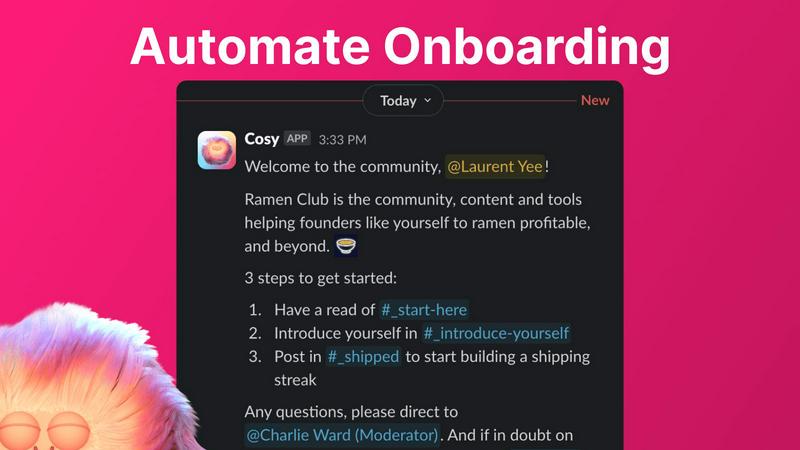
Automate Onboarding
Streamline the onboarding process for new members with up to 10 customizable welcome DM sequences. Triggered upon joining, these messages can include personalized touches such as names and links, allowing for a warm introduction. This feature saves you significant time and ensures that every new member feels welcomed, regardless of when they join.
Connect Your Members
Foster engagement by automatically introducing community members to one another through DMs. Set a customizable schedule for introductions, enhancing connections without any extra effort. Opted-in members are randomly selected for introductions, ensuring a lively and connected community atmosphere.
Member Directory
Create a comprehensive, searchable directory of your community members directly within Slack. Members can fill out customizable profiles that include essential details, making it easier for everyone to connect. With a simple command, members can access this directory, facilitating interactions without leaving the Slack environment.
Content Highlights
Instantly identify the top 10 most engaging posts in your community or find all public messages that have gone unanswered. Using quick slash commands, you can surface content that drives interaction, ensuring that important discussions do not get overlooked and that your community remains engaged and informed.
Use Cases of Cosy
New Member Onboarding
Easily onboard new members by automatically sending them personalized welcome messages that help them navigate the community. With automated follow-ups, you can ensure they have all the information needed to integrate smoothly into the group, reducing the workload on community managers.
Enhancing Member Engagement
Utilize the automated introduction feature to regularly connect members with each other, fostering a sense of belonging within the community. This approach encourages conversations and networking, significantly boosting overall engagement without requiring manual effort.
Simplifying Member Search
Leverage the member directory to help community members find each other based on shared interests or expertise. This simplifies the process of networking and collaboration, allowing members to connect with the right people quickly and effectively.
Highlighting Key Discussions
Ensure that important discussions are not lost in the noise by using content highlight features to surface engaging posts. This allows community managers to keep members informed and engaged with the most relevant content, enhancing participation in the community.
Frequently Asked Questions
How does Cosy automate onboarding for new members?
Cosy allows you to create up to 10 distinct onboarding sequences that automatically send personalized welcome messages to new members upon joining. You can customize these messages and set time delays for sending them, ensuring no member goes unnoticed.
Can I customize the member directory?
Yes, the member directory is customizable. You can create profiles with up to 10 fields, which can be text entries or multiple-choice options, allowing members to provide relevant information that enhances community interaction.
What commands can I use to access content highlights?
You can use specific slash commands to surface engaging content in your community. For instance, the command "/most-engaged-messages" retrieves the top 10 posts in a channel, while "/unreplied-messages" shows posts that have not received responses, helping to keep discussions active.
Is there a free version of Cosy available?
Yes, Cosy offers a free version that supports up to 250 members. Additionally, there is a 30-day trial available for unlimited members, allowing you to explore all its features without any commitment.
Explore more in this category:
Similar to Cosy

Free collection of online developer utilities, code formatters, and digital converters designed to streamline your daily workflow.


Visual financial timelines for couples and young professionals: model cash flow, life events, and shared goals.

Online tally counter for tracking attendance, workouts, inventory, sports scores, visitors, habits, and everyday counting tasks.

The #1 Native Form Builder Plugin for Framer - No Code, No Embeds, No External Platforms.

A free launch checklist for SaaS, apps, AI tools and more. Every step says why it matters and when you can skip it.

Practical, independent guides to home repairs, maintenance, costs, troubleshooting, and everyday fixes.

Translate JSON, Markdown, and TXT files while preserving keys, nested paths, and project structure.