
AI Audio Translator
Transcribe, translate, and dub spoken content in real-time with a live interactive console for lightning-fast results.
Visit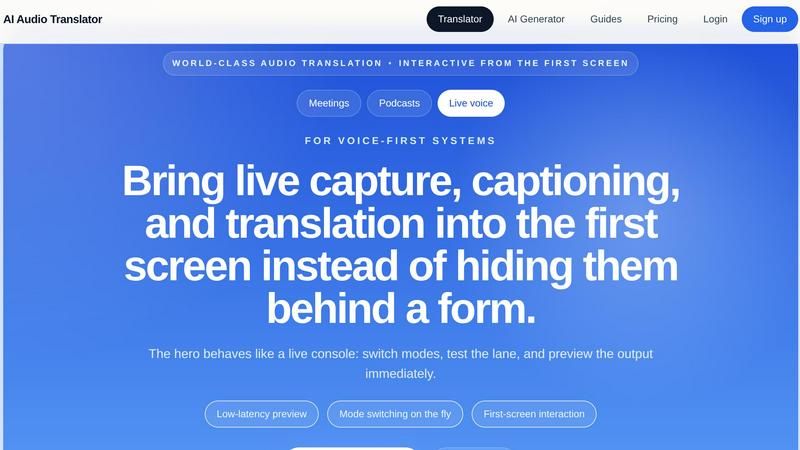
About AI Audio Translator
AI Audio Translator is a lightning-fast, browser-based tool built for spoken-content workflows. It eliminates the need to juggle multiple apps by combining transcription, translation, and optional dubbing into one focused, interactive studio. You can upload audio files, paste a public audio URL, or record directly in your browser. The tool then generates a transcript, translates it into your chosen language, and optionally creates dubbed speech with an AI voice. This product is designed for practical review: you inspect the transcript first, check the translation for accuracy, and only generate dubbed audio when you actually need it. It is ideal for podcasts, interviews, lessons, demos, and localization tasks. The core value is speed and efficiency. Instead of hiding features behind forms, the hero screen acts like a live console. You can switch modes, test lanes, and preview output instantly. Low-latency preview and mode switching on the fly mean you are never waiting. The entire pipeline is transparent: you see the transcript, translation, and dub generation status in real time. This tool is perfect for teams that need to move fast without sacrificing quality. Whether you are translating a product demo for overseas partners or adding subtitles to a recorded lecture, AI Audio Translator gets the job done in a fraction of the time.
Features of AI Audio Translator
Interactive First-Screen Studio
The hero interface behaves like a live console, not a static form. You can upload audio, paste a URL, or record on the spot. Switch between transcription, translation, and dubbing modes instantly. Preview your output with low-latency feedback. This design puts live capture, captioning, and translation right on the first screen, so you can start working immediately without digging through menus.
Transcript-First Review Lane
You always see the transcript before anything else. This lets you inspect the raw speech, check for errors, and make edits before moving to translation. The translated text appears alongside the source, making it easy to compare and verify accuracy. Only when you are satisfied do you generate dubbed audio. This review-first approach saves time and prevents costly mistakes in downstream workflows.
Flexible Input Options
Handle any source of spoken content from the same studio. Upload common audio formats like MP3, WAV, M4A, AAC, and OGG up to 100MB. Paste a public URL for direct access to online audio. Or hit record and capture voice directly in the browser. No need to switch between different tools or forms. Everything works in one unified lane, speeding up your workflow dramatically.
Optional AI Dubbed Audio
Turn translated text into playable, natural-sounding speech with a single toggle. You control when dubbing happens, so you are not generating audio you do not need. This feature is perfect for creating translated voice tracks for demos, learning materials, and localization. The AI voice is clear and professional, ready for immediate use in presentations or distribution.
Use Cases of AI Audio Translator
Podcasters Translating Interviews
Podcasters can upload recorded interviews and get a translated transcript and dubbed clips in minutes. Instead of hiring a translator or stitching together multiple tools, they use one focused workflow. The transcript-first review lets them verify accuracy before generating dubbed audio for international audiences. This speeds up content repurposing and expands reach without extra overhead.
Localization Teams Reviewing Spoken Content
Localization teams handle voice-over scripts, training materials, and recorded demos. With AI Audio Translator, they can inspect the transcript and translation before committing to a final dubbed track. This reviewability ensures high-quality output and clean handoffs to editors or stakeholders. The tool fits seamlessly into existing localization pipelines, cutting down turnaround time.
Educators Translating Lessons and Lectures
Teachers and trainers can translate recorded lessons, lectures, and explainers into multiple languages. They upload the audio, review the transcript, and generate dubbed speech for students who need it. This is especially useful for online courses with a global audience. The fast workflow means new language versions are ready in hours, not days.
Product Teams Preparing International Demos
Product teams preparing demos for overseas partners can quickly generate a reliable translated voice track. They record or upload the demo audio, review the transcript, and produce dubbed speech in the target language. This ensures the release call has a professional, localized presentation. The entire process is streamlined, so teams meet tight deadlines without stress.
Frequently Asked Questions
What audio formats does AI Audio Translator support?
AI Audio Translator supports MP3, WAV, M4A, AAC, and OGG file formats. The maximum file size is 100MB. You can also paste a public audio URL or record directly in the browser. This flexibility ensures you can work with almost any source of spoken content without converting files first.
Can I review the transcript before generating dubbed audio?
Yes, absolutely. The workflow is built around transcript-first review. You see the raw transcript immediately after upload or recording. You can inspect it, then view the translated text alongside the source. Only when you are satisfied do you toggle on the dubbing feature. This prevents wasted time and ensures high-quality output.
How many languages are supported for translation and dubbing?
AI Audio Translator supports a wide range of languages including English, Chinese, Japanese, Korean, French, German, Spanish, Portuguese, Italian, Russian, Arabic, Hindi, Dutch, Polish, Turkish, Vietnamese, Thai, and Indonesian. You can set a source language or let the tool auto-detect it. The target language list is equally extensive.
Is the dubbed audio ready to use immediately?
Yes, the AI-generated dubbed audio is playable and downloadable right from the studio. It is designed for practical use in demos, learning materials, and localization tasks. The voice is clear and professional, suitable for presentations or distribution. You can also copy or download the transcript and translation separately for further editing.
Explore more in this category:
Similar to AI Audio Translator


Create videos from podcasts, narration, voice recordings, or music with audio-aware AI, prompts, reference images, and flexible output settings.

Melodank turns your memories and special occasions into unique German or English songs you can preview and share as digital gifts.


VideoAny lets you generate uncensored videos, images, and audio from text or photos in one fast platform.

InstaSong turns any text prompt into a full royalty-free song with vocals and beats in under a minute.

Turn text prompts into original songs, background music, and video-ready audio at lightning speed with this free AI music generator.

Wisprs instantly transcribes speech in 100+ languages, identifies speakers, and generates summaries from clear audio.