
RemoveTexts vs Shrinkpad
Side-by-side comparison to help you choose the right product.

RemoveTexts
RemoveTexts is an AI tool that instantly erases text from images, delivering professional results without any design skills needed.
Last updated: March 11, 2026

Shrinkpad
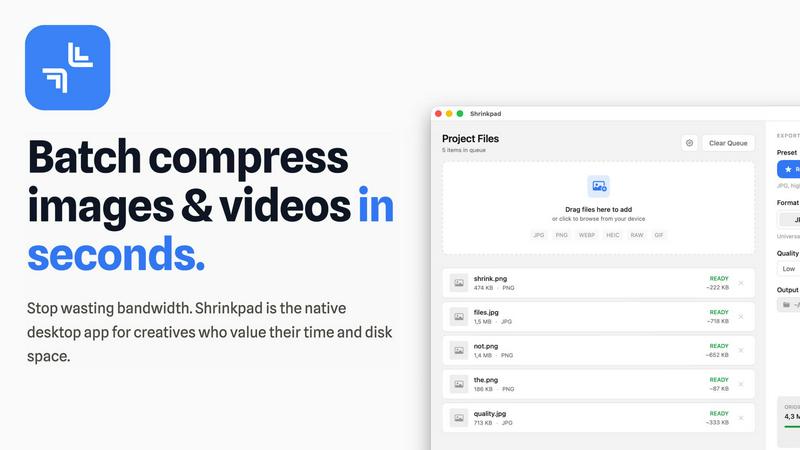
Shrinkpad instantly compresses batches of images and videos on your Mac to save space and time.
Last updated: February 28, 2026
Visual Comparison
RemoveTexts

Shrinkpad
Feature Comparison
RemoveTexts
Paint to Remove
This feature allows users to manually brush over specific areas of text they wish to erase. It provides precise control, ensuring that only the intended text is removed while preserving the surrounding image quality.
Auto Remove All
With this powerful one-click option, the AI automatically detects and removes every text element in the image. This feature is perfect for those who want a quick clean-up without having to manually select each text area.
Edit & Replace Text
This innovative feature enables users to change existing text in images while matching the original style. Whether you need to update a product label or correct a subtitle, it offers a seamless editing experience.
Remove Objects
In addition to text, this feature allows users to erase unwanted objects, logos, or other visual elements from their images. It combines the power of AI to ensure the background is reconstructed flawlessly, giving a clean result without any traces of the removed items.
Shrinkpad
Lightning-Fast Batch Processing
Stop processing files one by one. Shrinkpad is engineered for speed, leveraging multi-threaded compression and optimization for Apple Silicon to process thousands of images and videos in minutes. Drop an entire folder and watch as it instantly detects and queues all media files, ready for bulk compression with a single click. This massive time savings is a game-changer for handling large projects.
Intelligent Quality Optimization
No more guessing at compression settings. Shrinkpad automatically analyzes the visual complexity of each file to apply the perfect compression ratio. Its smart algorithms ensure maximum file size reduction without introducing artifacts or noticeable quality loss, delivering optimized assets that look perfect every time, automatically.
Complete Local Privacy & Security
Your files stay on your machine, period. Unlike web-based tools, Shrinkpad performs all compression locally using native macOS frameworks. This means your original high-resolution assets, client work, and sensitive projects are never uploaded to a cloud server, ensuring total privacy and security throughout your workflow.
Advanced Format & Workflow Support
Shrinkpad handles over 50 formats effortlessly, from common JPGs and PNGs to professional RAW files, HEIC, WEBP, AVIF, MP4, and MOV videos. It includes pro features like automatic file renaming, metadata stripping, and subfolder preservation. Export assets at 2x/4x from design tools and let Shrinkpad optimize and organize them in one fell swoop.
Use Cases
RemoveTexts
E-commerce Product Cleaning
Online sellers can use RemoveTexts to quickly eliminate watermarks and text overlays from product images, ensuring that their listings look professional and polished, ultimately boosting sales.
Social Media Content Creation
Content creators can efficiently remove unwanted captions, logos, or memes from images before posting them on their social media platforms. This helps maintain a clean aesthetic and enhances viewer engagement.
Document Redaction
Legal professionals and businesses can utilize RemoveTexts to redact sensitive information from documents and images, ensuring compliance with privacy laws while maintaining the integrity of the original content.
Creative Projects and Design
Artists and graphic designers can leverage RemoveTexts to edit images for various creative projects, allowing for the removal of distracting elements that could detract from the overall visual impact of their work.
Shrinkpad
Optimizing Website & App Assets
Developers and web designers can drastically reduce bundle sizes and improve load times. By batch-compressing hero images, icons, and promotional videos, Shrinkpad helps achieve faster Lighthouse Performance scores (like LCP) and enhances user experience without manual, per-file optimization.
Managing Photographer & Creator Libraries
Photographers and content creators drowning in large RAW files and 4K video footage can reclaim terabytes of storage. Shrinkpad processes entire shoots or content batches in one go, preparing files for client delivery, portfolio sites, or archiving while maintaining professional quality and saving enormous amounts of time.
Streamlining Design-to-Export Workflows
Designers using Figma, Photoshop, or Sketch can export all assets at high resolutions for various devices and then use Shrinkpad for final optimization. It automatically compresses and renames batches of files, eliminating the tedious, manual step of exporting individually optimized versions.
Preparing Files for Email & Collaboration
Professionals who need to send large batches of images or videos via email or collaboration platforms can use Shrinkpad to quickly reduce file sizes before sharing. This avoids hitting attachment limits, speeds up upload/download times, and ensures recipients get optimized files instantly.
Overview
About RemoveTexts
RemoveTexts is a groundbreaking AI-powered online image editing tool designed to remove unwanted text, watermarks, and other visual distractions from images with just a single click. Ideal for creators, marketers, and designers alike, it streamlines the process of enhancing visuals by eliminating text elements such as captions, memes, and date stamps. With RemoveTexts, users can achieve professional-grade results in less than 30 seconds without needing any design skills or Photoshop expertise. The platform leverages advanced deep learning technology to reconstruct the original background seamlessly, ensuring that the final image looks clean and polished. Whether you are an e-commerce seller needing clean product photos or a content creator looking to remove unwanted overlays, RemoveTexts is your go-to solution for quick and effective image editing.
About Shrinkpad
Shrinkpad is the ultimate batch compression powerhouse built exclusively for macOS. It slashes through the tedious work of optimizing images and videos, delivering lightning-fast results without sacrificing quality. Designed for photographers, designers, developers, and content creators, it transforms hours of manual busywork into a task that takes seconds. Simply drag and drop hundreds of files or entire folders, and Shrinkpad compresses them in a flash, reducing sizes by up to 90% while preserving visual integrity. Every operation happens locally on your Mac using native Apple frameworks, guaranteeing complete privacy—your files never touch the cloud. With seamless support for over 50 formats, including RAW photos and 4K videos, Shrinkpad is the essential tool for reclaiming disk space, speeding up websites, and streamlining your entire media workflow with unmatched efficiency.
Frequently Asked Questions
RemoveTexts FAQ
How does RemoveTexts work?
RemoveTexts uses advanced AI technology to analyze and reconstruct the background of an image after removing text or objects. It employs deep learning inpainting techniques, ensuring that the final result is seamless and professional.
What image formats does RemoveTexts support?
The tool supports popular image formats including JPG, PNG, and WebP, allowing users to upload a wide range of images for text removal without hassle.
Is there a limit to the image size I can upload?
Yes, users can upload images up to 10 MB in size. This ensures that images maintain their quality while being processed for text removal.
Can I use RemoveTexts for commercial purposes?
Absolutely! Many users, including e-commerce sellers and marketers, use RemoveTexts to prepare images for commercial use, ensuring that their visuals are clean and appealing without any unwanted text.
Shrinkpad FAQ
What file formats does Shrinkpad support?
Shrinkpad supports a wide range of over 50 image and video formats. This includes common formats like JPG, PNG, GIF, and MP4, as well as professional formats like RAW camera files (from Canon, Nikon, Sony, etc.), HEIC, WEBP, AVIF, ProRes, and MOV. It handles mixed batches of photos and videos seamlessly.
Does Shrinkpad support video compression?
Yes, absolutely. Shrinkpad provides powerful video compression alongside image optimization. It can compress large video files (including 4K footage) by significant percentages, reducing their size for easier storage, sharing, or web use while maintaining a high-quality visual output.
How many files can I process at once?
With the paid Personal or Team plans, you get unlimited batch processing. You can queue and process thousands of files in a single session without crashes. The Free Starter plan has a limit of 10 files per batch for initial testing.
Are my files uploaded to the cloud?
No. Privacy is a core principle of Shrinkpad. All processing is performed 100% locally on your Mac using Apple's native frameworks. Your original files, compressed results, and any data never leave your computer, ensuring complete security and privacy.
Alternatives
RemoveTexts Alternatives
RemoveTexts is an AI-powered tool designed to effortlessly remove text from images in seconds, making it a valuable asset for anyone needing quick and clean image edits. As a part of the image and photo editing category, it simplifies tasks like eliminating watermarks, subtitles, or unwanted text without the need for complex software like Photoshop. Users often seek alternatives to RemoveTexts for various reasons, such as pricing, specific feature sets, or compatibility with different platforms and devices. When choosing an alternative, consider factors like ease of use, output quality, language support, and the ability to perform batch processing. A good alternative should offer reliable performance and meet your specific editing needs efficiently.
Shrinkpad Alternatives
Shrinkpad is a powerful batch compression tool for macOS, squarely in the image and video optimization category. It excels at slashing file sizes locally and at lightning speed, making it a favorite for Mac users who prioritize efficiency and privacy. Users often explore alternatives for various reasons. Some may need a tool that works across Windows or online platforms, while others might seek different pricing models or specific advanced features not present in their current solution. The quest for the perfect fit is common in any software category. When evaluating an alternative, key factors to consider are processing speed, format support, and whether it operates locally or in the cloud. Your ideal choice should match your platform, respect your budget, and deliver the quality control you need without slowing down your creative workflow.