
ScreenDemos vs Wan 2.7 AI
Side-by-side comparison to help you choose the right product.

ScreenDemos
Create professional product demo videos in minutes with ScreenDemos' automatic effects and seamless recording.
Last updated: February 28, 2026

Wan 2.7 AI instantly generates professional videos from text or images for fast, cinematic storytelling.
Last updated: April 13, 2026
Visual Comparison
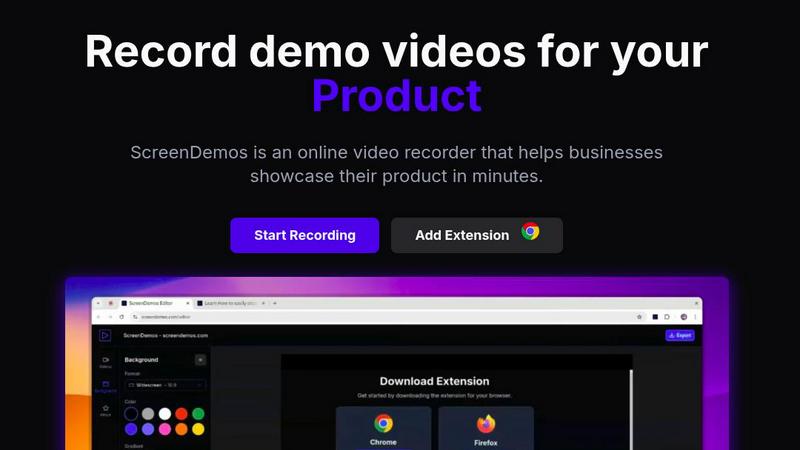
ScreenDemos
Wan 2.7 AI

Feature Comparison
ScreenDemos
Automatic Zoom Effects
With ScreenDemos' automatic zoom effects, producing engaging video demos becomes effortless. This feature guides the viewer's attention seamlessly, allowing you to highlight key areas of your screen without manual adjustments or extensive editing.
Smooth Animated Cursor
The smooth animated cursor feature enhances the viewer experience by providing a larger, more visible cursor that glides effortlessly across the screen. This makes it easier for viewers to follow along, ensuring that they do not miss critical actions during the demo.
Shortcuts Hints
Improve viewer engagement with shortcut hints displayed on-screen. This feature allows you to effortlessly showcase keyboard shortcuts during your demo, making it easier for your audience to learn and understand the functionalities of your product.
Custom Backgrounds
Personalize your demo videos with custom backgrounds that align with your brand’s identity. This feature allows you to maintain a consistent visual style across your videos, enhancing brand recognition while engaging your audience.
Wan 2.7 AI
Multi-Modal Video Generation
Wan 2.7 AI accelerates creation with multiple input methods. Go beyond simple text prompts by using image-to-video for consistent visual starting points or video-to-video for style transfer and enhancement. This multi-modal approach provides flexibility and speed, allowing you to prototype and iterate on video concepts from any asset in your workflow, dramatically cutting down production time.
Advanced Control & Customization
Gain precise control over your final output with advanced settings. Fine-tune camera angles, lighting, and scene transitions to match your exact vision. Specify aspect ratios for any platform, from 9:16 for TikTok to 21:9 for cinematic widescreen, and control resolution up to 1080p. This level of detailed customization ensures your videos are not only fast to create but also perfectly tailored for their intended use.
Enhanced Realism & Consistency
Experience a major leap in video quality with AI-powered realism that rivals professional production. Wan 2.7 delivers highly realistic textures, stable subject consistency across shots, and smoother environmental motion. Improved AI understanding of complex prompts leads to more accurate and coherent visuals, making your generated videos indistinguishable from those created with traditional, time-intensive methods.
Rapid Prototyping & Iteration
Speed is central to Wan 2.7. The platform is built for rapid prototyping, allowing you to generate video concepts and storyboard clips in moments. Quickly test different prompts, styles, and settings to iterate on your ideas without delay. This enables fast feedback loops and swift approval processes, ensuring your final video is perfected in record time.
Use Cases
ScreenDemos
Product Demos for Entrepreneurs
Entrepreneurs can leverage ScreenDemos to create stunning product demos in mere minutes. Whether announcing a new feature or showcasing product capabilities, this tool helps capture potential customers' attention quickly and effectively.
Onboarding Tutorials for Teams
Design and support teams can use ScreenDemos to produce onboarding tutorials that simplify the training process. By creating clear, concise videos, teams can expedite user onboarding and reduce confusion, ultimately enhancing the user experience.
Marketing Campaigns for Marketers
Marketers can utilize ScreenDemos to produce captivating videos for marketing campaigns. By showcasing features or benefits dynamically, they can engage their audience and communicate effectively, driving higher conversion rates.
Social Media Sharing for Developers
Developers can create quick demo videos to share on social media platforms, highlighting new features or changes in their applications. This not only boosts visibility but also encourages user feedback and engagement in real-time.
Wan 2.7 AI
Social Media Content Creation
Generate eye-catching, platform-optimized videos for Instagram Reels, TikTok, and YouTube Shorts at lightning speed. Create trending content, promotional clips, or engaging stories by simply describing your idea. The ability to quickly produce a high volume of stylized content helps maintain a consistent and dynamic social media presence without a lengthy production cycle.
Marketing & Advertising Promos
Produce professional marketing videos, product demos, and advertisement teasers in minutes. Use the cinematic and corporate styles to craft brand-aligned messages that capture attention. The rapid prototyping feature allows marketing teams to A/B test different concepts and visuals efficiently before committing to a final campaign asset.
Explainer & Animated Story Videos
Transform complex ideas into clear, engaging explainer videos or animated stories. Input a script or concept, select a style like cartoon or motion graphics, and let Wan 2.7 AI generate a compelling visual narrative. This is perfect for educators, startups, and businesses needing to communicate information quickly and effectively to their audience.
Creative Storyboarding & Pre-Visualization
Accelerate the pre-production phase for film, animation, or commercial projects. Use Wan 2.7 to generate fast render storyboard clips and visual sequences from written scenes. This allows directors and creatives to visualize shots, experiment with blocking and lighting, and secure scene approvals faster, streamlining the entire creative pipeline.
Overview
About ScreenDemos
ScreenDemos is the revolutionary, lightning-fast solution designed to help businesses create professional-grade video demos right from their web browsers. It streamlines the traditional, often tedious process of recording, editing, and post-processing, allowing users to produce studio-quality videos in minutes instead of hours. With a user-friendly browser extension, anyone—from marketing teams and product developers to educators and support staff—can effortlessly record their screens and automatically generate engaging content. The tool enhances videos with dynamic zoom effects, smooth cursor animations, and on-screen shortcut hints, ensuring viewers remain captivated. The main value proposition is clear: eliminate the need for complex software and editing skills, enabling users to focus on communicating their ideas with speed and impact. Whether you are showcasing a product feature or creating a tutorial, ScreenDemos is engineered for efficiency and effectiveness, making it an essential tool for modern businesses.
About Wan 2.7 AI
Wan 2.7 AI is the next-generation, creator-focused AI video generator designed to revolutionize your content workflow with unparalleled speed and efficiency. It transforms simple text prompts into stunning, professional-quality videos in seconds, eliminating the need for complex editing software or extensive production teams. This powerful tool is built for marketers, content creators, social media managers, and businesses of all sizes who need to produce high-impact video content rapidly. Its core value proposition lies in delivering enhanced realism, greater creative control, and a streamlined workflow that turns ideas into visual stories faster than ever before. With significant upgrades over Wan 2.6, it offers improved prompt understanding for higher-quality results, steadier multi-shot storytelling, and advanced controls for fine-tuning every aspect of your video. From cinematic scenes and animated explainers to dynamic social media clips, Wan 2.7 AI handles the heavy technical lifting, empowering you to focus purely on your creative vision and scale your video output effortlessly.
Frequently Asked Questions
ScreenDemos FAQ
Is ScreenDemos privacy-friendly?
Yes, ScreenDemos prioritizes user privacy. It never collects or stores any user data, processing all recordings locally. Users can choose to save videos on their devices or on the ScreenDemos website, ensuring data security.
What devices are supported?
ScreenDemos is compatible with all major browsers that support extensions, including Chrome and Firefox. It works seamlessly across all operating systems, including Windows, macOS, and Linux, making it accessible for everyone.
Why do I need to give permission to the extension?
The ScreenDemos extension requires permission to access your screen for recording. This ensures that users can capture their screen accurately and utilize the tool's features effectively while maintaining security and privacy.
Can I edit my videos after recording?
Yes, ScreenDemos allows you to preview and make edits to your demo videos after recording. This means you can refine your content, add enhancements, and ensure that it meets your quality standards before sharing it with your audience.
Wan 2.7 AI FAQ
What is the main improvement in Wan 2.7 over Wan 2.6?
Wan 2.7 focuses on significantly enhanced control and continuity. Key upgrades include improved prompt understanding for higher-quality results, steadier multi-shot storytelling for consistent narratives, and more stable rendering of subjects and environments. It also introduces better fine-tuning options for elements like lighting and motion, providing creators with a more reliable and professional output.
What video formats and aspect ratios does Wan 2.7 support?
Wan 2.7 offers seamless export in various formats and supports multiple aspect ratios to fit any platform. You can choose from 16:9 (standard widescreen), 9:16 (vertical for mobile), 1:1 (square), 4:3, 3:4, and 21:9 (cinematic). Videos can be generated and exported in resolutions including 480p, 720p, and 1080p for optimal quality and file size.
How does the credit system work for generating videos?
The platform operates on a credit-based system. Each video generation consumes a certain number of credits, which varies based on duration, resolution, and other settings. As indicated in the interface, a sample generation may cost 35 credits. Users can purchase credit packs to replenish their balance, allowing for flexible scaling of video production based on project needs.
Can I use my own images or videos as a starting point?
Yes, absolutely. Wan 2.7 supports image-to-video and video-to-video generation. You can upload your own image to serve as a visual reference or starting frame, guiding the AI's style and composition. Similarly, you can upload a video clip to transform its style or enhance it using AI, providing powerful tools for remixing and iterating on existing assets quickly.
Alternatives
ScreenDemos Alternatives
ScreenDemos is a fast and efficient solution for creating professional-grade product demos directly from your web browser. As part of the content creation and design tools category, it enables users to record their screens and produce engaging videos without the hassle of traditional editing. Users often seek alternatives due to various factors, including pricing, specific feature sets, or compatibility with different platforms. Whether it's for budget constraints or the need for specialized functionalities, exploring alternatives can provide options that better suit individual or team requirements. When selecting an alternative, consider factors such as user-friendliness, the range of features offered, integration capabilities, and the overall cost. Look for tools that prioritize speed and efficiency, mirroring the streamlined experience that ScreenDemos provides. Additionally, ensure that any chosen solution aligns with your specific needs in video production and enhances your workflow.
Wan 2.7 AI Alternatives
Wan 2.7 AI is a leading text-to-video generator that uses artificial intelligence to transform simple text prompts into professional-quality videos. It belongs to the fast-growing category of AI video creation tools, designed to streamline production for marketers, creators, and businesses. Users often explore alternatives for several practical reasons. Budget constraints, specific feature requirements, or the need for a different platform can all drive the search. Some may seek tools with different output styles, more granular editing control, or a pricing model that better fits their usage patterns. When evaluating other options, focus on core needs. Consider the quality and realism of the AI-generated video, the tool's speed and ease of use, and the flexibility it offers for customization. Also, assess the cost structure and any platform limitations to ensure a seamless fit for your workflow.