
Patrivox vs ScreenDemos
Side-by-side comparison to help you choose the right product.

Patrivox
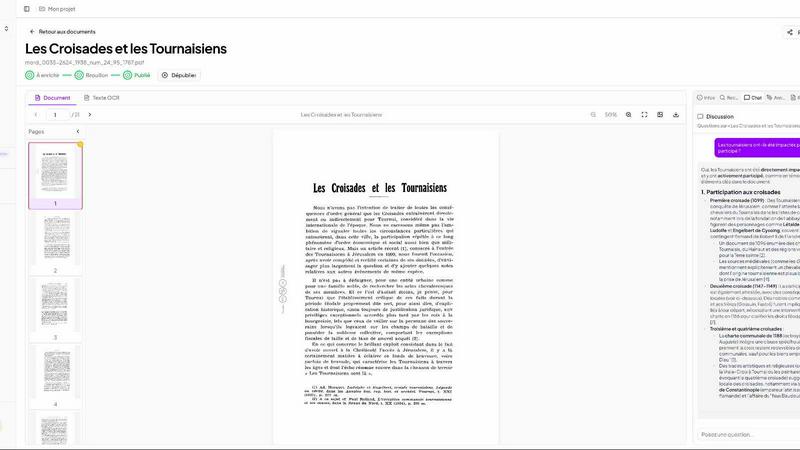
Patrivox uses AI to instantly digitize and make your entire archive fully searchable.
Last updated: March 4, 2026

ScreenDemos
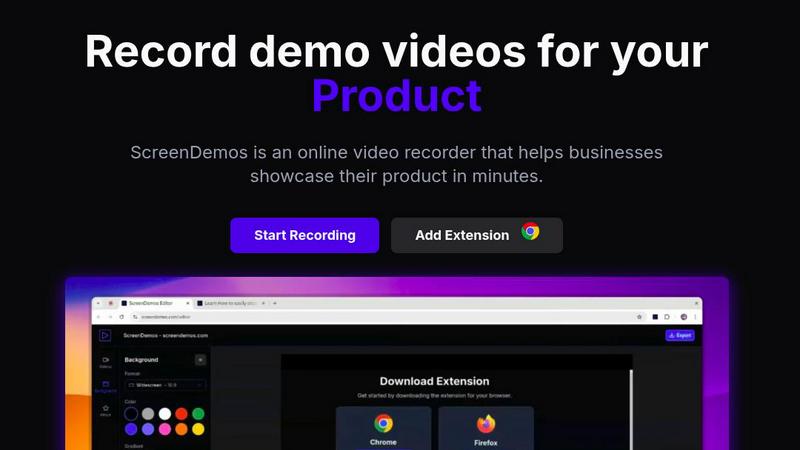
Create professional product demo videos in minutes with ScreenDemos' automatic effects and seamless recording.
Last updated: February 28, 2026
Visual Comparison
Patrivox
ScreenDemos
Feature Comparison
Patrivox
Automation: Drop it, Done
Drag and drop hundreds of PDFs at once. Within minutes, Mistral AI reads every page, performs advanced OCR, and automatically extracts entities (names, places, dates). Your entire collection is indexed and made searchable with zero manual entry or complex configuration required. It's bulk import and instant analysis.
Intelligent Search & AI Chat
Find any word in less than a second with robust, typo-tolerant full-text search. Filter results by date, author, or document type. Go beyond keywords and ask complex questions in natural language. The AI provides concise answers, directly citing the source documents for complete transparency and trust.
Constellation Knowledge Graph
Visualize the hidden connections within your archives. The platform automatically builds an interactive graph linking every identified person, place, and organization. Navigate from node to node to discover relationships and contextual links between documents that were previously impossible to see at a glance.
Sovereign European Hosting
Your data's security and compliance are paramount. Patrivox is 100% hosted in Europe and built as GDPR-native from the ground up. It includes features like audit logs and provides the assurance that sensitive archival material remains under strict European data protection standards.
ScreenDemos
Automatic Zoom Effects
With ScreenDemos' automatic zoom effects, producing engaging video demos becomes effortless. This feature guides the viewer's attention seamlessly, allowing you to highlight key areas of your screen without manual adjustments or extensive editing.
Smooth Animated Cursor
The smooth animated cursor feature enhances the viewer experience by providing a larger, more visible cursor that glides effortlessly across the screen. This makes it easier for viewers to follow along, ensuring that they do not miss critical actions during the demo.
Shortcuts Hints
Improve viewer engagement with shortcut hints displayed on-screen. This feature allows you to effortlessly showcase keyboard shortcuts during your demo, making it easier for your audience to learn and understand the functionalities of your product.
Custom Backgrounds
Personalize your demo videos with custom backgrounds that align with your brand’s identity. This feature allows you to maintain a consistent visual style across your videos, enhancing brand recognition while engaging your audience.
Use Cases
Patrivox
Municipal Archives
Digitize and showcase city deliberations, historical registers, and official correspondence. Transform public records from dusty files into a searchable public resource, enabling citizens and researchers to find information in seconds instead of days.
Historical Societies & Associations
Make your bulletins, yearbooks, and documentary collections fully explorable. Empower volunteers and members by eliminating manual indexing, allowing them to focus on research and storytelling using the AI-identified connections and instant search.
Heritage Libraries & Special Collections
Open your unique and fragile collections to a wider audience without risking the physical documents. Researchers can perform deep, semantic searches across thousands of pages online, discovering relevant materials through the AI chat and knowledge graph.
Dioceses & Parish Archives
Preserve and index precious parish registers, ecclesiastical letters, and historical documents. Create a secure, organized, and easily navigable digital archive that protects original materials while making genealogical and historical research effortless.
ScreenDemos
Product Demos for Entrepreneurs
Entrepreneurs can leverage ScreenDemos to create stunning product demos in mere minutes. Whether announcing a new feature or showcasing product capabilities, this tool helps capture potential customers' attention quickly and effectively.
Onboarding Tutorials for Teams
Design and support teams can use ScreenDemos to produce onboarding tutorials that simplify the training process. By creating clear, concise videos, teams can expedite user onboarding and reduce confusion, ultimately enhancing the user experience.
Marketing Campaigns for Marketers
Marketers can utilize ScreenDemos to produce captivating videos for marketing campaigns. By showcasing features or benefits dynamically, they can engage their audience and communicate effectively, driving higher conversion rates.
Social Media Sharing for Developers
Developers can create quick demo videos to share on social media platforms, highlighting new features or changes in their applications. This not only boosts visibility but also encourages user feedback and engagement in real-time.
Overview
About Patrivox
Patrivox is a lightning-fast European SaaS platform that transforms static archives into dynamic, searchable knowledge in minutes. It is designed for heritage institutions, municipal archives, historical societies, parishes, and any organization sitting on vast collections of scanned PDFs. Users simply drag and drop their documents, and Patrivox's AI, powered by Mistral AI, instantly goes to work. It performs next-generation OCR to extract every word, then automatically identifies and links key entities like people, places, and organizations within an interactive knowledge graph. The core value is unprecedented speed and efficiency: gone are the days of manual indexing and hours of fruitless searching. With Patrivox, you gain instant, typo-tolerant full-text search and the ability to ask questions in plain language, receiving AI-generated answers with direct citations. It makes inaccessible knowledge instantly accessible, shareable, and ready for research, all while ensuring data sovereignty with 100% European hosting and GDPR-native compliance.
About ScreenDemos
ScreenDemos is the revolutionary, lightning-fast solution designed to help businesses create professional-grade video demos right from their web browsers. It streamlines the traditional, often tedious process of recording, editing, and post-processing, allowing users to produce studio-quality videos in minutes instead of hours. With a user-friendly browser extension, anyone—from marketing teams and product developers to educators and support staff—can effortlessly record their screens and automatically generate engaging content. The tool enhances videos with dynamic zoom effects, smooth cursor animations, and on-screen shortcut hints, ensuring viewers remain captivated. The main value proposition is clear: eliminate the need for complex software and editing skills, enabling users to focus on communicating their ideas with speed and impact. Whether you are showcasing a product feature or creating a tutorial, ScreenDemos is engineered for efficiency and effectiveness, making it an essential tool for modern businesses.
Frequently Asked Questions
Patrivox FAQ
How quickly does Patrivox process documents?
Extremely fast. From the moment you drop your PDFs, the AI begins processing immediately. You can have a fully searchable knowledge base with entities identified and linked in a matter of minutes, not hours or days.
Is my data secure and private with Patrivox?
Absolutely. Patrivox prioritizes sovereignty. All data is processed and stored 100% within the European Union on secure servers. The platform is GDPR-native by design, ensuring full compliance with Europe's strict data protection regulations.
What is an AI query?
An AI query is counted each time you use the natural language chat feature to ask a question about your documents. Standard full-text searches and browsing the knowledge graph do not consume AI query credits.
Can I collaborate with my team on Patrivox?
Yes. All plans include unlimited "reader" accounts for viewing and searching. Paid plans include multiple administrator seats, allowing several team members to manage the archive, upload documents, and configure settings collaboratively.
ScreenDemos FAQ
Is ScreenDemos privacy-friendly?
Yes, ScreenDemos prioritizes user privacy. It never collects or stores any user data, processing all recordings locally. Users can choose to save videos on their devices or on the ScreenDemos website, ensuring data security.
What devices are supported?
ScreenDemos is compatible with all major browsers that support extensions, including Chrome and Firefox. It works seamlessly across all operating systems, including Windows, macOS, and Linux, making it accessible for everyone.
Why do I need to give permission to the extension?
The ScreenDemos extension requires permission to access your screen for recording. This ensures that users can capture their screen accurately and utilize the tool's features effectively while maintaining security and privacy.
Can I edit my videos after recording?
Yes, ScreenDemos allows you to preview and make edits to your demo videos after recording. This means you can refine your content, add enhancements, and ensure that it meets your quality standards before sharing it with your audience.
Alternatives
Patrivox Alternatives
Patrivox is a powerful AI-driven platform in the document management and content creation space. It specializes in transforming scanned documents and PDFs into a fully searchable digital knowledge base within minutes, using advanced OCR and entity recognition. Users often explore alternatives for various reasons. These can include budget constraints, the need for different feature sets like specific integrations, or requirements for a different deployment platform. The search for the right tool is common as organizational needs evolve. When evaluating alternatives, key considerations are processing speed and accuracy, the ability to handle your specific document types, the depth of search functionality, and how the platform scales. Security and data handling policies are also paramount for sensitive archives.
ScreenDemos Alternatives
ScreenDemos is a fast and efficient solution for creating professional-grade product demos directly from your web browser. As part of the content creation and design tools category, it enables users to record their screens and produce engaging videos without the hassle of traditional editing. Users often seek alternatives due to various factors, including pricing, specific feature sets, or compatibility with different platforms. Whether it's for budget constraints or the need for specialized functionalities, exploring alternatives can provide options that better suit individual or team requirements. When selecting an alternative, consider factors such as user-friendliness, the range of features offered, integration capabilities, and the overall cost. Look for tools that prioritize speed and efficiency, mirroring the streamlined experience that ScreenDemos provides. Additionally, ensure that any chosen solution aligns with your specific needs in video production and enhances your workflow.