
Refbox vs Zovo
Side-by-side comparison to help you choose the right product.

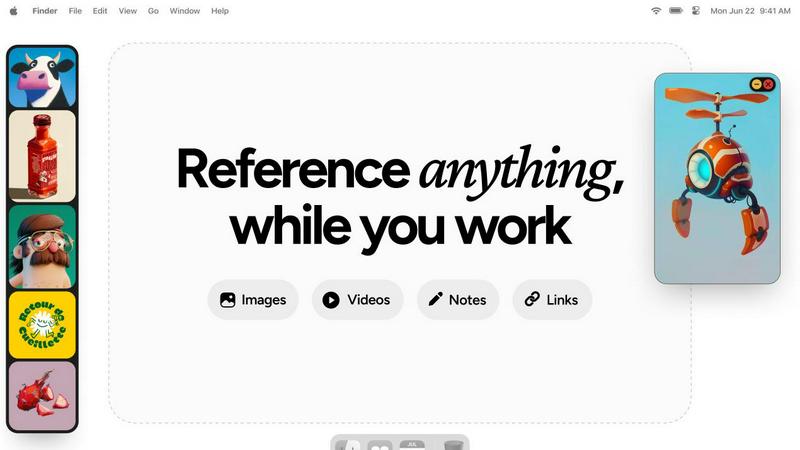
Refbox floats your images and notes above your workspace for instant access.
Last updated: February 28, 2026

Zovo offers 20 privacy-first Chrome extensions for developers and writers, all from a single solo developer.
Last updated: February 27, 2026
Visual Comparison
Refbox
Zovo

Feature Comparison
Refbox
Always-On-Top Floating Frames
Speed is paramount. Refbox creates resizable frames for your images, videos, GIFs, and notes that float persistently above every other application on your desktop. This means instant, glanceable access without ever minimizing your main work window. You can position references exactly where you need them, compare visuals side-by-side, and keep your workflow perfectly seamless from inspiration to execution.
Infinite Canvas & Quick-Swap Collections
Organize your chaos at lightning speed. Dump all your reference media onto a limitless canvas to see everything at once for broad moodboarding. Need to focus? Instantly swap between different curated Collections with a single click. Flip through items like a slideshow using arrow keys for rapid comparison, ensuring you find the perfect reference in seconds, not minutes.
Advanced Media Controls & Pixel-Perfect Tools
Go beyond simple viewing with power tools built for pros. Step through GIFs frame-by-frame for detailed animation study. Use the built-in color picker on any media to grab and copy hex codes instantly. View pixel art with proper crisp rendering, take website screenshots by pasting a URL, crop images on the fly, and even lock frames to draw behind them. Every action is optimized for speed.
Smart Shortcuts & Auto-Hide
Maintain a pristine, focused workspace. Configure keyboard shortcuts for every major action—opening the app, swapping collections, minimizing frames—for total hands-on-control. When you need full-screen focus, auto-hide your Refbox with a hotkey; it stays out of sight until you summon it back instantly. This minimizes visual clutter and maximizes screen real estate for your primary task.
Zovo
BeLikeNative
BeLikeNative enables users to write fluently in 80 languages with one keystroke. This flagship extension instantly rewrites your text, ensuring that you communicate like a native speaker. Ideal for writers, students, and professionals looking to enhance their language skills, this tool supports seamless integration across all writing platforms.
Tab Suspender Pro
Tab Suspender Pro intelligently manages your browser's memory usage by automatically suspending inactive tabs. This feature helps improve performance by reducing memory strain, making it perfect for users who tend to keep multiple tabs open while working or browsing. It offers memory tracking and smart detection for optimal efficiency.
Clipboard History Pro
Clipboard History Pro ensures that you never lose track of your copied text again. This extension stores up to 10,000 clips and features an instant search functionality for quick retrieval. Perfect for researchers, writers, and anyone who frequently copies and pastes, it simplifies the management of copied content.
Form Filler Pro
Form Filler Pro allows users to fill forms with a single click using saved profiles. This feature saves time and eliminates repetitive typing, making it ideal for users who frequently complete online forms. It supports multiple profiles and ensures that your data remains 100% local and secure.
Use Cases
Refbox
Digital Illustration & Concept Art
Illustrators and concept artists can pin character sketches, color palettes, and environment photos directly over their drawing software like Photoshop or Clip Studio Paint. This allows for constant visual comparison, ensuring anatomical accuracy, color matching, and stylistic consistency without breaking concentration to search for files, dramatically speeding up the drafting and rendering process.
UI/UX & Web Design
UI designers streamline their workflow by floating style guides, component libraries, and competitor website screenshots next to Figma or Sketch. They can quickly reference spacing, font sizes, and interaction patterns. The ability to take instant screenshots of live sites and add text notes for feedback keeps all critical reference material immediately accessible, ensuring design fidelity and faster iteration cycles.
3D Modeling & Animation
3D artists and animators use Refbox to keep orthographic reference images, texture maps, and motion study videos visible while working in complex software like Blender or Maya. The GIF frame-stepping feature is invaluable for analyzing movement frame-by-frame. This constant access prevents perspective errors and accelerates the modeling, texturing, and rigging phases.
Photography & Moodboarding
Photographers and art directors build dynamic moodboards by collating inspiration images, lighting setups, and color swatches on Refbox's infinite canvas. During editing in Lightroom or Capture One, they can float these boards for direct comparison. The organized collections allow for swift switching between different project themes or client visions, making creative direction clear and execution faster.
Zovo
Academic Writing
Students and researchers can leverage BeLikeNative to enhance their academic writing. By utilizing its one-keystroke rewrite feature, they can improve clarity and fluency, ensuring their papers meet high standards of academic integrity and communication.
Web Development
Web developers can benefit from the JSON Formatter Pro and Regex Tester Pro extensions. These tools enable them to format, validate, and debug JSON data seamlessly, enhancing their productivity and helping them avoid common coding pitfalls.
Content Creation
Content creators can streamline their workflow with Clipboard History Pro and Form Filler Pro. These tools provide quick access to previously copied text and allow for rapid form completion, making it easier to focus on creativity without getting bogged down by repetitive tasks.
Data Analysis
Data analysts can utilize Web Scraper Lite and Tab Suspender Pro to efficiently gather and manage data from multiple sources. The visual selector in Web Scraper Lite allows for easy data extraction, while Tab Suspender Pro optimizes their browser's performance, ensuring smooth multitasking.
Overview
About Refbox
Refbox is the lightning-fast floating reference app that eliminates creative friction. Built for speed-obsessed professionals, it pins your inspiration directly onto your workspace. Stop alt-tabbing through folders and browser tabs. Refbox lets you instantly float images, GIFs, videos, and notes in always-on-top, resizable frames that hover above any application you're using. This keeps your visual stimuli and critical notes visible at all times, ensuring your creative flow is never interrupted. It's designed for a wide spectrum of visual creators including graphic designers, illustrators, UI/UX designers, 3D artists, animators, photographers, and concept artists. The core value proposition is ruthless efficiency: by providing immediate, organized access to references without leaving your primary work window, Refbox dramatically boosts productivity and accuracy. It transforms a cluttered desktop or a mess of tabs into a streamlined, distraction-free command center for your creativity, letting you focus entirely on bringing your vision to life.
About Zovo
Zovo is a comprehensive suite of 20 powerful Chrome extensions developed by a solo developer with over a decade of experience and a proven track record of more than $400K earned on Upwork with a 100% success rate. Tailored for users who value efficiency, privacy, and customization, Zovo's flagship extension, BeLikeNative, revolutionizes writing by enabling over 3,300 users to express themselves like native speakers in 80 different languages with a simple keystroke. The suite includes essential tools like Tab Suspender Pro for memory management, JSON Formatter Pro for data handling, and Clipboard History Pro for seamless text management. Every extension prioritizes user privacy, ensuring that data never leaves your device, with no data harvesting or corporate interference. Users actively participate in shaping the development roadmap by voting on features, making Zovo a community-driven platform where your needs dictate the evolution of the tools you rely on. Experience monthly updates and the excitement of early access for members, while a selection of tools is available for free online at zovo.one.
Frequently Asked Questions
Refbox FAQ
What platforms does Refbox support?
Refbox is currently available for macOS and Windows operating systems. It is designed as a native desktop application to ensure high performance, system integration for features like always-on-top windows, and reliable access to your local files and clipboard, providing a fast and stable experience tailored for professional creative workflows.
Can I use Refbox with multiple monitors?
Absolutely. Refbox is built for expansive setups. You can drag and position your floating reference frames onto any connected monitor. This allows you to dedicate one screen entirely to your references and moodboards while using another for your primary design, animation, or editing software, creating an incredibly efficient and organized multi-screen workspace.
How does Refbox handle different file types?
Refbox supports a wide array of media natively. You can drag and drop or paste common image formats (JPG, PNG, SVG), videos (MP4, MOV), GIFs, and even text to create styled notes with checklists. For web references, simply paste a URL to generate a screenshot directly within the app. This versatility consolidates all your inspiration into one quick-access tool.
Is there a free trial or version available?
Yes, Refbox offers a free version with core functionality to let you experience the speed boost firsthand. This includes creating floating frames, basic collections, and using essential shortcuts. For access to advanced power features like unlimited collections, GIF frame control, the color picker, and website screenshots, you can upgrade to the Pro license with a one-time payment.
Zovo FAQ
What is Zovo?
Zovo is a suite of 20 Chrome extensions designed to enhance productivity and efficiency while prioritizing user privacy. Built by a solo developer, it offers tools for writing, data management, and web scraping, with a focus on community-driven development.
How does Zovo ensure user privacy?
Zovo guarantees 100% privacy by ensuring that all data processed by its extensions remains on your device. There is no data harvesting, and users can trust that their information is secure and not shared with third parties.
Can I request new features?
Absolutely! Users are encouraged to submit feature requests directly to the developer. The most requested features are prioritized and built based on community feedback, ensuring that the tools evolve according to user needs.
Is there a community for Zovo users?
Yes, Zovo has an active Discord community where users can discuss features, share tips, and connect with the developer directly. This community aspect enhances the user experience and fosters collaboration among users.
Alternatives
Refbox Alternatives
Refbox is a floating reference app in the productivity category. It keeps images, videos, and notes in always-on-top windows, eliminating disruptive app switching for creatives. Users often seek alternatives for various reasons. This includes needing a different pricing model, specific features not offered, or compatibility with a different operating system. It's a common step in finding the perfect workflow fit. When evaluating alternatives, prioritize core needs. Key factors include the ability to pin reference material, support for your file types, and seamless integration with your primary creative applications. Speed and an intuitive interface are also critical for maintaining efficiency.
Zovo Alternatives
Zovo is a robust suite of 20 privacy-first Chrome extensions designed specifically for developers and writers. Each tool focuses on enhancing productivity and management, offering features like JSON formatting, clipboard history, and tab suspension, all crafted by an experienced developer. As users seek out alternatives, they often look for better pricing, unique features, or compatibility with different platforms that might better suit their specific needs. When choosing an alternative, consider the range of features offered, the commitment to user privacy, and the flexibility of the tools available. It's also crucial to assess the developer's track record and community engagement, as user input can significantly shape the product's evolution. Finding a solution that meets your workflow demands while maintaining data security is essential in today's digital landscape.