
Magic Hour vs QuickImg
Side-by-side comparison to help you choose the right product.

Magic Hour
Create professional videos and images instantly with free AI tools.
Last updated: March 4, 2026
QuickImg instantly creates and edits stunning images with simple text prompts.
Last updated: February 28, 2026
Visual Comparison
Magic Hour

QuickImg
Feature Comparison
Magic Hour
Unified AI Studio
Access over 100 cutting-edge AI tools for video, image, and audio creation from one seamless, browser-based dashboard. This consolidation eliminates the need to juggle multiple subscriptions and platforms, allowing you to generate, edit, enhance, and publish stunning media at unprecedented speed. Jump from text-to-video to AI image editing to lip sync without any friction, supercharging your creative workflow.
Text-to-Video & Video-to-Video
Transform a simple text description into a cinematic video clip in one click. Need to refresh existing content? Instantly apply new artistic styles, aesthetics, or environments to any uploaded video with the powerful video-to-video feature. This allows for rapid content repurposing and experimentation, enabling you to create multiple engaging variations from a single asset in mere moments.
AI Face Swap & Lip Sync
Personalize content at lightning speed with advanced, realistic face swapping in both videos and photos. Pair this with the lip sync tool to make any character or photo deliver your specific message perfectly. These features are ideal for creating customized marketing content, personalized messages, or engaging social media clips without requiring any acting or complex filming.
Robust API for Developers
Ship AI-powered features in under 60 seconds with Magic Hour's powerful API. Designed for teams and agencies, it offers drop-in SDKs for Node, Python, Go, and Rust. Scale from 10 to 10 million requests with consistent performance and usage-based pricing. Easily integrate face swaps, virtual try-ons, text-to-video, and image-to-video generation directly into your own applications and campaigns.
QuickImg
Unified AI Model Hub
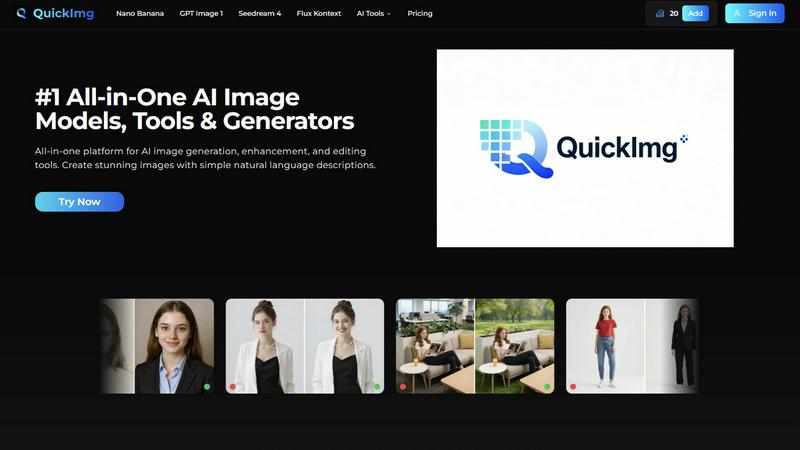
Access and compare multiple state-of-the-art AI image generators in one place. Choose from models like Nano Banana Pro for 2K/4K output, GPT Image 1 for superior text rendering, Seedream 4 for ultra-fast 4K generation, and Flux Kontext for precise editing. This hub allows you to instantly select the best model for your specific task—whether it's speed, resolution, or text accuracy—without juggling different subscriptions or platforms, streamlining your creative process dramatically.
Natural Language Image Crafting
Generate and modify images using simple, everyday language. Forget complex prompt engineering; just describe what you want to create or change. Tell QuickImg "a cat wearing a hat on Mars" or "make the background blue," and the AI handles the complex technical execution. This feature makes professional-grade image generation accessible to everyone, turning verbal ideas into visual reality in seconds.
One-Click Specialized Tools
Execute complex edits with a single click using a suite of AI-powered utilities. Instantly remove backgrounds, erase watermarks and unwanted text, upscale images to 4K, change clothes in photos, convert photos to anime, or transform pets into human characters. These tools automate specialized tasks that would take hours in traditional software, delivering professional results with unmatched speed and efficiency.
Ready-to-Use Templates & Workflow
Jumpstart your projects with a wide collection of professionally designed templates for common scenarios like product photos, social media posts, and advertisements. Combined with an intuitive, step-by-step interface (Describe, Generate, View Results), this feature guarantees a lightning-fast workflow. You achieve high-quality outcomes without starting from scratch, perfect for meeting tight deadlines and scaling content production.
Use Cases
Magic Hour
Social Media Content Creation
Generate a constant stream of fresh, eye-catching videos and images for platforms like TikTok, Instagram, and YouTube in minutes. Use text-to-video for quick explainers, apply trendy styles with video-to-video, or create personalized talking photos to boost engagement and grow your audience faster than ever before, all without a production crew.
Rapid Marketing & Ad Production
Produce high-conversion ad variants and marketing assets on tight deadlines. Create personalized UGC-style ads with AI face swap, generate professional spokesperson videos with talking photos, and upscale product images instantly. Test different styles and messages rapidly to optimize campaigns and drive real engagement without the high cost of traditional production.
Team Training & Internal Communications
Quickly create engaging training clips, onboarding videos, and internal announcements. Transform scripts into professional videos, animate presentations, and use lip sync to ensure clear messaging. This enables teams to produce consistent, high-quality communication materials efficiently, keeping everyone aligned and informed with minimal effort.
Scalable E-commerce & Personalization
E-commerce brands and agencies can generate thousands of unique assets for campaigns. Use the API for virtual try-ons, personalize product videos with different models via face swap, and create customized promotional content at scale. This drives experiential marketing and paid media performance by delivering personalized content to massive audiences.
QuickImg
Rapid Social Media Content Creation
Content creators and social media managers can produce a high volume of engaging, platform-specific graphics in record time. Generate unique visuals for posts, stories, and ads using natural language, quickly remove backgrounds for product highlights, or apply trendy styles like anime filters to photos. QuickImg's speed ensures you never miss a trending moment and can maintain a consistent, professional visual feed effortlessly.
E-commerce Product Visualization
Online sellers can instantly generate and enhance product images without a professional photoshoot. Create lifestyle shots by placing products in different AI-generated scenes, remove distracting backgrounds, upscale low-resolution images for detail clarity, and create consistent visual styles across a catalog. This drastically reduces time-to-market and costs associated with traditional product photography.
Creative Brainstorming & Prototyping
Designers, marketers, and teams can visualize concepts and ideas at the speed of thought. Use text-to-image to rapidly generate mood boards, concept art, ad mock-ups, and presentation visuals. The ability to iterate quickly with different AI models allows for fast exploration of creative directions, making brainstorming sessions more productive and visually tangible.
Personal Photo Enhancement & Fun
Individuals can easily edit personal photos for fun or practical use. Instantly remove unwanted objects or people from vacation pictures, change backgrounds for a new profile photo, transform a selfie into an anime character, or see a playful version of a pet as a human. QuickImg makes advanced photo editing accessible for personal projects, gifts, or simply exploring creativity without a technical hurdle.
Overview
About Magic Hour
Magic Hour is the lightning-fast, all-in-one AI studio that lives right in your browser. It consolidates over 100 powerful AI tools into a single, intuitive platform, making professional video and image creation accessible to everyone in seconds. Forget expensive equipment, complex software, and time-consuming reshoots. Whether you're a solo creator, a marketer on a tight deadline, or a developer needing scalable solutions, Magic Hour streamlines your entire workflow. Start with a simple text prompt, an image, or a video clip and instantly transform it into stunning, share-ready content. Generate videos from scripts, apply new artistic styles to existing footage, create personalized content with face swaps and lip sync, or produce professional AI headshots. Built for rapid iteration and consistency, it empowers you to create multiple variations, maintain brand style, and publish perfectly sized outputs for social media, ads, training, and more—all without ever leaving your web browser. Trusted by millions, it’s the fastest way to go from idea to execution.
About QuickImg
QuickImg is the ultimate all-in-one platform for AI-powered image creation and manipulation, designed for speed and efficiency. It consolidates multiple cutting-edge AI models and a comprehensive suite of editing tools into one intuitive interface, eliminating the need to switch between different services. The core value proposition is simple: generate, enhance, and edit stunning visuals in mere moments using simple natural language descriptions. Whether you're a professional designer needing rapid prototypes, a content creator crafting social media graphics, a marketer producing product visuals, or a hobbyist exploring creativity, QuickImg caters to all skill levels. By leveraging top-tier models like Nano Banana, GPT Image 1, and Seedream 4, it democratizes high-quality image production, removing the barrier of complex technical knowledge. The platform's streamlined workflow ensures you go from idea to finished asset faster than ever, making it the go-to solution for anyone looking to elevate their imagery game without the steep learning curve or time investment of traditional software.
Frequently Asked Questions
Magic Hour FAQ
Is Magic Hour really free to use?
Yes, Magic Hour offers a robust free tier that grants access to a wide array of its 100+ AI tools, including face swap, video-to-video, and the AI image editor. You can start creating immediately without a credit card. This allows creators to explore the platform's capabilities and generate significant content before considering any paid plans for advanced features or higher usage limits.
What kind of videos can I create with Magic Hour?
You can create a vast range of videos, including social media clips, promotional ads, animated explainers, personalized messages, and training materials. Key methods include generating scenes from text prompts (text-to-video), transforming existing videos with new styles (video-to-video), animating photos (talking photo), and creating videos from images (image-to-video). The platform supports cinematic 4K output.
How does the API work for developers?
The Magic Hour API is designed for rapid integration. You can get started with a single API call using provided SDKs for popular languages like Python and Node.js. Common endpoints include image-to-video and text-to-video generation. Developers can authenticate, install the SDK, and begin generating AI media in under 60 seconds, scaling seamlessly with usage-based pricing and a high uptime SLA.
Do I need any prior editing experience to use Magic Hour?
No, you do not need any prior video or image editing experience. Magic Hour is built for speed and accessibility. The interface is intuitive and browser-based, guiding you through simple steps like entering a text prompt or uploading a file. The AI handles the complex rendering, allowing anyone to produce professional-level visuals quickly and efficiently.
QuickImg FAQ
What AI models does QuickImg offer?
QuickImg provides access to several leading AI models in one platform. This includes Nano Banana and Nano Banana Pro for high-resolution generation, OpenAI's GPT Image 1 for excellent text understanding and rendering, ByteDance's Seedream 4 for fast 4K output, and Flux Kontext for precise editing with character consistency. You can choose the model that best fits your specific need for speed, quality, or detail.
Do I need to be a designer or know how to code to use QuickImg?
Absolutely not. QuickImg is built for users of all skill levels. Its core functionality is driven by natural language descriptions, meaning you simply type what you want to see or change in plain English. The interface is intuitive and the specialized tools are one-click operations, requiring no prior design experience, coding knowledge, or complex prompt engineering skills.
How fast is the image generation and editing process?
Speed and efficiency are central to QuickImg. Image generation typically takes mere seconds after you click "Generate." The one-click editing tools, like background removal or watermark erasure, deliver results almost instantly. The streamlined three-step workflow (Describe, Generate, View) is designed to get you from concept to final asset faster than any traditional software or fragmented online toolset.
Can I use QuickImg for commercial projects?
Yes, images created and edited using QuickImg can generally be used for commercial purposes, such as in marketing materials, on websites, or for product listings. However, it is always recommended to review the specific terms of service for the platform to understand any usage rights or limitations associated with the AI-generated content to ensure full compliance.
Alternatives
Magic Hour Alternatives
Magic Hour is a powerful, all-in-one AI studio for creating professional videos and images directly in your web browser. It consolidates a vast suite of AI tools into a single platform, making high-quality content creation fast and accessible to everyone from solo creators to marketing teams. Users often explore alternatives for various reasons. Some may have specific budget constraints or require a different pricing model. Others might need specialized features not covered in a consolidated tool, or they may prefer a desktop application over a browser-based service. Platform compatibility and unique workflow integrations also drive the search for other options. When evaluating alternatives, focus on your core needs. Consider the primary media type you create, whether video, images, or both. Assess the importance of a unified workflow versus best-in-class single features. Finally, always weigh the total cost against the speed and efficiency gains the tool provides to your creative process.
QuickImg Alternatives
QuickImg is a leading AI assistant platform for image generation and editing. It uses advanced models and natural language prompts to create, enhance, and modify visuals in seconds, perfect for designers and content creators. Users often seek alternatives for various reasons. Some need a different pricing model or a specific feature not offered. Others might require integration with a different workflow or simply want to explore other AI capabilities available in the market. When evaluating other tools, prioritize speed, output quality, and ease of use. Consider the core AI models powering the platform and whether its feature set aligns with your specific tasks, from simple edits to complex generation.