
ProcessBankStatement vs Tailride
Side-by-side comparison to help you choose the right product.

ProcessBankStatement
Convert your PDF bank statements to clean CSV files in seconds with 99% accuracy for seamless integration and analysis.
Last updated: March 19, 2026

Tailride
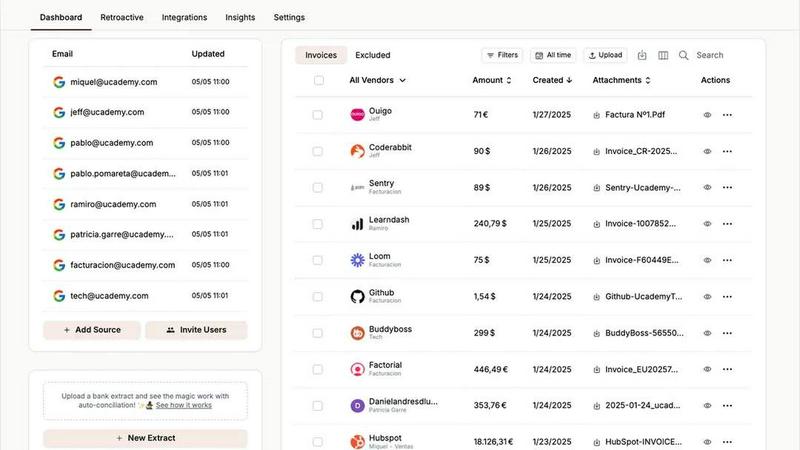
Automate invoice and receipt management effortlessly with Tailride's AI-powered inbox scanning and organization tool.
Last updated: February 27, 2026
Visual Comparison
ProcessBankStatement

Tailride
Feature Comparison
ProcessBankStatement
Instant CSV Conversion
Upload any PDF bank statement and receive a clean, organized CSV file in seconds. Our tool processes documents swiftly, transforming your data without delay.
High Accuracy Rate
Enjoy a 99% accuracy rate with our parsing engine, which meticulously extracts and structures your financial data. This reliability ensures you can trust the information you receive.
Batch Upload Capability
Process multiple bank statements at once with our batch upload feature. This functionality is perfect for high-volume work, allowing you to convert many documents simultaneously and save even more time.
Secure Data Handling
Your data’s security is our priority. Files are encrypted during transit, and you maintain complete control over your documents, with the ability to delete them whenever you choose.
Tailride
Inbox Scanning
Tailride's inbox scanning feature allows users to effortlessly find and organize invoices in their inbox within seconds. By connecting directly to your email, the platform monitors incoming invoices, regardless of their format—PDFs, images, or embedded in emails. This eliminates the chaos of lost invoices and ensures all financial documents are accounted for.
Online Portals
With Tailride's online portal extraction, users can easily pull invoices from various websites, removing the need for manual data entry. This feature is particularly beneficial for business owners who juggle multiple responsibilities, allowing them to focus on core operations while Tailride handles the invoice extraction across various platforms.
AI Processing
Tailride utilizes cutting-edge AI processing to intelligently categorize and manage invoices. By setting customizable rules, users can automate the classification of invoices based on specific criteria, streamlining workflows and ensuring that all financial documents are organized and easily accessible.
Reconciliation
The reconciliation feature of Tailride simplifies the matching of transactions with invoices, enabling users to quickly identify any missing documents. This feature is crucial for ensuring accurate financial records, making tax filings a breeze and keeping accountants happy with organized and complete data.
Use Cases
ProcessBankStatement
Accountants Streamlining Workflow
Accountants can use ProcessBankStatement to quickly convert client bank statements into CSV files, drastically reducing the time spent on manual data entry and allowing them to focus on higher-value tasks.
Bookkeepers Managing Multiple Clients
Busy bookkeepers can benefit from batch uploads, processing numerous statements from various clients in one go. This efficiency helps them meet tight deadlines and manage their workload effectively.
Small Business Owners Tracking Expenses
Small business owners can easily convert bank statements into structured data to track expenses and analyze cash flow. This tool makes financial oversight a breeze, enabling better decision-making.
Financial Analysts Performing Data Analysis
Financial analysts can utilize the clean data generated by ProcessBankStatement for in-depth analysis and reporting. This tool simplifies the initial data gathering phase, allowing analysts to dive deeper into their insights.
Tailride
Streamlined Invoicing for Accountants
Accountants managing multiple clients can benefit significantly from Tailride's features. By connecting their clients' email accounts, they can automatically extract and organize invoices, reducing the time spent on manual data entry and allowing for efficient financial oversight.
Expense Management for Employees
Tailride is perfect for businesses looking to manage employee expenses effectively. Employees can send photos of physical receipts via Telegram or WhatsApp, which are then processed and added to the shared dashboard, making expense tracking seamless and organized.
Efficient Tax Preparation
As the tax season approaches, businesses face the daunting task of gathering countless invoices. Tailride takes care of this by ensuring all invoices are captured and organized, allowing for a stress-free tax preparation process and reducing the chances of errors or omissions.
Enhanced Financial Visibility for Business Owners
Business owners can leverage Tailride to maintain a clear view of their financial status. By automatically organizing invoices and receipts, they can quickly access necessary documents, making financial decision-making faster and more informed.
Overview
About ProcessBankStatement
ProcessBankStatement is your go-to solution for transforming chaotic, time-consuming bank statement PDFs into clean, structured data in a matter of seconds. Designed with finance professionals in mind, this secure, web-based tool eliminates the tedious task of manual data entry. Simply upload any PDF bank statement—whether it originates from your online banking portal or is a scanned image of a paper statement—and watch as our advanced parsing engine processes it with remarkable speed and accuracy. In no time, you will receive a downloadable CSV file containing all your transactions neatly organized and ready for import into QuickBooks, Excel, or any other data analysis platform. Whether you are an accountant, bookkeeper, small business owner, or anyone who regularly handles financial data, ProcessBankStatement is here to save you valuable hours each week. With support for statements from all major U.S. banks such as Chase, Bank of America, and Wells Fargo, our tool ensures broad compatibility to meet your needs and streamline your workflow.
About Tailride
Tailride is an innovative AI-powered accounting automation platform designed to revolutionize the way businesses handle invoices and receipts. By seamlessly integrating with your email inbox, Tailride automatically detects, extracts, and processes invoices and receipts from emails and attachments using advanced intelligent document recognition. This platform is ideal for accountants, finance teams, and business owners who want to streamline their financial processes and eliminate manual data entry. Tailride provides a powerful Chrome extension for one-click extraction from over 20 popular platforms, including Amazon and Meta Ads, while also allowing for customizable AI rules that facilitate automatic categorization. With seamless integrations with leading accounting software like QuickBooks and Xero, as well as robust bank reconciliation features, Tailride is your ultimate partner for efficient financial management, saving you hundreds of hours each month.
Frequently Asked Questions
ProcessBankStatement FAQ
What file types are supported?
Currently, ProcessBankStatement supports PDF bank statements, including both text-based and scanned documents.
Can I upload scanned images or photos?
Absolutely! Our platform fully supports scanned PDFs and image-based bank statements, making it versatile for all types of documents.
Is there a free trial available?
Yes! Guests can process 3 pages per day for free, while registered users enjoy 5 pages per day at no cost, allowing you to test our service risk-free.
Is my data secure when using ProcessBankStatement?
Yes, your data security is paramount. All files are encrypted during transit, and you can delete your files anytime, ensuring complete control over your sensitive information.
Tailride FAQ
How does Tailride connect to my email?
Tailride connects natively to your email inbox without transferring your emails elsewhere. This ensures that your emails remain private while allowing the platform to monitor and extract invoices effectively.
Can Tailride handle invoices from multiple email accounts?
Yes, Tailride allows you to connect as many email accounts as needed. This feature is especially useful for accountants or businesses with multiple clients, ensuring that all invoices are captured in one place.
Is there a limit to the number of invoices Tailride can process?
Tailride is designed to handle large volumes of invoices efficiently. There are no specific limits on the number of invoices processed, making it suitable for businesses of any size.
What types of documents can Tailride extract?
Tailride can extract various document types, including PDFs, images, and emails containing invoices. This versatility ensures that no matter the format, your invoices will be captured and organized.
Alternatives
ProcessBankStatement Alternatives
ProcessBankStatement is an innovative online tool designed to convert PDF bank statements into organized CSV files quickly and accurately. As a part of the Business & Finance category, it's geared towards professionals who require efficient data management. Users often seek alternatives for various reasons, including cost considerations, specific feature requirements, or compatibility with different platforms. When considering an alternative, it's essential to evaluate factors such as processing speed, data accuracy, security measures, and user interface simplicity to ensure it meets all your financial management needs.
Tailride Alternatives
Tailride is an innovative AI-powered accounting automation platform that streamlines the process of managing invoices and receipts through email and web portals. It excels in intelligent document recognition, allowing users to effortlessly extract and categorize financial documents with unmatched speed and efficiency. Tailride is designed for businesses seeking to simplify their financial operations and enhance overall productivity. Users often seek alternatives to Tailride for various reasons, including pricing structures, specific feature sets, or compatibility with existing platforms. When choosing an alternative, it's crucial to consider factors such as ease of use, integration capabilities, and the level of automation offered. Ensuring that the solution aligns with your unique business needs can significantly impact your financial management efficiency.