
poseup vs SparkPix
Side-by-side comparison to help you choose the right product.

poseup
PoseUp instantly perfects your photos with one-click AI posture and composition enhancement.
Last updated: February 28, 2026

SparkPix
Edit photos effortlessly by typing commands to remove backgrounds, enhance quality, restore old images, and transform styles with SparkPix.
Last updated: March 11, 2026
Visual Comparison
poseup
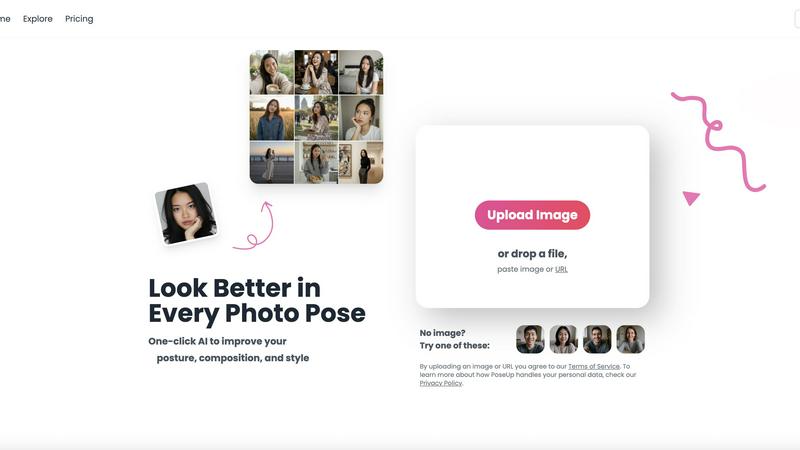
SparkPix

Feature Comparison
poseup
One-Click AI Pose Enhancement
This is the core engine of PoseUp. Upload any photo, and the AI instantly gets to work. It analyzes the subject's posture, limb positioning, and body angles to automatically suggest and apply corrections. This feature fixes slouching, awkward arm placement, and unbalanced stances, transforming a bad pose into a natural, confident, and aesthetically pleasing one in literally one click.
Intelligent Posture Correction & Composition Optimization
Going beyond simple adjustments, PoseUp's AI deeply understands photographic principles. It doesn't just straighten a back; it analyzes the entire scene to optimize composition. This includes refining the subject's positioning within the frame, improving balance, and ensuring the pose complements the environment for a more professional and intentional look, all done automatically.
Multi-Scene Professional Templates
For users seeking inspiration or a specific vibe, PoseUp offers tailored enhancement models for different scenarios. Whether it's a Casual Lifestyle shot, an Outdoor Adventure photo, a Professional Headshot, a Fitness & Wellness image, or a Coffee Shop Work scene, the AI applies context-aware optimizations to ensure the final result meets the stylistic standards of that genre.
Fast, No-Skill-Required Processing
Speed and accessibility are fundamental features. The platform supports JPG, PNG, WEBP, and HEIC formats with images up to 5MB. The process is designed for maximum efficiency: upload, automatic AI analysis, and instant results. There is zero learning curve, no manual editing tools to master, and professional outcomes are guaranteed in seconds, making high-quality enhancement accessible to everyone.
SparkPix
AI Photo Editor
With SparkPix's AI Photo Editor, editing photos is as simple as typing instructions. Just describe what you want, like "remove background" or "enhance colors," and watch as the AI delivers stunning edits in under 30 seconds. This feature is designed for speed and efficiency, ensuring that even the most complex edits can be performed swiftly without any manual skill.
Background Remover
The one-click Background Remover feature allows users to instantly eliminate backgrounds from portraits, product images, or intricate scenes. This tool is perfect for creating professional-looking photos for e-commerce or social media, making it easier to focus on your subject without distractions.
Unblur Image
Say goodbye to blurry photos with SparkPix's Unblur Image feature. This AI-driven tool fixes motion blur, out-of-focus shots, and compression artifacts, transforming your images into clear, sharp visuals. It's perfect for those critical moments that weren't captured perfectly the first time.
Photo Restoration
Restore cherished memories with SparkPix’s Photo Restoration feature. This tool repairs old, faded, scratched, or damaged photos, making it an ideal choice for preserving family archives and historical images. Breathe new life into your vintage pictures and keep memories alive for future generations.
Use Cases
poseup
Elevating Social Media Presence
Content creators, influencers, and everyday users can instantly upgrade their Instagram, TikTok, or LinkedIn profiles. PoseUp transforms casual selfies and photos into stunning, engagement-ready content by perfecting poses and composition, ensuring you always put your best digital foot forward with minimal time investment.
Perfecting Professional Portraits and Headshots
Job seekers, professionals, and entrepreneurs can create polished headshots without expensive photo shoots. PoseUp corrects posture, ensures a confident stance, and optimizes the frame to produce credible and appealing professional portraits that make a strong first impression on resumes, company websites, and professional networks.
Enhancing Family and Event Photography
Capture the perfect family portrait or couple photo without the stress of coordinating everyone's pose. Upload group photos or couple pose ideas, and PoseUp will intelligently adjust each person's posture and the group's overall composition, turning chaotic moments into frame-worthy memories effortlessly.
Refining Portfolio Content for Photographers
Photographers can use PoseUp as a powerful first-pass editing tool to quickly enhance client photos or polish their portfolio pieces. It offers a rapid way to correct minor pose imperfections before deep editing, saving hours of manual retouching and ensuring only the best-posed images are presented to clients or audiences.
SparkPix
Social Media Content Creation
SparkPix is a game-changer for influencers and content creators. Users can quickly enhance their photos and create eye-catching visuals that stand out on platforms like Instagram and TikTok. With features like background removal and style transfer, your posts will attract more engagement and followers.
Family Photo Restoration
For families looking to restore old photographs, SparkPix provides the perfect solution. Users can repair and revitalize faded or damaged images, bringing treasured memories back to life. This is especially useful for preserving family history and sharing it with loved ones.
E-commerce Product Photography
Online sellers can utilize SparkPix to create professional product images effortlessly. The Background Remover and AI Photo Editor features help ensure product photos are clear and visually appealing, enhancing the shopping experience and driving sales.
Artistic Transformations
Artists and hobbyists can explore their creativity by using the Style Transfer feature. Transform ordinary photos into stunning works of art, mimicking styles like oil painting or watercolor. This feature is ideal for those looking to create unique pieces for personal use or to share with their audience.
Overview
About poseup
PoseUp is a lightning-fast AI photo enhancer designed to make anyone look incredible in photos instantly. It tackles the core problem of awkward or unflattering poses by using advanced artificial intelligence to analyze and correct posture, optimize composition, and enhance overall style with a single click. The platform is built for speed and efficiency, delivering professional-grade photo improvements in seconds without requiring any technical photography skills or lengthy editing sessions. It serves a massive audience, from everyday users wanting better selfies and social media content to professional photographers and content creators seeking to polish their portfolios rapidly. The core value proposition is undeniable: transform any ordinary, flawed, or awkward photo into a visually compelling masterpiece effortlessly. With free starting credits and a user-friendly interface, PoseUp democratizes high-quality photo enhancement, making it an indispensable tool for anyone who wants to look their best in every shot without the hassle.
About SparkPix
SparkPix is a revolutionary AI-powered photo editing tool designed for everyone, regardless of their skill level. This web-based platform allows users to edit photos simply by typing what they want, eliminating the need for complex software like Photoshop. With SparkPix, you can effortlessly enhance your images, restore memories, or create stunning artistic transformations in just seconds. Ideal for photographers, social media enthusiasts, and anyone looking to improve their images, SparkPix provides a user-friendly interface that makes editing as easy as sending a text message. Whether you want to remove backgrounds, restore old photographs, or apply artistic styles, SparkPix offers a suite of powerful features that deliver professional-grade results in no time. Start for free and unleash your creativity without any prior experience.
Frequently Asked Questions
poseup FAQ
How does PoseUp work?
Simply upload your photo to the PoseUp platform. Our advanced AI model instantly analyzes key elements like body posture, limb alignment, and overall composition. It then automatically applies corrections and enhancements to create a more flattering and professionally composed version of your image, delivering results in seconds.
Is PoseUp free to use?
Yes, you can get started with PoseUp for free. The platform offers free credits upon sign-up, allowing you to experience the AI enhancement capabilities firsthand. This lets you test the tool and see the transformative results on your own photos before committing to any paid plans for higher volume usage.
What kind of photos work best with PoseUp?
PoseUp is versatile and works well with a wide range of photos, including selfies, full-body shots, professional headshots, couple photos, and group portraits. For optimal results, use clear, well-lit photos where the subject's pose is visible. The AI is designed to handle various scenes from casual to professional.
What file formats and sizes does PoseUp support?
PoseUp supports common image formats including JPG, PNG, WEBP, and HEIC. Each uploaded image can be up to 5MB in size. This ensures compatibility with most photos from smartphones and digital cameras, allowing for quick and efficient processing directly through your web browser.
SparkPix FAQ
How does SparkPix work?
SparkPix uses advanced AI algorithms to analyze and edit photos based on the user’s text instructions. Simply type what you want to change, and the AI processes the request to deliver the desired results quickly.
Is SparkPix free to use?
Yes, SparkPix offers a free plan that provides users with 5 credits to start editing. No credit card is required, making it easy to try out the tool before committing to a paid plan.
What platforms does SparkPix support?
SparkPix is a web-based application, meaning it can be accessed from any device with an internet connection. It works seamlessly on desktops, iPhones, and Android devices, ensuring you can edit photos on the go.
Can I generate images from text prompts?
Absolutely! SparkPix includes an AI Image Generator that allows you to create images from text prompts in various resolutions. This feature is perfect for generating unique visuals based on your specific ideas or concepts.
Alternatives
poseup Alternatives
PoseUp is an AI-powered photo enhancement tool in the image and photo category. It specializes in one-click optimization to instantly improve posture, composition, and style, turning ordinary shots into professional-looking images. Users often seek alternatives for various reasons. This includes needing different pricing models, access to more specialized editing features, or compatibility with specific platforms and workflows. It's a common step to find the perfect tool that aligns with individual needs and budgets. When evaluating other options, prioritize core capabilities. Look for reliable AI pose correction, support for your common file formats, and a straightforward user experience. The goal is to find a tool that delivers quality enhancements with speed and efficiency, minimizing your editing time.
SparkPix Alternatives
SparkPix is an innovative AI-powered online photo editor that allows users to edit images effortlessly by simply typing their desired commands. This platform falls under the image and photo editing category, providing features such as background removal, photo restoration, and style transfer, all designed for quick and user-friendly editing without any prior Photoshop experience. Users often seek alternatives to SparkPix due to various factors, including pricing structures, specific feature sets, or compatibility with different platforms. When evaluating alternatives, it’s essential to consider factors such as the ease of use, the range of available features, pricing plans, and the flexibility of the platform across devices. By doing so, users can find an editing tool that best fits their unique needs and preferences.