
Octopods vs Playwriter
Side-by-side comparison to help you choose the right product.

Octopods
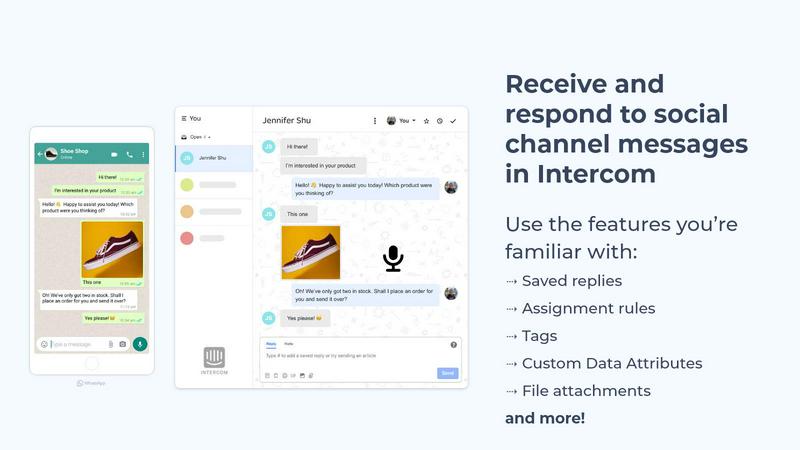
Octopods centralizes WhatsApp, SMS, Telegram, and more into Intercom or HubSpot for seamless customer communication.
Last updated: February 27, 2026

Playwriter
Playwriter empowers agents to control your existing Chrome browser seamlessly using AI, eliminating bot detection and maximizing performance.
Last updated: March 18, 2026
Visual Comparison
Octopods
Playwriter

Feature Comparison
Octopods
Native Integration
Octopods works natively within Intercom and HubSpot, allowing your team to manage messages from various channels without the need for additional apps or platforms, ensuring a streamlined workflow.
Rich Media Support
Send and receive various types of rich media, including images, videos, audio files, documents, and GIFs, enabling engaging and dynamic interactions with customers across all messaging platforms.
Proactive Outbound Messaging
Utilize templates for proactive messaging, allowing your teams to reach out to customers before they ask for help. This feature enhances engagement and improves customer satisfaction.
Custom Data Attributes
Leverage Custom Data Attributes for effective filtering and segmentation of conversations, allowing for tailored communication strategies that meet the unique needs of different customer segments.
Playwriter
Actual Browser Session
Playwriter enables agents to operate within your current browser session, utilizing all your existing extensions, logins, and cookies. This functionality eliminates issues related to bot detection and enhances the overall experience by allowing agents to perform tasks as if they were a human user.
Full Automation API
With Playwriter, you gain access to a comprehensive automation API that allows for the execution of any Playwright code. This means you can easily integrate and execute complex scripts without the hassle of additional configuration or wrappers, making automation seamless and efficient.
Debugger and Live Code Editing
Playwriter includes an intuitive debugger that supports breakpoints, allowing for real-time code editing and troubleshooting. This feature simplifies the debugging process, enabling users to identify and resolve issues swiftly, thus enhancing productivity and reducing downtime.
Accessibility Snapshots
Playwriter offers unique accessibility snapshots that are significantly smaller in size compared to traditional screenshots. This feature allows for efficient and quick capturing of web page states, enhancing performance without compromising on detail, making it ideal for automated testing and analysis.
Use Cases
Octopods
Customer Support
Support teams can handle inquiries from multiple messaging platforms all in one place. This eliminates the need to switch apps, ensuring quick resolutions and a consistent customer experience.
Sales Follow-ups
Sales teams can engage leads on their preferred messaging channels while keeping conversations synchronized in their CRM. This ensures no opportunities are missed and follow-ups remain efficient.
Omnichannel Communication
Octopods allows businesses to centralize all messaging apps into one cohesive workflow, ensuring that every customer interaction is captured and accessible without introducing new tools.
Automated Workflows
By integrating Octopods, teams can automate workflows using existing Intercom or HubSpot features like SLAs, bots, and AI tools, enhancing productivity and response times across all messaging channels.
Playwriter
Automated Testing
Developers can leverage Playwriter for automated testing of web applications. By allowing AI agents to interact with the application as real users would, you can ensure that your testing is thorough and representative, identifying issues that may arise in real-world scenarios.
Web Scraping
Playwriter is perfect for web scraping tasks where agents need to navigate complex web pages. With access to your existing browser session, they can efficiently collect data without running into roadblocks like CAPTCHAs or consent walls, making data extraction faster and more reliable.
Performance Monitoring
Utilize Playwriter to monitor the performance of web applications by allowing agents to track metrics in real time. The ability to set breakpoints and edit code live means that you can adjust your monitoring scripts on the fly, ensuring that you capture all necessary performance data.
Collaborative Development
Teams can collaborate more effectively using Playwriter by sharing the same browser session. When an agent encounters a challenge, team members can step in to assist in real time, resolving issues collaboratively rather than relying on logs or recorded sessions.
Overview
About Octopods
Octopods is a cutting-edge tool designed to seamlessly integrate over 18 popular messaging channels, including WhatsApp, Telegram, Instagram, LINE, Viber, SMS, and WeChat, directly into your Intercom or HubSpot inbox. This innovative solution is tailored for customer support, sales, and operations teams who need to communicate with customers on their preferred platforms without the hassle of switching between multiple apps. Octopods streamlines communication by creating native conversations within Intercom and HubSpot, allowing teams to utilize essential features like tags, saved replies, and workflows without any context switching. With its rich media support and proactive messaging capabilities, Octopods ensures that your team can efficiently manage customer interactions while maintaining a high level of service. The setup process is straightforward, taking just minutes, and prioritizes user privacy by not retaining conversation data. As an officially recognized partner of Intercom and HubSpot, Octopods guarantees a reliable and secure integration experience.
About Playwriter
Playwriter is an innovative tool designed to enhance the capabilities of AI agents by allowing them to control your actual browser session. Unlike traditional AI agents that operate in isolated environments, Playwriter integrates seamlessly with your existing Chrome browser, providing your agents with access to all your logins, extensions, and cookies. This ensures that they can perform tasks without the limitations of bot detection and the inefficiencies of spawning new browser instances. Playwriter is ideal for developers, testers, and automation experts who require a robust solution for web interaction. Its powerful automation API, combined with features like accessibility snapshots and real-time collaboration, empowers users to streamline repetitive tasks efficiently. Additionally, Playwriter's open-source nature and MIT licensing make it an accessible choice for anyone looking to elevate their web automation capabilities.
Frequently Asked Questions
Octopods FAQ
How does Octopods ensure data privacy?
Octopods does not retain conversation data, prioritizing user privacy and compliance with data protection standards. This ensures your customer interactions remain secure and confidential.
Which messaging channels can I integrate with Octopods?
Octopods connects with over 18 messaging channels, including WhatsApp, Telegram, Instagram, LINE, Viber, SMS, and WeChat, allowing teams to communicate with customers on their preferred platforms.
How quickly can I set up Octopods?
Setting up Octopods takes just a few minutes, allowing your team to start managing conversations across different messaging channels almost immediately without complex configurations.
Is Octopods an official partner of Intercom and HubSpot?
Yes, Octopods is an officially recognized app partner for both Intercom and HubSpot, ensuring a reliable and secure integration that works natively within these platforms.
Playwriter FAQ
How does Playwriter enhance browser automation?
Playwriter enhances browser automation by enabling agents to work within your actual browser session, providing access to all your extensions, logins, and cookies. This leads to improved efficiency and reduced risk of bot detection.
What platforms does Playwriter support?
Playwriter is compatible with a variety of MCP clients, including Cursor, Claude, and VS Code, making it versatile for different development environments and user preferences.
Is Playwriter open source?
Yes, Playwriter is open source and distributed under the MIT license, allowing users to modify and distribute the software freely while benefiting from community contributions and improvements.
How do I get started with Playwriter?
Getting started with Playwriter is straightforward. Simply install the Chrome extension, set up the CLI, and follow a few easy steps to connect your browser, allowing your agents to begin browsing almost instantly.
Alternatives
Octopods Alternatives
Octopods is an innovative tool that connects over 18 messaging channels, including WhatsApp, Telegram, and Instagram, to your Intercom or HubSpot inbox. This category of software is essential for customer support teams seeking to streamline communication across various platforms. Users often search for alternatives due to factors like pricing, specific feature sets, or the need for integration with different platforms that better match their business requirements. When choosing an alternative, it’s crucial to consider the range of supported messaging channels, ease of integration, and the ability to maintain seamless workflows without context switching. Additionally, look for features that enhance customer engagement, such as rich media support and automation capabilities, to ensure your team can operate efficiently and effectively.
Playwriter Alternatives
Playwriter is an innovative tool in the automation category that empowers users to control Chrome through AI via a command-line interface (CLI) or multi-client platform (MCP). It offers a seamless experience by providing access to your actual browser session, making it ideal for users who require automation with real-time browser capabilities. Many users seek alternatives due to various factors such as pricing concerns, specific feature requirements, or compatibility with different platforms. When choosing an alternative, consider the features that align with your needs, such as automation capabilities, ease of integration, and support for multiple clients. Additionally, evaluate whether the alternative can maintain your browser sessions and provide the same level of accessibility and usability as Playwriter. A careful assessment of these factors will ensure you find an option that best fits your automation goals.