
Never Drop vs Phishly
Side-by-side comparison to help you choose the right product.

Never Drop
NeverDrop captures contacts and drafts personalized follow-ups instantly, turning every handshake into a deal.
Last updated: February 28, 2026

Phishly
Phishly instantly detects phishing emails with AI for lightning-fast security.
Visual Comparison
Never Drop

Phishly
Feature Comparison
Never Drop
Scan Business Cards Instantly
Never Drop allows you to snap a photo of any business card, utilizing AI-powered OCR technology to extract vital details such as name, company, title, phone number, and email in seconds. No more manual input, squinting, or misplaced cards.
Automatic Email Enrichment
Don't settle for generic emails or incomplete contact information. Never Drop automatically finds and enriches profiles with verified work emails based on the lead's name and company, eliminating the guesswork and manual searches.
Personalized AI-Drafted Follow-Ups
The app utilizes your voice notes and conversation context to generate personalized follow-up emails that reflect your true tone and intent. This means no more generic templates—just tailored messages that resonate with your leads.
Team Collaboration Dashboard
Never Drop provides a centralized workspace for your sales team, allowing you to organize scans by event, reassign leads among team members, and track all activity through a comprehensive dashboard. This ensures everyone stays aligned and no lead falls through the cracks.
Phishly
One-Click Gmail Integration
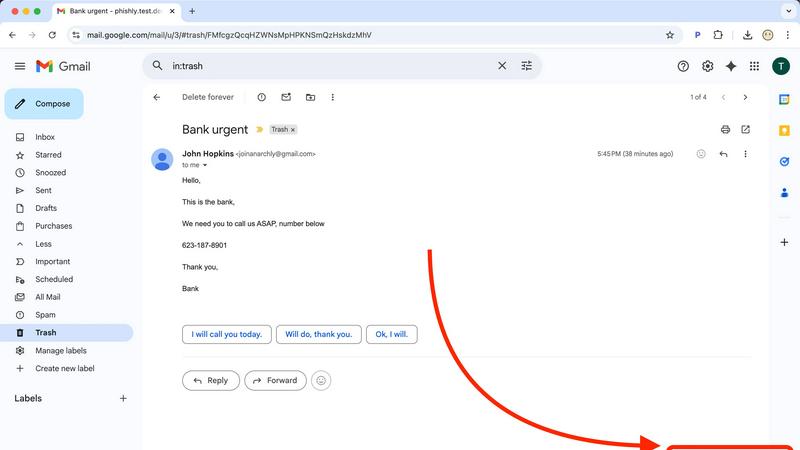
Integrate phishing defense directly into your inbox with the Phishly Chrome extension. Once installed, a "Scan with Phishly" button appears directly within your Gmail interface. Open any email that raises suspicion and click the button. The analysis happens instantly in the background, pulling the email content for scanning without you having to copy, paste, or navigate away. This seamless integration ensures maximum speed and efficiency, turning a complex security check into a single, effortless action right where you work.
AI-Powered Multi-Indicator Analysis
Our core AI engine doesn't rely on a single check; it conducts a rapid, comprehensive multi-point inspection of every email you submit. It scans for suspicious and newly registered domains, checks for sender spoofing and address mismatches, analyzes the writing for urgent language and emotional manipulation tactics, and looks for hidden threats in links and attachments. This holistic approach ensures even sophisticated phishing attempts that mimic legitimate communications are identified quickly and accurately, providing you with a thorough security snapshot in an instant.
Clear, Actionable Risk Assessment
Phishly cuts through the noise with straightforward, color-coded results. Every scan concludes with a definitive verdict: Safe (Green), Medium Risk (Yellow), or High Risk (Red). Each rating is paired with a detailed, plain-language breakdown that explains exactly why the AI reached its conclusion, listing the specific indicators found. This transforms complex technical data into an immediate understanding of the threat level, empowering you to delete, report, or proceed with confidence without needing to interpret cryptic warnings.
Privacy-First & Instant Web Tool
For emails outside of Gmail or for users who prefer a web-based approach, Phishly offers a blazing-fast web tool. Simply copy the text or headers of any suspicious email and paste them into the website's analyzer. The AI delivers the same comprehensive risk report within seconds. Crucially, Phishly is built on a privacy-first model. It only ever analyzes emails you explicitly and manually choose to submit. We do not scan your inbox, read your mail, or store your personal communications, ensuring your privacy remains completely protected.
Use Cases
Never Drop
Trade Shows and Exhibitions
At busy trade shows, speed is essential. Never Drop enables sales teams to quickly scan business cards, add context, and send follow-ups while the conversation is still fresh, maximizing the chances of closing deals.
Networking Events
In networking situations, meeting numerous potential clients can be overwhelming. With Never Drop, users can efficiently capture contact information and context, ensuring every interaction is followed up promptly and effectively.
Conferences and Seminars
Conferences are prime opportunities for lead generation. Never Drop allows attendees to manage leads seamlessly, ensuring that no valuable connections are lost amidst the chaos of busy schedules and diverse interactions.
Business Dinners and Meetups
Whether it’s a casual dinner or a formal meetup, Never Drop simplifies the lead capture process. Attendees can quickly scan and enrich contact details, ensuring they follow up on meaningful conversations that could lead to future business opportunities.
Phishly
Verifying Urgent Account Alerts
You receive a panic-inducing email claiming your bank account is locked or your password has been compromised, complete with a "Click Here to Secure" link. Instead of rushing and risking a mistake, you instantly scan it with Phishly. Within seconds, the AI highlights the spoofed sender address, the suspicious link domain, and the high-pressure language, giving you a "High Risk" verdict. This allows you to safely ignore the scam and contact your bank directly through their official website or app.
Screening Client or Vendor Communications
Freelancers and small businesses often receive initial contact or invoices from new clients and vendors. A fraudulent invoice can lead to significant financial loss. Before clicking any links or downloading attachments from an unfamiliar sender, paste the email content into Phishly's web tool. The rapid analysis can reveal subtle signs of forgery, like a slightly altered company name in the email address or mismatched branding, helping you avoid business email compromise (BEC) scams efficiently.
Educating Family and Team Members
Phishing awareness is critical but difficult to teach. Use Phishly as a real-time educational tool. When a family member or employee is unsure about an email, walk them through the scanning process. The clear "Medium Risk" or "High Risk" rating alongside the detailed explanation of red flags (e.g., "The sender's domain does not match the claimed company's official domain") provides a concrete, memorable lesson that builds long-term security intuition faster than any generic training video.
Checking Promotional & Contest Emails
You get an exciting email saying you've won a contest you don't remember entering or offering an unbelievable discount from a major retailer. These are common phishing lures. Quickly scan the message with the Gmail extension. Phishly's AI can detect the use of URL shorteners that hide true destinations, analyze the too-good-to-be-true language, and identify fake tracking pixels, providing an instant reality check before you hand over any personal information or credentials.
Overview
About Never Drop
Never Drop is an innovative lead-capture app tailored for sales teams navigating the fast-paced environments of trade shows, conferences, and networking events. This powerful tool revolutionizes the way leads are collected and managed by enabling users to effortlessly scan business cards with their smartphones. Upon scanning, users can enhance the captured information with invaluable voice notes or text context about their conversations, ensuring no crucial details about leads are forgotten. The app's advanced AI then steps in to draft personalized follow-up emails in under two minutes, significantly reducing the risk of losing valuable leads. With seamless integration into popular CRMs like HubSpot, Never Drop streamlines the sales process, keeping your pipeline organized and efficient. Say goodbye to lost opportunities and hello to quick, effective follow-ups that turn potential leads into closed deals, all while you move from one meeting to the next.
About Phishly
Phishly is your lightning-fast AI sentinel against deceptive emails. It's an AI-powered phishing detection platform designed for speed and simplicity, delivering instant clarity on any suspicious message. Available as a seamless Chrome extension for Gmail and a straightforward web tool, Phishly puts powerful security analysis directly in your workflow. Simply open any email in Gmail and click "Scan with Phishly" or paste suspicious email content directly onto the website for an immediate, in-depth assessment. The advanced AI engine rapidly scans for a comprehensive range of phishing indicators, including suspicious domains, mismatched sender addresses, urgent or threatening language, and sophisticated social engineering tactics. It then provides a clear, actionable risk rating: Safe, Medium Risk, or High Risk, each accompanied by a detailed explanation of the red flags it found. Built for individuals, freelancers, and small businesses, Phishly offers enterprise-grade detection without the complexity or cost. It operates on a strict privacy-first principle, only analyzing emails you explicitly choose to scan. With no technical knowledge required and a free-to-use model, Phishly delivers the instant answers you need to make safe decisions in seconds, not minutes.
Frequently Asked Questions
Never Drop FAQ
What is Never Drop?
Never Drop is a lead-capture app designed for sales teams at events. It allows users to scan business cards, add contextual notes, and automatically generate personalized follow-up emails—all in under two minutes.
How does business card scanning work?
Simply take a photo of any business card using the Never Drop mobile app. The app's AI-powered OCR technology extracts contact details like names and emails in seconds, making lead management a breeze.
What types of events is Never Drop for?
Never Drop is ideal for trade shows, conferences, networking events, meetups, and business dinners—any scenario where you meet new contacts and need to follow up quickly and efficiently.
Do I need the mobile app?
Yes, the mobile app is essential for scanning business cards, recording voice context, and sending follow-ups on the go. The web dashboard complements the app, allowing for team management and activity tracking.
Phishly FAQ
How does Phishly protect my privacy?
Phishly is built on a strict, privacy-by-design principle. We do not access, read, or store your emails automatically. The Chrome extension only activates when you explicitly click the "Scan with Phishly" button on a specific, open email. The web tool only analyzes text you manually paste into it. We do not scan your inbox, monitor your activity, or retain your email content after the analysis is complete. Your security check remains completely confidential.
Is Phishly really free to use?
Yes, Phishly is currently completely free to use. Our goal is to make essential phishing protection accessible to everyone, from individuals to small businesses. You can install the Chrome extension and use the web analysis tool without any subscription fees, account creation, or usage limits. This allows you to integrate powerful, AI-driven security into your daily routine instantly and without any financial barrier.
What makes Phishly different from my email provider's spam filter?
Your email provider's spam filter works passively in the background and often misses sophisticated phishing emails that look legitimate (spear phishing). Phishly is an active, on-demand tool you control. It uses more advanced AI to analyze content, context, and subtle social engineering cues that basic filters ignore. It's designed for those ambiguous emails that land in your inbox, not your spam folder, giving you a second opinion in seconds.
Do I need technical skills to use Phishly?
Absolutely not. Phishly is designed for simplicity and speed, requiring zero technical knowledge. The Chrome extension adds a single, obvious button to Gmail. The web tool is a simple paste-and-analyze box. The results are presented in clear, plain English with color-coded risk levels. You get enterprise-level security analysis without any configuration, complex settings, or cybersecurity expertise required.