
Nano Banana vs Shrinkpad
Side-by-side comparison to help you choose the right product.

Nano Banana
Create stunning, high-resolution images instantly with Nano Banana, the AI-powered generator for all your visual needs.
Last updated: February 27, 2026

Shrinkpad
Shrinkpad instantly compresses batches of images and videos on your Mac to save space and time.
Last updated: February 28, 2026
Visual Comparison
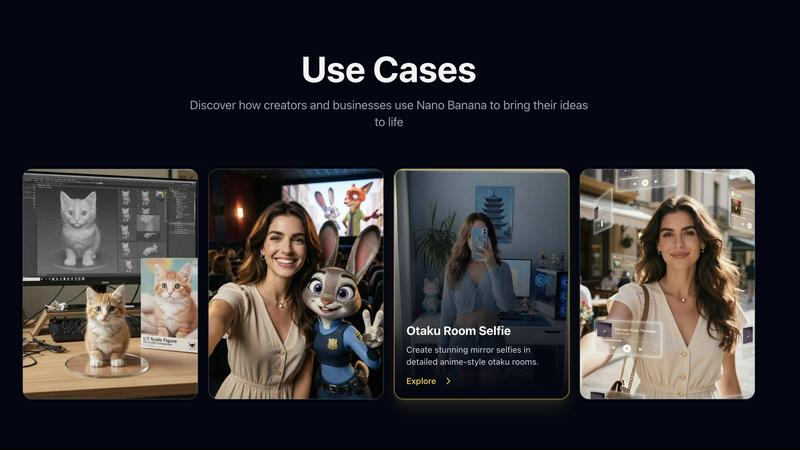
Nano Banana
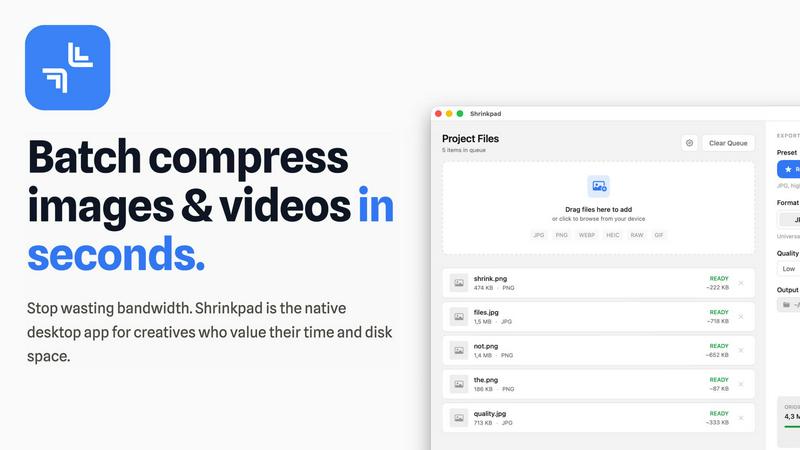
Shrinkpad
Feature Comparison
Nano Banana
Powerful AI Image Generation
Nano Banana utilizes advanced AI algorithms to generate images from simple text prompts. This powerful feature allows users to create high-quality visuals in seconds, making the creative process faster and more efficient.
Versatile Image Styles
With Nano Banana, you can explore multiple image styles including photorealistic, artistic, and 3D renderings. This versatility ensures that you can produce visuals that perfectly match your project requirements and aesthetic preferences.
Smart Editing Tools
The platform includes AI-powered editing tools that enable users to enhance and modify their images with precision. Whether you need to adjust colors, apply filters, or make detailed edits, Nano Banana’s smart editing capabilities give you complete control.
Commercial-Ready Images
All images generated through Nano Banana are ready for commercial use without any restrictions. This feature is invaluable for businesses and marketers who need high-quality visuals for marketing campaigns, product listings, and more.
Shrinkpad
Lightning-Fast Batch Processing
Stop processing files one by one. Shrinkpad is engineered for speed, leveraging multi-threaded compression and optimization for Apple Silicon to process thousands of images and videos in minutes. Drop an entire folder and watch as it instantly detects and queues all media files, ready for bulk compression with a single click. This massive time savings is a game-changer for handling large projects.
Intelligent Quality Optimization
No more guessing at compression settings. Shrinkpad automatically analyzes the visual complexity of each file to apply the perfect compression ratio. Its smart algorithms ensure maximum file size reduction without introducing artifacts or noticeable quality loss, delivering optimized assets that look perfect every time, automatically.
Complete Local Privacy & Security
Your files stay on your machine, period. Unlike web-based tools, Shrinkpad performs all compression locally using native macOS frameworks. This means your original high-resolution assets, client work, and sensitive projects are never uploaded to a cloud server, ensuring total privacy and security throughout your workflow.
Advanced Format & Workflow Support
Shrinkpad handles over 50 formats effortlessly, from common JPGs and PNGs to professional RAW files, HEIC, WEBP, AVIF, MP4, and MOV videos. It includes pro features like automatic file renaming, metadata stripping, and subfolder preservation. Export assets at 2x/4x from design tools and let Shrinkpad optimize and organize them in one fell swoop.
Use Cases
Nano Banana
Product Photography
Create eye-catching product photos that highlight your items in the best light. Nano Banana's AI can generate professional-quality images that make your products stand out on e-commerce platforms.
Logo Design
Design unique logos that capture your brand's essence. With the ability to generate various styles, Nano Banana helps businesses create memorable logos that leave a lasting impression.
Illustrations for Marketing
Enhance your marketing materials with custom illustrations. Whether it’s for social media, blogs, or advertisements, Nano Banana allows you to generate stunning visuals that attract and engage your audience.
Character Design
Bring characters to life with AI-generated designs. Ideal for game developers and authors, Nano Banana can create unique character concepts that suit any narrative or artistic vision.
Shrinkpad
Optimizing Website & App Assets
Developers and web designers can drastically reduce bundle sizes and improve load times. By batch-compressing hero images, icons, and promotional videos, Shrinkpad helps achieve faster Lighthouse Performance scores (like LCP) and enhances user experience without manual, per-file optimization.
Managing Photographer & Creator Libraries
Photographers and content creators drowning in large RAW files and 4K video footage can reclaim terabytes of storage. Shrinkpad processes entire shoots or content batches in one go, preparing files for client delivery, portfolio sites, or archiving while maintaining professional quality and saving enormous amounts of time.
Streamlining Design-to-Export Workflows
Designers using Figma, Photoshop, or Sketch can export all assets at high resolutions for various devices and then use Shrinkpad for final optimization. It automatically compresses and renames batches of files, eliminating the tedious, manual step of exporting individually optimized versions.
Preparing Files for Email & Collaboration
Professionals who need to send large batches of images or videos via email or collaboration platforms can use Shrinkpad to quickly reduce file sizes before sharing. This avoids hitting attachment limits, speeds up upload/download times, and ensures recipients get optimized files instantly.
Overview
About Nano Banana
Nano Banana is a cutting-edge AI image generation platform that empowers users to transform text descriptions into stunning visual content effortlessly. Leveraging Google's advanced AI technology, this tool caters to creators, marketers, and businesses seeking high-quality images for various applications. With Nano Banana, you can create everything from product photos and logos to intricate illustrations in a matter of seconds. The platform offers a user-friendly interface that allows for quick image generation, making it accessible for everyone, whether you're a hobbyist or a professional. The main value proposition of Nano Banana lies in its ability to deliver professional-quality images at lightning speed, ensuring that your creative ideas come to life with minimal effort. Plus, all images are commercial-ready, giving you the freedom to use them without restrictions. With a special offer of 50% off on all plans, there has never been a better time to explore the world of AI-generated imagery.
About Shrinkpad
Shrinkpad is the ultimate batch compression powerhouse built exclusively for macOS. It slashes through the tedious work of optimizing images and videos, delivering lightning-fast results without sacrificing quality. Designed for photographers, designers, developers, and content creators, it transforms hours of manual busywork into a task that takes seconds. Simply drag and drop hundreds of files or entire folders, and Shrinkpad compresses them in a flash, reducing sizes by up to 90% while preserving visual integrity. Every operation happens locally on your Mac using native Apple frameworks, guaranteeing complete privacy—your files never touch the cloud. With seamless support for over 50 formats, including RAW photos and 4K videos, Shrinkpad is the essential tool for reclaiming disk space, speeding up websites, and streamlining your entire media workflow with unmatched efficiency.
Frequently Asked Questions
Nano Banana FAQ
What is Nano Banana?
Nano Banana is an AI image generation platform that transforms text descriptions into high-quality visuals, making it easy for users to create professional images for various applications.
Can I try it for free?
Yes! Nano Banana offers a free trial with no credit card required. Experience the capabilities of the platform before committing to a subscription.
Can I use the images commercially?
Absolutely! All images generated with Nano Banana are commercial-ready, allowing you to use them in your marketing, websites, and more without any restrictions.
How do I get started?
To get started, simply sign up for a free trial on the Nano Banana website. Once registered, you can begin creating images by entering your text descriptions and generating visuals in seconds.
Shrinkpad FAQ
What file formats does Shrinkpad support?
Shrinkpad supports a wide range of over 50 image and video formats. This includes common formats like JPG, PNG, GIF, and MP4, as well as professional formats like RAW camera files (from Canon, Nikon, Sony, etc.), HEIC, WEBP, AVIF, ProRes, and MOV. It handles mixed batches of photos and videos seamlessly.
Does Shrinkpad support video compression?
Yes, absolutely. Shrinkpad provides powerful video compression alongside image optimization. It can compress large video files (including 4K footage) by significant percentages, reducing their size for easier storage, sharing, or web use while maintaining a high-quality visual output.
How many files can I process at once?
With the paid Personal or Team plans, you get unlimited batch processing. You can queue and process thousands of files in a single session without crashes. The Free Starter plan has a limit of 10 files per batch for initial testing.
Are my files uploaded to the cloud?
No. Privacy is a core principle of Shrinkpad. All processing is performed 100% locally on your Mac using Apple's native frameworks. Your original files, compressed results, and any data never leave your computer, ensuring complete security and privacy.
Alternatives
Nano Banana Alternatives
Nano Banana is a cutting-edge AI image generation platform that utilizes Google's advanced technology to create stunning visual content from simple text descriptions. This tool falls into the category of image and photo generation, catering to creators, marketers, and businesses looking to produce high-quality images for various applications, including product photos, logos, and illustrations. Users often seek alternatives to Nano Banana due to factors such as pricing, specific feature sets, or compatibility with other platforms and workflows. When choosing an alternative, it's essential to consider the quality of image output, ease of use, available styles, and licensing options to ensure it meets your specific needs and expectations.
Shrinkpad Alternatives
Shrinkpad is a powerful batch compression tool for macOS, squarely in the image and video optimization category. It excels at slashing file sizes locally and at lightning speed, making it a favorite for Mac users who prioritize efficiency and privacy. Users often explore alternatives for various reasons. Some may need a tool that works across Windows or online platforms, while others might seek different pricing models or specific advanced features not present in their current solution. The quest for the perfect fit is common in any software category. When evaluating an alternative, key factors to consider are processing speed, format support, and whether it operates locally or in the cloud. Your ideal choice should match your platform, respect your budget, and deliver the quality control you need without slowing down your creative workflow.