
Nani vs Prompt Builder
Side-by-side comparison to help you choose the right product.

Nani streamlines AI image generation by organizing prompts and images into reusable sets for effortless creativity.
Last updated: February 27, 2026

Prompt Builder
Craft, optimize, and manage AI prompts for any model in seconds, enhancing efficiency and consistency in your workflow.
Last updated: April 13, 2026
Visual Comparison
Nani

Prompt Builder
Feature Comparison
Nani
Supercharged Image Generation
Nani leverages the power of Nano Banana Pro to enable rapid image creation. Simply type your prompt, hit generate, and watch as stunning images are produced in seconds. Customizable aspect ratios and resolutions ensure your images meet your specific needs without any visible watermark.
Reusable Prompt Sets
Maintain creative consistency with Nani's reusable prompt sets. Group images and save prompts that can be accessed anytime. This feature is perfect for users who want to keep character designs, styles, and workflows uniform across multiple projects, saving time and effort.
Organized Libraries
With Nani, keeping your work organized is a breeze. Create folders, filter by favorites, and use bulk-selection tools to manage your image library. This organized approach ensures that you can scale your workflow efficiently without clutter, making it easier to find and utilize your best work.
Seamless Collaboration
Enhance teamwork with Nani's drag-and-drop functionality. Share your creations via public links and allow others to recreate your work in their accounts. This feature fosters collaboration and creativity among teams, ensuring everyone can contribute effectively to the project.
Prompt Builder
Prompt Generator
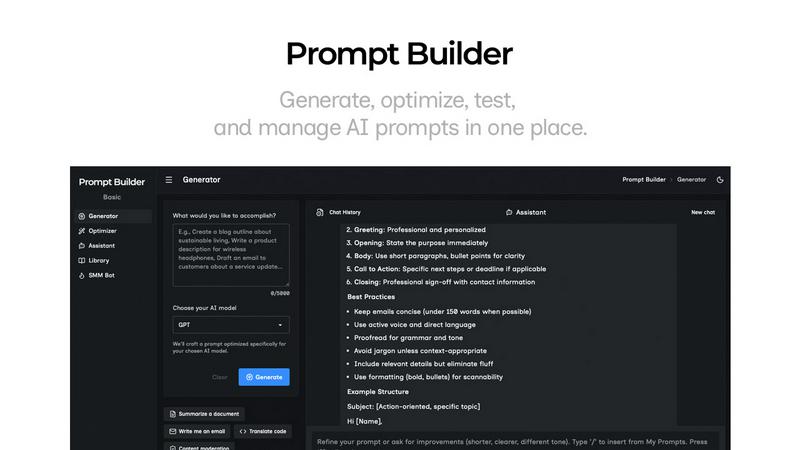
The Prompt Generator enables users to describe their ideas and select a target AI model. It automatically generates a professional-grade prompt optimized for that model, saving time and ensuring high-quality outputs tailored to specific requirements.
Chat Refinement
With the built-in chat refinement feature, users can iteratively improve their prompts. This chat environment allows real-time adjustments, making it easy to refine language, structure, and specificity, ultimately leading to more effective prompts.
Prompt Library
The Prompt Library is a centralized repository where users can save, organize, and reuse their best prompts. It includes features for searching, filtering by category and model, and managing prompts, making it easy to keep track of valuable resources across different projects.
Prompt Optimizer
The Prompt Optimizer takes existing prompts and enhances them in seconds. By providing structured improvements in clarity, constraints, and output formats, users can quickly turn mediocre prompts into high-performing ones that yield better results.
Use Cases
Nani
Rapid Prototyping for Designers
Designers can leverage Nani for quick prototyping, generating multiple iterations of concepts in minutes. By saving reusable prompt sets, they can maintain consistent design elements while experimenting with various styles, enhancing their creative process.
Content Creation for Social Media
Content creators can use Nani to generate eye-catching images for their social media channels. With the ability to quickly create and organize visuals, they can maintain a consistent brand aesthetic and keep their audience engaged with fresh content.
Marketing Campaigns
Marketers can benefit from Nani by rapidly producing images tailored for specific campaigns. The tool's organizational features allow them to group images by theme or campaign, ensuring that all assets are easily accessible and on-brand.
Educational Resources for Teachers
Teachers can use Nani to create engaging visuals for educational materials. By generating custom illustrations and organizing them into folders, they can enhance lesson plans while saving time, allowing them to focus on teaching rather than design logistics.
Prompt Builder
Content Creation
Content creators can leverage Prompt Builder to generate engaging articles, social media posts, and marketing copy. By swiftly crafting and optimizing prompts, they can ensure their content resonates with target audiences and stands out in crowded markets.
Educational Resources
Educators and trainers can use Prompt Builder to create tailored prompts for lesson plans, quizzes, and instructional content. This tool allows for quick adjustments and refinements to meet specific learning outcomes and student needs.
Software Development
Developers can utilize Prompt Builder to generate prompts for interactive AI applications, ensuring that the AI responds accurately to user queries. With the ability to fine-tune prompts for different models, they can enhance user experience and functionality.
Market Research
Market researchers can create prompts for surveys and data collection, refining them based on feedback and results. This enables them to gather precise insights, leading to more informed decisions and strategies based on accurate data.
Overview
About Nani
Nani is an innovative workflow tool that revolutionizes the process of AI image generation, specifically tailored for users who engage in regular and repetitive creative tasks. Unlike traditional AI image generation tools that are often designed for one-off projects, Nani streamlines the workflow, allowing artists, designers, and content creators to enhance their productivity with ease. Built on Google's advanced Nano Banana Pro (Gemini), Nani provides a seamless experience that eliminates the tedious task of rewriting prompts and endlessly scrolling through image feeds. With its user-friendly interface, Nani enables quick image creation while offering unique features like reusable prompt sets and organized folders. This ensures consistency and efficiency in creative projects, empowering users to concentrate on their artistic vision rather than the administrative burdens of image generation. With Nani, unleash your creativity and supercharge your workflow today!
About Prompt Builder
Prompt Builder is an innovative workspace designed for prompt engineering that empowers users to create, test, and save prompts tailored to various AI models. Its intuitive interface allows users to start with a draft and refine it through a chat feature, ensuring the final output aligns with the chosen model, whether it's GPT, Claude, Gemini, or others. This tool is especially beneficial for content creators, marketers, developers, and AI enthusiasts who demand efficiency in generating high-quality prompts. By eliminating the tedious process of rewriting prompts for different models, Prompt Builder streamlines the workflow, saving valuable time and effort. The platform also features an Optimizer that enhances existing prompts, a library for storing reusable prompts, and an Assistant for quick testing. With Prompt Builder, transforming an idea into a ready-to-use prompt is quick and seamless, allowing users to focus on results rather than the intricacies of prompt crafting.
Frequently Asked Questions
Nani FAQ
How does Nani improve my workflow?
Nani enhances your workflow by streamlining the image generation process, allowing for quick creation, organization, and reuse of prompts. It minimizes administrative tasks so you can focus on your creativity.
Is there a limit to the number of images I can generate?
No, there is no limit to the number of images you can generate with Nani. You pay only for what you create, making it a flexible solution for your creative needs.
Do I need to subscribe to use Nani?
No subscriptions are required. Nani operates on a simple credit-based billing system, allowing you to pay only for what you generate without any long-term commitments.
Are my credits going to expire?
No, your credits never expire. This means you can generate images at your own pace without the pressure of losing unused credits over time.
Prompt Builder FAQ
How does Prompt Builder optimize prompts for different AI models?
Prompt Builder tailors prompts specifically for selected AI models by adjusting the structure, constraints, and output format. This ensures users receive optimized responses with fewer retries.
Can I save my prompts for future use?
Yes, Prompt Builder includes a comprehensive Prompt Library where you can save, organize, and reuse your best prompts. This feature allows for easy access to valuable resources across multiple projects.
Is there a limit on the number of prompts I can generate?
Users can start free with 25 assistant requests per month. This allows ample opportunity to explore and generate various prompts without any upfront payment or credit card requirement.
What types of prompts can I create with Prompt Builder?
You can create a wide range of prompts, including content for articles, social media posts, educational resources, and interactive applications. The tool is versatile and supports numerous AI models for diverse use cases.
Alternatives
Nani Alternatives
Nani is a groundbreaking workflow tool designed to simplify the AI image generation process, especially for artists, designers, and content creators. Falling under the category of AI Assistants, Nani organizes prompts and images into reusable sets, streamlining repetitive creative tasks. Users often seek alternatives to Nani for various reasons, such as pricing concerns, specific feature requirements, or compatibility with different platforms. When searching for an alternative, consider factors like user interface, ease of use, feature set, and pricing to ensure it meets your creative workflow needs.
Prompt Builder Alternatives
Prompt Builder is a cutting-edge prompt engineering workspace designed to generate, optimize, test, and manage AI prompts all in one centralized location. It caters specifically to users looking to streamline their AI interactions across various models such as GPT, Claude, and others. As AI technology evolves, users often seek alternatives for a multitude of reasons, including pricing structures, feature sets, platform compatibility, and ease of use. When searching for alternatives, it's essential to consider factors like the range of supported AI models, the intuitiveness of the user interface, and the availability of optimization tools. Additionally, reviewing community resources like libraries of reusable prompts can enhance the overall experience and productivity. Prioritizing these aspects will help you find a solution that best fits your specific needs.