
CloudBurn vs Mod
Side-by-side comparison to help you choose the right product.

CloudBurn
Stop surprise AWS bills by seeing infrastructure costs directly in your pull requests.
Last updated: February 28, 2026

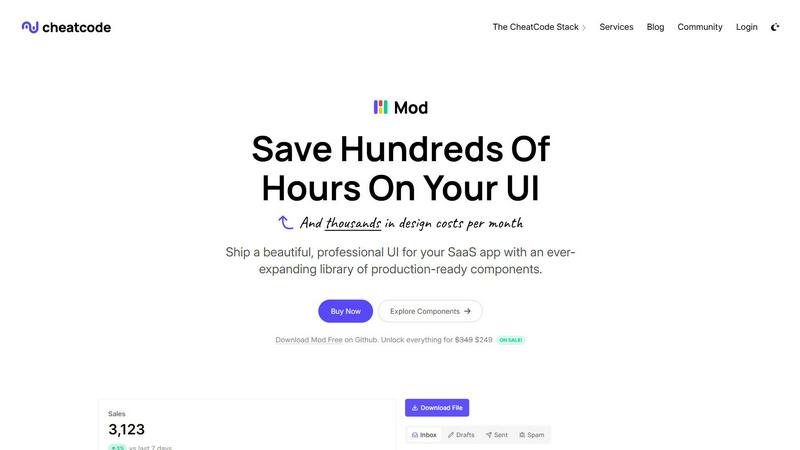
Ship SaaS UIs lightning-fast with Mod's ready-to-use CSS components.
Visual Comparison
CloudBurn

Mod
Feature Comparison
CloudBurn
Real-Time Pull Request Cost Analysis
CloudBurn provides instant AWS cost estimates directly within your GitHub pull requests. The moment a PR with infrastructure changes is opened, CloudBurn automatically analyzes the IaC diff, calculates the precise monthly cost impact using live AWS pricing, and posts a comprehensive report as a comment. This gives developers immediate visibility into the financial consequences of their code before merge, enabling cost optimization as part of the standard review process.
Live AWS Pricing Integration
Forget outdated spreadsheets and manual estimates. CloudBurn pulls real-time, accurate pricing data directly from AWS for every resource in your Terraform or CDK stack. This ensures your cost projections reflect the latest on-demand rates, reserved instance discounts, and regional pricing variations, giving you confidence that the numbers you see are correct and actionable for making informed architectural decisions.
Seamless GitHub Native Integration
Setup is fast and secure, with billing, permissions, and installation handled 100% through GitHub. After a quick install from the GitHub Marketplace, CloudBurn works silently in the background. It connects to your chosen GitHub Action for CDK diff or Terraform plan output, requiring no complex configuration or sensitive credential management outside your existing ecosystem, minimizing friction and security overhead.
Detailed Line-Item Cost Breakdown
CloudBurn goes beyond a simple total. Its PR reports break down the cost impact per resource, showing current cost, new cost, and the delta. Each resource includes a detailed description with the exact hourly price and AWS usage type. This granularity helps teams instantly identify which specific change is driving cost increases, facilitating targeted discussions on optimization and alternative configurations during review.
Mod
Massive Component Library
Mod ships with over 88 meticulously crafted, responsive components designed specifically for SaaS interfaces. This includes everything from complex data tables, dashboards, and form layouts to navigation bars, modals, and pricing cards. Each component is built with accessibility and real-world functionality in mind, providing a solid foundation you can customize and extend. This vast library means you can assemble entire application pages in minutes, not days, dramatically accelerating your time-to-market.
Extensive Design System & Themes
Beyond components, Mod offers an extensive design system with 168 unique styles and 2 complete themes (light and dark) to ensure visual consistency across your entire application. The system includes a full suite of design tokens for typography, color palettes, spacing, shadows, and borders. This built-in design coherence eliminates guesswork and ensures your UI looks polished and professional from day one, all while giving you the flexibility to tailor the look to your brand.
Framework-Agnostic & Easy Integration
Mod is designed to work anywhere. It's not tied to a specific JavaScript framework or backend technology. You can effortlessly drop it into a Next.js project, a Nuxt application, a SvelteKit site, or even a traditional server-rendered app using Rails or Django. This flexibility protects your investment and allows your team to use the best tools for the job without being locked into a specific frontend ecosystem, making onboarding and project migration seamless.
Dark Mode & Mobile-First Icons
The framework includes full, automatic support for dark mode, allowing users to switch themes based on their preference or system settings with zero extra development work on your part. Furthermore, Mod comes bundled with a comprehensive library of over 1,500 icons optimized for clarity and performance. Combined with its strictly mobile-first, responsive design philosophy, this ensures your SaaS application delivers an exceptional experience on any device, from desktop to smartphone, right from the start.
Use Cases
CloudBurn
Preventing Costly Production Misconfigurations
Catch architectural mistakes with a high price tag before they deploy. A developer might accidentally specify a t3.xlarge instance instead of a t3.micro. CloudBurn flags this as a +$133 monthly change in the PR, prompting an immediate review and correction. This prevents heart-stopping AWS bills and eliminates the risky, time-consuming refactoring required to fix such errors in a live environment.
Enabling Proactive FinOps Culture
Shift financial accountability left in the development cycle. CloudBurn makes cost a first-class metric in every infrastructure code review, alongside performance and security. Engineering teams can debate the cost/benefit of a new database instance or a more powerful compute option in the PR, fostering a culture of cost-awareness and collective ownership over the cloud budget from the very first line of code.
Streamlining Architecture Review & Approval
Platform and FinOps teams can scale their governance without becoming a bottleneck. Instead of manually reviewing every Terraform plan, they can set policies and rely on CloudBurn's automated reports to surface high-cost changes for attention. This accelerates developer velocity for standard changes while ensuring guardrails are in place, making the review process faster and more data-driven.
Optimizing Existing Infrastructure
Use CloudBurn for proactive cost management on live systems. By creating a pull request that modifies existing resources—like downsizing instance types or adjusting auto-scaling parameters—teams can see the projected monthly savings before applying the change. This de-risks optimization efforts and provides clear, pre-approval financial justification for infrastructure improvements.
Mod
Rapid SaaS Prototyping & MVPs
For founders and solo developers validating an idea, speed is everything. Mod allows you to build a fully functional, investor-ready prototype or Minimum Viable Product (MVP) in record time. Instead of spending weeks on UI design and CSS, you can use the pre-built components and themes to create a convincing and usable application interface, allowing you to test your core business logic and gather user feedback faster than ever before.
Streamlining Team Development Workflows
Development teams can standardize their UI development using Mod as a single source of truth for design. This eliminates inconsistencies between different parts of the application and reduces the back-and-forth between developers and designers. New team members can become productive immediately by using the documented components, and code reviews become faster as the UI foundation is already established and reliable.
Modernizing Legacy Application UIs
Companies with older, monolithic applications often struggle with outdated and inconsistent user interfaces. Mod provides a perfect path for a gradual, low-risk UI overhaul. Teams can incrementally replace old CSS and components with Mod's modern, responsive ones without needing to rewrite the entire application at once. This approach delivers immediate visual and UX improvements while maintaining application stability.
Building Internal Tools & Admin Panels
Internal dashboards, admin panels, and CRUD interfaces don't need custom design but do require clarity, functionality, and quick development. Mod is ideal for these projects, offering all the necessary components like data grids, charts, form controls, and layout utilities. Developers can spin up powerful internal tools that are both useful and aesthetically pleasing, without diverting precious design resources from customer-facing products.
Overview
About CloudBurn
CloudBurn is the lightning-fast FinOps shield engineered for modern development teams. It eliminates the painful, costly lag between deploying infrastructure and discovering its financial impact. Built specifically for developers and platform engineers using Terraform or AWS CDK, CloudBurn integrates directly into your GitHub workflow to deliver real-time AWS cost estimates the moment a pull request is opened. This transforms reactive bill-shock into proactive, actionable cost intelligence. By analyzing your infrastructure-as-code diffs against live AWS pricing data, it posts a detailed, line-item cost report directly into the PR conversation within seconds. This creates an immediate feedback loop, empowering your team to discuss, debate, and optimize costs during code review—when changes are trivial and free. It prevents expensive misconfigurations from ever reaching production, turning every engineer into a cost-conscious builder. CloudBurn delivers an immediate return on investment by safeguarding your cloud budget from day one, shifting cost visibility left and stopping financial surprises before they spiral.
About Mod
Mod is a lightning-fast, production-ready CSS framework engineered exclusively for building modern SaaS application user interfaces. It eliminates the endless cycle of writing custom CSS from scratch, allowing developers and teams to ship polished, professional-grade products at breakneck speed. As a core component of the CheatCode developer stack, Mod provides a comprehensive, battle-tested design system that translates directly into faster development cycles and reduced costs. It's built for solo developers, startups, and engineering teams who need to move quickly without sacrificing design quality or user experience. The framework is completely framework-agnostic, meaning it integrates seamlessly with your existing tech stack, whether you're using Next.js, Nuxt, SvelteKit, Vite, Ruby on Rails, Django, or any other modern tool. With Mod, you get a massive library of pre-built components and styles out of the box, enabling you to focus on building your application's unique logic and features instead of wrestling with CSS inconsistencies and design decisions.
Frequently Asked Questions
CloudBurn FAQ
How does CloudBurn calculate costs?
CloudBurn calculates costs by analyzing the output of your cdk diff or terraform plan command, which is captured by a GitHub Action. It identifies the resources being added, modified, or destroyed, then fetches the current, on-demand pricing for those specific resources and configurations from the official AWS Price List API. It runs this calculation for a standard 730-hour month to provide a clear monthly estimate for the proposed changes.
Is my code or cloud configuration data secure?
Yes. CloudBurn is built with security as a priority. The integration is 100% handled through GitHub—you install it via the GitHub Marketplace. CloudBurn does not require direct access to your AWS accounts or sensitive credentials. It only receives the diff/plan output you choose to send via the GitHub Action, and all communication is secured. Billing and permissions are also managed entirely through GitHub's secure systems.
What IaC tools and cloud providers does CloudBurn support?
Currently, CloudBurn provides deep, native integration for AWS cloud infrastructure. It supports the two most popular infrastructure-as-code frameworks for AWS: HashiCorp Terraform and the AWS Cloud Development Kit (AWS CDK). You can use the dedicated GitHub Actions provided for each tool to seamlessly integrate CloudBurn into your CI/CD pipeline for automated cost reporting.
Can I try CloudBurn before committing to a paid plan?
Absolutely. You can start using CloudBurn for free with its Community plan. Additionally, you can experience all the advanced Pro features with a full 14-day free trial, no credit card required. You can cancel the trial at any time, or simply continue using the feature-rich Community plan forever if it meets your needs. This lets you fully evaluate its ROI and fit within your team's workflow risk-free.
Mod FAQ
What makes Mod different from Tailwind CSS or Bootstrap?
While Tailwind is a utility-first framework requiring you to construct every component yourself, Mod is component-first. It provides complete, production-ready SaaS components out of the box, saving you the time of building common UI patterns from utilities. Compared to Bootstrap, Mod is specifically architected for modern SaaS applications with a more contemporary design aesthetic, built-in dark mode, and a focus on the components SaaS products actually need, like complex dashboards and data tables.
Is Mod truly compatible with any framework?
Yes, Mod is built with standard, framework-agnostic CSS and uses plain CSS custom properties (variables) for theming. It does not rely on any framework-specific JavaScript. You can import its CSS into any web project, whether it's a React, Vue, Svelte, or backend-driven application. The components are provided as HTML/CSS examples that you can integrate into your framework's templating system.
How does the yearly update model work?
Your license includes access to all updates and new components released for one full year from your purchase date. CheatCode continuously improves Mod based on community feedback and emerging design trends. These updates ensure your projects stay current with the latest web standards and design practices without requiring you to manually manage and integrate changes from an open-source project.
Can I customize the components to match my brand?
Absolutely. Mod is built for customization. The entire system is powered by CSS custom properties (variables) for colors, typography, spacing, and more, allowing you to easily override the default theme to match your brand identity. You can also modify the source CSS directly or use the provided utility classes to adjust components to your exact specifications without breaking the core design system.