
MemMachine vs Prompt Builder
Side-by-side comparison to help you choose the right product.

MemMachine
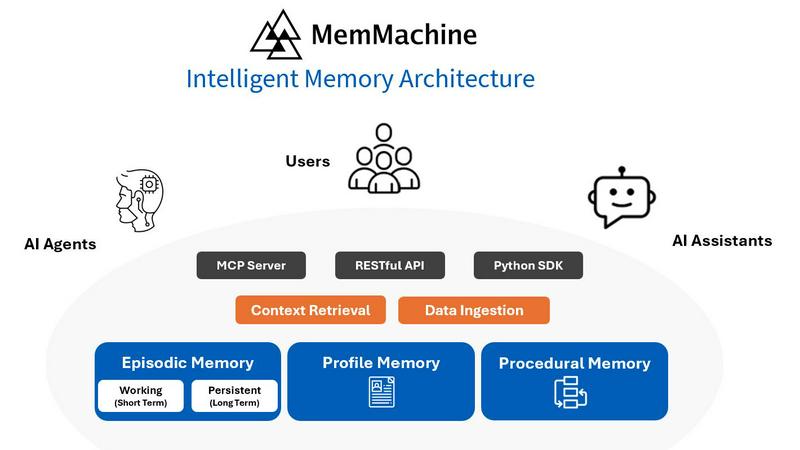
MemMachine is the open-source memory layer that makes AI agents learn and personalize fast.
Last updated: February 28, 2026

Prompt Builder
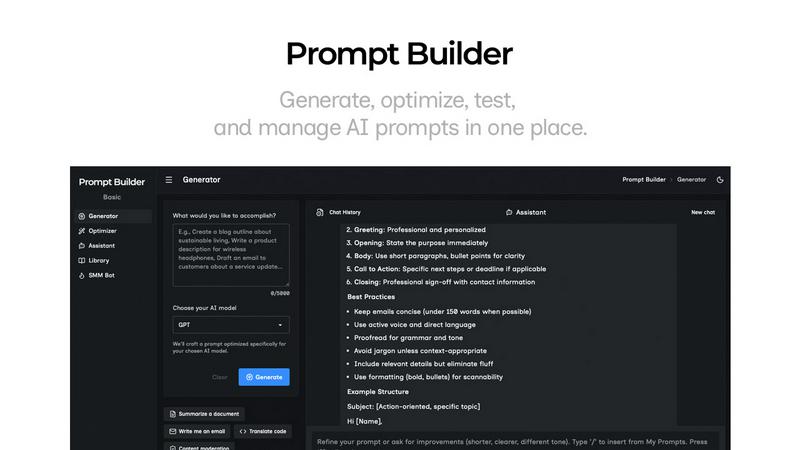
Generate, optimize, test, and manage AI prompts in one place. Turn an idea into a ready-to-use prompt in seconds.
Visual Comparison
MemMachine
Prompt Builder
Overview
About MemMachine
MemMachine is the open-source memory layer that supercharges AI agents with persistent, evolving intelligence. It's the critical infrastructure that allows applications to learn, store, and instantly recall information from every past interaction. Forget building chatbots that reset with every session. MemMachine transforms them into deeply personalized, context-aware assistants that understand user history, preferences, and patterns. Designed for developers and engineering teams building the next generation of AI products, it provides a sophisticated memory system that works seamlessly across multiple sessions, different AI agents, and various large language models (LLMs). By building a dynamic, ever-growing user profile, MemMachine enables your applications to not just react, but proactively anticipate needs. It's the key to unlocking AI that feels truly intelligent, delivering lightning-fast, personalized experiences that drive unprecedented user engagement and efficiency. Build agents that remember, and watch user satisfaction skyrocket.
About Prompt Builder
Prompt Builder is a prompt engineering workspace for writing, testing, and saving prompts. Describe the task in plain English, and it helps you create a prompt that matches the model you choose. Start with a draft, refine it in chat, save or pin versions, then run them when you are ready. It works with GPT, Claude, Gemini, Llama, Mistral, DeepSeek, Grok, Perplexity, and more. You also get an Optimizer, an assistant for quick tests, and a library of reusable prompts and templates from the community. Turn an idea into a ready-to-use prompt in seconds. Refine it in chat, save it to your Library, and run it anytime.