
LuxSign vs Refbox
Side-by-side comparison to help you choose the right product.

LuxSign lets you securely sign and manage documents online in minutes with eIDAS SES compliance for legal validity.
Last updated: February 27, 2026

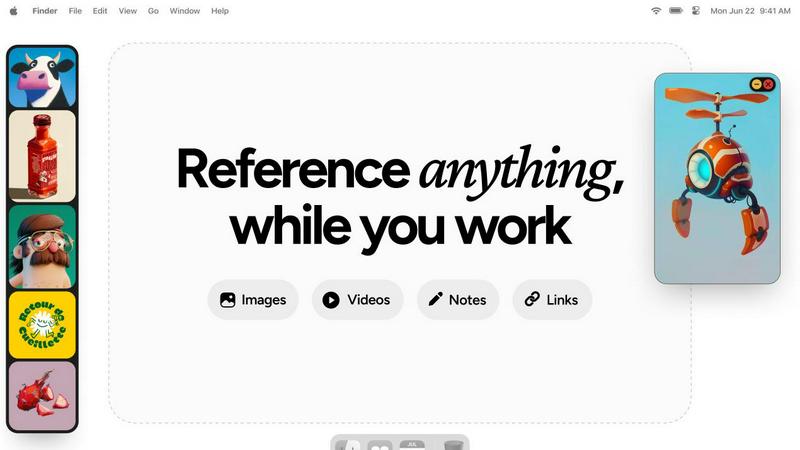
Refbox floats your images and notes above your workspace for instant access.
Last updated: February 28, 2026
Visual Comparison
LuxSign

Refbox
Feature Comparison
LuxSign
Multiple Signature Methods
LuxSign offers diverse signing methods, allowing users to draw their signature with a mouse, type their name, or upload an image. This flexibility caters to individual preferences, making the signing process quick and personalized.
Advanced Security
This platform employs industry-standard encryption techniques to protect your documents at every stage: during upload, storage, and transmission. With secure data hosting in Luxembourg, users can trust that their information is safe and compliant with EU regulations.
Collaboration Workspaces
LuxSign enables teams to create shared workspaces, facilitating seamless collaboration on documents. Organize files into folders, manage member access, and work together efficiently, ensuring everyone stays on the same page throughout the signing process.
Complete Audit Trail
Every action taken on a document is meticulously logged, providing detailed audit trails with timestamps, IP addresses, and signer information. This transparency is essential for compliance and verification, giving users peace of mind regarding document integrity.
Refbox
Always-On-Top Floating Frames
Speed is paramount. Refbox creates resizable frames for your images, videos, GIFs, and notes that float persistently above every other application on your desktop. This means instant, glanceable access without ever minimizing your main work window. You can position references exactly where you need them, compare visuals side-by-side, and keep your workflow perfectly seamless from inspiration to execution.
Infinite Canvas & Quick-Swap Collections
Organize your chaos at lightning speed. Dump all your reference media onto a limitless canvas to see everything at once for broad moodboarding. Need to focus? Instantly swap between different curated Collections with a single click. Flip through items like a slideshow using arrow keys for rapid comparison, ensuring you find the perfect reference in seconds, not minutes.
Advanced Media Controls & Pixel-Perfect Tools
Go beyond simple viewing with power tools built for pros. Step through GIFs frame-by-frame for detailed animation study. Use the built-in color picker on any media to grab and copy hex codes instantly. View pixel art with proper crisp rendering, take website screenshots by pasting a URL, crop images on the fly, and even lock frames to draw behind them. Every action is optimized for speed.
Smart Shortcuts & Auto-Hide
Maintain a pristine, focused workspace. Configure keyboard shortcuts for every major action—opening the app, swapping collections, minimizing frames—for total hands-on-control. When you need full-screen focus, auto-hide your Refbox with a hotkey; it stays out of sight until you summon it back instantly. This minimizes visual clutter and maximizes screen real estate for your primary task.
Use Cases
LuxSign
Streamlining Contract Management
Companies can use LuxSign to manage their contracts more effectively. By digitizing the signing process, businesses reduce turnaround times and enhance overall efficiency, allowing for quicker deal closures.
Facilitating Remote Work
With LuxSign, employees working remotely can easily sign and send documents securely from anywhere. This accessibility ensures that critical documents are processed without unnecessary delays, supporting a flexible work environment.
Enhancing Customer Experience
Businesses can improve customer satisfaction by providing a fast and easy signing process for contracts and agreements. LuxSign's user-friendly interface and instant notifications keep customers informed and engaged throughout the process.
Ensuring Compliance in Regulated Industries
Industries such as finance and healthcare can benefit from LuxSign's high compliance standards. With end-to-end encryption and GDPR adherence, organizations can confidently manage sensitive documents while meeting regulatory requirements.
Refbox
Digital Illustration & Concept Art
Illustrators and concept artists can pin character sketches, color palettes, and environment photos directly over their drawing software like Photoshop or Clip Studio Paint. This allows for constant visual comparison, ensuring anatomical accuracy, color matching, and stylistic consistency without breaking concentration to search for files, dramatically speeding up the drafting and rendering process.
UI/UX & Web Design
UI designers streamline their workflow by floating style guides, component libraries, and competitor website screenshots next to Figma or Sketch. They can quickly reference spacing, font sizes, and interaction patterns. The ability to take instant screenshots of live sites and add text notes for feedback keeps all critical reference material immediately accessible, ensuring design fidelity and faster iteration cycles.
3D Modeling & Animation
3D artists and animators use Refbox to keep orthographic reference images, texture maps, and motion study videos visible while working in complex software like Blender or Maya. The GIF frame-stepping feature is invaluable for analyzing movement frame-by-frame. This constant access prevents perspective errors and accelerates the modeling, texturing, and rigging phases.
Photography & Moodboarding
Photographers and art directors build dynamic moodboards by collating inspiration images, lighting setups, and color swatches on Refbox's infinite canvas. During editing in Lightroom or Capture One, they can float these boards for direct comparison. The organized collections allow for swift switching between different project themes or client visions, making creative direction clear and execution faster.
Overview
About LuxSign
LuxSign is a cutting-edge, secure electronic signature platform designed specifically for businesses that demand high compliance and robust security. Built in the heart of Luxembourg, LuxSign ensures that all documents are encrypted end-to-end and stored exclusively within the nation, adhering strictly to GDPR requirements. This platform is ideal for companies operating within the European Union, as it supports eIDAS SES standards, providing legal validity for contracts across all member states. With user-friendly features such as drag-and-drop signature field placement, automated notifications, and versatile signing workflows, LuxSign streamlines the document signing process, making it efficient and hassle-free. Whether you're a small business or a large enterprise, LuxSign offers scalable solutions that meet your electronic signature needs while maintaining the highest levels of security and compliance.
About Refbox
Refbox is the lightning-fast floating reference app that eliminates creative friction. Built for speed-obsessed professionals, it pins your inspiration directly onto your workspace. Stop alt-tabbing through folders and browser tabs. Refbox lets you instantly float images, GIFs, videos, and notes in always-on-top, resizable frames that hover above any application you're using. This keeps your visual stimuli and critical notes visible at all times, ensuring your creative flow is never interrupted. It's designed for a wide spectrum of visual creators including graphic designers, illustrators, UI/UX designers, 3D artists, animators, photographers, and concept artists. The core value proposition is ruthless efficiency: by providing immediate, organized access to references without leaving your primary work window, Refbox dramatically boosts productivity and accuracy. It transforms a cluttered desktop or a mess of tabs into a streamlined, distraction-free command center for your creativity, letting you focus entirely on bringing your vision to life.
Frequently Asked Questions
LuxSign FAQ
How does LuxSign ensure document security?
LuxSign utilizes industry-standard encryption for documents throughout the upload, storage, and transmission phases. Additionally, all data is securely hosted in Luxembourg, complying with GDPR and local data protection laws.
Is LuxSign compliant with EU regulations?
Yes, LuxSign adheres to eIDAS SES standards, ensuring that electronic signatures are legally valid and admissible in most business transactions across the European Union.
What types of documents can I sign with LuxSign?
LuxSign supports a variety of document formats, including PDF, DOC, and DOCX. Users can easily upload files up to 10MB for signing.
Can I track the signing process in real-time?
Absolutely! LuxSign provides automatic email notifications for every stage of the signing process, allowing users to track when documents are sent, viewed, and signed in real-time.
Refbox FAQ
What platforms does Refbox support?
Refbox is currently available for macOS and Windows operating systems. It is designed as a native desktop application to ensure high performance, system integration for features like always-on-top windows, and reliable access to your local files and clipboard, providing a fast and stable experience tailored for professional creative workflows.
Can I use Refbox with multiple monitors?
Absolutely. Refbox is built for expansive setups. You can drag and position your floating reference frames onto any connected monitor. This allows you to dedicate one screen entirely to your references and moodboards while using another for your primary design, animation, or editing software, creating an incredibly efficient and organized multi-screen workspace.
How does Refbox handle different file types?
Refbox supports a wide array of media natively. You can drag and drop or paste common image formats (JPG, PNG, SVG), videos (MP4, MOV), GIFs, and even text to create styled notes with checklists. For web references, simply paste a URL to generate a screenshot directly within the app. This versatility consolidates all your inspiration into one quick-access tool.
Is there a free trial or version available?
Yes, Refbox offers a free version with core functionality to let you experience the speed boost firsthand. This includes creating floating frames, basic collections, and using essential shortcuts. For access to advanced power features like unlimited collections, GIF frame control, the color picker, and website screenshots, you can upgrade to the Pro license with a one-time payment.
Alternatives
LuxSign Alternatives
LuxSign is a cutting-edge electronic signature platform designed for businesses that prioritize compliance and security. As an eIDAS SES compliant solution, it offers legally valid signatures across all EU member states, making it a top choice for organizations operating within the region. However, users often seek alternatives for various reasons, including pricing, additional features, or specific functionality that better aligns with their operational needs. When selecting an alternative to LuxSign, it's crucial to consider factors such as compliance with local regulations, user experience, integration capabilities, and the range of features offered. Look for platforms that provide end-to-end encryption, robust support for workflows, and customization options to ensure they meet your business requirements effectively.
Refbox Alternatives
Refbox is a floating reference app in the productivity category. It keeps images, videos, and notes in always-on-top windows, eliminating disruptive app switching for creatives. Users often seek alternatives for various reasons. This includes needing a different pricing model, specific features not offered, or compatibility with a different operating system. It's a common step in finding the perfect workflow fit. When evaluating alternatives, prioritize core needs. Key factors include the ability to pin reference material, support for your file types, and seamless integration with your primary creative applications. Speed and an intuitive interface are also critical for maintaining efficiency.