
LinkedIn Speak vs Z-Image-Edit
Side-by-side comparison to help you choose the right product.

LinkedIn Speak
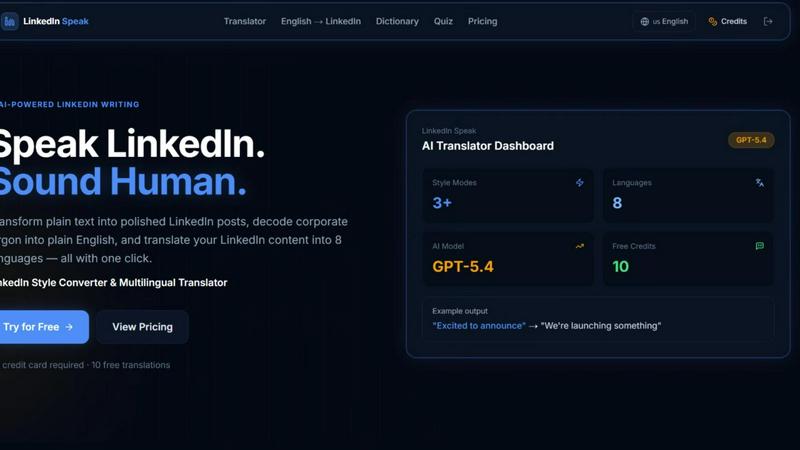
Instantly transform plain text into polished LinkedIn posts and translate them across eight languages.
Last updated: April 13, 2026

Z-Image-Edit
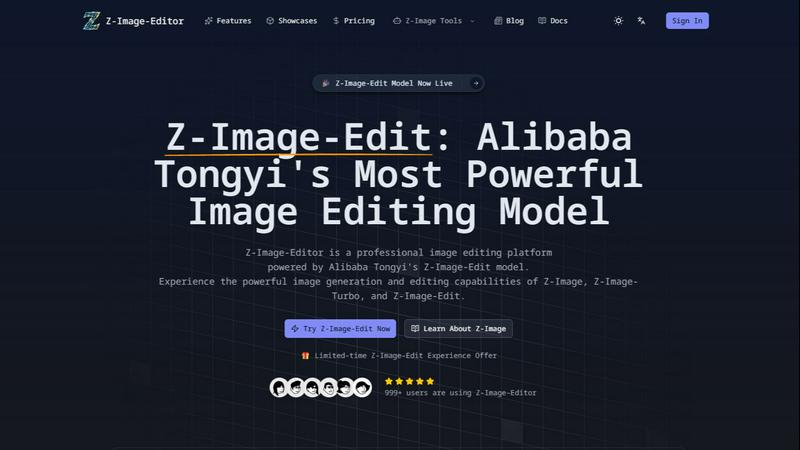
Z-Image-Edit is your go-to app for lightning-fast image creation and editing using simple text commands.
Last updated: February 28, 2026
Visual Comparison
LinkedIn Speak
Z-Image-Edit
Feature Comparison
LinkedIn Speak
AI-Powered Style Converter
This core feature instantly transforms any plain text into a perfectly toned LinkedIn post. Go from a simple idea like "we hired someone" to a professional announcement like "We are thrilled to welcome a new star to our team..." in under three seconds. It applies the specific linguistic patterns, keywords, and persuasive structures that perform best on the platform, ensuring your content sounds native to LinkedIn's ecosystem without any manual effort.
Corporate Jargon Decoder
Cut through the noise instantly. This smart dictionary feature takes dense, confusing corporate jargon and translates it into clear, plain English. Input phrases like "synergize scalable solutions" or "leveraging core competencies" and get back human-readable translations like "work together on expandable plans" or "using our main strengths." It's the fastest way to ensure your messaging is transparent and understandable to all your connections.
Multilingual Translation Engine
Expand your reach globally with one click. LinkedIn Speak's advanced translator converts your LinkedIn content into eight different languages, allowing you to engage with international networks and clients without barriers. This feature maintains the professional tone and intent of your original message, enabling fast and efficient cross-border communication and personal branding.
Multiple Style Modes
Fine-tune your voice with precision speed. Beyond a standard conversion, choose from specialized style modes like Polished, Satirical, Professional, Light, or Extreme. Need a formal company announcement? Use Professional. Want a more engaging, casual update? Select Light. This granular control lets you adapt your message for different audiences and purposes in a flash, all from a single interface.
Z-Image-Edit
Natural Language Processing
Z-Image-Edit utilizes advanced natural language processing capabilities that allow users to describe their desired edits in simple terms. This feature eliminates the need for technical jargon, making image editing accessible to everyone, from novice users to seasoned professionals.
Ultra-Fast Generation
With the Z-Image-Turbo model, users can generate high-quality images in as little as 2 seconds. This incredible speed enables rapid prototyping and instant results, making it the ideal choice for time-sensitive projects where efficiency is crucial.
Multilingual Support
Z-Image-Edit provides bilingual text rendering, supporting both English and Chinese instructions. This feature enhances usability for a global audience, making it easier for users from diverse linguistic backgrounds to engage with the platform and produce stunning visuals.
Flexible Model Options
The platform offers three distinct models—Z-Image-Edit, Z-Image-Turbo, and Z-Image-Base—each serving different user requirements. Whether you need detailed instruction-driven edits, quick image generation, or an open-source solution for development, Z-Image-Edit has you covered.
Use Cases
LinkedIn Speak
For Busy Professionals & Executives
Maximize your visibility in minimal time. Executives and busy professionals can draft post ideas in simple bullet points or quick voice notes and use LinkedIn Speak to instantly convert them into eloquent, share-ready posts. This ensures a consistent and influential presence on the platform without sacrificing hours of writing and editing, making thought leadership fast and efficient.
For Non-Native English Speakers
Build confidence and clarity in your professional communication. Non-native speakers can write posts in their native language or in simple English and use the tool to polish the grammar, apply the correct LinkedIn phrasing, and ensure the tone is culturally appropriate. The jargon decoder also helps them understand and engage with content from other users, breaking down language barriers at high speed.
For Marketing & Social Media Teams
Scale content production and maintain brand voice effortlessly. Marketing teams managing multiple company or executive profiles can use LinkedIn Speak to ensure every post, regardless of the initial drafter, adheres to a polished, on-brand professional style. The multilingual feature allows for rapid adaptation of campaign messaging for different regional pages, streamlining global social media strategy.
For Job Seekers & Network Builders
Craft standout profiles and engagement comments quickly. Job seekers can transform their resume bullet points into compelling LinkedIn profile summaries and activity posts. The tool helps them phrase accomplishments in the impactful language recruiters seek. It also assists in writing thoughtful, well-worded comments on industry posts to build visibility and network faster.
Z-Image-Edit
Graphic Design
Graphic designers can leverage Z-Image-Edit to create stunning visuals quickly, allowing them to focus on creativity rather than technical details. The ability to generate images based on simple descriptions streamlines the design process significantly.
Marketing Campaigns
Marketers can utilize Z-Image-Edit for creating eye-catching promotional materials and social media graphics. With ultra-fast generation and high-quality outputs, campaigns can be launched faster, responding to market trends in real-time.
Content Creation
Content creators, including bloggers and video editors, can enhance their visuals effortlessly. Whether it’s creating featured images or thumbnails, Z-Image-Edit makes it easy to produce engaging content that captivates audiences.
Educational Purposes
Educators can use Z-Image-Edit to generate visuals for presentations or learning materials. The platform’s quick generation and multilingual support make it a valuable tool for creating engaging educational content that resonates with diverse learners.
Overview
About LinkedIn Speak
LinkedIn Speak is the ultimate AI-powered accelerator for professional communication. It is engineered for speed and efficiency, transforming how individuals and businesses create content for the world's premier professional network. The core mission is simple: help you speak the nuanced language of LinkedIn with confidence and clarity, in record time. This all-in-one platform tackles the three biggest hurdles in LinkedIn content creation: crafting the perfect tone, cutting through confusing jargon, and reaching a global audience. Whether you're a busy executive, a solopreneur, a marketer managing multiple accounts, or a non-native English speaker, LinkedIn Speak eliminates guesswork and friction. Its one-click technology converts plain ideas into polished posts, decodes corporate buzzwords into plain English, and instantly translates content across eight major languages. This isn't just about writing; it's about optimizing your professional voice for maximum impact and engagement at lightning speed, freeing you to focus on strategy and connection.
About Z-Image-Edit
Z-Image-Edit is a revolutionary online image editor and generator designed to elevate your creative workflow with lightning speed and professional-grade output. Powered by Alibaba Tongyi's state-of-the-art Z-Image series models, this platform allows users to make precise image edits and generate stunning visuals by simply using natural language instructions in both English and Chinese. Forget the hassle of complex software interfaces; just describe what you envision, and Z-Image-Edit brings it to life with remarkable accuracy. It's perfect for designers, marketers, content creators, and developers who demand photorealistic results. The platform features three robust models tailored to different needs: Z-Image-Edit for instruction-driven edits, Z-Image-Turbo for ultra-fast generation in as little as 2 seconds, and Z-Image-Base for those looking to customize and develop using open-source frameworks. Built on an advanced 6B-parameter Single-Stream Diffusion Transformer (S3-DiT) architecture, Z-Image-Edit combines efficiency with exceptional output quality, ensuring that creativity is both powerful and seamless.
Frequently Asked Questions
LinkedIn Speak FAQ
How many free translations do I get?
New users receive 10 free credits immediately upon signup, with no credit card required. Each use of the AI Translator (for style conversion, jargon decoding, or language translation) consumes one credit. This allows you to test the tool's speed and capabilities extensively before deciding on a paid plan.
What languages does the translator support?
LinkedIn Speak's powerful translation engine currently supports conversion across eight major languages. This enables you to take your English LinkedIn content and instantly adapt it for professional audiences in other key linguistic markets, all from the same dashboard with incredible efficiency.
How fast is the translation and conversion process?
The platform is built for speed, with an average processing time of less than three seconds per request. Whether you are converting style, decoding jargon, or translating between languages, the AI delivers polished, ready-to-use results almost instantaneously, aligning with a fast-paced professional workflow.
What are the different "Style Modes" for?
The Style Modes give you rapid, granular control over the tone and personality of your converted text. Choose 'Polished' for a refined edit, 'Professional' for formal announcements, 'Light' for casual updates, 'Satirical' for humorous takes, or 'Extreme' for highly stylized versions. This lets you tailor your message for different contexts and audiences in a flash.
Z-Image-Edit FAQ
What types of images can I create with Z-Image-Edit?
Z-Image-Edit allows you to create a wide variety of images, including graphics for marketing, illustrations for blogs, and visuals for social media. Its flexibility caters to numerous creative needs.
Is Z-Image-Edit easy to use for beginners?
Absolutely! Z-Image-Edit is designed with user-friendliness in mind. You can simply describe what you want in natural language, making it accessible for users of all skill levels.
How fast can I expect results from Z-Image-Turbo?
With Z-Image-Turbo, you can expect high-quality image generation in as little as 2 seconds. This rapid output is perfect for those who need quick results without compromising quality.
Can I use Z-Image-Edit for commercial purposes?
Yes, Z-Image-Edit can be used for commercial purposes, making it an excellent tool for businesses looking to create professional-grade visuals for various marketing and branding efforts.
Alternatives
LinkedIn Speak Alternatives
LinkedIn Speak is an AI-powered writing and design tool that instantly transforms plain text into professional LinkedIn posts. It also decodes corporate jargon and translates content across multiple languages, streamlining profile and content creation for the platform. Users often seek alternatives for various reasons. Some need a tool that integrates with different social platforms beyond LinkedIn. Others may prioritize specific features like advanced analytics, different pricing models, or a user interface that better matches their personal workflow. When evaluating other options, consider your primary goals. Look for core functionality in text enhancement and clarity. Assess translation capabilities if you work globally. Finally, compare the value based on your output volume and whether you need multi-platform support.
Z-Image-Edit Alternatives
Z-Image-Edit is an advanced online image editor and generator that leverages Alibaba's innovative AI technology, specifically designed for transforming images with natural language commands. This product is ideal for designers, marketers, and content creators who seek to streamline their creative process while achieving professional-quality results. Users often search for alternatives due to factors such as pricing, specific feature sets, platform compatibility, or the need for additional customization options. When selecting an alternative, it is essential to consider aspects like ease of use, speed of output, image quality, and the range of functionalities that can cater to varying creative needs. --- [{"question": "What is Z-Image-Edit?", "answer": "Z-Image-Edit is a professional-grade online image editor and generator powered by Alibaba Tongyi's AI technology, allowing users to create and edit images using natural language commands."}, {"question": "Who is Z-Image-Edit for?", "answer": "Z-Image-Edit is designed for designers, marketers, content creators, and developers who require fast, high-quality image generation and editing."}, {"question": "Is Z-Image-Edit free?", "answer": "The pricing model for Z-Image-Edit may vary, and users should check the platform for specific subscription or usage costs."}, {"question": "What are the main features of Z-Image-Edit?", "answer": "Key features of Z-Image-Edit include natural language instruction editing, ultra-fast image generation with Z-Image-Turbo, and accurate bilingual text rendering."}]