
LinkedIn Speak vs LinkedInPro
Side-by-side comparison to help you choose the right product.

LinkedIn Speak
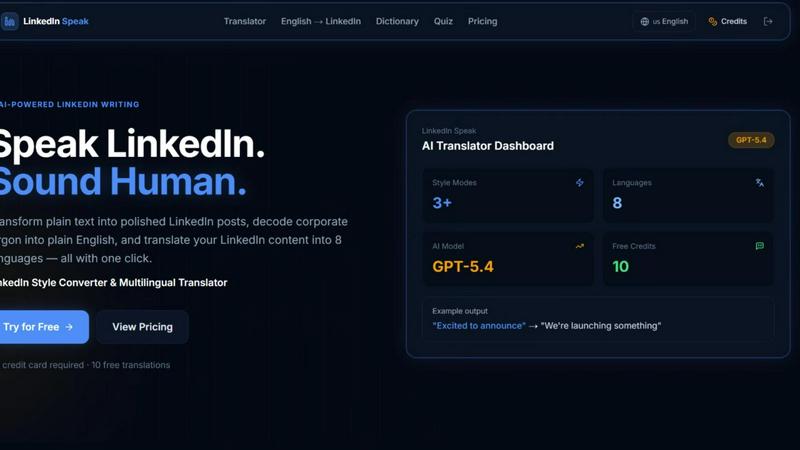
Instantly transform plain text into polished LinkedIn posts and translate them across eight languages.
Last updated: April 13, 2026
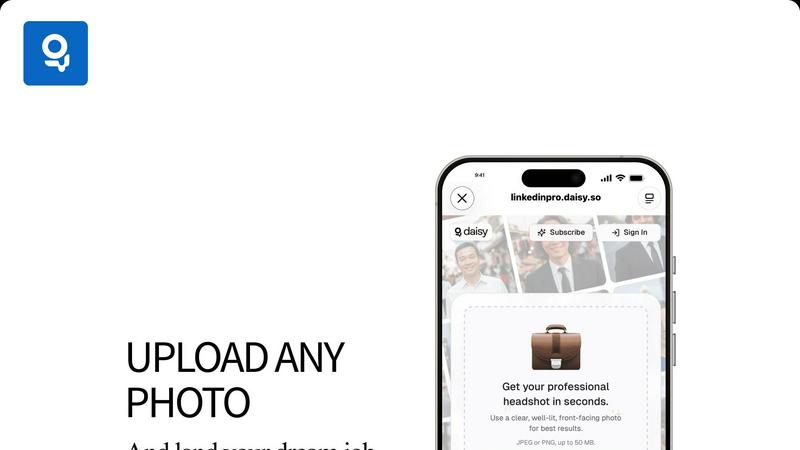
Get a flawless professional headshot from any casual photo in seconds.
Last updated: February 28, 2026
Visual Comparison
LinkedIn Speak
LinkedInPro
Feature Comparison
LinkedIn Speak
AI-Powered Style Converter
This core feature instantly transforms any plain text into a perfectly toned LinkedIn post. Go from a simple idea like "we hired someone" to a professional announcement like "We are thrilled to welcome a new star to our team..." in under three seconds. It applies the specific linguistic patterns, keywords, and persuasive structures that perform best on the platform, ensuring your content sounds native to LinkedIn's ecosystem without any manual effort.
Corporate Jargon Decoder
Cut through the noise instantly. This smart dictionary feature takes dense, confusing corporate jargon and translates it into clear, plain English. Input phrases like "synergize scalable solutions" or "leveraging core competencies" and get back human-readable translations like "work together on expandable plans" or "using our main strengths." It's the fastest way to ensure your messaging is transparent and understandable to all your connections.
Multilingual Translation Engine
Expand your reach globally with one click. LinkedIn Speak's advanced translator converts your LinkedIn content into eight different languages, allowing you to engage with international networks and clients without barriers. This feature maintains the professional tone and intent of your original message, enabling fast and efficient cross-border communication and personal branding.
Multiple Style Modes
Fine-tune your voice with precision speed. Beyond a standard conversion, choose from specialized style modes like Polished, Satirical, Professional, Light, or Extreme. Need a formal company announcement? Use Professional. Want a more engaging, casual update? Select Light. This granular control lets you adapt your message for different audiences and purposes in a flash, all from a single interface.
LinkedInPro
Lightning-Fast AI Transformation
Experience near-instant results. Our proprietary AI engine is optimized for speed, transforming your everyday photo into a professional-grade headshot in mere seconds. There's no waiting, no processing delays. Just upload your photo and get your polished results faster than you can schedule a traditional photographer.
Studio-Quality Enhancement Suite
Go beyond simple filters. LinkedInPro's AI intelligently analyzes your photo to perform complex, professional-grade enhancements. It automatically corrects lighting to eliminate shadows and create a balanced, flattering glow, refines skin texture and details for a natural look, and sharpens focus to ensure you look crisp and professional.
Multiple Style & Background Options
Get the perfect look for your brand. LinkedInPro doesn't give you just one result. Choose from a variety of professional styles, including different corporate backgrounds (like office or neutral backdrops) and attire options. This flexibility allows you to select the headshot that best fits your industry, role, and personal branding goals.
Secure & Simple User Process
Your privacy and ease are paramount. The platform features a streamlined, intuitive interface where you can upload a photo directly from your device or take one on the spot. All processing is done securely, with clear terms of use and a privacy policy. We ensure your data is handled responsibly so you can focus on your results with complete confidence.
Use Cases
LinkedIn Speak
For Busy Professionals & Executives
Maximize your visibility in minimal time. Executives and busy professionals can draft post ideas in simple bullet points or quick voice notes and use LinkedIn Speak to instantly convert them into eloquent, share-ready posts. This ensures a consistent and influential presence on the platform without sacrificing hours of writing and editing, making thought leadership fast and efficient.
For Non-Native English Speakers
Build confidence and clarity in your professional communication. Non-native speakers can write posts in their native language or in simple English and use the tool to polish the grammar, apply the correct LinkedIn phrasing, and ensure the tone is culturally appropriate. The jargon decoder also helps them understand and engage with content from other users, breaking down language barriers at high speed.
For Marketing & Social Media Teams
Scale content production and maintain brand voice effortlessly. Marketing teams managing multiple company or executive profiles can use LinkedIn Speak to ensure every post, regardless of the initial drafter, adheres to a polished, on-brand professional style. The multilingual feature allows for rapid adaptation of campaign messaging for different regional pages, streamlining global social media strategy.
For Job Seekers & Network Builders
Craft standout profiles and engagement comments quickly. Job seekers can transform their resume bullet points into compelling LinkedIn profile summaries and activity posts. The tool helps them phrase accomplishments in the impactful language recruiters seek. It also assists in writing thoughtful, well-worded comments on industry posts to build visibility and network faster.
LinkedInPro
The Active Job Seeker
You're applying to roles and need to stand out immediately. Instead of using an outdated or casual photo, get a professional headshot in seconds to update your LinkedIn profile, resume, and application portals. A polished image builds trust with recruiters and hiring managers, making a critical strong first impression before you even send a message.
The Busy Entrepreneur & Founder
Time is your most valuable asset, and your image is your brand. LinkedInPro allows founders and solopreneurs to quickly generate a consistent, professional look across all business platforms—LinkedIn, company website, investor decks, and speaker bios—without the downtime and cost of a photoshoot, keeping the focus on growing the business.
The Career Professional Upgrading Their Profile
You're not actively job hunting but want to maintain a competitive, modern presence. Refresh your LinkedIn profile, corporate directory photo, or professional association bio with an updated headshot that reflects your current role and seniority. It’s a quick win for personal branding and network perception.
The Remote Worker & Digital Nomad
Working from anywhere means you might not have access to a local photographer. LinkedInPro delivers a consistent, high-quality professional image regardless of your location. Ensure your virtual meeting avatars, client-facing profiles, and professional networks present you in the best possible light, instantly.
Overview
About LinkedIn Speak
LinkedIn Speak is the ultimate AI-powered accelerator for professional communication. It is engineered for speed and efficiency, transforming how individuals and businesses create content for the world's premier professional network. The core mission is simple: help you speak the nuanced language of LinkedIn with confidence and clarity, in record time. This all-in-one platform tackles the three biggest hurdles in LinkedIn content creation: crafting the perfect tone, cutting through confusing jargon, and reaching a global audience. Whether you're a busy executive, a solopreneur, a marketer managing multiple accounts, or a non-native English speaker, LinkedIn Speak eliminates guesswork and friction. Its one-click technology converts plain ideas into polished posts, decodes corporate buzzwords into plain English, and instantly translates content across eight major languages. This isn't just about writing; it's about optimizing your professional voice for maximum impact and engagement at lightning speed, freeing you to focus on strategy and connection.
About LinkedInPro
LinkedInPro is the AI-powered revolution for your professional image. It is designed to deliver studio-quality headshots in seconds, eliminating the traditional barriers of time, cost, and complexity. This lightning-fast platform is built for ambitious professionals, active job seekers, and savvy entrepreneurs who understand that a powerful digital presence is non-negotiable. Simply upload a clear photo, and LinkedInPro's advanced artificial intelligence takes over, performing intelligent enhancements to lighting, refining facial details, and applying professional styling to create a polished, authentic-looking headshot. The core value is unmatched speed, affordability, and accessibility: get a headshot that attracts recruiters, builds instant credibility, and strengthens your personal brand in under a minute. No more scheduling photoshoots or paying hundreds of dollars. LinkedInPro offers multiple style and background options, providing the flexibility to tailor your look to your specific industry and career goals. It is the ultimate tool for anyone serious about making a powerful, positive first impression online, redefining professional image creation with breathtaking efficiency.
Frequently Asked Questions
LinkedIn Speak FAQ
How many free translations do I get?
New users receive 10 free credits immediately upon signup, with no credit card required. Each use of the AI Translator (for style conversion, jargon decoding, or language translation) consumes one credit. This allows you to test the tool's speed and capabilities extensively before deciding on a paid plan.
What languages does the translator support?
LinkedIn Speak's powerful translation engine currently supports conversion across eight major languages. This enables you to take your English LinkedIn content and instantly adapt it for professional audiences in other key linguistic markets, all from the same dashboard with incredible efficiency.
How fast is the translation and conversion process?
The platform is built for speed, with an average processing time of less than three seconds per request. Whether you are converting style, decoding jargon, or translating between languages, the AI delivers polished, ready-to-use results almost instantaneously, aligning with a fast-paced professional workflow.
What are the different "Style Modes" for?
The Style Modes give you rapid, granular control over the tone and personality of your converted text. Choose 'Polished' for a refined edit, 'Professional' for formal announcements, 'Light' for casual updates, 'Satirical' for humorous takes, or 'Extreme' for highly stylized versions. This lets you tailor your message for different contexts and audiences in a flash.
LinkedInPro FAQ
What kind of photo should I upload for the best results?
For optimal AI enhancement, upload a clear, well-lit, front-facing photo. Ensure your face is fully visible without heavy shadows, hats, or sunglasses. A high-quality selfie or portrait taken against a relatively plain background works perfectly. The AI uses this input to intelligently build your professional headshot.
How does LinkedInPro ensure my headshot looks authentic and not fake?
Our advanced AI is specifically trained to enhance, not replace. It focuses on professional refinements like lighting correction, detail sharpening, and subtle styling while preserving your core likeness and features. The goal is a natural, polished version of you, not a generated or artificial-looking avatar.
Is my data and uploaded photo secure with LinkedInPro?
Absolutely. Security and privacy are fundamental. Your uploads are processed securely, and we adhere to a strict Privacy Policy. We do not claim ownership of your photos, and your data is handled with care. You can review our Terms of Use and Privacy Policy for complete details on our commitments.
How many different headshot styles can I get?
LinkedInPro provides multiple style options from a single upload. You will receive a selection of professionally styled headshots featuring different backgrounds (e.g., corporate office, neutral tones) and attire variations. This gives you the flexibility to choose the perfect look that aligns with your personal brand and professional needs.
Alternatives
LinkedIn Speak Alternatives
LinkedIn Speak is an AI-powered writing and design tool that instantly transforms plain text into professional LinkedIn posts. It also decodes corporate jargon and translates content across multiple languages, streamlining profile and content creation for the platform. Users often seek alternatives for various reasons. Some need a tool that integrates with different social platforms beyond LinkedIn. Others may prioritize specific features like advanced analytics, different pricing models, or a user interface that better matches their personal workflow. When evaluating other options, consider your primary goals. Look for core functionality in text enhancement and clarity. Assess translation capabilities if you work globally. Finally, compare the value based on your output volume and whether you need multi-platform support.
LinkedInPro Alternatives
LinkedInPro is a lightning-fast AI tool in the productivity category that instantly transforms casual photos into polished professional headshots. It's built for speed, affordability, and accessibility, eliminating the traditional photoshoot. Users often seek alternatives for various reasons. Some may need different pricing models, specific feature sets like more style variations, or a platform that integrates with other professional tools. Others might simply want to compare options before committing. When evaluating alternatives, key factors include the speed of generation, the quality and authenticity of the AI output, the range of styles and backgrounds offered, and of course, the overall cost. The best choice will align with your specific professional needs and budget.