
Code Word Solver - Missing Words Finder vs LessonPlanGenerator
Side-by-side comparison to help you choose the right product.

Code Word Solver - Missing Words Finder
Unlock codewords effortlessly with our fast, user-friendly solver that finds missing words in seconds.
Last updated: February 27, 2026

LessonPlanGenerator
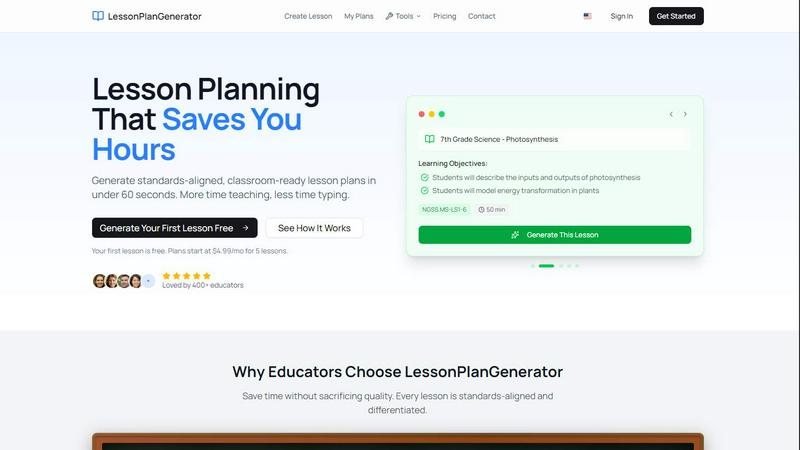
Generate standards-aligned lesson plans in under 60 seconds, freeing up your time to focus on teaching.
Last updated: February 27, 2026
Visual Comparison
Code Word Solver - Missing Words Finder

LessonPlanGenerator
Feature Comparison
Code Word Solver - Missing Words Finder
Single Pattern Solving
The single pattern solving feature allows users to input one known word pattern and receive a list of potential word matches. You simply enter the letters you know, using placeholders for unknown letters, and the solver instantly filters through its extensive dictionary. This feature is invaluable for pinpointing answers quickly and efficiently, reducing the frustration of guesswork.
Multi-Pattern Solving
With multi-pattern solving, users can enter two interconnected patterns simultaneously to find side-by-side solutions. This feature is particularly beneficial when the same number-to-letter relationships recur across different words in a puzzle. It provides a more comprehensive approach to solving complex puzzles, ensuring you do not miss any potential answers.
Flexible Pattern Input
The flexible pattern input functionality allows users to specify known letters while using symbols for unknowns. By utilizing dots or question marks for unique unknown letters and numbers for repeated unknown letters, users can precisely articulate their knowledge. For instance, entering "112.2" will yield matches like "llama," showcasing the tool's capability to understand complex patterns.
Customizable Difficulty Dictionaries
Recognizing that different players have varying levels of experience and preference, Code Word Solver offers user-selectable dictionaries. You can choose from three difficulty levels: Hard (260k words), Normal (115k words), or Easy (20k words). This feature ensures that you have access to an appropriate word list that matches your skill level, enhancing your puzzle-solving experience.
LessonPlanGenerator
60-Second Generation
With a user-friendly interface, educators can enter their lesson topic, grade, and subject, and the AI generates a complete lesson plan in seconds. This rapid turnaround means no more wasted time staring at blank templates, allowing teachers to make the most of their time.
Standards Aligned
LessonPlanGenerator includes built-in alignment with various educational standards such as CCSS and NGSS. The visual alignment checks identify gaps in standards coverage before administrators do, ensuring that every lesson meets necessary educational guidelines.
Differentiation Built In
Recognizing the diverse needs of learners, the platform automatically generates differentiation strategies, including ELL supports, IEP accommodations, and gifted extensions. This ensures that every student receives the tailored support they need to thrive in the classroom.
Export Anywhere
The platform offers seamless export options to Google Docs and PDF formats, making it easy for teachers to share their lesson plans with students and administrators. With just one click, educators can prepare their plans for classroom use or administrative review.
Use Cases
Code Word Solver - Missing Words Finder
Quick Puzzle Resolution
For avid puzzle enthusiasts who want to resolve codeword puzzles quickly, the Code Word Solver provides an efficient way to find solutions. By inputting known letters, users can minimize time spent on each puzzle and maximize enjoyment, making it perfect for competitive settings or casual play.
Learning Tool for Beginners
Newcomers to codeword puzzles can use the tool as a learning aid. By understanding how to input patterns and seeing potential word matches, beginners can gain confidence and improve their skills. This educational aspect encourages engagement and makes learning fun.
Collaborative Puzzle Solving
Friends or family members can use the Code Word Solver together to tackle challenging puzzles. By inputting different patterns and collaborating on solutions, users can enhance their teamwork and problem-solving abilities, turning a solitary activity into a social event.
Enhancing Puzzle Variety
Puzzle creators can benefit from the tool as well. When designing new puzzles, they can use the solver to ensure that the words they choose fit specific patterns and difficulty levels. This can enhance the overall quality and challenge level of the puzzles they create, appealing to a broader audience.
LessonPlanGenerator
Time-Saving for Classroom Teachers
Teachers can quickly generate lesson plans that adhere to state standards, allowing them to focus more on teaching and less on planning. This increased efficiency enables them to engage more with their students.
Support for Substitute Teachers
Substitute teachers can utilize LessonPlanGenerator to access ready-made lesson plans that are clear and structured. This ensures that the learning continues smoothly in the absence of the regular teacher.
Resource for Instructional Coaches
Instructional coaches can leverage the platform to create lesson plans and assessments that support their coaching strategies. This allows them to provide targeted feedback to their colleagues and improve overall teaching effectiveness.
Flexible Planning for Homeschool Educators
Homeschool families can benefit from the platform's flexibility to generate lesson plans across multiple grade levels. This allows parents to tailor their children's education without being locked into a single curriculum or long-term commitment.
Overview
About Code Word Solver - Missing Words Finder
Code Word Solver - Missing Words Finder is an innovative tool designed to enhance your codeword puzzle-solving experience. Whether you're a novice puzzler or a seasoned expert, this tool is your ally in overcoming the challenges of codeword puzzles. By allowing you to input known patterns and eliminating guesswork, it helps you decode complex grids with precision. The essence of codeword puzzles lies in replacing letters with numbers (1-26), and once you establish a letter's numeric representation, that relationship remains consistent throughout the puzzle. This solver is perfect for anyone looking to solve single or multiple pattern codewords, simplifying the process and significantly speeding up the time it takes to find solutions. With its user-friendly interface, the Code Word Solver caters to a wide range of users, from casual puzzlers to competitive enthusiasts, making it a must-have tool for anyone who loves word games.
About LessonPlanGenerator
LessonPlanGenerator is a cutting-edge AI-powered SaaS platform designed specifically for educators who need to streamline the lesson planning process. By focusing on a curriculum-first workflow, it allows teachers to generate high-quality, standards-aligned lesson plans in just under 60 seconds. Users simply select their grade level, subject, state standards, time constraints, and classroom context, and the platform takes care of the rest. This eliminates the often time-consuming struggle of creating lesson plans from scratch. Beyond lesson plans, LessonPlanGenerator also creates assessments, rubrics, worksheets, and supporting materials, all aligned to the same standards. This feature not only saves educators valuable planning time but also ensures compliance with administrative and district requirements, making it an essential tool for K-12 teachers, substitute teachers, instructional coaches, and homeschool educators eager to focus more on teaching rather than planning.
Frequently Asked Questions
Code Word Solver - Missing Words Finder FAQ
How do I enter a pattern into the Code Word Solver?
To enter a pattern, simply input the known letters directly. Use a dot (.) or a question mark (?) for any unknown letters, and numbers for repeated unknown letters. For example, "11.E" would match "ooze."
What dictionaries are available for use?
Code Word Solver offers three dictionary options based on difficulty levels: Hard (260k words), Normal (115k words), and Easy (20k words). You can select the one that best suits your puzzle-solving style.
Can I submit new words or definitions to the database?
Yes! If you encounter a word that's not included in the database or want to suggest a new definition, you can submit it to help improve the tool's word coverage over time. This community-driven approach enhances the solver's effectiveness.
Is there guidance for using the tool effectively?
Absolutely! The Code Word Solver includes step-by-step instructions for inputting patterns and maximizing your use of the tool. Whether you're a beginner or an expert, these instructions will help you navigate the puzzle-solving process smoothly.
LessonPlanGenerator FAQ
Is there a free option?
Yes, your first lesson is completely free. This allows you to experience the benefits of LessonPlanGenerator without any financial commitment.
How does pricing work?
Plans start at $4.99 per month for five lessons. There are also options for credit packs, giving users flexibility based on their lesson planning needs.
What subjects and grades do you support?
LessonPlanGenerator supports a wide range of subjects across K-12 grade levels. Educators can easily customize their lesson plans based on their specific teaching requirements.
Which standards are supported?
The platform includes built-in support for major educational standards such as CCSS and NGSS, along with state-specific standards, ensuring your lesson plans are compliant and relevant.
Alternatives
Code Word Solver - Missing Words Finder Alternatives
Code Word Solver - Missing Words Finder is an intuitive online tool designed specifically for solving codeword puzzles. By leveraging patterns and letter-number mappings, it assists users in quickly and efficiently finding the right answers without guesswork. This product belongs to the category of puzzle-solving aids and appeals to those who enjoy engaging with word games. Users often seek alternatives to Code Word Solver due to various reasons such as pricing, additional features, or compatibility with different devices. When evaluating alternatives, it's essential to consider factors like the user interface, the size of the word database, and the flexibility of input methods. A good alternative should enhance the puzzle-solving experience while catering to individual preferences and needs.
LessonPlanGenerator Alternatives
LessonPlanGenerator is an AI-powered SaaS tool designed specifically for educators who need to quickly create high-quality, standards-aligned lesson plans, assessments, and rubrics. This platform streamlines the lesson planning process, allowing teachers to select their grade level, subject, and specific state standards to generate tailored lesson plans in minutes. Users often seek alternatives for various reasons, such as pricing, specific features, or the need for a platform that better fits their unique classroom environment. When searching for an alternative, consider factors like ease of use, customization options, integration capabilities, and how well the tool aligns with your educational standards and goals.