
Kling 5 vs SubtitlesFast
Side-by-side comparison to help you choose the right product.

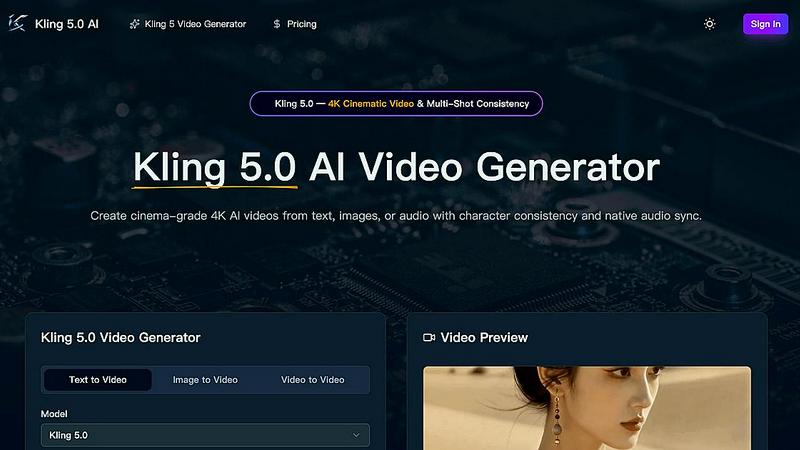
Kling 5.0 instantly generates professional 4K AI videos from text with consistent characters and native audio sync.
Last updated: April 13, 2026

SubtitlesFast
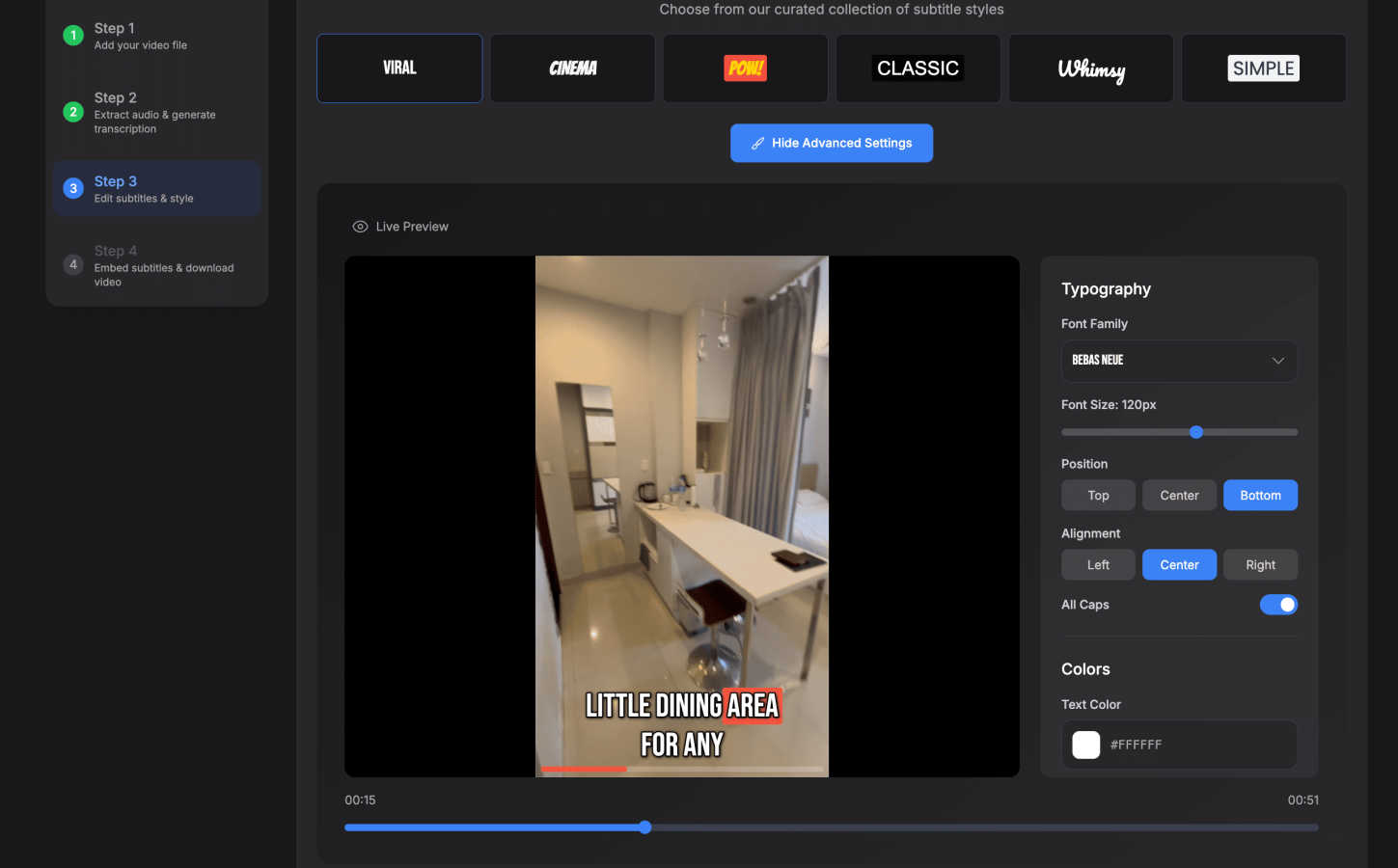
Edit and subtitle your videos in minutes with SubtitlesFast, the ultimate tool for fast and stylish content creation.
Last updated: March 1, 2026
Visual Comparison
Kling 5
SubtitlesFast
Feature Comparison
Kling 5
4K Cinematic Video Generation
Kling 5.0 generates videos up to 15 seconds long in stunning 4K resolution. Its advanced AI engine renders clips with a professional, cinematic look and feel, complete with realistic textures, accurate lighting, and atmospheric effects. This ensures your output is immediately ready for commercial use on platforms like YouTube, TikTok, and broadcast.
Multi-Shot Character Consistency
The Omni Subject Library allows you to lock a character's facial features and proportions across unlimited shots and camera angles. This revolutionary feature maintains perfect character identity for episodic content, product series, or brand campaigns, eliminating the inconsistency typical in AI-generated video.
Native Audio Generation & Lip-Sync
Kling 5.0 doesn't just create silent clips. It generates synchronized audio—including dialogue, Foley, and ambient sound—in one pass. It features phoneme-level lip-sync for English, Chinese, Japanese, Korean, and Spanish, with emotion-matched expressions for a complete and natural audio-visual experience.
Advanced Physics Simulation
The integrated physics engine ensures elements like water, fabric, fire, and human anatomy move with complete naturalism. This results in fluid dynamics, realistic cloth movement, and lifelike motion that are indistinguishable from reality, crucial for believable scene creation and cutscene prototyping.
SubtitlesFast
Auto-Transcription
SubtitlesFast utilizes cutting-edge AI technology to provide auto-transcription in over 50 languages. This feature ensures that subtitles are not only accurate but also cater to a global audience, making your content accessible to viewers everywhere.
One-Click Export
With the One-Click Export feature, users can download their videos with subtitles burned in and ready for immediate posting. This functionality eliminates the tedious steps of manual exporting, allowing creators to share their content on platforms like TikTok, YouTube, and Instagram in just a few clicks.
Customizable Styles
SubtitlesFast offers over 30 animated styles for subtitles, allowing users to customize the appearance to match their unique branding. This flexibility enhances the visual appeal of videos, ensuring that subtitles not only convey information but also complement the overall aesthetic.
Simple Editing Tools
The platform includes a straightforward editing interface that allows users to make timeline edits, add text, images, and music effortlessly. This simplicity ensures that even those with minimal technical skills can produce high-quality videos without a steep learning curve.
Use Cases
Kling 5
Social Media Content Creation
Generate eye-catching, platform-optimized videos for TikTok, Instagram Reels, and YouTube Shorts in minutes. Quickly turn trending ideas or promotional messages into engaging 4K clips with perfect aspect ratios (9:16, 1:1, 16:9) to captivate your audience and boost engagement rates rapidly.
Prototyping for Filmmakers & Animators
Storyboard and visualize complex scenes instantly. Filmmakers can test cinematic shots, camera movements (zoom, pan, tilt), and character consistency before expensive live shoots. Animators can rapidly prototype motion and physics for characters and environments, accelerating the pre-production pipeline.
Marketing & Advertising Campaigns
Produce high-volume, consistent video ads for product launches, brand stories, or social campaigns. Maintain character and product consistency across a series of ads, generate videos with native audio for different languages, and create broadcast-quality assets at a fraction of the traditional cost and time.
Educational & Explainer Videos
Transform scripts or concept images into dynamic, engaging explainer videos. The AI can animate diagrams, illustrate concepts with realistic physics, and use character consistency for a series of lessons. Add synchronized narration and lip-sync to create professional educational content efficiently.
SubtitlesFast
Daily Vloggers
Content creators who post daily vlogs can significantly benefit from SubtitlesFast. With its fast and efficient subtitle generation, vloggers can focus on content creation, knowing that they can add polished subtitles in minutes.
Educators
Teachers and educators utilizing video as a teaching tool can enhance engagement and comprehension by adding subtitles. SubtitlesFast makes it easy to create accessible educational content that can reach students with varying learning needs.
Social Media Marketers
Marketers looking to boost their video campaigns can utilize SubtitlesFast to create compelling content that resonates with their audience. The ability to quickly add eye-catching subtitles helps improve viewer retention and interaction rates.
Business Presentations
Businesses can use SubtitlesFast for internal and external presentations that require clear communication. Adding subtitles ensures that all stakeholders can follow along, regardless of language barriers or hearing impairments.
Overview
About Kling 5
Kling 5.0 is the next-generation AI video generator that transforms ideas into cinema-grade 4K videos in seconds. It's built for speed and efficiency, empowering creators, marketers, filmmakers, and businesses to produce professional video content without complex software or lengthy production times. The platform accepts text prompts, images, or audio as input and generates stunning videos with advanced features like multi-shot character consistency and native audio sync. Its core value proposition is delivering broadcast-ready quality with an intuitive, lightning-fast workflow. Whether you're prototyping scenes, creating social media ads, or producing episodic content, Kling 5.0 provides the tools to bring your vision to life with unprecedented speed and cinematic fidelity, making high-end video creation accessible to everyone.
About SubtitlesFast
SubtitlesFast is an innovative online tool that streamlines the process of adding subtitles to videos, making it an essential resource for content creators, marketers, and advocates for accessibility. Designed to operate seamlessly in your web browser, this platform enables users to upload video files, utilize advanced AI auto-transcription for accurate subtitle generation, and customize the subtitle style to reflect their brand identity. With its user-friendly interface, SubtitlesFast allows creators to improve viewer engagement by making videos more accessible to diverse audiences. Whether you're a vlogger, educator, or business owner, this tool equips you with the capabilities to create professional-quality videos quickly. Forget the hassle of software downloads and complex editing processes; with SubtitlesFast, you can focus on what truly matters—delivering outstanding content in record time.
Frequently Asked Questions
Kling 5 FAQ
What input methods does Kling 5.0 support?
Kling 5.0 is incredibly versatile, accepting three primary inputs. You can generate video from a text prompt, animate a static image or piece of concept art, or convert an existing video into a new style using the video-to-video feature. This flexibility lets you start your creative process from any point.
How does the character consistency feature work?
You use the Omni Subject Library to "lock" a subject—like a character or product. Once locked, the AI model remembers and replicates that subject's key features (face, proportions, style) across every new video you generate. This ensures the subject remains identical, enabling seamless multi-shot narratives and series.
In which languages does the lip-sync feature work?
The native audio generation and phoneme-level lip-sync currently support five major languages: English, Chinese, Japanese, Korean, and Spanish. This allows for the creation of realistic, synchronized dialogue and character speech in a wide range of projects for global audiences.
What is the maximum video length and quality?
Kling 5.0 can generate video clips up to 15 seconds in duration. The output quality is professional-grade 4K resolution, ensuring exceptional detail, clarity, and cinematic texture suitable for everything from social media to commercial broadcast.
SubtitlesFast FAQ
How does SubtitlesFast generate subtitles?
SubtitlesFast uses advanced AI auto-transcription technology to accurately generate subtitles from uploaded video files. It processes audio in real-time, ensuring high accuracy across multiple languages.
Can I customize the style of my subtitles?
Yes, SubtitlesFast offers over 30 animated styles for you to choose from. You can customize the font, color, and animation to align with your brand's identity, providing a personalized touch to your videos.
Is there a limit to the video file size I can upload?
SubtitlesFast allows users to upload video files of varying sizes. However, for optimal performance and processing speed, it is recommended to keep the files under a certain limit, which is specified on the platform.
Do I need to install any software to use SubtitlesFast?
No, SubtitlesFast is a web-based tool, meaning you can access it directly through your browser without the need for downloads or installations. This makes it incredibly convenient for users on any device.
Alternatives
Kling 5 Alternatives
Kling 5.0 is a leading AI video generator, a tool designed to create professional videos from simple text prompts. This category is booming, offering creators a fast track from idea to finished visual content without traditional editing hurdles. Users often explore alternatives for various reasons. Some need a different pricing model or a free tier to start. Others might seek specific features like longer video lengths, unique animation styles, or integration with other platforms that better suit their workflow. When evaluating other options, focus on core needs: output quality and resolution, the speed of generation, ease of use, and cost structure. Also, consider the flexibility of the AI—how well it interprets diverse prompts and the control you have over the final result.
SubtitlesFast Alternatives
SubtitlesFast is a powerful online tool designed for video editing and subtitling, aimed primarily at content creators, marketers, and accessibility advocates. This platform streamlines the process of adding subtitles to videos, leveraging AI auto-transcription to ensure accuracy and efficiency. Users often explore alternatives for various reasons, including pricing concerns, feature sets, or compatibility with specific platforms. When searching for a substitute, it's essential to consider aspects such as ease of use, customization options, and the speed of the subtitle generation process to ensure it meets your unique needs.