
Interhubz vs Onthen
Side-by-side comparison to help you choose the right product.

Interhubz
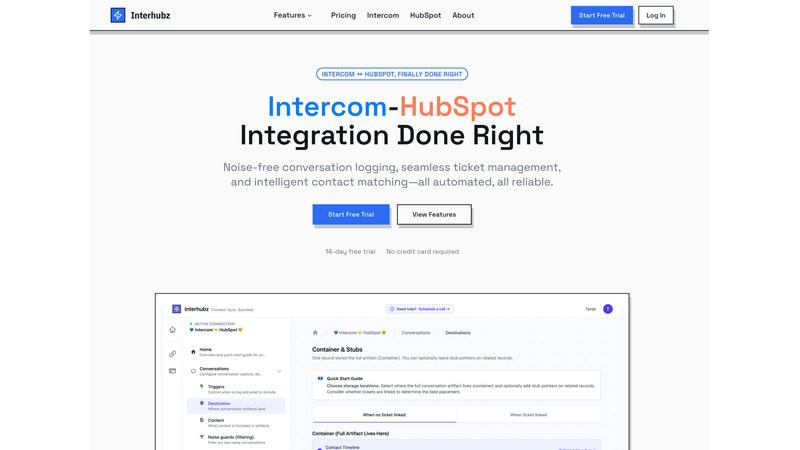
Interhubz effortlessly syncs Intercom chats to HubSpot as clean, single entries with smart matching and ticket.
Last updated: February 27, 2026

Onthen
Onthen centralizes all onboarding tasks into one fast, branded page for seamless automation.
Last updated: April 4, 2026
Visual Comparison
Interhubz
Onthen
Feature Comparison
Interhubz
One Note Per Conversation
Interhubz transforms every Intercom conversation into a single, formatted note in HubSpot. This means no more cluttered timelines filled with multiple entries; instead, users get a clean, readable summary that includes the full transcript and relevant attachments, ensuring that the context is always preserved.
Intelligent Contact Matching
This feature uses advanced algorithms to intelligently match contacts and companies based on email, phone numbers, and custom properties. This means that users can avoid duplicates and maintain a clean database, allowing for more effective communication and follow-ups with customers.
One-Click Ticket Creation
Creating tickets in HubSpot directly from Intercom has never been easier. With just one click, users can generate tickets while ensuring that status and ownership sync automatically between both platforms. This feature eliminates the need for manual updates and keeps everyone on the same page.
Noise Guards
Interhubz includes smart noise guards that automatically filter out bot conversations and spam. Users can configure these filters to ensure that only meaningful interactions are synced to HubSpot, keeping the CRM clean and focused on valuable customer interactions.
Onthen
Branded, Frictionless Task Pages
Onthen transforms your onboarding into a single, beautifully branded webpage. Simply upload your logo and choose a color; Onthen applies your branding across the entire participant experience, including all automated emails. This creates a professional, seamless extension of your company, requiring no passwords or logins from participants. It’s one link, one page, and zero friction to get started, dramatically accelerating time-to-completion.
Flexible Task Actions & Automation
Move beyond basic checklists with a powerful library of task actions. Combine built-in tools like secure document uploads, form fills, photo requests, and identity verification (KYC) with integrations to other apps. Automate the busywork: set up automatic nudges for overdue tasks and schedule weekly digest emails to keep everyone on track. Build a template once and run your onboarding on autopilot, saving countless hours of manual coordination.
Built-In Collaboration & Communication
Stop switching between email, chat, and your project tracker. Onthen provides a single page for true collaboration. Participants can delegate tasks among themselves, and you can communicate directly via comments on each task. This keeps all context and files centralized, ensuring nothing gets lost in translation and tasks keep moving forward without you having to chase for updates or answers.
Deep CRM Integration & Sync
Onthen knows your CRM is the system of record. It seamlessly bridges the gap by syncing every action—completed forms, uploaded documents, verification statuses—directly back to your CRM’s contact timeline and custom fields. This eliminates double data entry, ensures your team has instant access to the latest information, and provides a complete audit trail of the onboarding journey within your existing workflow.
Use Cases
Interhubz
Customer Support Teams
Support teams using Intercom can benefit from Interhubz by seamlessly logging conversations into HubSpot. This ensures that sales and customer success teams have access to full context, making it easier to follow up with customers and address their needs effectively.
Sales Follow-Up
Sales teams can leverage Interhubz to create HubSpot tickets directly from Intercom conversations. This streamlines the process of capturing leads and ensures that no potential customer interactions fall through the cracks, enhancing the sales funnel.
Data Management
With intelligent contact matching, teams can maintain a clean and organized database. Interhubz helps prevent duplicates, ensuring that customer information is accurate and up-to-date, which is crucial for effective communication and relationship management.
Automated Workflow Integration
For companies that rely on automated workflows, Interhubz provides a REST API for developers. This allows for custom integration solutions, enabling teams to automate their processes further and tailor the integration to meet specific business needs.
Onthen
Client Onboarding for Service Agencies
Speed up revenue realization by onboarding new clients in days, not weeks. Replace messy email introductions and scattered file requests with a polished, branded portal. Collect contracts, brand guidelines, access credentials, and project briefs through structured tasks. Automatic reminders ensure clients submit items on time, while your team gets everything neatly organized and synced to your CRM, ready for project kickoff.
Employee & Contractor Onboarding
Streamline HR processes by guiding new hires through all pre-start paperwork and setup from a single link. Use tasks to collect signed contracts, tax forms, and bank details, verify identity and right-to-work, and request profile photos for badges. Delegation features allow different departments (IT, HR, Facilities) to manage their tasks within the same flow, providing a cohesive and efficient first-day experience.
Financial Services & Compliance Checks
Accelerate account opening and customer due diligence with built-in compliance actions. Integrate KYC and proof of address verification directly into the onboarding task list. Clients can securely submit sensitive documents and complete identity checks in a guided, compliant manner. All data and verification statuses sync to your CRM, creating a secure, auditable, and fast-tracked compliance pipeline.
Product-Led SaaS User Activation
Improve free-to-paid conversion by guiding new users through critical setup steps. Create an onboarding task page that helps users connect their data, invite team members, configure settings, and complete key product tutorials. Use feedback tasks to identify friction points immediately. This structured guidance increases product adoption and time-to-value, turning sign-ups into successful, engaged customers faster.
Overview
About Interhubz
Interhubz is a powerful integration tool designed specifically for teams that operate with Intercom for customer support and HubSpot for sales and customer success. It addresses the major challenges of connecting these platforms, such as cluttered timelines, fragmented communication, and the manual chaos of ticket management. By consolidating multiple conversation entries into a single, comprehensive note, Interhubz enhances the readability of HubSpot timelines. This means that important context is retained, allowing teams to work more efficiently. With intelligent contact matching and automated noise filtering, Interhubz ensures that only meaningful interactions are logged, while simplifying the ticket creation process with bi-directional sync. Ultimately, Interhubz is built for operators who need a streamlined and reliable integration, minimizing manual effort and maximizing productivity.
About Onthen
Onthen is the lightning-fast platform that eliminates onboarding chaos. It replaces endless email chains, confusing spreadsheets, and manual follow-ups with a single, branded task page accessible via one unique link. Designed for speed and efficiency, Onthen centralizes every step of your client, employee, or customer onboarding process into a clear, collaborative workspace. It’s built for businesses that need to move quickly without dropping the ball—agencies, SaaS companies, financial services, HR teams, and any professional service that requires structured information gathering. The core value proposition is simple: you build a reusable, automated onboarding flow once, and Onthen executes it flawlessly every time. Participants get a frictionless, password-free experience with clear to-do lists, while you gain complete visibility and control. Everything stays in sync with your CRM, turning a typically fragmented process into a streamlined, branded, and trackable engine for growth. No chasing, no confusion, just rapid, results-driven onboarding.
Frequently Asked Questions
Interhubz FAQ
How does Interhubz improve timeline management?
Interhubz consolidates multiple entries from Intercom into a single, readable note in HubSpot. This eliminates timeline pollution and allows teams to quickly access relevant conversation details without sifting through clutter.
Can I filter out unwanted conversations?
Yes, Interhubz features smart noise guards that automatically filter out bot conversations and spam. Users can configure these filters to ensure only meaningful interactions are logged in HubSpot.
Is there a trial period for Interhubz?
Absolutely! Interhubz offers a 7-day free trial with no credit card required. This allows teams to explore its features and see the benefits firsthand before committing.
How easy is it to set up Interhubz?
Setting up Interhubz is straightforward and quick. The integration can be completed in just a few minutes with a simple one-click OAuth connection, making it accessible even for non-technical users.
Onthen FAQ
How do participants access their onboarding page?
Access is instant and frictionless. You send a unique, branded link via email (or any channel). Participants simply click the link to open their personalized task page in any web browser. There are no passwords to create or accounts to log into, which removes the biggest barrier to starting the process and gets them completing tasks immediately.
Does Onthen integrate with my existing CRM?
Yes, Onthen is built to sync seamlessly with your CRM. It connects with popular platforms to push collected data, document links, task completion statuses, and notes directly into the contact record's timeline and custom fields. This ensures all onboarding intelligence is centralized where your team already works, eliminating manual data entry and keeping records perfectly synchronized.
Can I reuse onboarding processes for different clients or users?
Absolutely. Onthen’s template functionality allows you to build a perfect onboarding workflow once and save it as a reusable template. You can then launch a new instance of that template for each new participant with a single click. This ensures consistency, saves massive setup time, and lets you automate and scale your onboarding process effortlessly.
How does Onthen handle reminders and follow-ups?
Onthen automates all follow-up communication to save you time. You can configure automatic, branded email nudges to be sent for overdue tasks. Additionally, the platform can send a helpful weekly summary email to all participants, highlighting completed items and outlining what’s left to do. This keeps the process moving without you ever having to send a manual chase email.
Alternatives
Interhubz Alternatives
Interhubz is a powerful integration tool that connects Intercom chats to HubSpot, streamlining the customer support process. By consolidating multiple chat entries into a single, clean timeline note, it enhances the efficiency of communication between teams. Users often seek alternatives to Interhubz for various reasons, including pricing concerns, feature sets that better align with their specific needs, or compatibility with different platforms. When selecting an alternative, consider factors such as ease of use, integration capabilities, and overall cost-effectiveness to ensure you find a solution that meets your team's requirements.
Onthen Alternatives
Onthen is a customer support tool that automates and centralizes client onboarding with branded checklists. It eliminates messy email chains by providing a single, collaborative page for task management, syncing progress directly with your CRM. Users often seek alternatives for various reasons. Budget constraints, the need for specific integrations, or a desire for a platform that bundles onboarding with other functions like project management can drive the search. Some teams may simply prefer a different user interface or workflow. When evaluating other options, prioritize core needs. Look for automated task assignment, clear progress tracking, and seamless CRM synchronization. The goal is to maintain that critical efficiency—replacing manual follow-ups with a system that keeps everyone aligned automatically.