
Dokie AI vs Image3D AI
Side-by-side comparison to help you choose the right product.

Dokie AI
Dokie AI instantly creates professional presentations in minutes using advanced Claude Opus 4.6 technology.
Last updated: March 19, 2026

Image3D AI
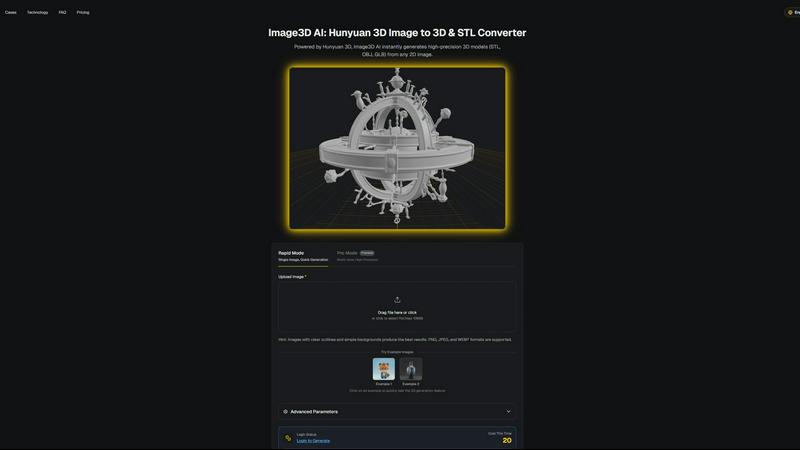
Transform any 2D image into high-quality 3D models in minutes with Image3D AI, no 3D skills required.
Last updated: March 1, 2026
Visual Comparison
Dokie AI

Image3D AI
Feature Comparison
Dokie AI
AI Generate PPT
Describe your topic in plain text and Dokie AI's engine creates a complete, structured slide deck from scratch. It automatically generates compelling content, chooses professional layouts, incorporates relevant charts, and applies a cohesive design theme. This feature turns a single idea into a ready-to-present story in under a minute, bypassing the blank slide entirely.
AI Beautify PPT
Upload any existing PowerPoint file and let Dokie AI instantly enhance it. The AI analyzes your slides, fixes awkward layouts, refines typography, applies modern color schemes, and elevates the overall visual styling to a professional standard—all while meticulously preserving your original content and message.
Multi-Format Conversion
Dokie AI serves as a central hub for transforming various content formats into editable presentations. Seamlessly convert PDF documents, Word files, HTML web pages, and even YouTube videos directly into structured PowerPoint slides. This streamlines research and content compilation into a single, fast workflow.
Intelligent Speaker Notes
Go beyond slides with AI-generated speaker notes and talking points for each part of your presentation. This feature analyzes your deck's content to create detailed notes that help you deliver confident, articulate presentations without needing to script everything manually, saving significant preparation time.
Image3D AI
Rapid Mode
Rapid Mode allows users to generate 3D models from a single image quickly. Ideal for those needing fast results, this feature is perfect for converting logos or simple designs into 3D assets without compromising quality.
Pro Mode
Pro Mode takes 3D modeling to the next level, allowing users to upload multi-view images for high-precision conversions. This mode is designed for professionals who require intricate detail and accuracy in their 3D models.
Versatile File Formats
Image3D AI supports multiple file formats, including STL, OBJ, and GLB. This versatility ensures that users can easily integrate their 3D models into various applications, whether for 3D printing, game development, or web use.
User-Friendly Interface
The platform features a straightforward, intuitive interface that enables users of all skill levels to create stunning 3D models effortlessly. With simple drag-and-drop functionality, users can upload images and generate models in just a few clicks.
Use Cases
Dokie AI
Startup Pitch Deck Creation
Founders can move from a business idea to a compelling investor pitch deck in minutes. Describe your vision, market, and solution; Dokie AI structures the narrative, creates impactful slides, and designs a professional deck that makes a strong first impression, accelerating fundraising efforts.
Marketing Report Automation
Marketers can instantly transform campaign data, performance metrics, and written reports into visually engaging presentation decks. Convert PDF analytics or text summaries into beautiful slides for stakeholder reviews, eliminating hours of manual design work for routine reports.
Educational Lecture Preparation
Educators and trainers can quickly build lesson presentations from their notes, textbooks (PDF), or even educational YouTube videos. Dokie AI structures the content into digestible slides with clear visuals, allowing teachers to focus on delivery rather than slide design.
Sales Proposal Enhancement
Sales teams can upload their standard proposal templates or content-heavy slides and use the Beautify feature to instantly upgrade them. This ensures every client-facing presentation is visually polished and professionally designed, boosting credibility and engagement during pitches.
Image3D AI
Game Development
Game developers can leverage Image3D AI to rapidly create game-ready 3D assets from concept art or sketches. The platform's PBR material support allows for seamless integration into popular game engines like Unity and Unreal Engine.
E-commerce
E-commerce businesses can convert product images into interactive 3D models, providing customers with engaging AR previews. This enhances the online shopping experience, allowing potential buyers to view products from all angles.
3D Printing
Image3D AI acts as an efficient STL converter, delivering high-precision, print-ready files for 3D printing. Users can transform their ideas into tangible products quickly, saving time and resources in the prototyping process.
Architecture & Design
Architects and designers can utilize Image3D AI to generate architectural models swiftly. This feature significantly reduces the time spent on manual modeling, enabling professionals to focus on creativity and project development.
Overview
About Dokie AI
Dokie AI is the leading AI-powered presentation maker, engineered to create professional slide decks in minutes, not hours. It eliminates the need for design skills or tedious template adjustments by using true AI generation powered by Claude Opus 4.6. This advanced AI handles the entire process: structuring your content, selecting optimal layouts, applying professional typography, and crafting cohesive visual design automatically. It's built for business professionals, educators, marketers, and startup founders who need to communicate ideas powerfully and efficiently. The core value proposition is speed and quality—transforming a simple text prompt or an existing document into a polished, presentation-ready deck instantly. Dokie AI moves beyond basic automation to become an intelligent design partner, ensuring every presentation is structurally sound and visually compelling from the first click.
About Image3D AI
Image3D AI is a revolutionary tool that leverages cutting-edge artificial intelligence to transform static 2D images into breathtaking, production-ready 3D models within seconds. Powered by Tencent's advanced Hunyuan 3D engine, this innovative platform caters to a diverse audience, ranging from casual 3D printing enthusiasts to professional game developers. Its user-friendly interface requires no prior 3D modeling skills, making it accessible for anyone looking to create high-fidelity assets effortlessly. Users can generate models from a single image or multiple views, ensuring seamless integration into various workflows like prototyping, 3D printing, and enhancing visual experiences in gaming and e-commerce. With Image3D AI, creativity knows no bounds, as it streamlines the creative process and turns imaginative ideas into tangible 3D objects in no time.
Frequently Asked Questions
Dokie AI FAQ
How does Dokie AI differ from template-based tools like Canva?
Unlike tools that simply place your text into pre-made templates, Dokie AI uses true generative AI (Claude Opus 4.6) to architect the entire presentation. It intelligently structures your content, creates logical narrative flow, designs custom layouts suited to your topic, and selects complementary visuals—all automatically. It's an AI designer, not just a template picker.
What file formats can I convert into a presentation?
Dokie AI supports a wide range of input formats for conversion. You can directly create presentations from PDF files, Microsoft Word documents, plain text, HTML web pages, and even YouTube video URLs. This flexibility allows you to turn almost any source material into a slide deck instantly.
Does the Beautify feature change my content?
No. The AI Beautify PPT feature is designed to enhance only the visual design and layout of your slides. It strictly preserves all your original text, data, charts, and images. The AI focuses on improving aesthetics, spacing, fonts, colors, and overall visual hierarchy without altering your core message.
Is there a way to get prompts from an existing presentation?
Yes, Dokie AI includes a "PPT Reverse Prompt" tool. You can upload a presentation, and the AI will analyze its design and content to extract the descriptive prompts that could be used to recreate or generate a similar deck. This is excellent for learning or replicating a desired style.
Image3D AI FAQ
How does Image3D AI convert 2D images to 3D models?
Image3D AI uses advanced algorithms powered by the Hunyuan 3D engine to analyze 2D images and generate detailed 3D models. The AI infers depth and structure from the images, producing high-fidelity assets efficiently.
What file formats can I export my 3D models in?
You can export your 3D models in various formats, including STL for 3D printing, OBJ for editing in multiple 3D software, and GLB for web and AR applications. This flexibility allows users to choose the best format for their needs.
Are there any specific image requirements for optimal results?
Yes, for the best results, we recommend using high-contrast images with clear outlines and simple backgrounds. Avoid blurry or low-light images, as they can hinder the AI's ability to generate accurate 3D models.
What types of projects can benefit from Image3D AI?
Image3D AI is versatile and can enhance projects in various fields, including game development, e-commerce, 3D printing, and architecture. Its ability to generate high-quality 3D models from 2D images makes it suitable for a wide range of applications.
Alternatives
Dokie AI Alternatives
Dokie AI is a leading AI presentation maker in the design tools category, designed to generate professional slide decks from simple text prompts. It uses advanced AI to automate content structure, layout, and visual design, offering a fast alternative to manual creation or rigid templates. Users often explore alternatives for various reasons, including budget constraints, specific feature needs like advanced collaboration, or a preference for different AI models and platforms. Finding the right fit depends on your unique workflow and presentation goals. When evaluating other options, key factors to consider are the core AI capability for content and design generation, pricing flexibility, output quality, and the ease of integrating into your existing process. The best tool is one that balances intelligent automation with the control you need.
Image3D AI Alternatives
Image3D AI is an innovative tool that falls under the category of design software, specifically engineered to transform 2D images into high-quality 3D models in a matter of seconds. With its powerful AI-driven capabilities, it appeals to a broad audience, including 3D printing enthusiasts, game designers, and anyone seeking to enhance their visual projects. However, users often seek alternatives due to various reasons such as pricing, feature sets, and specific platform compatibility that may better suit their individual needs. When searching for an alternative to Image3D AI, consider factors such as the variety of export formats available, the quality of material generation, and the flexibility of modes offered. It's also essential to evaluate the user interface and overall ease of use, as these aspects can significantly impact the efficiency of your workflow. Ultimately, finding the right tool involves identifying what features align best with your creative objectives and technical requirements.