
HeyVid vs Learniverse
Side-by-side comparison to help you choose the right product.

HeyVid AI is your all-in-one solution for quickly generating stunning videos and images with professional quality at lightning speed.
Last updated: April 4, 2026

Learniverse
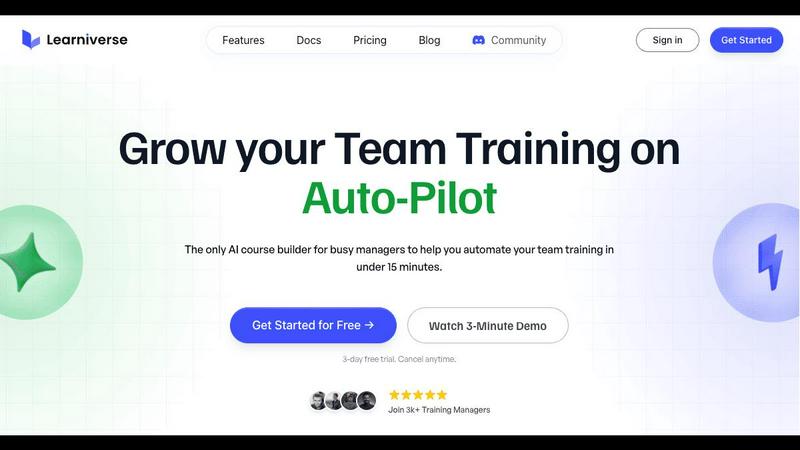
Learniverse transforms your documents into engaging training courses in minutes, streamlining knowledge for busy teams.
Last updated: February 28, 2026
Visual Comparison
HeyVid

Learniverse
Feature Comparison
HeyVid
Text to Video
Transform written content into dynamic videos with the Text to Video feature. Simply input your text, and HeyVid AI will generate a visually appealing video that conveys your message effectively. This feature is perfect for content creators looking to bring their scripts to life quickly.
Image to Video
With the Image to Video capability, you can animate static images and create engaging video content. Upload your visuals, and watch as HeyVid AI breathes life into them, adding motion and effects that captivate viewers. Ideal for marketers and social media managers, this feature enhances visual storytelling.
AI Image Generator
The AI Image Generator allows users to create stunning visuals from text prompts or existing images. Choose from various leading image models to produce unique and eye-catching graphics that stand out. This feature is perfect for businesses wanting to elevate their branding with custom imagery.
AI Video API & Workflow
HeyVid's AI Video API and Workflow tools streamline the video creation process for developers and businesses. Integrate video generation capabilities into your applications seamlessly, enabling automated content creation at scale. This feature is crucial for tech entrepreneurs looking to enhance their services with advanced video solutions.
Learniverse
Instant Course Creation
Learniverse turns your existing content into interactive lessons, quizzes, and progress tracking features in minutes. Simply upload your PDFs, videos, or documents, and watch as the AI assembles a comprehensive training course.
Custom Branding
Launch a professional training portal that aligns with your company’s identity. With Learniverse, you can customize colors, logos, and domains, ensuring the training experience feels polished and cohesive, rather than generic.
Progress Tracking
Monitor your team's training progress without the hassle of spreadsheets. Learniverse provides insights into completion rates, engagement levels, and areas where users may be struggling, allowing for timely interventions.
Community Features
Foster collaboration and knowledge sharing with built-in community features. Team members can interact, ask questions, and share insights, creating a supportive learning environment that enhances the training experience.
Use Cases
HeyVid
Marketing Campaigns
HeyVid is a game-changer for digital marketers. Use the platform to create compelling ad campaigns that grab attention and drive conversions. With its quick video and image generation capabilities, marketers can produce content that resonates with their audience and boosts engagement.
Educational Content
Educators can leverage HeyVid to generate informative video tutorials and training materials. Whether for online courses or classroom settings, the platform enables teachers to create visually appealing content that enhances learning experiences and keeps students engaged.
Product Launches
Launching a new product? Use HeyVid to create stunning launch videos that build anticipation and excitement. With dynamic visuals and professional quality, your product announcements will stand out, making it easier to capture your audience's interest and drive sales.
Social Media Content
Social media managers can save time and effort with HeyVid's one-click video maker. Generate short-form videos and eye-catching thumbnails that enhance your social media presence and engage followers effectively. The platform equips you with the tools to keep your content fresh and captivating.
Learniverse
Onboarding New Employees
Accelerate the onboarding process for new hires by providing them with an organized, interactive training path. Learniverse ensures that all essential information is readily accessible, allowing new employees to ramp up quickly.
Upskilling Existing Staff
Empower your current team by offering training modules that help them acquire new skills or improve existing ones. With Learniverse, you can easily create courses that address skill gaps and enhance employee performance.
Compliance Training
Simplify the delivery of mandatory compliance training by using Learniverse to create and update courses swiftly. Ensure that all employees receive the same crucial information in a consistent, engaging format that they actually complete.
Continuous Learning Initiatives
Encourage a culture of continuous learning within your organization. With Learniverse, you can effortlessly build and maintain a library of training materials that employees can access anytime, fostering ongoing professional development.
Overview
About HeyVid
HeyVid is your ultimate AI-powered video and image generator, designed to simplify the content creation process for everyone from creators to marketers. It allows users to generate stunning high-quality videos and images quickly and effortlessly. With easy-to-use features, HeyVid caters to a wide range of individuals and businesses, including entrepreneurs, educators, and digital agencies. The platform's main value proposition lies in its ability to streamline the creative workflow, enabling users to turn ideas into professional content within moments. Whether you need a pitch video, a product launch, or engaging social media posts, HeyVid has the tools you need to captivate your audience and elevate your brand's presence.
About Learniverse
Learniverse is the zero-effort, AI-powered training platform designed specifically for busy teams that need to streamline their training processes. Gone are the days of enduring the weeks-long nightmare of course creation. With Learniverse, you can instantly transform your existing knowledge—whether it's scattered PDFs, documents, videos, or even simple ideas—into complete, interactive learning paths. This platform is tailor-made for training managers, team leaders, and HR professionals who are looking for a fast, efficient solution. The core value proposition of Learniverse lies in its breathtaking speed and efficiency, allowing you to deploy consistent, engaging, and trackable training. Forget juggling disjointed tools and manually updating materials. With Learniverse, you can launch a fully branded company academy in minutes, not months, enabling your team to focus on strategic work while the platform automates everything else. Experience the future of training with built-in AI assistance, custom branding options, community features, and deep analytics—all without the complex setup or design skills typically required.
Frequently Asked Questions
HeyVid FAQ
What types of content can I create with HeyVid?
With HeyVid, you can create a variety of content types, including videos from text or images, animations, and high-quality images from prompts. The platform supports multiple AI models to cater to diverse creative needs.
Is HeyVid suitable for beginners?
Absolutely! HeyVid is designed with an intuitive interface that makes it easy for users of all skill levels to create professional-quality content. You don't need any editing skills to get started—just describe your vision, and let HeyVid do the rest.
Can I use HeyVid for commercial purposes?
Yes, HeyVid is perfect for commercial use. Whether you are creating marketing materials, educational content, or corporate videos, the platform provides the tools needed to produce high-quality content that aligns with your business goals.
Are there any limitations on the AI models?
While HeyVid offers a wide range of AI models for video and image generation, certain models may have specific requirements, such as credit usage or resolution options. Users can select models based on their project needs and desired outcomes.
Learniverse FAQ
How quickly can I set up my training academy?
You can launch your fully branded training academy in just minutes. Learniverse automates the setup process, allowing you to focus on content rather than logistics.
What types of content can I upload to Learniverse?
Learniverse supports a variety of content formats including PDFs, videos, recordings, and documents. You can easily convert any existing knowledge into interactive training materials.
Is Learniverse suitable for small teams?
Absolutely! Learniverse is designed for teams of all sizes. Its scalability and ease of use make it an ideal solution for both small businesses and large organizations.
Can I track employee progress and engagement?
Yes, Learniverse provides robust analytics features that allow you to track employee progress, engagement rates, and areas for improvement, ensuring that your training initiatives are effective.
Alternatives
HeyVid Alternatives
HeyVid is an all-in-one AI video and image generator designed to help users create high-quality visual content quickly and efficiently. As a productivity and management tool, it caters to those who need professional-grade media without the steep learning curve or time commitment typically associated with such tasks. Users often seek alternatives to HeyVid for various reasons, including pricing concerns, specific feature sets, or compatibility with different platforms. When selecting an alternative, it's crucial to consider factors such as ease of use, the quality of output, available features, and whether it meets your specific content creation needs. Doing your homework can lead to the perfect solution tailored to your requirements.
Learniverse Alternatives
Learniverse is an AI-powered training platform designed to streamline the course creation process for busy teams. It falls within the productivity and management category, offering a solution that transforms existing documents, videos, and ideas into interactive learning paths in a matter of minutes. Users often seek alternatives to Learniverse due to factors such as pricing, specific feature sets, or compatibility with existing tools and workflows. When looking for an alternative, consider key aspects such as ease of use, AI capabilities, branding options, and the depth of analytics provided to ensure it meets your team's unique training needs.