
Gleem.AI Studio vs LinkedIn Speak
Side-by-side comparison to help you choose the right product.

Gleem.AI Studio
Gleem.AI Studio is your all-in-one workspace for effortlessly generating and editing stunning visuals in one seamless.
Last updated: February 27, 2026

LinkedIn Speak
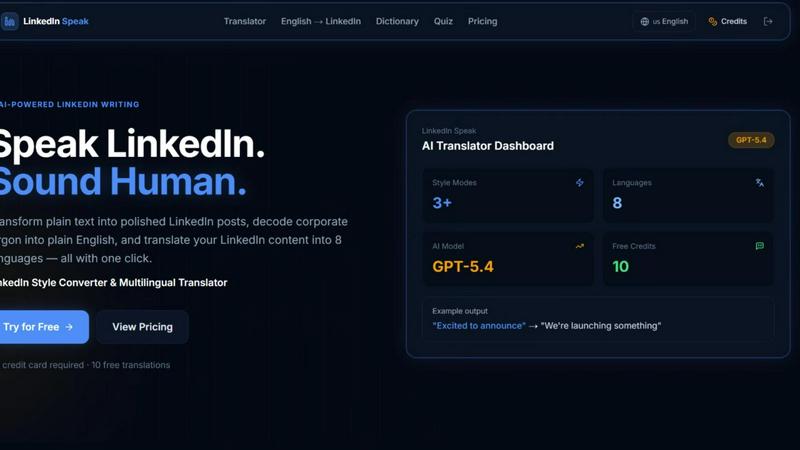
Instantly transform plain text into polished LinkedIn posts and translate them across eight languages.
Last updated: April 13, 2026
Visual Comparison
Gleem.AI Studio

LinkedIn Speak
Feature Comparison
Gleem.AI Studio
Text to Image Generator
Transform your ideas into breathtaking visuals with the powerful text-to-image generator. Simply input your concept, choose the desired size, and let Gleem's advanced Prompt Enhance feature refine your words into stunning graphics.
AI Image Editing
Edit images effortlessly with the built-in AI editing tools. Use natural language prompts to add or remove objects, adjust poses, apply filters, and restore old photos—all in one intuitive interface that simplifies editing.
AI Avatars
Generate and customize your very own AI avatars for use in any scene. Easily adjust their poses and experiment with different outfits, eliminating the need for time-consuming photoshoots while keeping your visuals fresh and engaging.
Seamless Workflow
Gleem.AI Studio's unified workspace ensures that all creative processes occur without interruption. Generate, edit, and manage avatars in one place, maintaining context and flow without the frustration of switching tabs or losing focus.
LinkedIn Speak
AI-Powered Style Converter
This core feature instantly transforms any plain text into a perfectly toned LinkedIn post. Go from a simple idea like "we hired someone" to a professional announcement like "We are thrilled to welcome a new star to our team..." in under three seconds. It applies the specific linguistic patterns, keywords, and persuasive structures that perform best on the platform, ensuring your content sounds native to LinkedIn's ecosystem without any manual effort.
Corporate Jargon Decoder
Cut through the noise instantly. This smart dictionary feature takes dense, confusing corporate jargon and translates it into clear, plain English. Input phrases like "synergize scalable solutions" or "leveraging core competencies" and get back human-readable translations like "work together on expandable plans" or "using our main strengths." It's the fastest way to ensure your messaging is transparent and understandable to all your connections.
Multilingual Translation Engine
Expand your reach globally with one click. LinkedIn Speak's advanced translator converts your LinkedIn content into eight different languages, allowing you to engage with international networks and clients without barriers. This feature maintains the professional tone and intent of your original message, enabling fast and efficient cross-border communication and personal branding.
Multiple Style Modes
Fine-tune your voice with precision speed. Beyond a standard conversion, choose from specialized style modes like Polished, Satirical, Professional, Light, or Extreme. Need a formal company announcement? Use Professional. Want a more engaging, casual update? Select Light. This granular control lets you adapt your message for different audiences and purposes in a flash, all from a single interface.
Use Cases
Gleem.AI Studio
Marketing Assets Creation
Utilize Gleem.AI Studio to quickly create eye-catching marketing materials. From social media graphics to digital ads, the platform allows marketers to produce professional visuals rapidly, improving engagement and brand visibility.
Social Media Visuals
Craft unique and compelling visuals for your social media channels in minutes. With the text-to-image generator and AI editing tools, you can enhance your posts and stories, capturing your audience's attention effortlessly.
Product Image Generation
Generate high-quality product images that showcase your offerings in the best light. Use the AI image editing features to customize photos, ensuring your products stand out in a competitive market.
Creative Variations Testing
Experiment with different visual styles and concepts without starting from scratch. Gleem.AI Studio enables users to iterate on designs quickly, allowing teams to test creative variations and refine their approach based on real-time feedback.
LinkedIn Speak
For Busy Professionals & Executives
Maximize your visibility in minimal time. Executives and busy professionals can draft post ideas in simple bullet points or quick voice notes and use LinkedIn Speak to instantly convert them into eloquent, share-ready posts. This ensures a consistent and influential presence on the platform without sacrificing hours of writing and editing, making thought leadership fast and efficient.
For Non-Native English Speakers
Build confidence and clarity in your professional communication. Non-native speakers can write posts in their native language or in simple English and use the tool to polish the grammar, apply the correct LinkedIn phrasing, and ensure the tone is culturally appropriate. The jargon decoder also helps them understand and engage with content from other users, breaking down language barriers at high speed.
For Marketing & Social Media Teams
Scale content production and maintain brand voice effortlessly. Marketing teams managing multiple company or executive profiles can use LinkedIn Speak to ensure every post, regardless of the initial drafter, adheres to a polished, on-brand professional style. The multilingual feature allows for rapid adaptation of campaign messaging for different regional pages, streamlining global social media strategy.
For Job Seekers & Network Builders
Craft standout profiles and engagement comments quickly. Job seekers can transform their resume bullet points into compelling LinkedIn profile summaries and activity posts. The tool helps them phrase accomplishments in the impactful language recruiters seek. It also assists in writing thoughtful, well-worded comments on industry posts to build visibility and network faster.
Overview
About Gleem.AI Studio
Gleem.AI Studio is an innovative AI image workspace that simplifies the creative process for marketers, creators, and small teams. Designed for those who prioritize creativity over configuration, it brings together AI image generation, editing, and remixing in a single, intuitive platform. With Gleem.AI Studio, users can generate stunning visuals from simple text prompts, edit images seamlessly, and even create personalized AI avatars—all without the hassle of switching between multiple tools. The platform's streamlined workflow fosters quick iterations and enhances creative flow, allowing users to focus on their artistic vision rather than grappling with complex interfaces. Whether you are producing marketing assets, social media content, or product images, Gleem.AI Studio empowers you to work efficiently and effectively, making it the go-to solution for anyone seeking to elevate their visual content.
About LinkedIn Speak
LinkedIn Speak is the ultimate AI-powered accelerator for professional communication. It is engineered for speed and efficiency, transforming how individuals and businesses create content for the world's premier professional network. The core mission is simple: help you speak the nuanced language of LinkedIn with confidence and clarity, in record time. This all-in-one platform tackles the three biggest hurdles in LinkedIn content creation: crafting the perfect tone, cutting through confusing jargon, and reaching a global audience. Whether you're a busy executive, a solopreneur, a marketer managing multiple accounts, or a non-native English speaker, LinkedIn Speak eliminates guesswork and friction. Its one-click technology converts plain ideas into polished posts, decodes corporate buzzwords into plain English, and instantly translates content across eight major languages. This isn't just about writing; it's about optimizing your professional voice for maximum impact and engagement at lightning speed, freeing you to focus on strategy and connection.
Frequently Asked Questions
Gleem.AI Studio FAQ
What is Gleem.AI Studio?
Gleem.AI Studio is an AI-powered image workspace that combines image generation, editing, and avatar creation in one streamlined platform, designed for marketers and creators.
How does the text-to-image generator work?
The text-to-image generator allows users to input simple text prompts, which are then transformed into stunning visuals using advanced AI technology. The Prompt Enhance feature refines these prompts for optimal results.
Can I edit images after generating them?
Yes, Gleem.AI Studio offers robust AI image editing capabilities that let you modify generated images directly within the platform, making it easy to enhance and customize your visuals.
Is it possible to use my own avatars in the workspace?
Absolutely! Gleem.AI Studio allows you to generate and personalize your own AI avatars, which can be placed in various scenes, giving you flexibility and creativity in your projects.
LinkedIn Speak FAQ
How many free translations do I get?
New users receive 10 free credits immediately upon signup, with no credit card required. Each use of the AI Translator (for style conversion, jargon decoding, or language translation) consumes one credit. This allows you to test the tool's speed and capabilities extensively before deciding on a paid plan.
What languages does the translator support?
LinkedIn Speak's powerful translation engine currently supports conversion across eight major languages. This enables you to take your English LinkedIn content and instantly adapt it for professional audiences in other key linguistic markets, all from the same dashboard with incredible efficiency.
How fast is the translation and conversion process?
The platform is built for speed, with an average processing time of less than three seconds per request. Whether you are converting style, decoding jargon, or translating between languages, the AI delivers polished, ready-to-use results almost instantaneously, aligning with a fast-paced professional workflow.
What are the different "Style Modes" for?
The Style Modes give you rapid, granular control over the tone and personality of your converted text. Choose 'Polished' for a refined edit, 'Professional' for formal announcements, 'Light' for casual updates, 'Satirical' for humorous takes, or 'Extreme' for highly stylized versions. This lets you tailor your message for different contexts and audiences in a flash.
Alternatives
Gleem.AI Studio Alternatives
Gleem.AI Studio is an all-in-one AI image workspace designed for creators looking to streamline their visual content creation process. This platform allows users to generate and edit images in one unified environment, eliminating the need for complex setups and tool juggling. Users often seek alternatives for various reasons, including pricing concerns, specific feature requirements, or compatibility with their existing workflows. When searching for an alternative, it's crucial to consider factors such as ease of use, the range of features offered, and how well the platform aligns with your creative needs. Look for solutions that emphasize a seamless user experience and provide the flexibility to adapt to your personal or team requirements without sacrificing speed or efficiency.
LinkedIn Speak Alternatives
LinkedIn Speak is an AI-powered writing and design tool that instantly transforms plain text into professional LinkedIn posts. It also decodes corporate jargon and translates content across multiple languages, streamlining profile and content creation for the platform. Users often seek alternatives for various reasons. Some need a tool that integrates with different social platforms beyond LinkedIn. Others may prioritize specific features like advanced analytics, different pricing models, or a user interface that better matches their personal workflow. When evaluating other options, consider your primary goals. Look for core functionality in text enhancement and clarity. Assess translation capabilities if you work globally. Finally, compare the value based on your output volume and whether you need multi-platform support.